Hardware is fun: Two HOWTOs

March 16th, 2009 by cneumair

How to build a Do-It-Yourself beamer

Nowadays, everybody has a home theater. Most people pay lots of money and don’t have fun. We paid almost no money (300 €) and had lots of fun.

Signal source:

  1. Get an old and silent computer on eBay. VGA is enough. We got a HP Vectra VL400.
  2. Get a good and old PCI  sound card with 4.1 or 6.1 with proper Linux driver support. We got an SB Live!
  3. Use a VDR distribution like easyVDR, assuming you also want to watch DVB or simply use mplayer on the console with the frame buffer.
  4. Assuming you use VDR, hack FBTV to center your image on the framebuffer and do deinterlacing [patchset found via google]. Ensure that you have a 1:1 mapping between signal source (PAL TV or anamorphic DVDs in my case), and the screen pixels.

Video:

  1. Get an old overhead projector, 4000 ANSI lumen or more. Mine is a 3M 1750 with suboptimal but cheap halogen lamps.
  2. Get an old robust TFT monitor, and remove the panel from the electronics. Mine is a EIZO L365.
  3. Build a mask from cardboard in adequate size and put it on the OHP
  4. Build two parallel spacers from wood and put them between the cardborad and the TFT
  5. Get a tangential fan that can be built into a slot, and put it from the side between the panel and the OHP
  6. Get a cheap used but quality projection canvas. Don’t use eBay, usually they are to expensive. In Germany, you can use quoka.de to find cheap ones. We got a Stumpfl AV 1:1 4 m^2. If you don’t find any, build it yourself. The most important thing would be a planar framing, and a proper canvas. In Central Europe, I can recommend boesner.com for the frame, and gerriets.de for a molleton base layer followed by a reflective foil layer.

Audio:

  1. Get an old but very good and defective audio amplifier on eBay. The Grundig V5000 is amazing, really! For 4.1 or 6.1, you’ll need two or three of them because in the 80s, they “just” needed Stereo.
  2. Know somebody with adequate electronic skills for repairing it, or repair it yourself.

Now: Have fun! A classical 80/20 solution: (even less than) 20% of the (financial) complexity and 80% of the optimum result - achievable with 10000 € or more.

Possibly related:

How to reconstruct broken mechanical components from some random hardware

  1. Be upset that knob X or handle Y is not produced or shipped anymore by any support in the world
  2. Find a skillful model building company which does prototype development - so they make also small batches (say, 1)
  3. Use a CAD tool like CATIA, and construct the mechanical component on your computer. Use a (digital) sliding caliper, and work at least to 1/10 mm.
  4. Give the CAD construction to the model builders who have CNCs or do rapid prototyping for you.

Now: Be totally happy that you got your component! :)

I hope this animated everybody who totally focused on software to also consider hardware recompilation. It’s fun, really :).

1 KB = 1024 Bytes? No, 1 KB = 1000 Bytes!

September 30th, 2008 by cneumair

I read up on the history of the ancient convention that 1024 Bytes are called 1 Kilobyte. The problem with the convention is that it’s totally unintuitive unless you know it.

Unfortunately, Microsoft decided to use the following conventions and now the whole world uses it:

  • 1 KB = 1024 Bytes
  • 1 MB = 1024 * 1024 Bytes
  • 1 GB = 1024 * 1024 * 1024 Bytes.

Basically, that is a mish-mash of the ancient 70s convention of using kB for 1000 Bytes and KB for 1024 Bytes, and an abuse of the SI definitions of M and G prefixes. Actually, there is no mB or gB convention, although that would have been logic in the original convention. This is due to the fact that in the 70s - the age of large and expensive computers -, nobody believed that mass storage would actually be achievable at all.

Just assume you never used a computer, ancient UNIX tools or listened to a computer science lecture, or were taught anything about computers. Wouldn’t you expect that

  • 1 KB = 1000 Bytes
  • 1 MB = 1000 * 1000 Bytes
  • 1 GB = 1000 * 1000 * 1000 Bytes?

I filed a bug report against glib, with an historical analysis of the usage of all conventions and formalized nomenclatures in existence (slightly wrong) demanding that g_format_size_for_display() uses the latter conventions. This actually matches IEC recommendations.

One important side-effect of the conventions are:

  • K=1000: Memory sticks and main memory cells are made in powers-of-two - because the address line uses binary logic (i.e. powers-of-two). Historically, their size is advertized with K=1024 to get nice, non-fractional values. Below the 1 GB limit, they were probably advertized with kB rather than KB - but that shouldn’t be relevant anymore. With K=1000, on your computer screen memory (and memory sticks) shows up LARGER than advertized.
  • K=1024: Hard disks do not have such cell architectures, and they are advertized with K=1000. It was some kind of marketing trick in the very beginning, making the disk look larger than you expect, when you set K=1024 as old-fashioned “IT geek”. The effect is that with K=1024, on your computer screen hard disks look SMALLER than advertized.

Compare for yourself: Which of the two statements is positive, psychologically:

  • In contrast to Windows, under Linux my 70 GB hard disk has 70 GB as advertized, and my 1 GB memory sticks grow to 1,07 GB
  • Like under Windows, under Linux my 70 GB hard disk shrinks to 65,1 GB and my 1 GB memory sticks have 1 GB as advertized

Wouldn’t it also be nice to have a 100 MB file with 100 * 1000 Kilobytes? No more calculator I/O or right-clicking required for estimating the “actual” size in byte units!

I am mostly writing this blog entry to get some feedback from our users, rather than from programmers. Please also mention your background in your blog comments! Further concrete information regarding historic conventions and IEC and SI standards is available in the bug report mentioned above.

Also note that I do NOT demand to use the additional odd KiBi, MiBi, GiBi IEC convention that in fact make the current situation worse by using prefixes nobody knows, still defining Ki = 1024. My guess is that it was just introduced for offering an alternative for traditionalists who probably wanted “some convention with the beloved 1024”. But it is a non-traditional measurement prefix for a traditional concept, which makes it unattractive both for old(-fashioned) traditionalists and young pragmatists.

Update

I removed the possibly intimidating roundhouse kicks against IT community, and somewhat out-of-context IRC log excerpts. Sorry if anybody felt insulted - some certainly did. You can find an interesting collection of opinions and personal backgrounds in the blog comments.

Nautilus multihead desaster

September 19th, 2008 by cneumair

Today I tried out Nautilus with dual-head, i.e. two monitors that share a large virtual screen using XRandr. It was a desaster! Not XRandr - I love it! But it turns out that Nautilus miserably fails to be useful in a dual-head layout.

I already fixed Nautilus 2.24 to never move any icons outside the (virtual) screen area some time ago, but for dual-head we have horrible issues:

* Dead space is not detected, icons are put happily there

* The icons are not laid out per physical monitor, but per virtual screen. You can easily have icons that are “shared” between two monitors. While the actual icon layout is a bit tricky in the case of overlapping monitor regions, in the non-overlapping case we should perfectly be able to do nice per-monitor icon layouts.

* When there is a loading error for a file launched from the desktop, it is displayed in the middle of the (virtual) screen, and not in the middle of the monitor you used to open the location.

* The first navigation window is always opened on the monitor where the last navigation window was closed, even when you open it through the panel on a different monitor (patch pending release team approval).

* We don’t begin the icon layout on the monitor that you right-click to select “clean up by name”

* No background image awareness, i.e. the background image is just centered across monitors, even if it fits on the first monitor. Ideally, we’d have per-monitor backgrounds, of course.

* … any more issues you report, assuming you actually use GNOME in a dual monitor setup …

Now, a serious question: Is our user base so small, that we just receive bug reports evry once in a while, and not constantly? Are our users masochistic or unprofessional enough to tolerate this in a desktop environment that is supposed to be used in business environments?

While I frequently use beamers in combination with my laptop, I miserably failed to use them with Linux and used Windows for my (university) beamer needs from day two on. An educated guess is that almost every GNOME user out there does the same and uses Linux for non-serious business only. This is somewhat frustrating, as we are still trying to deliver a robust and business grade desktop environment - aren’t we? Note that this is NOT a rant about XRandr, which is really, really neat. It’s just we who suck!

Update

Some comments suggest that some of our users feel insulted, and rectify themselves that they actually filed bugs, gave up on us or something along those lines. It is interesting how some people describe their use-cases, griefs and work-arounds. I love how everybody cares about quality, files bug reports and kicks us in the arse when things are broken. I certainly did not write this to insult anybody. You have to understand that I somehow feel like an innkeeper who thinks that he has some good wine in his cellar, realizing that half his wine from a certain country is decomposed.

Before / After

August 16th, 2008 by cneumair

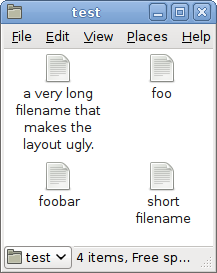
 Before

  Before

Note how the regular grid layout is destroyed by the long file name, which can make its row very large.

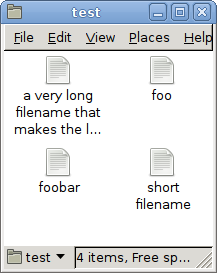
 After

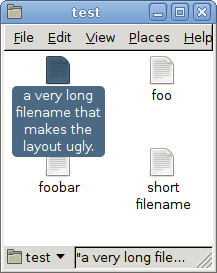
   After (1/2)           After (2/2)

Note how the grid layout is preserved, while the whole filename is still visible as the file is selected or hovered.

Take that five year old bug report! Thanks to the incredible Pango grand master Behdad. Many play the Banjo, but only few master the Pango.

Update

I received lots of feedback. Many appreciations were given, some usability concerns were raised and some people just didn’t like the change. Therefore, I added GConf keys that allow you to control in detail (i.e. for all zoom levels, and for the desktop) how many lines of text you want.

Another proposal was that file extensions should never be truncated. This will be implemented as Pango supports it. There is also an interesting recent user request to ellipsize file names depending on the other displayed file names (assuming you have “alongfilename-01-continuin-hereg.jpg”, “alongfilename-02-continuing-here.jpg” the result is supposed to be “along…e-01-…ere..jpg”, “along…e-02-…ere..jpg”.

GVFS programmer wanted

July 22nd, 2008 by cneumair

Nautilus 2.23.5(.1) [shipped with GNOME 2.23.5] has tab support,  an eject button next to mounted volumes in the sidebar, and a “restore” feature for the trash that figures out the location where a file came from automatically before moving it out of the trash.

Unfortunately, moving files out of the trash in general takes a very long time with GVFS due to a bug. We would be very pleased if you volunteered to fix the bug:

http://bugzilla.gnome.org/show_bug.cgi?id=529971

The future of GNOME

July 18th, 2008 by cneumair

Since everybody nowadays comments on the future of GNOME/GTK+, I’d also like to add my two cents - although more briefly than others.

In short, I think we’ve reached our objectives and should polish GNOME 2 ’til doomsday.

3.0? No!

As of writing, I see no reason for delivering a (long-term) API/ABI-incompatible GNOME 3.0 or GTK+ 3.0, and many have written the same before. I’m just repeating it here to make sure that everybody, including the kind-hearted individuals who try to force a GSEAL’ed GTK+ to make it more clean, are aware of the massive opposition against this plan.

C is ugly as hell and does not support public/procted/private classes. Therefore, no C programmer can really mind ugly exposed internals. Adding setters and getters is a in principle a good idea, but there is no reason to break working applications that access data exposed in GTK+ structs. Maybe a GSEAL() fan could tell me how third-party subclasses that are derived from GTK+ stock widgets can access protected member variables? If you just expose getter/setter functions, everybody can access the internals, and you could have put it into the object’s struct anyway.

Status Quo: Conservative + Boring

The current GNOME and GTK+ development clearly “stalls” or “stagnates”. From the point of a developer this sounds horrible. However, you could also formulate that positively and call it “solid”. We’ve come a long way. Since GNOME 2.0, our target was to deliver a non-obtrusive, simple and useful desktop environment. We’ve done our best, and people love it. I know many people who use GNOME because it’s simple and clean.

Radical Concepts => New Project

We created a successful brand by radically sticking to one strategy: Simplicity. The current traditional desktop approach without any fancy database concepts is very successful and is used by many people.

The brand will be damaged if we throw in half-baked complex interaction concepts. Like many of you my dear readers, I love the idea to use the computer as a personal assistant or secretary, and I’ve also thought how it could work in such a scenario. However, at least radical concepts (“GNOME Online Desktop”, “everything is organized as database”, etc.) should clearly be put forward outside the GNOME project, at least until they are mature and proven in a testing environment with average people instead of “innovation” fanboys. “Innovation”, after all, is just a buzzword, and in science they often just re-invent old concepts. I’m sure that the scientists among you will agree with this.

It may sound a bit disappointing that we’ve become conservative, but that’s the typical life cycle of people in western civilization, why shouldn’t it also apply to software projects with well-defined objectives?

If I were at GUADEC…

July 12th, 2008 by cneumair

I’d walk around and tell people to find more useful projects than wasting their time with adding tabs to each single GNOME application. Maybe the semmingly true rumors that one or another GNOME fellow might be somewhat lunatic (panties, anybody?) inspired theprogrammers who are implementing this.

One initial aspect: Calumn is totally right that tab implementations at application level are an effect of the lack of platform MDI support. We implement it at application level where we need solutions today and tomorrow, rather than the day after tomorrow. However, it is not yet clear whether tabs are useful at all for 90% of the applications.

Why tabs for Nautilus (and web browsers, spreadsheet, …) are a good idea

Let me briefly explain why I added tab support to Nautilus: It helps people with their workflow. Today, I used it to tidy up my document folders. I could use it to navigate between file operation source and destination folders extremely quickly, using the keyboard and ctrl-x, ctrl-v, and ctrl-page-up/down. I was two times as fast as with a console (where you need auto-completion), and five times as fast as with a mouse

Tab support for browser-like file managers is a good idea, because people know how to use the tab concept properly since it has been invented for web browser. It is also useful for spreadsheets, where you often compare multiple documents and calculations. It is also useful for having multiple conversations at once, because each of them is linear, and you can use the tabs to switch between losely-associated linear tasks or documents.

Why tabs for media players are a bad idea

On the other hand, tab support in Totem is ridiculous. Somebody must have put LSD into the GUADEC social event food, and everybody now feels like Syd Barrett and his Lucifer Cat!

Regarding Totem: It is already perfectly doing what it should do: Play a song or video, and let me queue more of them. One song or video at once. How can I watch two videos at once?

Why you should think first, and implement features afterwards (i.e. gcalctool tabs)!

Let me exemplify this regarding gcalctool:

Even my non-programmable pocket calculator (Casio FX-991ES) has more features than this non-noticeable desktop calculator. Amongst others, it can not deal with symbolic calculations, complex numbers, nature constants, variables. It does not even have a calculation history as I mentioned in a comment in Scott James’ blog. This is a shame! Before you implement such a craptastic feature, think about how it will be used! Again: gcalctool does not have any calculation history. This is as if I implemented tabs in Nautilus without implementing the back/forward button before, so you had to switch to a new tab each time you want to display a new folder.

Now I’ll do something useful and learn for my function theory exam.

You talented developers at GUADEC should also do something useful and fix the GTK+ tree view mouse interaction.

All-Clear :o)

It turns out that the tab implementations were just mockups. Have fun at GUADEC!

It’s done!

July 8th, 2008 by cneumair

Nautilus 2.24 will have tab support:

Nautilus with Tabs

Thanks to Jared Moore for making the tab user interface consistent with Epiphany and GNOME Terminal.

Project Exposé: Improving the GTK+ tree view selection interaction

June 4th, 2008 by cneumair

After my recent blog entry about Nautilus tab support, Jared Moore raised his hand, started a private bzr branch and hacked away. This is great news, because it shows that we have so much contribution potential. For instance, Paweł Paprota is about to receive an SVN account.

A main focus of us (the “established” developers and maintainers) is to ensure that all you programming contributors out there receive optimal assistance and mentoring. Of course, this also applies to users, translators, artwork contributors, and journalists!

Because my last blog entry was a success, let’s try it again:

We are looking for someone who wants to improve the GTK+ tree view selection interaction: At the moment there is no way to pop up a context menu or drag a selection rectangle in a crowded list of files in the Nautilus list view.

The six years old bug report is available here, an email explaining the current issue is available on the mailing list archives of gtk-devel-list.

I need a helping hand: Make Nautilus tabs a joy for users! :)

May 26th, 2008 by cneumair

This is a message to all the people who want to get involved with GNOME/Nautilus development, and do something useful! :)

As of writing, I am the only active Nautilus maintainer, and I am totally running out of time due to my studies. I’ll have a high frequency engineering exam on Wednesday, and it’s getting worse due to various time-consuming activities in my spare time.

Therefore, I am looking for an interested hacker who wants to finish my work on Nautilus user interface tab support (”multiview” branch). You should make sure that all the keybindings and mouse interaction patterns are consistent with Epiphany, and that the overall user experience is flawless.

You should have good communication skills since you would work with the usability team on a GNOME-wide policy for tabbed applications (i.e. keyboard and mouse interaction), and make sure that Epiphany, Nautilus, gedit and gnome-terminal behave accordingly.

Do some hacking for hugs and fame! :)

Update: Jareed Moore volunteered, and already published an analysis of the keybindings and mouse interaction shortcomings. Feel free to add any issues you find.


Bad Behavior has blocked 52 access attempts in the last 7 days.