Nautilus 2.24 will have tab support:
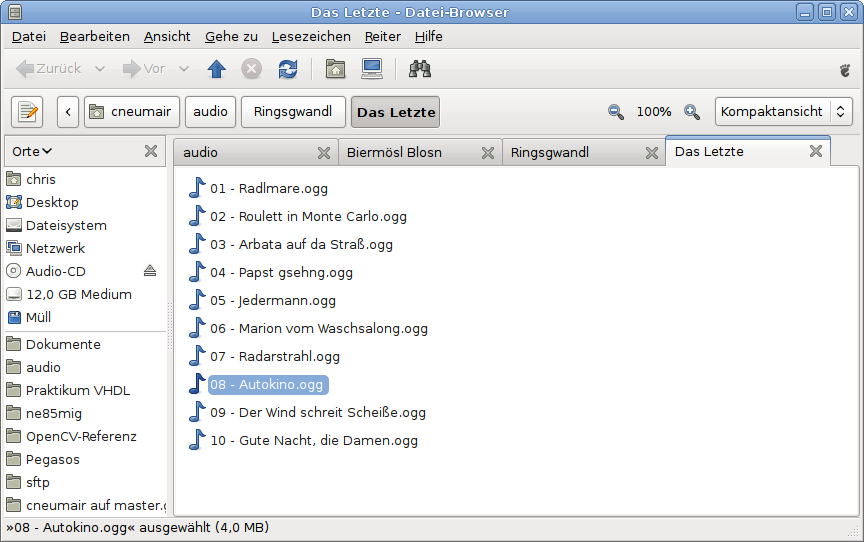
Thanks to Jared Moore for making the tab user interface consistent with Epiphany and GNOME Terminal.
Nautilus 2.24 will have tab support:
Thanks to Jared Moore for making the tab user interface consistent with Epiphany and GNOME Terminal.
Looks about 50/50 to me, between those who like the idea, and those who think it’s appalling. Leaning towards the latter, myself – but then, I never use Nautilus in that particular mode anyway, preferring the simple spatial-style windows.
On the one hand, I’m not a huge fan of tabs in file managers. On the other hand, I have a lot of respect for and am a devoted fan of anyone who improves Nautilus.
What I’m really excited about is that eject button. 😉
This is only in browser mode, right, not spatial?
> This is only in browser mode, right, not spatial?
Yes, of course.
Finally something to get rid of n opened windows of Nautilus 🙂 And people who loath it – come on, don’t want it – don’t use it. Nautilus with and without tabs is still Nautilus (as Terminal and Firefox, by the way). It is not like you are forced to use it.
Not a fan of tabs myself but it is a relatively unobtrusive option so I’m glad to see you making efforts to keep users happy.
For those who long for the days of Gnome Midnight Commander and are interested in Tabs and Split Views you may want to look at an experimental web browser called “Tab Lanes”
http://www.tablane.com/screenshots.php?tab=screenshots
As far as the idea went it seemed slightly more practical than the split view system offered by Konqueror. Not that I want to encourage that sort of thing.
I’m still hoping for file management that makes it as easy to sort and manage the stream incoming files as it is to sort and file my incoming mail. Tagging and searching also offer a brighter future for file management.
> > This is only in browser mode, right, not spatial?
> Yes, of course.
Cheers. I find the browser mode awful anyway, particularly for non-technical users, so I’m not bothered. I do like that the feature is invisible anyway unless you explicitly want to use tabs, as it is in Firefox.
This better not be another one of those tab jokes, because I am really dying for tab support in nautilus.
Please god, don’t let this be a joke.
I suppose that “making the tab user interface consistent with Epiphany and GNOME Terminal” means using the same hotkeys for the same actions.
If so, I don’t know if there is such a thing in gtk, but as I’ve already read about making hotkeys consistent across applications many times in different projects, I think it could be interesting to have something such as “stock hotkeys”, in the same way there already are stock icons, in order to ease using/managing the commonly-used “hotkeyed” actions.
This would also make easier to “re-hotkey” some actions to the user’s taste in a once-for-all fashion (gconf supports something like “overlayed” configurations, right? this could be used for application-specific overrides).
Just an idea.
Well. They done this useless bullshit for file manager: tabs. But didn’t the most usefull thing: split view. Idiots.