I don’t know if this is in the works (or already exists but isn’t used), but it’d be nice to let the launchers on the side support different ways of opening certain applications. For instance chrome(ium?) has normal windows and incognito windows. To open the latter in Gnome 3, you have to open a regular window and use the options menu to open a second window. It’d probably be better if right clicking on the chrome icon gave both “New Window” and “New Incognito Window” options, instead of just the former and “Remove from Favorites” (and a list of open windows).
Of course, it’d be up to Google/whoever works on Chromium to publish the proper information, but the possibility would be nice if it isn’t already there (and I don’t see any applications that do have a similar option, so I’m flagrantly assuming it isn’t there).
What Dan is trying to say, is that there should be a kind of jumplist on applications in the dock, to do special actions with applications (e.g. instead of just running “chromium”, add a new action which will run “chromium –incognito”)
That looks promising, but I have one concern: is there any specification about what should be in the app menu and what should be in the traditional per-window menu? IMHO, there are two possibilities: wether both menus present exactly the same items, or there is a clear conceptual distinction between the two menus so that it’s immediately clear for users in which menu to find the item they’re looking for.
Not a developer, I think the menubar only goes away when 1) the application specifically supports this 2) the application is maximized. Not totally sure though. If you want to test this yourself, get an up to date distribution (or jhbuild) and run “gjs src/test-gapplication.js” from the gnome-shell repository (or the gnome-shell 3.3.3 tarball).
Well, global menus are common in OS X and they have no problem with huge spaces. What is most important to write down some guidelines. Global menus must hold only stuff which isn’t necessary in everyday’s work. If something is used more frequently, use button on toolbar.
What was done wrong in Unity that they just moved old menus up there, without slowly migrating them.
dot
What’s the line “checkbox” suppose to mean?
Does it mean that the setting is “off” and you have slide it to turn it “on”?
or does it mean that the setting is “on” and you have to slide it to turn it “off”?
Pēteris Krišjānis
Finally, I already thought when we could start hack on this 😉
Comments
12 responses to “Mutter and GNOME shell 3.3.3”
I don’t know if this is in the works (or already exists but isn’t used), but it’d be nice to let the launchers on the side support different ways of opening certain applications. For instance chrome(ium?) has normal windows and incognito windows. To open the latter in Gnome 3, you have to open a regular window and use the options menu to open a second window. It’d probably be better if right clicking on the chrome icon gave both “New Window” and “New Incognito Window” options, instead of just the former and “Remove from Favorites” (and a list of open windows).
Of course, it’d be up to Google/whoever works on Chromium to publish the proper information, but the possibility would be nice if it isn’t already there (and I don’t see any applications that do have a similar option, so I’m flagrantly assuming it isn’t there).
This is already being worked on, in parallel to the AppMenu.
See https://live.gnome.org/ThreePointThree/Features/Jumplists
I don’t get it
What Dan is trying to say, is that there should be a kind of jumplist on applications in the dock, to do special actions with applications (e.g. instead of just running “chromium”, add a new action which will run “chromium –incognito”)
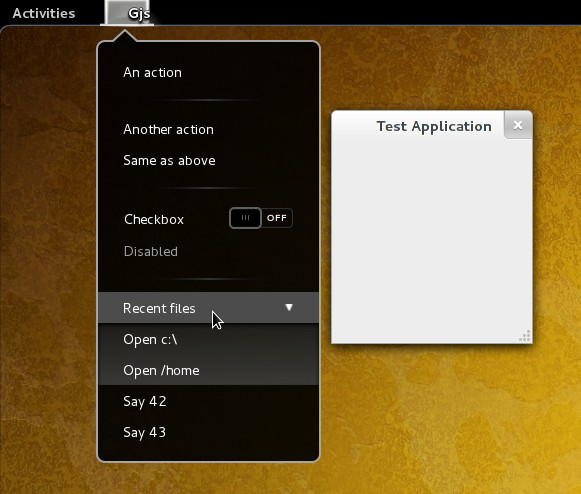
@Oscar It looks like an app menu demo 🙂
http://live.gnome.org/GnomeShell/Design/Whiteboards/AppMenu
That looks promising, but I have one concern: is there any specification about what should be in the app menu and what should be in the traditional per-window menu? IMHO, there are two possibilities: wether both menus present exactly the same items, or there is a clear conceptual distinction between the two menus so that it’s immediately clear for users in which menu to find the item they’re looking for.
Also, please have a look at this Ubuntu bug report (https://bugs.launchpad.net/unity/+bug/682788) before doing something you might regret 🙂
Not a developer, I think the menubar only goes away when 1) the application specifically supports this 2) the application is maximized. Not totally sure though. If you want to test this yourself, get an up to date distribution (or jhbuild) and run “gjs src/test-gapplication.js” from the gnome-shell repository (or the gnome-shell 3.3.3 tarball).
Well, I think this whiteboard just answered most of my concerns: http://live.gnome.org/GnomeShell/Design/Whiteboards/AppMenu
Well, global menus are common in OS X and they have no problem with huge spaces. What is most important to write down some guidelines. Global menus must hold only stuff which isn’t necessary in everyday’s work. If something is used more frequently, use button on toolbar.
What was done wrong in Unity that they just moved old menus up there, without slowly migrating them.
What’s the line “checkbox” suppose to mean?
Does it mean that the setting is “off” and you have slide it to turn it “on”?
or does it mean that the setting is “on” and you have to slide it to turn it “off”?
Finally, I already thought when we could start hack on this 😉