Auto-EDID ICC Profiles

A favour, my geeky friends:

gnome-settings-daemon and colord-kde create an ICC profile based on the color information found in the EDID blob. Sometimes the EDID data returns junk, and so the profile is also junk. This can do weird things to color managed applications. I’m trying to find a heuristic for when to automatically suppress the profile creation for bad EDIDs, such as the red primary being where blue belongs and that kind of thing. To do this, I need data. If you could run this command, I’d be very grateful.

for f in $HOME/.local/share/icc/edid-* ; do
    curl -i -F upload=@$f http://www.hughski.com/profile-store.php
done

This uploads the auto-EDID profile to my webserver. There is no way I can trace this data back to any particular user, and no identifiable data is stored in the profile other than the MD5 of the EDID blob. I’ll be sharing the processed data when I’ve got enough uploads. If you think that your EDID profile is wrong then I’d really appreciate you also emailing me with the “Location:” output from CURL, although this is completely optional. Thanks!

Translated Color Profiles

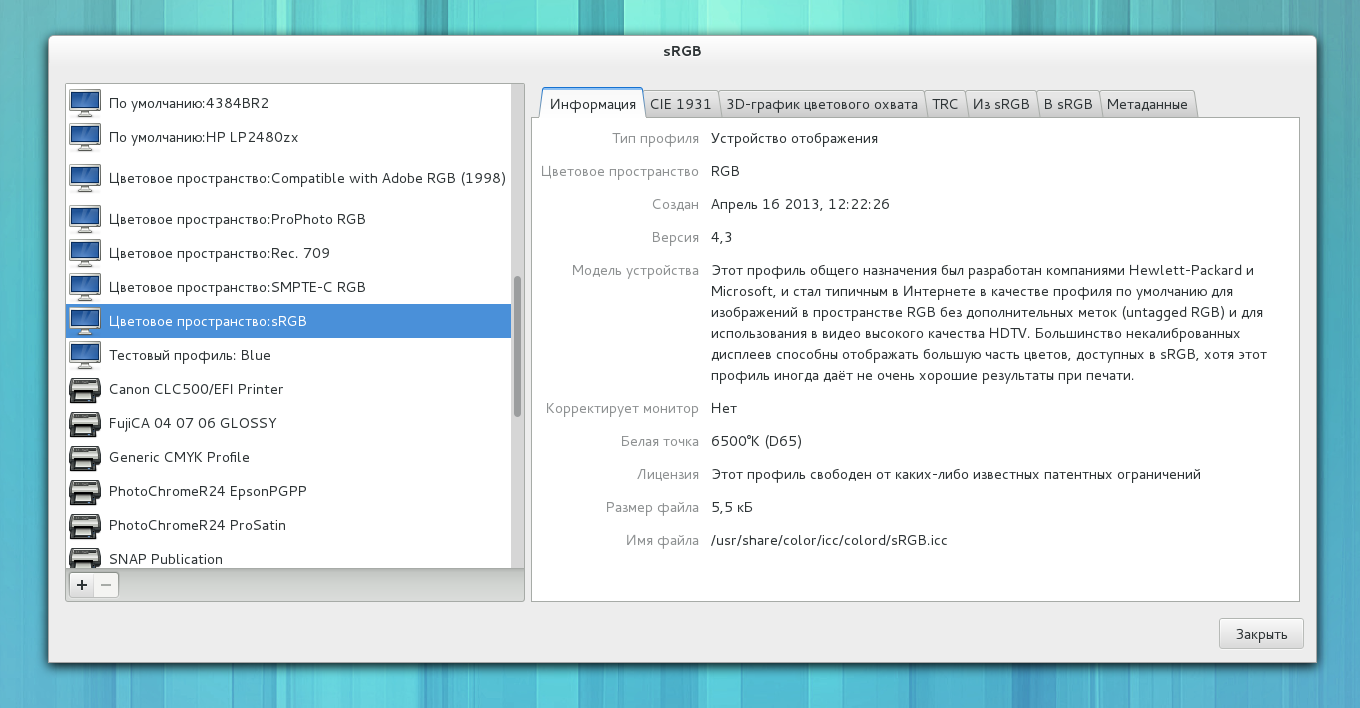
In GNOME 3.10 we’ll have translated ICC profiles thanks to all the translators. This should make Alexandre Prokoudine happy indeed.

Screenshot from 2013-04-18 08:49:52

For applications, libcolord provides a CdIcc GObject if you don’t feel like dealing with wchar_t‘s and ‘mluc‘ objects yourself. Applications that deal with ICC profiles and want to get the localized versions of the description should probably look at this example code in C or in Python.

Comments, as always, welcome.

GNOME Software overall plan

I’ve been asked by a few people now to outline my plans for improving software installation in GNOME. I’ve started to prototype a new app called ‘GNOME Software’. It exists in gnome git and currently uses PackageKit to manage packages. It’s alpha quality, but basically matches the mockups done by the awesome guys in #gnome-design. It’s designed to be an application management application. GNOME PackageKit lives on for people that know what a package is and want a pointy-clicky GUI, so I’m not interested in showing low level details for power users.

Of course, packages are so 2012. It’s 2013, and people want to play with redistributable things like listaller and glick2 static blobs. People want to play with updating an OS image like ostree and that’s all awesome. Packages are pretty useful in some situations, but we don’t want to limit ourselves to being just another package installer. From a end-user point of view, packages are just an implementation detail.

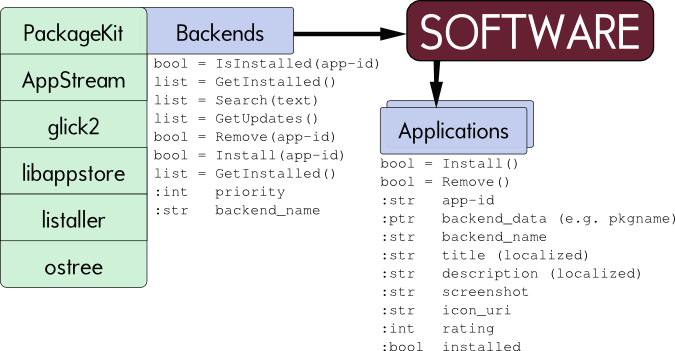
So, I’ve been designing gnome-software to be pluggable. This means you can write an AppStream plugin to provide things like icons and screenshots for not-yet-installed software. You can write a plugin to ask ostree to update itself, and also a plugin to ask PackageKit to update a specific package. The idea is that we just run all the plugins in parallel when the user opens the dialog, and hide all the gutty details about the application update/install/removal itself. If installing packages falls out of favour we drop the PackageKit plugin, and instead write a plugin for ${distribution_system_of_the_year}.

I’ve done a quick technical outline below:

System Design

There are a few sticky issues I’ve not yet solved, like what happens if inksape is installed locally using Glick2 and also installed as a package. I suppose you’d get two entries in the results, and two things to update. Not sure. Ideas welcome.

There’s quite a bit of working code in git, but I didn’t want to write too much until I’d had some feedback from the community. Comments, suggestions and flames very welcome. Thanks.


ColorMunki Smile

I’ve just purchased a ColorMunki Smile so I can write a native colord driver for the i1 display class of hardware. I’ll base this on the Argyll CMS driver which is also GPLv2+ and this will mean we can get faster and more reliable readings by not spawning /usr/bin/spotread and trying to screen scrape the output. It also means we can support the newer LED backlights in the client UIs, which the smile supports.

GResource and colord startup

A couple of days ago I released colord 0.1.30. This was an otherwise unremarkable release with the normal splattering of a few bugfixes and the occasional small new features.

One such feature is the use of GResource. The new GResource stuff that landed in Glib 2.32 allows you to embed abritary binary data into the actual executable file. This is typically used for embedding small files that are normally loaded at runtime, for instance D-Bus introspection files or small application icons. Embedding that data also lets us strip the blanks from any XML file, and optionally compress the data too. It means we’re not seeking and loading many small files when the binary is run, which reduces by a small amount the amount of I/O that is done, and hence speeds up startup.

So I got thinking. Looking at the cold startup[1] I/O profile of colord, the first thing it does is scan for any files in /usr/share/color/icc for *.icc files. On the default system in Fedora, we only have a few files installed in that directory, and all of them are generated by colord at package build time and shipped in the colord package. We know where they are going to be, and what the contents are. Typically there are ~10 profiles installed, and they are all less than 1kb in size.

Since 0.1.30, at build time the profiles generated by colord (and only those) get included into the binary as resources. This means the colord binary size grows by slightly less than 10k, but means we don’t load 10 small files from the disk at startup. The files are still installed like normal so that applications can reference them as files like before, but if there is an internal mmap’ed copy of the same profile we use that instead. This reduces the amount of I/O that colord does at startup by about half. It speeds the daemon startup by about 35ms on SSD hardware (as seeks are cheap) but on spinning rust drives or LiveCD media it makes an order of magnitude more difference.

[1] cold, as in not in hot-cache. Do ‘echo 3 > /proc/sys/vm/drop_caches’ if you want to see the difference.


Color Calibration Survey Results

A couple of weeks ago I asked people on my blog and a few chosen mailing lists to answer three simple questions:

  1. What monitor calibration devices do you own?
  2. Which of these devices have you used in the last 6 months?
  3. If you were to buy a new calibration device, which would you buy?

I wanted to work out what hardware I should buy for testing with gnome-color-manager and colord for each release. The results are very skewed toward Linux users, but that was kind of the point of the survey.

So, the first set of data, which 203 people answered:

Notable points:

  • Nobody owns a Colorimetre HCFR. Not much of a suprise really.
  • Spyder4 is new hardware which performs well, but hardly anyone owns one yet.
  • 43% of people answering the survey own a ColorHug, which isn’t too much of a suprise since it was posted on the ColorHug Google+ page. Still, pretty awesome for such a new project.

The next graph is very similar to the first, with 191 people responding:

Notable points:

  • There are a lot of Spyder2’s sitting in drawers unused.
  • Lots of people bought a ColorHug, and don’t use it very often. This isn’t suprising as it’s the least expensive device by a long way.
  • i1Pro owners use the device a lot more than people that own other devices. This is also a very expensive device, so again, kinda makes sense.

The last graph is interesting in a number of ways, from 173 users:

  • 52% of Linux users would buy a ColorHug. This is the most popular cheap colorimeter option.
  • 31% of people would buy a much more expensive photospectrometer rather than a colorimeter.
  • 11% of people want to buy hardware considered obsolete by the manufacturer.
  • 2 people want to buy a Colorimetre HCFR. Good luck there :)
  • 6 people wanted to buy a ColorHug Spectro, even though it wasn’t an option on the survey and doesn’t even exist yet.

Based on the results of this data, I think it’s important for me to buy some Spyder hardware and concentrate on the photospectrometer-type hardware. Thanks to all respondents, your help has been really valuable.


Color management in GNOME 3.8

I’ve spent a few hours each day for the last couple of weeks writing code to support the new mockups done by Allan for display calibration. This involved two pretty big patches, one for a reworked color panel in the control center, and one for the colord-session native calibration I blogged about a few weeks ago.

I’m glad to say this landed upstream yesterday after review by Bastien, and now people are trying it out and finding niggles which I’ve been busily fixing.

There are lots of nice features which required adding quite a few new properties to colord, the daemon which makes all this UI possible. colord now knows (from the kernel) if a device is internal, and can’t be removed. This allows us to make a few of the translations much better. We’ve also got the ability to “turn off” color management for a device, which is persistent between reboots. We can also remove profiles automatically added by colord (using metadata information) which is also stored in a database.

To test this, you currently need colord, gnome-settings-daemon and gnome-control-center from git master, although we’ll be doing some tarball releases in the next few days.