The last two weeks I have been working on the nautilus-search (and now nautilus-search2) branch of Nautilus. The initial code in this branch was written by andersca and was later maintained by joe. It had a pluggable search interface with a beagle implementation that let you easily search for files from Nautilus. Places->Search in the menu would give you a text entry in the toolbar, and when you typed text there the matches was shown in the normal directory view. Here is how it looked:
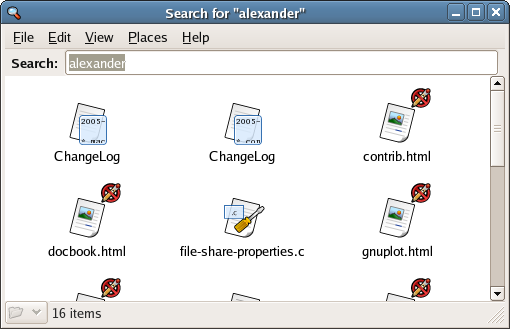
While pretty cool and useful, this really isn’t state of the art compared to e.g. MacOS X or MS Vista. For one, it doesn’t support what Apple calls “Smart Folders” and MS “Virtual Folders”, nor does it allow you to specify the search other than with text. Furthermore, the search acts as a special type of folder, but I didn’t like the fact that its not obvious that this is not a “normal” folder.
So, after spending some time on the code I now have this:
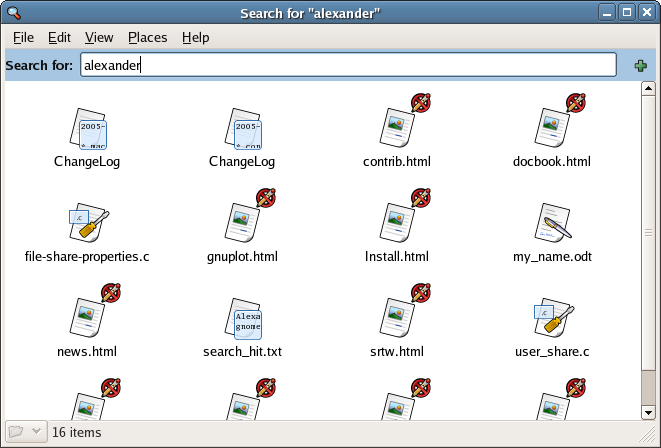
The blue area is a special part of the window I called “extra location widgets” in the code. It can be used to show that this is a special kind of folder, and I think we should use it for folders in burn:/// also. Furthermore, the “+” button lets you add limitations on the search:
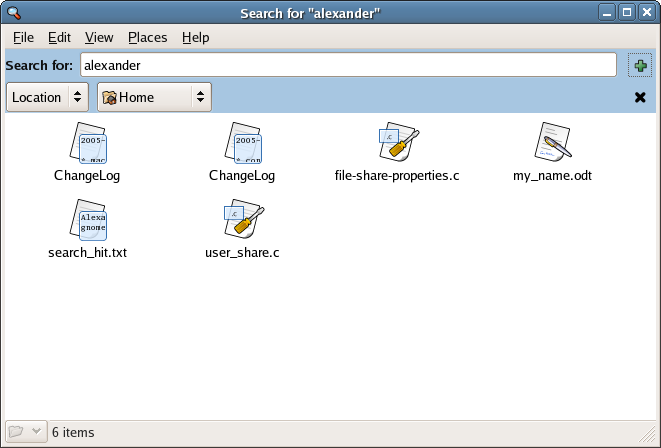
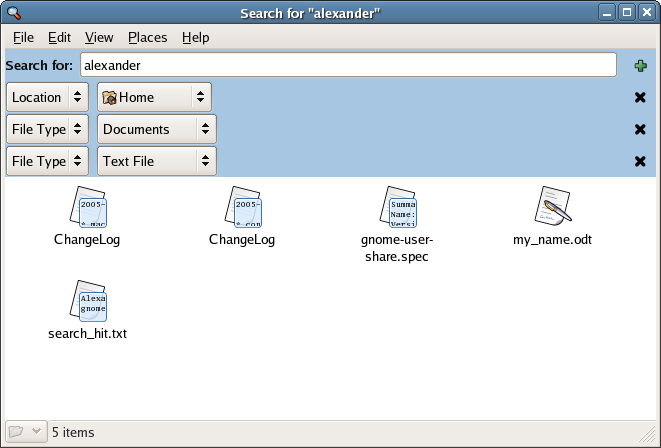
You can also search by type:
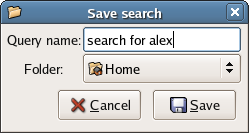
When you are satisfied with your search you can use File -> Save Search As… which gives you this dialog:
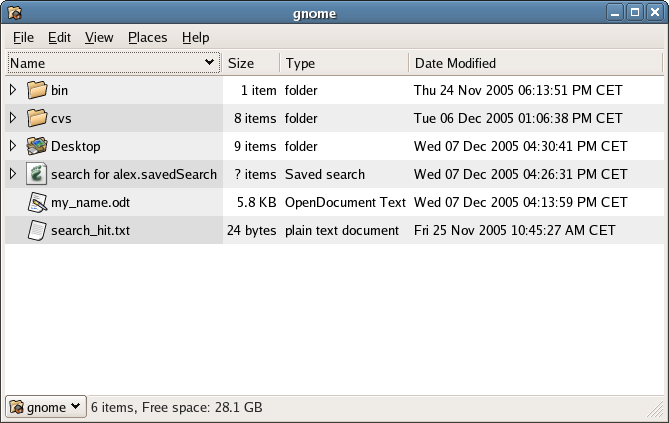
Looking in home, we see the newly saved file “search for alex.savedSearch”. Its really a simple xml file describing the query. However, we can tell by the expander that Nautilus treats it as a folder.
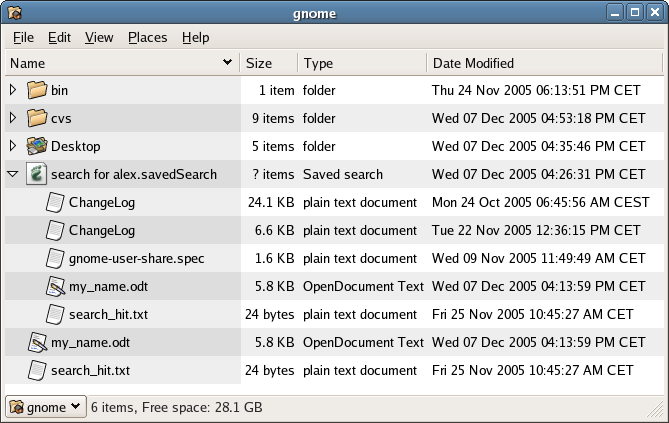
If you expand it, you get the results of the search as if it was a normal folder:
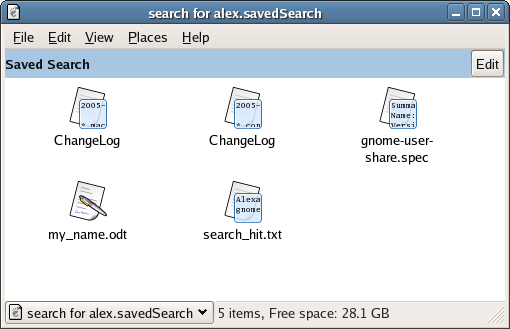
And if you click on it you show the file as a folder:
You can also edit it by clicking on the edit button, giving you back the original query edit widgets. When you’ve changed them to your liking, File -> Save Search updates the search file on disk:
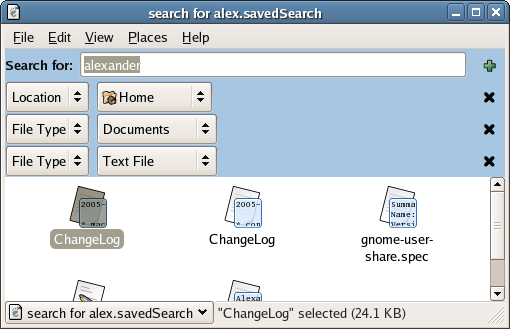
All this code is on the nautilus-search2 branch in cvs. Its mostly working, I just need to fix some bugs and add a simple (non-indexing) search backend and I think its ready to be merged to HEAD.
It seems that there’s a lot of wasted space when one goes to “Advanced Search” (via the additional fields). In this case, MS’s sidebar/pane might seem like a better idea.
I’m curious. Why is Gnome preceeding to use technologies that the major distributors haven’t even agreed can be included legally in their distros.
By this I mean, why is Nautilus utilizing beagle when beagle relies on Mono which at least one major distro refuses to include due to legal issues?
Is this going to become the trend for Gnome, because if it is, then this is going to tear apart the Gnome desktop from the inside. It seems insane to develop tools for Gnome that clearly can’t be used on all platforms.
That’s why it uses a modular backend, so it can use either Beagle, if it is installed, or any other search solution.
One quick question. What happenes when a user tries to copy files into the “virtual folders”?
>One quick question. What happenes when a user tries to copy files into the “virtual folders”?
Looks like that is only interactive non pseudo virtual folders(I don’t know how to call this feature=).
Awesome feature.
As another poster said: Labels is the way to go.
So the perfect scenario for me would be:
Search for a lot of labels, put files in those folders and they get those labels.
Actually every field that is search for, should be able to change. If the user put a file in a folder, where it doesn’t make sense to change the file (e.g the creation date) sensible warnings (non-ui blocking) should tell the user what to do, and how to fix the problem, e.g create a new search.
Also, labels should be two way:
If you just search for all labels on the system – or look at the properties of a file to see its label, you can just drag the label to any other files!
Then these files would also get the labels.
Also if a person has made a search, he could just drag a lot of labels to the search, and they would be included.
Just to recap, a label is just like a directory (a name), except the ordering doesn’t matter.
It is really a long sought feature, because people really don’t care if a file is called images/housewarming/teapots/green-teapot.jpg
or housewarming/teapots/green/image
The just one the file, that they saved with some comments. Also, open and save dialogs should implement this as much as possible. Make it easy to search, and add labels when doing these operations.
(Actually I think that open and save dialogs is the spawn of the devil, but lets take one thing at a time).
So pleeaase consider this in nautilus search. Nautilus search should support labels, and dragging things to a search folder should not be illegal!
>One quick question. What happenes when a user tries to copy files into the “virtual folders”?
it would be nice that doing this tags that file with the search key(s).
This could integrate/replace tagging function in f-spot / banshee(?) …
You should try putting the query options boxes in one line as they take up a sizable chunk of the window.
This is a feature that Linux lacked till now. Windows has yahoo search and google desktop search. And mac has its own built-in search tool called spotlight. Till now most linux distributions did not bundle Beagle by default in Linux. So one had to go and download it and install it in order to use it.
Believe me, it was a reall hassle for me when I was using fedora core 2. Even when I moved to ubuntu, it was an irritant.
Now by incorporating beagle in nautilus, the developers have addressed a most asked for feature.
Kudos to nautilus developers.
PS: can’t you integrate it on the taskbar too ? like in a Mac?
—
Ravi
http://linuxhelp.blogspot.com
I’d be nice if the search folders would work in none nautilus applications also, like the terminal.
This could perhaps be accomplished by having nautilus creating a folder some secret place, make symlinks to the found files, make a symlink at the saved place to the secret folder. And then offcource update it as much as needed.
This way the user could also manually put files in the folder, and even wine programs would be able to open the folder.
We could say that searches, similarly to the CD burner, are not real “locations”, as far as Nautilus is concerned. This seems to give rise to certain problems, as the functionalities related to these objects differ from those of normal locations in Nautilus.
* You cannot paste a file into a search, or rather what logic would this serve ? Usually, when you cannot paste or move a file in nautilus, it is because the place is read only, or you do not have permission, not because it represents something other than a location.
* When you click on search in a browser window, you loose the utility of the cookie crumb navigator. (you get lost 😮 )
* When you click search in a spatial window, it actually opens the search in another window. Could this window not simply be a “search application window” rather than a Nautilus window ?
* Perhaps a list view would be the preferred default way to view a search results (irrelevant of the default nautilus setting), not only to view the path (and additional information for identifying files) but also to provide quick sorting (sorting is kind of like a second search).
* When you start a search with the tree view in the side pane, what should be shown as the current location in the tree view ?
* Subfolders in a saved search appear “inside” the saved search, however when you open a subfolder you get sent to the actual path of the folder. It would therefore seem that presenting search results like a folder could be the wrong metaphor.
* A user may want to add an emblem to a file in a saved search, but not to the actual file, or the other way around…
* When you change search parameters of a saved search, does it automatically save them, or ask for confirmation ? Both ways I can see this as problematic, as you generally do not save things in Nautilus.
* A saved search shows subfolders “inside” the search (in exactly the same way as files are “inside” folders), however when you click on these subfolders you are actually redirected to the real folder. Say I searched for files modified today ; as a user, considering a “virtual folder” type metaphor, I would assume to find only files modified today in the saved search subfolders.
* Seeing as files appear to be “inside” a saved search, could the user not think the files have been copied there ?
Actions applied to the contents of these special places differ substantially from those applied to other objects in nautilus, such as folders or network places, thus problems arise from trying to imitate normal Nautilus behavior. So many inconsistencies make me wonder if it is wise to integrate such functions as search or a CD burner into the file manager. The new search seems very impressive, but what are the real advantages of having this in Nautilus rather than separate ? To me it would seem much clearer if the CD burner was completely separate from the file manager, and if search was performed in a separate window.
The need for “not normal” folders, that gave rise to the “blue background” for me goes to show that this just should not be here. If the we must differentiate “special” nautilus browser windows, why not just put them in another window, or a separate application ? One consensus could be that a particular application window serves a particular purpose ; Nautilus is a navigator, not a burner or a search tool etc. You wouldn’t add a CD burner to evolution, even though it can save files, Nautilus would be adapted for browsing CVS or SVN though (as it is for http://FTP...).
Search as it is works without confusing anybody, although it lacks some much needed functionality. I think one of the main things currently missing (pre 2.13) is a button in nautilus that opens the search dialog ready to search in the current path, and saved searches ; plus of course backends, beagle… The main thing I am getting at here is that I do not think integrating search into Nautilus (represented similar to folders) is at all a step in the right direction, I think it will do more to confuse users than it does benefit them with the new functionality. I think the exact same functionality can be provided without integrating search into the file manager part of Nautilus, with an interface similar to the current implementation, added search buttons, a few modifications and addition of new capabilities.
I do hope I don’t seem too harsh, the new search is very impressive, and contains many very neat ideas, so much so that I feel rather bad about criticizing it. I was rather hesitant about posting this, as I don’t want to seem to be bashing other peoples hard work, but I am rather worried that we may be trading simplicity for snazziness here. It would seem to me that most people accept the new implementation as an improvement, but please give it a little thought.
I hope these comments will be found useful by some, hopefully for ideas to help make the GNOME interface both more simple and more functional.
Love, Karderio
This is a great start and the suggestions are great too. And here’s another approach. Searches result in a “document” containing HTML(-like) links to found files. This “document” metaphor is general and could be extended to document all sorts of “results”. No special icons, windows, widgets, etc. Just a new “document” (could actually contain HTML) containing results of this or that operation. Open the document, click a link and the taget appears, opens, executes, as appropriate. It’s very intuitive. The documents could be .html, .map or other.