It’s done!

Nautilus 2.24 will have tab support:
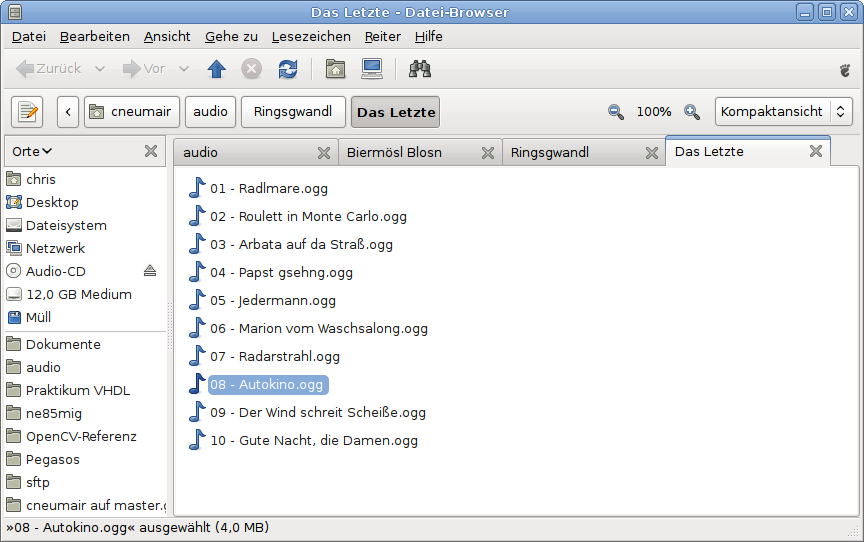
Nautilus with Tabs

Thanks to Jared Moore for making the tab user interface consistent with Epiphany and GNOME Terminal.

64 Responses to “It’s done!”

  1. cosimoc Says:

    Hi Christian, hello from GUADEC :)
    This is great, thanks for the work!

  2. mimoune djouallah Says:

    perfect, how about add the possibility to customize the main panel bar, i just want to add to icons in nautilus, icon view and list view,
    thanks for your work, at last we are seeing some new features ( GUI) added to nautilus

  3. Julio Carlos Says:

    Where I can get it? SVN? GIT? or maybe .deb?

  4. baze Says:

    well, i would have liked split view better, but tabs are nice too.
    the thing that really makes me happy, however, is that little eject button in the side pane! something i really learned to love in apple’s finder. very nice to see, this has been added aswell!

  5. Alexander Jones Says:

    SDI mode of operation, please!

    Also, is Ctrl+T open tab now or send to Trash?

  6. gnometard Says:

    You, sir, deserve a bacon chocolate chip cookie.
    Actually, you can have as many as you’d like.
    The open source community is full of projects that have tedious work that needs to be done, and Nautilus is one of them. Most people avoid that work at all cost, but you took one for the team. Thanks a bunch, man. I can’t wait to start using it.

  7. Livio Says:

    Yippie.

  8. knipknap Says:

    Cool! What shocks me more is the list view though. Does this mean that Nautilus now comes with a list that works for single click? That’s just totally awesome.

  9. Alan Says:

    I sincerely hope those of us who don’t particularly like tabs will never notice the difference (…shame about Gedit) but I’m optimistic you’ve done it right.

  10. snuxoll Says:

    noooooo, you have got to be kidding me! Well, at least I don’t use the browser view, but still….

  11. Steve Says:

    Wow. Looks great! I had my doubts when I first heard about tabs being put into Nautilus, but I’m pleasantly surprised. Thanks! I look forward to trying them out.

  12. Life Stupidities » Blog Archive » Tab Obsession Says:

    […] browsers, IM clients and terminals is generally productive but adding tabs to Thunderbird and now Nautilus is really taking things to unnecessesary […]

  13. Jones Lee Says:

    Mama mia! Great job! The ejection icon next to the volume is also cool! Lovely work!

  14. mrroboto Says:

    Now, Nautilus is a pefect KDE-AppleFinder Hybrid. Compliments.

  15. Ty Rex Says:

    Great news! :) I think tabs will be a fantastic addition to a fantastic file browser.

    But… “consistent with Epiphany and GNOME Terminal” - does that mean “sane, intiutive and like every other tab-based app” like GNOME Terminal or “suddenly disappearing and generally being hard to navigate and use” like Epiphany for more than 4 or 5 tabs? Can’t tell from the screenshot, need one more tab I guess. :)

    Now, split view? Please? pretty please? ;)

    (Oh, and +1 on liking the eject button)

  16. Gabe Says:

    This looks neat. Can we drag files from one tab to another?

  17. Ivan N. Zlatev BLoG - MSDN Search shows Mono results Says:

    […] cow! GNOME’s Nautilus with tabs (still looks butt ugly, but oh […]

  18. Tux Says:

    Great, now if only somebody could do something about the annoying cut and paste, I do a search criteria for certain files in Nautilus search, its finds them I highlight them, do a cut and paste into another directory folder and it can’t move the files ?!?!

  19. Dwight Says:

    hmm.. interesting. Can you drag files between tabs? That would be neat

  20. Cedynamix » Nautilus 2.24 et les onglets c’est officiel Says:

    […] Je vous en avais déjà parlé il y a quelque temps dans ce billet. Mais aujourd’hui c’est officiel Nautilus 2.24 supportera bel et bien  la navigation par onglet. C’est Christian Neumair sur son Blog qui vient de l’annoncer. […]

  21. Jared Moore Says:

    Great work Christian! :)

  22. lariamat Says:

    Please make a reasonable KEYBOARD SHORTCUT for the switching between the tabs! Not like GNOME Terminal’s Alt+.

    If it works like Epiphany ( Ctrl+PgUp/PgDwn ) to reach the previous/next Tab it is OK. Better would be if it worked like firefox’ Ctl+Tab.

    Thank you! Great work!

  23. Dennis Krul Says:

    Wow! That’s amazing!! That has been one of the features on my wishlist for quite some time now!

    Yes, I like tabs.

    The eject button is also quite sexy. Certainly more intuitive than some cryptic option like ‘unmount’ in a right-click context menu :)

    Rock on!

  24. gheet Says:

    You ROCKS! Look really cool!

  25. Jaden Leningrad Says:

    woa nice, I’m really really really looking forward for the 2.24 release :)

    ich hoff nur dass es genauso wird wie ichs mir vorgestellt hab… aber da ich ubuntu alpha verwend werd ichs wohl eh bald testen können :)

  26. antistress Says:

    Thanks for your work
    Is there an impact in terms of performance (time to start Nautilus, memory usage) ?
    Do you plan to allow that feature through an extension ?

  27. Bart Says:

    Hey very cool!!!

    Hopefully we have the cool features like in Firefox:
    - Middleclick on tab close it
    - Doubleclick in tab space generates a new one
    - Drag & Drop to change the order of the tabs

    …and Alan is right tabs in gEdit work in a bad way, may there are synergies between the nautilus implementation and the gEdit implementation to have a powerfull implementation in both Nautilus and gEdit :)

    Great work!

  28. Xav Says:

    Eeeek …

  29. Bart Says:

    … i forget two features:
    - The directory path as a tooltip when hovering over the tab
    - using the mousewheel at the tab space for cycling through the tabs

    These are two good features of the implementation of tabs of gEdit :)

  30. Andrés G. Aragoneses Says:

    I agree with Alan (although congratulations).

  31. Jos Says:

    It seems GNOME and KDE are trading places.
    Dolphin gets rid of the tabs and Nautilus adds them.
    The screenshot you give took a while to parse for me. It was not obvious to me that the row of buttons is actually a poor mans implementation of the breadcrumb idea. Making it clean via visual clues that the row of buttons represents a directory would be a nice next point of improvement.

  32. Nautilus, enfin les onglets | Zen-Dreams Says:

    […] c’est maintenant officiel, Nautilus sera enfin muni de la navigation par onglet. En effet, c’etait un des défauts […]

  33. Hells_Dark Says:

    Thanks a lot Christian. I hope to see some of your work into the next gnome versions :)

  34. Livio Says:

    I hope interface will be modified in future so it takes less screen space.

  35. troll Says:

    Oh god what a mess, complete usability nightmare. That’s exactly like one of those KDE’s UI brainfarts. I hope my Nautilus will never ever make me a new tab, I want to be able to disable that feature completely and for good.

  36. zong Says:

    What are going to be shortcut-keys?

  37. Charbucks Says:

    As someone who does like tabs, awesome! I agree with baze that split view would be pretty cool, but this is a great improvement over the millions of nautilus windows that I always seem to end up with. Good stuff.

  38. Pestañas de Nautilus listas para su estreno en Gnome 2.24 | Blog de Marcelo Ramos | Lo que hago, lo que me interesa, lo que me llama la atención Says:

    […] Neumair, desarrollador de Gnome e impulsor de la implementación de pestañas en Nautilus, acaba de publicar en su blog una captura anunciando que el soporte para pestañas ya está listo y estará presente en el […]

  39. loeppel Says:

    NICE :) - Just what everyone was waiting for!!

  40. Anders Says:

    Wieehh \o/

  41. chris Says:

    nice. tabs are very slick but +1 for split view. that feature in dolphin is SO nice~

  42. Arafat Says:

    After 5 years of wait!

    When I proposed the idea on gnome irc everybody was telling me to quit the chat although I was a translation coordinator back then!
    It was a totally bad idea..

    Welcome to freedom!!

  43. Arafat Says:

    After 5 years of wait!

    When I proposed the idea on gnome irc everybody was telling me to quit the chat although I was a translation coordinator back then!
    It was a totally bad idea they said..

    Welcome to freedom!!

  44. JojoMan Says:

    Amazing work, Congratz. I have been waiting a long time for this feature.

    One Request: Allow easily dragging files from one tab to another (mouse over tab toggle/activate?) thanks again for the great work…

  45. Stéphane Démurget Says:

    *Eek* too … Having a compact view is awesome but this … this does feel right … why do ppl want tabs in the first place? not enough space on an Asus Eee or something like that? Surely not for modern desktop, there is no problem putting 3 windows next to each other. If you need more you’re simply incredibly messy.

    I see tabs useful for documents primarly. It’s useful for terminals as you can have multiple different ones (remote, local, … etc) but only care to see one at a time (a terminal tab usually is per “activity”).

    I do not see much the point of having a tab for a directory, really. That’s too bad because it seems to be an awesome hack, thanks Christian. Anyway that’s great it is an option, at least it will not be put on on any distribution, as it seems to be useful for advanced users (but which ones?).

    After the Compact view I suppose the only real beasts left are rubberbanding in the list view and PolicyKit integration (that’s the #1 grief of every new users I encounter - “why can’t I copy this there?”).

  46. Pestañas de Nautilus listas para su estreno en Gnome 2.24 Says:

    […] de Gnome e impulsor de la implementación de pestañas en Nautilus, acaba de publicar en su blog (blogs.gnome.org/cneumair/2008/07/08/its-done/) una captura anunciando que el soporte para pestañas ya está listo y estará presente en el […]

  47. Bart Says:

    It seems the compact view likes most but split view and tabs are not favorites of all (but my too +1 for split screen here).
    So Stéphane is right, there should be options for enabling, disabling tabs and - if we getting it - splt view.

  48. raw sausage Says:

    The day my Nautilus makes me one single tab I will install Vista and use it from there on. You have ruined the last viable alternative desktop environment in any case so why not join the dark side completely.

  49. kov » Blog Archive Says:

    […] it seems like lots of people are enjoying adding tab support to GNOME […]

  50. Christian Neumair Says:

    Hey Christian, thanks for caring to answer my blog post =). I posted an answer there, but thought it would be better to just post here:

    I heartedly agree with you on providing solutions for today and tomorrow, not waiting for a future that may never come. I just think that ‘multiple slots/documents in a common window’ is the wrong problem to solve =). In other words, I don’t think a file manager window should ever be showing more than one folder.

  51. Tabs, tabs, tabs « Che ne so? Says:

    […] […]

  52. Simon Says:

    Looks about 50/50 to me, between those who like the idea, and those who think it’s appalling. Leaning towards the latter, myself - but then, I never use Nautilus in that particular mode anyway, preferring the simple spatial-style windows.

  53. La folie des onglets sous GNOME « Informatique de Julien Says:

    […] connaissait déjà les onglets sous Nautilus […]

  54. James D Says:

    On the one hand, I’m not a huge fan of tabs in file managers. On the other hand, I have a lot of respect for and am a devoted fan of anyone who improves Nautilus.

    What I’m really excited about is that eject button. ;-)

  55. Murray Cumming Says:

    This is only in browser mode, right, not spatial?

  56. cneumair Says:

    > This is only in browser mode, right, not spatial?

    Yes, of course.

  57. Peteris Krisjanis Says:

    Finally something to get rid of n opened windows of Nautilus :) And people who loath it - come on, don’t want it - don’t use it. Nautilus with and without tabs is still Nautilus (as Terminal and Firefox, by the way). It is not like you are forced to use it.

  58. Calum Benson: Tab frenzy | labor Says:

    […] to admit I cringe every time somebody adds tabs to an application. Not because I have anything against appropriate use of tabs (and […]

  59. Alan Says:

    Not a fan of tabs myself but it is a relatively unobtrusive option so I’m glad to see you making efforts to keep users happy.

    For those who long for the days of Gnome Midnight Commander and are interested in Tabs and Split Views you may want to look at an experimental web browser called “Tab Lanes”
    http://www.tablane.com/screenshots.php?tab=screenshots
    As far as the idea went it seemed slightly more practical than the split view system offered by Konqueror. Not that I want to encourage that sort of thing.

    I’m still hoping for file management that makes it as easy to sort and manage the stream incoming files as it is to sort and file my incoming mail. Tagging and searching also offer a brighter future for file management.

  60. Murray Cumming Says:

    > > This is only in browser mode, right, not spatial?
    > Yes, of course.

    Cheers. I find the browser mode awful anyway, particularly for non-technical users, so I’m not bothered. I do like that the feature is invisible anyway unless you explicitly want to use tabs, as it is in Firefox.

  61. Andrew Says:

    This better not be another one of those tab jokes, because I am really dying for tab support in nautilus.

    Please god, don’t let this be a joke.

  62. Invasione di TAB (schede) in GNOME 3? « pollycoke :) Says:

    […] avvenuta tra diversi sviluppatori GNOME, mentre ero un po’ AFK. Le cose sono degenerate fino ad ottenere ciò che potete ammirare in questa piccola galleria in cui cerco di riunire tutti gli […]

  63. Lluís Says:

    I suppose that “making the tab user interface consistent with Epiphany and GNOME Terminal” means using the same hotkeys for the same actions.

    If so, I don’t know if there is such a thing in gtk, but as I’ve already read about making hotkeys consistent across applications many times in different projects, I think it could be interesting to have something such as “stock hotkeys”, in the same way there already are stock icons, in order to ease using/managing the commonly-used “hotkeyed” actions.

    This would also make easier to “re-hotkey” some actions to the user’s taste in a once-for-all fashion (gconf supports something like “overlayed” configurations, right? this could be used for application-specific overrides).

    Just an idea.

  64. Denis Says:

    Well. They done this useless bullshit for file manager: tabs. But didn’t the most usefull thing: split view. Idiots.


Bad Behavior has blocked 32 access attempts in the last 7 days.