ctx, cancel := context.WithTimeout(context.Background(), csiPodRunningTimeout)
defer cancel()
pvcWatch, err := f.ClientSet.CoreV1().PersistentVolumeClaims(f.Namespace.Name).Watch(ctx, metav1.ListOptions{})
framework.ExpectNoError(err, "create PVC watch")
defer pvcWatch.Stop()

...

for {
	select {
	case event := <-pvcWatch.ResultChan():
		framework.Logf("PVC event %s: %#v", event.Type, event.Object)
		switch event.Type {
		case watch.Modified:
			pvc, ok := event.Object.(*v1.PersistentVolumeClaim)
			if !ok {
				framework.Failf("PVC watch sent %#v instead of a PVC", event.Object)
			}
			_, set := pvc.Annotations["volume.kubernetes.io/selected-node"]
			if set {
				nodeAnnotationSet = true
			} else if nodeAnnotationSet {
				nodeAnnotationReset = true
			}
		case watch.Deleted:
			break loop
		case watch.Error:
			// Can this occur when the apiserver is under heavy load?
			// If yes, then we should bail out of the test here early and
			// skip further checks instead of treating it as a test failure.
			framework.Failf("PVC watch failed prematurely: %v", event.Object)
		}
	case <-ctx.Done():
		framework.Failf("Timeout while waiting to observe PVC list")
	}
}
The problem is hard to spot unless you’re familiar with Kubernetes watches, and perhaps even if you are familiar but don’t work on OpenShift.
Watches and Channels
Watches can and do terminate at any time, gracefully or not. Sometimes a new apiserver leader is elected and the old one terminates watches and clients must reconnect to the new leader. Sometimes the leader just goes away because its node got rebooted. Sometimes there’s a network hiccup and the HTTP connection backing the watch times out. Regardless of the cause, they happen and your code needs to handle them. OpenShift CI forces frequent leader elections to specifically catch these issues before they get to customers.
A watch stuffs events into a Go channel. The code using the watch reads events out of the channel, usually in a for loop (to continuously grab events) with a select block (to ensure individual read operations don’t block which enables cancelation when the channel returned by ctx.Done() is closed). Reading from a Go channel (case event := <-pvcWatch.ResultChan()) returns an optional second boolean indicating whether the channel has been closed.
The testcase loop doesn’t exit until either the testcase times out and the ctx.Done() channel is closed, one of the event handler cases fails the testcase, or the PersistentVolumeClaim is deleted. So what happens if the Watch is closed unexpectedly and nothing checks whether the channel is closed?
The read returns a null value immediately. The code continuously executes the framework.Logf("PVC event %s: %#v", event.Type, event.Object) line for 30 seconds until the test terminates. Depending on how fast your machine is, this can be millions of log lines and lots of CPU.
The Sun sets on iptables (image by fdecomite, CC BY 2.0)
iptables is the default Linux firewall and packet manipulation tool. If you’ve ever been responsible for a Linux machine (aside from an Android phone perhaps) then you’ve had to touch iptables. It works, but that’s about the best thing anyone can say about it.
At Red Hat we’ve been working hard to replace iptables with its successor: nftables. Which has actually been around for years but for various reasons was unable to completely replace iptables. Until now.
What’s Wrong With iptables?
iptables is slow. It processes rules linearly which was fine in the days of 10/100Mbit ethernet. But we can do better, and nftables does; it uses maps and concatenations to touch packets as little as possible for a given action.
Most of nftables’ intelligence is in the userland tools rather than the kernel, reducing the possibility for downtime due to kernel bugs. iptables puts most of its logic in the kernel and you can guess where that leads.
When adding or updating even a single rule, iptables must read the entire existing table from the kernel, make the change, and send the whole thing back. iptables also requires locking workarounds to prevent parallel processes from stomping on each other or returning errors. Updating an entire table requires some synchronization across all CPUs meaning the more CPUs you have, the longer it takes. These issues cause problems in container orchestration systems (like OpenShift and Kubernetes) where 100,000 rules and 15 second iptables-restore runs are not uncommon. nftables can update one or many rules without touching any of the others.
iptables requires duplicate rules for IPv4 and IPv6 packets and for multiple actions, which just makes the performance and maintenance problems worse. nftables allows the same rule to apply to both IPv4 and IPv6 and supports multiple actions in the same rule, keeping your ruleset small and simple.
If you’ve every had to log or debug iptables, you know how awful that can be. nftables allows logging and other actions in the same rule, saving you time, effort, and cirrhosis of the liver. It also provides the “nft monitor trace” command to watch how rules apply to live packets.
nftables also uses the same netlink API infrastructure as other modern kernel systems like /sbin/ip, the Wi-Fi stack, and others, so it’s easier to use in other programs without resorting to command-line parsing and execing random binaries.
Finally, nftables has integrated set support with consistent syntax rather than requiring a separate tool like ipset.
What about eBPF?
You might have heard that eBPF will replace everything and give everyone a unicorn. It might, if/when it gets enhancements for accountability, traceability, debuggability, auditability, and broad driver support for XDP. But nftables has been around for years and has most (all?) of these things today.
nftables Everywhere
I’d like to highlight the great work by members of my team to bring nftables over the finish line:
Eric Garver updated firewalld (the default firewall manager on Fedora, RHEL, and other distros) to use nftables by default. This change alone will seamlessly flip the nftables switch for countless users. It’s a huge deal.
Florian Westphal figured out how to make nftables and iptables NAT coexist in the kernel. He also fixed up the iptables compat commands and handles the upstream releases to make sure we can actually use this stuff.
And of course the upstream netfilter community!
Thanks iptables; it’s been a nice ride. But nftables is better.
Recently Dave Täht wrote a blog post investigating latency and WiFi scanning and came across NetworkManager’s periodic scan behavior. When a WiFi device scans it obviously must change from its current radio channel to other channels and wait for a short amount of time listening for beacons from access points. That means it’s not passing your traffic.
With a bad driver it can sometimes take 20+ seconds and all your traffic gets dropped on the floor.
With a good driver scanning takes only a few seconds and the driver breaks the scan into chunks, returning to the associated access point’s channel periodically to handle pending traffic. Even with a good driver, latency-critical applications like VOIP or gaming will clearly suffer while the WiFi device is listening on another channel.
So why does NetworkManager periodically scan for WiFi access points?
Roaming
Whenever your WiFi network has multiple access points with the same SSID (or a dual-band AP with a single SSID) you need roaming to maintain optimal connectivity and speed. Jumping to a better AP requires that the device know what access points are available, which means doing a periodic scan like NetworkManager does every 2 minutes. Without periodic scans, the driver must scan at precisely the worst moment: when the signal quality is bad, and data rates are low, and the risk of disconnecting is higher.
Enterprise WiFi setups make the roaming problem much worse because they often have tens or hundreds of access points in the network and because they typically use high-security 802.1x authentication with EAP. Roaming with 802.1x introduces many more steps to the roaming process, each of which can fail the roaming attempt. Strategies like pre-authentication and periodic scanning greatly reduce roaming errors and latency.
User responsiveness and Location awareness
The second reason for periodic scanning is to maintain a list of access points around you for presentation in user interfaces and for geolocation in browsers that support it. Up until a couple years ago, most Linux WiFi applets displayed a drop-down list of access points that you could click on at any time. Waiting for 5 to 15 seconds for a menu to populate or ‘nmcli dev wifi list’ to return would be annoying.
But with the proliferation of WiFi (often more than 30 or 40 if you live in a flat) those lists became less and less useful, so UIs like GNOME Shell moved to a separate window for WiFi lists. This reduces the need for a constantly up-to-date WiFi list and thus for periodic scanning.
To help support these interaction models and click-to-scan behaviors like Mac OS X or Maemo, NetworkManager long ago added a D-Bus API method to request an out-of-band WiFi scan. While it’s pretty trivial to use this API to initiate geolocation or to refresh the WiFi list based on specific user actions, I’m not aware of any clients using it well. GNOME Shell only requests scans when the network list is empty and plasma-nm only does so when the user clicks a button. Instead, UIs should simply request scans periodically while the WiFi list is shown, removing the need for yet another click.
WHAT TO DO
If you don’t care about roaming, and I’m assuming David doesn’t, then NetworkManager offers a simple solution: lock your WiFi connection profile to the BSSID of your access point. When you do this, NetworkManager understands that you do not want to roam and will disable the periodic scanning behavior. Explicitly requested scans are still allowed.
You can also advocate that your favorite WiFi interface add support for NetworkManager’s RequestScan() API method and begin requesting periodic scans when WiFi lists are shown or when your browser uses geolocation. When most do this, perhaps NetworkManager could be less aggressive with its own periodic scans, or perhaps remove them altogether in favor of a more general solution.
That general solution might involve disabling periodic roaming when the signal strength is extremely good and start scanning more aggressively when signal strength drops over a threshold. But signal strength drops for many reasons like turning on a microwave, closing doors, turning on Bluetooth, or even walking to the next room, and triggering a scan then still interrupts your VOIP call or low ping headshot. This also doesn’t help people who aren’t close to their access point, leading to the same scanning problem David talks about if you’re in the basement but not if you’re in the bedroom.
Another idea would be to disable periodic scanning when latency critical applications are active, but this requires that these applications consistently set the IPv4 TOS field or use the SO_PRIORITY socket option. Few do so. This also requires visibility into kernel mac80211 queue depths and would not work for proprietary or non-mac80211-based drivers. But if all the pieces fell into place on the kernel side, NetworkManager could definitely do this while waiting for applications and drivers to catch up.
If you’ve got other ideas, feel free to propose them.
You don’t need an Uber, you don’t need a cab (via Casey Bisson CC BY-NC-SA 2.0)
NetworkManager 1.2 was released yesterday, and it’s already built for Fedora (24 and rawhide), a release candidate is in Ubuntu 16.04, and it should appear in other distros soon too. Lubo wrote a great post on many of the new features, but there’s too many to highlight in one post for our ADD social media 140-character tap-tap generation to handle. Ready for more?
indicator menus
Wayland is coming, and it doesn’t support the XEmbed status icons like nm-applet creates. Desktop environments also want more control over how these status menus appear. While KDE and GNOME both provide their own network status menus Ubuntu, XFCE, and LXDE use nm-applet. How do they deal with lack of XEmbed and status icons?
Ubuntu has long patched nm-applet to add App Indicator support, which exposes the applet’s menu structure as D-Bus objects to allow the desktop environment to draw the menu just like it wants. We enhanced the GTK3 support in libdbusmenu-gtk to handle nm-applet’s icons and then added an indicator mode to nm-applet based off Ubuntu’s work. We’ve made packager’s lives easier by building both modes into the applet simultaneously and allowing them to be switched at runtime.
IP reconfiguration
Want to add a second IP address or change your DNS servers right away? With NetworkManager 1.2 you can now change the IP configuration of a device through the D-Bus interface or nmcli without triggering a reconnect. This lets the network UIs like KDE or GNOME control-center apply changes you make to network configuration immediately without interrupting your network connection. That might take a cycle or two to show up in your favorite desktop environment, but the basis is there.
802.1x/WPA Enterprise authentication
An oft-requested feature was the ability to use certificate domain suffix checking to validate an authentication server. While NetworkManager has supported certificate subject checking for years, this has limitations and isn’t as secure as domain suffix checking. Both these options help prevent man-in-the-middle attacks where a rogue access point could masquerade as as your normal secure network. 802.1x authentication is still too complicated, and we hope to greatly simplify it in upcoming releases.
Interface stacking
While NM has always been architected to allow bridges-on-bonds-on-VLANs, there were some internal issues that prevented these more complicated configurations from working. We’ve fixed those bugs, so now layer-cake network setups work in a flash! Hopefully somebody will come up with a fancy drag-n-drop UI based off Minecraft or CandyCrush with arbitrary interface trees. Maybe it’ll even have trophies when you finally get a Level 48 active-backup bond.
Old Stable Series
Now that 1.2 is out, the 1.0 series is in maintenance mode. We’ll fix bugs and any security issues that come up, but typically don’t add new features. Backporting from 1.2 to 1.0 will be even more difficult due to the removal of dbus-glib, a major feature in 1.2 release. If you’re on 1.0, 0.9.10, or (gasp!) 0.9.8 I’d urge you to upgrade, and I think you’ll like what you see!
dbus-glib debuted in 2002 and was the first usable D-Bus client library for GLib-based applications. NetworkManager used it since the earliest commits in mid-2004.
Why do you care?
Apps and services built on it and enabled the modern desktop. If you’ve ever tried to code directly to libdbus to add a D-Bus service or talk to one you know what a pain that is. dbus-glib made that process infinitely easier but had a ton of quirks that didn’t fit well with an evolving GLib. But in the past 5 years the GLib authors recognized that D-Bus needed first-class support and they wrote GDBus with much better GLib integration and a modern asynchronous API. dbus-glib has been on life-support for years. It was time to move on.
The upcoming NetworkManager 1.2 release will finally remove use of dbus-glib for the daemon, command-line/TUI utilities, nm-applet/editor, and VPN plugins if you build with legacy components disabled. Almost nobody noticed this in-flight rebuild of the airplane and that’s exactly how we like it. I cannot understate how much work this was and how much careful planning we (well, mostly Dan Winship) did to ensure we didn’t break backwards compatibility of either the utility libraries or the D-Bus interface.
To be fair, this is a slight lie; we can’t maintain C API/ABI compatibility in the legacy client libraries by removing dbus-glib and we cannot drop them yet either. But we did write the new libnm which much more closely matches GLib coding practices and API, including GCancellables and asynchronous functions. Its API is close enough to the old libnm-util and libnm-glib that porting to libnm is not a huge task, and porting will actually remove code from your application too. Seriously: the libnm port for nm-connection-editor was +772/-1203 lines of code and nm-applet was +697/-990. Killing code feels great.
We’ve already ported over all the NetworkManager tools like nmcli, nmtui, nm-applet, nm-connection-editor, and all the VPN plugins. In the process, we cleaned up a ton of code, created better client APIs, wrote more testcases, reduced the dependency chain, and paid down most of our technical debt. When kdbus (or bus1 or whatever it’s called) eventually hits, NetworkManager will be ready.
Almost since the beginning of time, NetworkManager kept an internal list of access points found in the last 3 scans. Since the background scan were triggered at least every two minutes, an access point could stay in the list for up to 6 minutes. This was a compromise between mobility, unreliable drivers, and an unreliable medium (eg, air). Even when you’re not moving the closest access point may not show up in every scan. So NetworkManager attempted to compensate by keeping access points around for a longer time.
Obviously that approach has problems if you’re driving, on a train, or on a bus. You can end up with a huge list of access points that are obviously no longer in range. If you turn off an access point, it could stay in the list a long time.
Ubuntu contributed a patch that exposes the “last seen time” for each access point, which allows the user-interface to decide for itself which access points to show. A location service (like Firefox or Geoclue) may want a more complete list of access points than the live Wi-Fi network list does, for example, which is why NetworkManager keeps the list in the first place instead of only showing the results of the most recent (and potentially unreliable) scan.
But in the end this behavior needed to change, and with recent versions of wpa_supplicant it was possible to make NetworkManager’s scanning behavior better. The supplicant also contains a scan list from which NetworkManager built it’s. Wouldn’t it be great if there was one list instead of two?
So we threw away the internal NetworkManager list and just followed the supplicant’s list. When the supplicant decides that an access point is no longer visible, NetworkManager removes it too. This works better because the supplicant has more information than NetworkManager does and can make smarter decisions. NetworkManager tweaks the supplicant’s behavior through the BSSExpireAge and BSSExpireCount properties so that any access point seen more than 4 minutes ago, or not seen in the past two scans, will be dropped.
When scans happen more often, like when a Wi-Fi network list is displayed, the two-scan limit removes access points after 20 or 30 seconds in the best case. The supplicant performs backgrounds scans to facilitate faster roaming, which can be triggered on signal strength, which also helps remove old access points when they are out of range.
Tracking the Current BSS
Along with the scanning cleanup, NetworkManager delegates tracking the access point you’re currently associated with to wpa_supplicant’s CurrentBSS property. Previously NetworkManager periodically asked the Wi-Fi driver what the current access point was, but this was inconsistently implemented between drivers and required hacky workarounds to smooth out intermittent results.
The supplicant’s CurrentBSS property tracks the access point the supplicant wants to be associated with, not what the driver currently is associated with, but these are almost always the same thing, and there’s no point in telling the user that they are momentarily disconnected from their access point during a scan when there is no actual interruption in traffic due to 802.11 protocol mechanisms like powersave buffering. This was another huge cleanup in the NetworkManager codebase.
Death of dbus-glib
Finally, along with these changes all communication with wpa_supplicant was switched to use GDBus instead of the old, deprecated, and unmaintained dbus-glib library. This advances our goal of removing all use of dbus-glib from NetworkManager, which was one of the first major users of the library in 2004, and is likely the last one too. GDBus provides much better integration with glib and the GIO model, is fully supported, and has an saner API.
And even better, through the painstaking work of Dan Winship, Jirka Klimes, Thomas Haller, Lubomir Rintel, me, and others, all of NetworkManager 1.2 was ported to GDBus without changing our public D-Bus API. Welcome to the future!
Just a quick note that we’ve released the latest stable NetworkManager, version 1.0.4. This is mainly a bugfix release, though it does have a couple new features and larger changes. Some of those are:
Some configuration options can now be changed without restarting the NM daemon. Those include the ‘dns’, ‘connectivity’, and ‘ignore-carrier’ settings.
Devices that have only an IPv6 link-local address are no longer assumed to be connected; by default whenever an interface is set “up” the kernel will assign an IPv6 link-local address which could theoretically be used for communication. NetworkManager used to interpret this as the interface being available for network communication, while this is rarely what users want or expect.
Correct routing is now maintained when two interfaces of the same priority are connected to the same network.
udev rules can now be used to tell NetworkManager to manage or unmanage specific devices.
Connections with children (bridge, bond, team, etc) can now optionally bring up their slave interfaces when the master is started.
Many, many bugs and crashers have also been fixed in the core daemon, the libraries, and nmcli.
We’re well into the development cycle of NetworkManager 1.2 as well, where among other things, we’ll finally be moving to GDBus instead of dbus-glib. We’ll also have support for structured logging with journald, indicating that certain connections are metered, advertising LLDP-discovered information, built-in IPv4 link-local addressing to get rid of avahi-autoipd, improvements to Wi-Fi Access Point scanning, less verbose logging by default, improvements to DNS handling, and more. Look for it later this year!
Just this morning Lubomir released NetworkManager 1.0.2, the latest of the 1.0 stable series. It’s a great cleanup and bugfix release with contributions from lots of community members in many different areas of the project!
Some highlights of new functionality and fixes:
Wi-Fi device band capability indications, requested by the GNOME Shell team
Devices set to ignore carrier that use DHCP configurations will now wait a period of time for the carrier to appear, instead of failing immediately
Startup optimizations allow networking-dependent services to be started much earlier by systemd
Memory usage reductions through many memory leak fixes and optimizations
teamd interface management is now more robust and teamd is respawned when it terminates
dnsmasq is now respawned when it terminates in the local caching nameserver configuration
Fixes for an IPv6 DoS issue CVE-2015-2924, similar to one fixed recently in the kernel
IPv6 Dynamic DNS updates sent through DHCP now work more reliably (and require a fully qualified name, per the RFCs)
An IPv6 router solicitation loop due to a non-responsive IPv6 router has been fixed
While the list of generally interesting enhancements may be short, it masks 373 git commits and over 50 bugzilla issues fixed. It’s a great release and we recommend that everyone upgrade.
Next up is NetworkManager 1.2, with DNS improvements, Wi-Fi scanning and AP list fixes for mobile uses, NM-in-containers improvements (no udev required!), even less dependence on the obsolete dbus-glib, less logging noise, device management fixes, continuing removal of external dependencies (like avahi-autoipd), configuration reload-ability, and much more!
NetworkManager is a system service that manages network interfaces and connections based on user or automatic configuration. It supports Ethernet, Bridge, Bond, VLAN, team, InfiniBand, Wi-Fi, mobile broadband (WWAN), PPPoE and other devices, and supports a variety of different VPN services. You can manage it a couple different ways, from config files to a rich command-line client, a curses-like client for non-GUI systems, graphical clients for the major desktop environments, and even web-based management consoles like Cockpit.
There’s an old perception that NetworkManager is only useful on laptops for controlling Wi-Fi, but nothing could be further from the truth. No laptop I know of has InfiniBand ports. We recently released NetworkManager 1.0 with a whole load of improvements for workstations, servers, containers, and tiny systems from embedded to RaspberryPi. In the spirit of making double-plus sure that everyone knows how capable and useful NetworkManager is, let’s take a magical journey into Administrator-land and start at the very bottom…
Daemon Configuration Files
Basic configuration is stored in /etc/NetworkManager/NetworkManager.conf in a standard key/value ini-style format. The sections and values are well-described by ‘man NetworkManager.conf’. A standard default configuration looks like this:
[main]
plugins=ifcfg-rh
You can override default configuration through either command-line switches or by dropping “configuration snippets” into /etc/NetworkManager/conf.d. These snippets use the same configuration options from ‘man NetworkManager.conf’ but are much easier to distribute among larger numbers of machines though packages or tools like Puppet, or even just to install features through your favorite package manager. For example, in Fedora, there is a NetworkManager-config-connectivity-fedora RPM package that installs a snippet that enables connectivity checking to Fedora Project servers. If you don’t care about connectivity checking, you simply ‘rpm -e NetworkManager-config-connectivity-fedora’ instead of tracking down and deleting /etc/NetworkManager/conf.d/20-connectivity-fedora.conf.
Just for kicks, let’s take a walk through the various configuration options, what they do, and why you might care about them in a server, datacenter, or minimal environment…
Configuration Snippets
First, each configuration “snippet” in /etc/NetworkManager/conf.d can override values set in earlier snippets, or even the default configuration (but not command-line options). So the same option specified in 50-foobar.conf will override that option specified in 10-barfoo.conf. Many options also support the “+” modifier, which allows their value to be added to earlier ones instead of replacing. So “plugins+=something-else” will add “something-else” to the list, instead of overwriting any earlier values. You’ll see why this is quite useful in a minute…
This option enables or disables certain settings plugins, which are small loadable libraries that read and write distribution-specific network configuration. For example, Fedora/RHEL would specify ‘plugins=ifcfg-rh’ for reading and writing the ifcfg file format, while Debian/Ubuntu would use ‘plugins=ifupdown’ for reading /etc/network/interfaces, and Gentoo would use ‘plugins=ifnet’. If you know your distro’s config format like the back of your hand, NetworkManager doesn’t make you change it.
There is one default plugin though, ‘keyfile’, which NetworkManager uses to read and write configurations that the distro-specific plugins can’t handle. These files go into /etc/NetworkManager/system-connections and are standard .ini-style key/value files. If you’re interested in the key and value definitions, you can check out ‘man nm-settings’ and ‘man nm-settings-keyfiles’, or even look at some examples.
[main]
monitor-connection-files=yes | no (default no)
By popular demand, NetworkManager no longer watches configuration files for changes. Instead, you make all the changes you want, and then explicitly tell NetworkManager when you’re done with “nmcli con reload” or “nmcli con load <filename>”. This prevents reading partial configuration and allows you to double-check that everything is correct before making the configuration update. Note that changes made through the D-Bus interface (instead of the filesystem) always happen immediately.
However, if you want the old behavior back, you can set this option to “yes”.
[main]
auth-polkit=yes | no (default yes)
If built with support for it, NetworkManager uses PolicyKit for fine-grained authorization of network actions. This will be the subject of another article in this series, but the TLDR is that PolicyKit easily allows user A the permission to use WiFi while denying user B WiFi but allowing WWAN. These things can be done with Unix groups, but that quickly gets unwieldy and isn’t fine-grained enough for some organizations. In any case, PolicyKit is often unecessary on small, single-user systems or in datacenters with controlled access. So even if your distribution builds NetworkManager with PolicyKit enabled, you can turn it off for simpler root-only operation.
[main]
dhcp=dhclient | dhcpcd | internal (default determined at build time, dhclient preferred if enabled)
With NetworkManager 1.0 we’ve added a new internal DHCP client (based off systemd code which was based off ConnMan code) which is smaller, faster, and lighter than dhclient or dhcpcd. It doesn’t do DHCPv6 yet, but we’re working on that. We think you’ll like it, and it’s certainly much less of a resource hog than a dhclient process for every interface. To use it, set this option to “internal” and restart NetworkManager.
If NetworkManager was built with support for dhclient or dhcpcd, you can use either of these clients by setting this option to the client’s name. Note that if you enable both dhclient and dhcpcd, dhclient will be preferred for maximum compatibility.
[main]
no-auto-default= (default empty)
By default, NetworkManager will create an in-memory DHCP connection for every Ethernet interface on your system, which ensures that you have connectivity when bringing a new system up or booting a live DVD. But that’s not ideal on large systems with many NICs, or on systems where you’d like to control initial network bring-up yourself. In that case, you should set this option to “*” to disable the auto-Ethernet behavior for all interfaces, indicating that you’d like to create explicit configuration instead. You can also use MAC addresses or interface names here too! On Fedora we’ve created a package called NetworkManager-config-server that sets this option to “*” by default.
[main]
ignore-carrier= (default empty)
Trip over a cable? Want to make sure a critical interface stays configured if the switch port goes down? This option is for you! Setting it to “*” (all interfaces) or using MAC addresses or interface names here will tell NetworkManager to ignore carrier events after the interface is configured. For DHCP connections a carrier is obviously required for initial configuration, while static connections can start regardless of carrier status. After that, feel free to unplug the cable every time Apple sells an iPhone!
[main]
configure-and-quit=yes | no (default no)
New with 1.0 is the “configure and quit” mode where NetworkManager configures interfaces (including, if desired, blocking startup until networking is active) and then quits, spawning small helpers to maintain DHCP leases and IPv6 address lifetimes if required. In a datacenter or cloud where cycles are money, this can save you some cash and deliver a more stable setup with known behavior.
Want to control DNS yourself? NetworkManager makes it easy! Don’t want to? NetworkManager makes that easy too! When you set this option to ‘dnsmasq’ NetworkManager will configure dnsmasq as a local caching nameserver, including split DNS for VPN tunnels. If you set it to ‘none’ then NetworkManager won’t touch /etc/resolv.conf and you can use dispatcher scripts that NetworkManager calls at various points to set up DNS any way you choose.
Leaving the option empty or setting it to “default” asks NetworkManager to own resolv.conf, updating system DNS with any information from your explicit network settings or those received from automatic means like DHCP.
In the upcoming NetworkManager 1.2, DNS information is written to /var/lib/NetworkManager/resolv.conf and, if NM is allowed to manage /etc/resolv.conf, that file will be a symlink to the one in /var similar to systemd-resolvd. This makes it easier for external tools to incorporate the DNS information that NetworkManager combines from multiple sources like DHCP, PPP, IPv6, VPNs, and more.
[keyfile]
unmanaged-devices= (default empty)
Want to keep NetworkManager’s hands off a specific device? That’s what this option is for, where you can use “interface-name:eth0” or “mac:00:22:68:1c:59:b1” to prevent automatic management of a device. While there are some situations that require this, by default NetworkManager doesn’t touch virtual interfaces that it didn’t create, like bridges, bonds, VLANs, teams, macvlan, tun, tap, etc. So while it’s unusual to need this option, we realize that NetworkManager can be used in concert with other tools, so it’s here if you do.
Connectivity checking helps users log into captive ports and hotspots, while also providing information about whether or not the Internet is reachable. When NetworkManager connects a network interface, it sends an HTTP request to the given URI and waits for the specified response. If you’re connected to the Internet and the connectivity server isn’t down, the response should match and NetworkManager will change state from CONNECTED_SITE to CONNECTED. It will also check connectivity every ‘interval’ seconds so that clients can report status to the user.
If you’re instead connected to a WiFi hotspot or some kind of captive portal like a hotel network, your DNS will be hijacked and the request will be redirected to an authentication server. The response will be unexpected and NetworkManager will know that you’re behind a captive portal. Clients like GNOME Shell will then indicate that you must authenticate before you can access the real Internet, and could provide an embedded web browser for this purpose.
Upstream connectivity checking is disabled by default, but some distribution variants (like Fedora Workstation) are now enabling it for desktops, laptops, and workstations. On a server or embedded system, or where traffic costs a lot of money, you probably don’t want this feature enabled. To turn it off you can either remove your distro-provided connectivity package (which just drops a file in /etc/NetworkManager/conf.d) or you can remove the options from NetworkManager.conf.
Special NetworkManager data files
In the normal course of network management sometimes non-configuration data needs to persist. NetworkManager does this in the /var/lib/NetworkManager directory, which contains a few different files of interest:
seen-bssids
This file contains the BSSIDs (MAC addresses) of WiFi access points that NetworkManager has connected to for each configured WiFi network. NetworkManager doesn’t do this to spy on you (and the file is readable only by root), but instead to automatically connect to WiFi networks that do not broadcast their SSID. You almost never need to touch this file, but if you are concerned about privacy feel free to delete this file periodically.
timestamps
Each time you connect to a network, whether wired, WiFi, etc, NetworkManager updates the timestamp in this file. This allows NetworkManager to determine which network you last used, which can be used to automatically connect you to more preferred networks. NetworkManager also uses the timestamp as an indicator that you have successfully connected to the network before, which it uses when deciding whether or not to ask for your WiFi password when you get randomly disconnected or the driver fails.
NetworkManager.state
This file stores persistent user-determined state for Airplane mode for each technology like WiFi, WWAN, and WiMAX. Normally this is controlled by hardware buttons, but some systems don’t have hardware buttons or the drivers don’t work, plus that state is not persistent across boots. So NetworkManager stores a user-defined state for each radio type and will ensure the radio stays in that state across reboots too.
DHCP lease and configuration files
When you obtain a DHCP lease, that lease may last longer than your connection to that network. To ensure that you receive a nominally stable IP address the next time you connect, or to ensure that your TCP sessions are not broken if there is a network hiccup, NetworkManager stores the DHCP lease and attempts to acquire the same lease again. These files are stored per-connection to ensure that a lease acquired on your home WiFi or ethernet network is not used for work or Starbucks. Temporary DHCP configuration files are also stored here, which are constructed based on your preferences and on generic DHCP configuration files in /etc for each supported DHCP client. If you want to wipe the DHCP slate clean, feel free to remove any of the lease or configuration files.
And that’s it for this time, stay tuned for the next part in this series!
Right before the 2014 holidays, and more than 10 years after the first line of NetworkManager was typed, we released version 1.0. A huge milestone on the way to making NetworkManager more cooperative, more flexible, more configurable, and more useful than ever before.
How you ask?
1: libnm: the new GLib client library
For all the GLib/GObject users out there, we’ve rebuilt libnm-util and libnm-glib from the ground up into a new single library called libnm. It uses GDBus instead of dbus-glib. It provides GIO-style asynchronous methods. It also exposes IP addresses, MAC addresses, and other properties as strings instead of byte arrays, and combines the old NMClient and NMRemoteSettings objects into a single NMClient object, among other things.
from gi.repository import GLib, NM

for dev in NM.Client.new(None).get_devices():
    ipcfg = dev.get_ip4_config()
    if ipcfg:
        for addr in ipcfg.get_addresses():
            print "(%s) %s/%d" % (dev.get_iface(), addr.get_address(), addr.get_prefix())
2: a smaller, faster DHCP client
While it doesn’t do DHCPv6 (yet!) this internal client (based off systemd/connman code) is much faster than dhclient and dhcpcd, and doesn’t consume huge amounts of memory like dhclient. Use the ‘dhcp=internal’ option in NetworkManager.conf to enable it and let us know how it works. We’ll be adding DHCPv6 support and enhancing the recognized options in the near future.
3: configure and quit
Have a more static configuration and still want to use NetworkManager configuration and API to manage it? The ‘configure-and-quit=yes’ option in NetworkManager.conf will configure your interfaces and quit the NM process, spawning small helpers to preserve DHCP and IPv6 addresses. This saves cycles (and therefore money) and is simpler to manage.
4: more cooperative
Continuing the trend, NetworkManager 1.0 does a much better job of leaving externally configured interfaces alone until you tell it to do something. In addition to improvements for IPv6 sysctl recognition and user-added route preservation, externally created virtual interfaces are no longer automatically set IFF_UP, and NetworkManager handles external master/slave relationship changes more smoothly.
5: more powerful nmcli
We’ve added PolicyKit and interactive password support to nmcli, allowing full command-line-only operation for most network connections, even for less privileged users. There’s a new ‘nmcli dev connect’ command that brings up an interface using the best available connection. You can also delete virtual interfaces directly through nmcli.
6: improved IPv6
We’ve ensured that if network interfaces are supposed to be down and unconfigured, that the kernel doesn’t assign a link-local address to them, to prevent potential security issues when you think networking is down. We’ve also added support for IPv6 WWAN connections and fixes to respect router-delivered MTUs.
7: Bluetooth DUN support
Bluez5 changed API for Dial-Up-Networking functionality, which broke the NetworkManager support. At long last we’ve added that support back, no thanks to Bluez. Happy mobile networking!
8: more flexible and cooperative routing
Every interface that can have a default route now gets one, and NetworkManager manages the priorities to ensure they don’t conflict. Plus, if you need to, you can manually manage priorities on a per-connection basis to prefer WiFi over WWAN or WWAN over ethernet, or whatever you need.
9: fewer dependencies
We’ve also removed some direct dependencies (PolicyKit), slimmed down code, and split functionality into selectable plugins, leading to easier installs on limited systems and better configurability.
That’s just the tip of the iceberg; we’ve improved almost every part of NetworkManager and we’re not stopping there. We’re planning improvements to container use-cases, WiFi, VPNs, power savings, client APIs, and much more. 2015 is gonna be a great year, and not just because the version number is greater than 1!


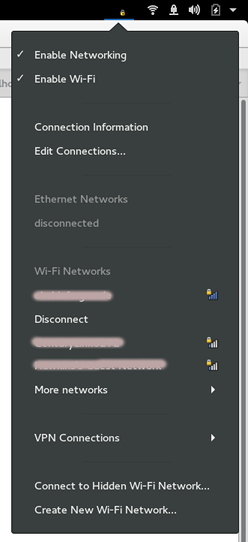 Wayland is coming, and it doesn’t support the XEmbed status icons like nm-applet creates. Desktop environments also want more control over how these status menus appear. While KDE and GNOME both provide their own network status menus Ubuntu, XFCE, and LXDE use nm-applet. How do they deal with lack of XEmbed and status icons?