Migrating blog
May 25, 2009
I just performed the migration of this blog to my main blog at http://simos.info/blog/
I exported this WordPress blog at Tools/Export and then simply imported in my main WordPress blog at Tools/Import. The blog posts are mixed properly by date thus a proper merge takes place.
The new RSS feed for p.g.o. is http://simos.info/blog/archives/category/pgo/feed
Robert describes how to generate PDF files from GNOME documentation source files.
We describe here how to manually generate PDF files from translated documentation.
The relevant gnome-doc-utils files for documentation generation is at http://git.gnome.org/cgit/gnome-doc-utils/tree/tools. As far as I understand from reading the makefile, there is no support yet to build PDFs out of localised documentation.
Let’s assume we want to generate PDF documentation for the GNOME 2 User Guide, for the Greek language.
1. We clone the relevant repository
$ git clone git://git.gnome.org/gnome-user-docs
2. Then,
cd gnome-user-docs/gnome2-user-guide/
and now generate the equivalent XML files found in C/ with the localisation for the Greek language (found in el/),
\ls C/*.xml | perl -n -e 'chop; $a=$_; print "xml2po -p el/el.po $a > el/`basename $a`\n"' | sh
3. Let’s see what we created,
$ ls el/
el.po    glossary.xml  goscustdesk.xml
gosfeedback.xml  gosoverview.xml  gosstartsession.xml
legal.xml  figures  gosbasic.xml  goseditmainmenu.xml
gosnautilus.xml  gospanel.xml     gostools.xml
user-guide.xml
$ _
The main file is user-guide.xml, which references the rest of the XML files.
4. One additional step I like to do is convert all those individual .xml in a single big XML file just before performing the conversion to PDF. This helps to figure out any markup mistakes that could have been caused during the translation.
cd el/
xmllint --noent user-guide.xml --output documentation-user-guide.xml
This step does not have the desired effect with the XML in the user-guide because the include files are referenced with “<include xmlns=”http://www.w3.org/2001/XInclude” href=”gosbasic.xml”/>” rather than the “&gosbasic;” which “xmllint –noent” appears to like. Other GNOME documentation use the latter style. Lazyweb, any tips so that xmllint can create a single big fat XML file?
4. You may want to manually populate the figures/ directory. That is, copy any C/figures/* files that are not present in your LL/figures/ directory.
5. In order to create PDF files in NON-iso-8859-1, we need to use the xetex backend,
dblatex --backend=xetex --verbose documentation-user-guide.xml
If all go well, you are greeted with a documentation-user-guide.pdf document.
Two things may go wrong here; there is either an invalid construct in the XML file or you have stumbled on a XeTex bug for your language.
For the Greek language there is a known bug and a workaround for XeTex.
Here is the GNOME2 User Guide (PDF) for
I also tried the user-guide with
Chinese: Fails to compile, encoding problem or most probably limitation in XeTeX.
Thai: Compiles just fine but no Thai font is available. How do you add fonts to XeTeX?
Punjabi: Compiles just fine but no Hindi font is available. How do you add fonts to XeTeX?
Git clones vs Shallow Git clones
April 18, 2009
When cloning a Git repository, there is an option to limit the amount of history your clone will have. If you set the parameter to –depth 1, you get the least amount of history, and you create a shallow clone.
The git clone man page says that you cannot push your commits if you have a shallow clone. Apparently, there is no error message when you actually push your commits, so it is a situation that might bring problems in the repository in the future.
Lacking more details on whether pushing commits from shallow clones is bad for the repository, let’s measure if there are any gains when someone opts for shallow clones.
| Module (gnome-2-26) | Full clone (MB) | Shallow clone (MB) |
| evolution | 204 | 189 |
| gtk+ | 193 | 172 |
| nautilus | 139 | 108 |
| gnome-games | 127 | 120 |
| gnome-applets | 110 | 98 |
| gnome-user-docs | 108 | 102 |
| evolution-data-server | 84 | 77 |
| anjuta | 76 | 66 |
| libgweather | 69 | 68 |
| gnome-panel | 68 | 60 |
| ekiga | 61 | 49 |
| dasher | 58 | 49 |
| orca | 55 | 47 |
| gnome-utils | 53 | 48 |
| gnome-icon-theme | 51 | 49 |
| gedit | 49 | 45 |
| epiphany | 48 | 42 |
| gnome-control-center | 46 | 40 |
| gdm | 43 | 38 |
| glib | 42 | 37 |
| gnome-system-tools | 33 | 29 |
| gnome-media | 33 | 30 |
| totem | 31 | 27 |
| gnome-power-manager | 31 | 27 |
| gnome-backgrounds | 31 | 30 |
| brasero | 31 | 29 |
| metacity | 29 | 27 |
| gnome-desktop | 28 | 24 |
| tomboy | 27 | 25 |
| seahorse | 24 | 22 |
| gnome-terminal | 23 | 21 |
| gnome-session | 23 | 20 |
| gucharmap | 22 | 19 |
| gnome-vfs | 22 | 19 |
| glade3 | 21 | 19 |
| gconf | 21 | 20 |
| eog | 21 | 18 |
| gcalctool | 19 | 17 |
| libgnomeui | 18 | 15 |
| gtkhtml | 18 | 16 |
| evince | 18 | 15 |
| gnome-themes | 17 | 16 |
| cheese | 17 | 15 |
| file-roller | 16 | 14 |
| empathy | 16 | 15 |
| gok | 14 | 13 |
| gtksourceview | 13 | 12 |
| gnome-keyring | 13 | 12 |
| gnome-doc-utils | 13 | 13 |
| bug-buddy | 13 | 11 |
| zenity | 12 | 11 |
| yelp | 12 | 11 |
| sound-juicer | 12 | 11 |
| libgnome | 12 | 11 |
| gvfs | 12 | 9.9 |
| gnome-system-monitor | 12 | 11 |
| deskbar-applet | 12 | 9.5 |
| libbonobo | 11 | 8.8 |
| gnome-settings-daemon | 11 | 11 |
| gnome-devel-docs | 11 | 11 |
| evolution-exchange | 9.9 | 9.3 |
| gnome-screensaver | 9 | 8.3 |
| vte | 8.7 | 7.5 |
| libbonoboui | 8.7 | 7.4 |
| libgtop | 8.4 | 6.9 |
| libgnomeprintui | 8.4 | 7.1 |
| gconf-editor | 8.4 | 7.9 |
| libgnomeprint | 8.1 | 7 |
| vinagre | 7.3 | 6 |
| libwnck | 6.6 | 5.9 |
| accerciser | 6.6 | 6.3 |
| gtk-engines | 6.4 | 5.4 |
| sabayon | 5.8 | 5.2 |
| vino | 5.7 | 5.3 |
| gnome-nettool | 5.3 | 4.9 |
| mousetweaks | 5 | 4.7 |
| totem-pl-parser | 4.6 | 4.5 |
| at-spi | 4.5 | 3.9 |
| libgnomecanvas | 4.3 | 3.7 |
| atk | 4.2 | 3.7 |
| gnome-netstatus | 4.1 | 3.8 |
| devhelp | 3.9 | 3.2 |
| gdl | 3.5 | 3.2 |
| gnome-mag | 3.2 | 2.9 |
| gnome-menus | 3 | 2.6 |
| hamster-applet | 2.8 | 2.2 |
| gnome-user-share | 2.6 | 2.5 |
| evolution-mapi | 2.2 | 2.1 |
| libgnomekbd | 1.8 | 1.7 |
| alacarte | 1.6 | 1.4 |
| pessulus | 1.5 | 1.3 |
| evolution-webcal | 1.4 | 1.3 |
| swfdec-gnome | 1.1 | 0.94 |
| Total (MB) | 2625.6 | 2349.24 |
| Time (min) | 52 | 37 |
The git repositories for all modules of gnome-2-26 weight 2.6GB while their shallow clones are 2.3GB. There is a difference of less than 300MB.
Comparatively, if it takes 52 minutes to clone all GNOME 2.26 repositories, their shallow clones save 15 minutes.The speed that was reported by git clone was about 1.4MB/s in this experiment.
Cloning is bound by both your bandwidth and your CPU (especially when resolving deltas). It would be interesting to evaluate if there would be benefits (on git.gnome.org load, speed of cloning) by having daily tarballs of anonymous clones of the modules, so that one can download using HTTP and then simply add their account details and update with git pull –rebase.
With the above information, it makes sense to avoid making shallow clones, especially when you intend to push your changes. Instead, one would dedicate at least 2.6GB for the repositories, and keep them.
intltool-manage-vcs was used to retrieve the repositories.
Update: The GNOME 2.26 modules (2.6GB in size for all their repositories), compresses down to 1.6GB (.tar.bz2).
Towards a GNOME CLI translation management tool
April 8, 2009
In Designing a command-line translation tool for GNOME, I described how a CLI translation management tool would be used to ease the work of a translator with commit access. The discussion was continued with Leonardo‘s post Parsing damned-lies’ releases.xml.in in the command line.
The stage we are now is that we have a tool (not official GNOME tool, but rather at beta testing phase!) that can manage the repositories for us, so that the checking out and committing can be fairly automated. The source is available at http://github.com/simos/intltool-manage-vcs/.
We show two working examples.
Let’s say we want to update the documentation for gcalctool. We run
$ ./intltool-manage-vcs --language el --release gnome-2-26 \
--username simos --module gcalctool --transtype doc --init
Release  : gnome-2-26
Language : el
    Category: admin-tools
    Category: dev-tools
    Category: dev-platform
    Category: desktop
        Module:              gcalctool, Branch: gnome-2-26

Download completed successfully.
$ _
In the PO/ subdirectory there is a PO file for gcalctool. We update it using our favourite translation tool, and then
$ ./intltool-manage-vcs --language Greek --commit
Sending        el/el.po
Transmitting file data .
Committed revision 2475.
$ _
Let’s see another example. We want to update the gnome-games documentation. These are several individual PO files, for each of the games.
$ ./intltool-manage-vcs --language el --release gnome-2-26 \
--username simos --module gnome-games --transtype doc --init
Release  : gnome-2-26
Language : el
    Category: admin-tools
    Category: dev-tools
    Category: dev-platform
    Category: desktop
        Module:            gnome-games, Branch: gnome-2-26

Download completed successfully.
$ _
There are several files,
$ ls PO
aisleriot.gnome-2-26.el.po gnibbles.gnome-2-26.el.po
gnotravex.gnome-2-26.el.po README
blackjack.gnome-2-26.el.po gnobots2.gnome-2-26.el.po
gnotski.gnome-2-26.el.po same-gnome.gnome-2-26.el.po
glchess.gnome-2-26.el.po gnome-sudoku.gnome-2-26.el.po
gtali.gnome-2-26.el.po START
glines.gnome-2-26.el.po gnometris.gnome-2-26.el.po
iagno.gnome-2-26.el.po gnect.gnome-2-26.el.po
gnomine.gnome-2-26.el.po mahjongg.gnome-2-26.el.po
$ _
We enter the PO/ subdirectory and we update those files we wish. We can also run scripts on the PO files. For example, all these documentation files contain the same fragment of the FDL license, so we can translate the license once, and then merge automatically to all translations.
Finally,
$ ./intltool-manage-vcs --language Greek --commit
Sending        el/el.po
Transmitting file data .
Committed revision 9014.
Sending        el/el.po
Transmitting file data .
Committed revision 9015.
Sending        el/el.po
Transmitting file data .
Committed revision 9016.
$ _
In the above example, we updated the documentation of three of the games.
Here are tips when using this tool
- There is a –dry-run option that is useful when experimenting or trying for the first time.
- You can filter which group of a release to download, based on category. Existing categories are desktop, admin-tools, dev-tools, dev-platform. Also, on translation type, either documentation or UI (if you do not specify, we get both). On module, by providing the module name.
And the current limitations
- We currently only support SVN. This will change once the repositories move to git.gnome.org, in about two weeks time.
- You need to have at least an initial translation (currently, the script does not svn add files). To be fixed once we move to git.
- We do not currently update ChangeLog files. That’s why gnome-games is so cool for these experiments. Due to the git move, we would not need to mess with ChangeLog files.
- We are dependent on the http://l10n.gnome.org/languages/el/gnome-2-26/xml URLs (replace el with your language). These URLs expose the release modules information in a nice XML file. Previously, the information used to exist in an XML file in the repository of damned-lies. Now, the information lies in the mysql database of damned-lies+vertimus, and is exposed through the above type of URL.
- Due to the previous point, we commit to branch or trunk, depending on what is available in the latest release (gnome-2-26). That means, my translation fixes in gnome-games have not made it to trunk (HEAD). This is something that can be fixed with a workaround. It would be actually cool to use this tool to commit to both gnome-2-xx and master at the same time.
- We currently do not deal with figures.
Considering that damned-lies+vertimus will be having commit functionality soon, I think that having more than one option for easy commiting translations is good.
Features for the killer VoIP app
August 10, 2008
I see two issues that plague FLOSS VoIP apps and do not allow their widest adoption. The first VoIP app that gets these, should get fame and glory.
First, the majority of users are broadband users, with a router that protects the inside systems. It is not possible for an outsider to initiate a network connection to a system inside the LAN. If both users that try to communicate have this typical network configuration, then the current tools say something like «You have a symmetric NAT, and at the moment the way to fix this is to either put your computer in the DMZ or enable manually port-forwarding for specific ports.» Ekiga discusses this issue at Ekiga behind a NAT router and directs the affected users (when using the program) to that page. Twinkle (QT-based SIP-phone) shows you a dialog box with the exact ports to enable for port-forwarding on your router.
The issue of a symmetric NAT can be solved in most of the cases by using the UPnP protocol. If the router supports UPnP (most do by default), then the VoIP app can enable the port-forwarding by itself, transparently from the user, and it will just work.
Until recently there was no good UPnP library, which was probably the reason for the lack of support. However, this changed with GUPnP.
The bug report to add (G)UPnP support to Ekiga is Bug 337166 – UPnP for firewall/NAT penetration.
Ekiga already supports STUN and Zeroconf. With UPnP, the vast majority of users would be covered.
The other issue is the difficulty in configuring your third-party VoIP SIP account, that allows you to make inexpensive voice conversations to telephones and mobiles. The reason why it is difficult is because the user has to figure out the SIP server and other configuration details. The terminology is confusing, registrar, domain, etc.
Ekiga has good support in configuring Diamondcard. The user is presented with a Wizard when configuring for the first time Ekiga.
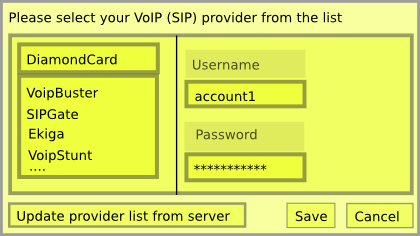
What needs to be done is to put together the details for each provider and maintain a list at ekiga.com. The client would have a copy of the list, and allow on-demand updates. The bug report, Bug 547215 – Ekiga should know all SIP/VoIP providers, allow easy account addition.
Update 11Aug08: Wiki page with PC-to-phone providers and their details.
There is a discussion going on at desktop-devel about whether the UI strings in the source code should also have non-ASCII characters. For example, should typical strings with double-quotes have those fancy Unicode double quotes?
printf(_("Could not find file “%s”\n"));
instead of
printf(_("Could not find file \"%s\"\n"));
The general view from the replies is to go ahead and add those nice Unicode characters.
Actually, there are UI messages already with non-ASCII characters (the ellipsis character, …) in GNOME 2.22:
- glade3
- epiphany
In GNOME 2.24, there are even more (with ellipsis):
- gucharmap
- epiphany
- gnome-terminal
- gedit
- glade3
Regarding the fancy Unicode double quotes, there are UI strings in GNOME 2.22 (same list for 2.24) in the following packages:
- evince
- cheese
- epiphany
- eog
- gnome-doc-utils
What are the arguments against having non-ASCII characters in UI strings?
- There might be systems that still use 8-bit legacy encodings. In this case, the UTF-8 encoded may not be displayed properly. However, when I tried to demonstrate this on my system (Ubuntu 8.04), I failed miserably. I downloaded a small GTK2 text editor (called tea), I changed a source UI string to include “” and ellipsis, compiled and installed. I then opened a shell, set LANG to POSIX (or C), and ran the text editor. The UI message was proper Unicode and I could even type non-ASCII in the text editor. I resorted to changing a system locale (I picked en_IN) to ISO-8859-1, then logged out. In the login screen it did not show the 8-bit encoding. If someone has a proper legacy 8-bit encoding system with GNOME (OpenBSD, FreeBSD, etc), could you please try it out?
- As Alan Cox mentioned in the thread, the canonical way to deal with UI strings in the source code should be to keep as ASCII, and put any fancy Unicode characters in the translation files (even for en_US, get an en_US translation file).
Is GNOME (or components) used in a legacy 7-bit/8-bit environment?
If there is any reason to keep UI strings in the source code as plain ASCII, speak now, or the Unicode flood gates are about to open.
Update 16 May 2008:There is a document at the ISO/IEC 9899 website (C programming language), that mentions the issue of character sets in C. It is http://www.open-std.org/jtc1/sc22/wg14/www/docs/C99RationaleV5.10.pdf.
On page 26, section 5.2.1, it says
The C89 Committee ultimately came to remarkable unanimity on the subject of character set requirements. There was strong sentiment that C should not be tied to ASCII, despite its heritage and despite the precedent of Ada being defined in terms of ASCII. Rather, an implementation is required to provide a unique character code for each of the printable graphics used by C, and for each of the control codes representable by an escape sequence. (No particular graphic representation for any character is prescribed; thus the common Japanese practice of using the glyph “¥” for the C character “\” is perfectly legitimate.) Translation and execution environments may have different character sets, but each must meet this requirement in its own way. The goal is to ensure that a conforming implementation can translate a C translator written in C.
For this reason, and for economy of description, source code is described as if it undergoes the same translation as text that is input by the standard library I/O routines: each line is terminated by some newline character regardless of its external representation.
With the concept of multibyte characters, “native” characters could be used in string literals and character constants, but this use was very dependent on the implementation and did not usually work in heterogenous environments. Also, this did not encompass identifiers.
It then goes on with an addition to C99:
A new feature of C99: C99 adds the concept of universal character name (UCN) (see §6.4.3) in order to allow the use of any character in a C source, not just English characters. The primary goal of the Committee was to enable the use of any “native” character in identifiers, string literals and character constants, while retaining the portability objective of C.
Both the C and C++ committees studied this situation, and the adopted solution was to introduce a new notation for UCNs. Its general forms are \unnnn and \Unnnnnnnn, to designate a given character according to its short name as described by ISO/IEC 10646. Thus, \unnnn can be used to designate a Unicode character. This way, programs that must be fully portable may use virtually any character from any script used in the world and still be portable, provided of course that if it prints the character, the execution character set has representation for it.
Of course the notation \unnnn, like trigraphs, is not very easy to use in everyday programming; so there is a mapping that links UCN and multibyte characters to enable source programs to stay readable by users while maintaining portability. Given the current state of multibyte encodings,
10 this mapping is specified to be implementation-defined; but an implementation can provide the users with utility programs that do the conversion from UCNs to “native” multibytes or vice versa, thus providing a way to exchange source files between implementations using the UCN notation.
Update 7 Aug 2008: According to PEP 8, Style Guide for Python Code, under Encodings, says
    For Python 3.0 and beyond, the following policy is prescribed for
    the standard library (see PEP 3131): All identifiers in the Python
    standard library MUST use ASCII-only identifiers, and SHOULD use
    English words wherever feasible (in many cases, abbreviations and
    technical terms are used which aren't English). In addition,
    string literals and comments must also be in ASCII. The only
    exceptions are (a) test cases testing the non-ASCII features, and
    (b) names of authors. Authors whose names are not based on the
    latin alphabet MUST provide a latin transliteration of their
    names.

    Open source projects with a global audience are encouraged to
    adopt a similar policy.
(Emphasis mine)
Timezones, clock applet and marketing dangers
March 23, 2008
It is great to receive feedback from users that try out the development versions of distributions (such as Ubuntu and Fedora). Usually, these are small bugs that can easily get fixed. However, there is this bug that looks potent to lead to political dissatisfaction and bad publicity to GNOME.
The clock applet (gnome-panel) now shows the timezones of cities that one selects. You click on the Edit button, you select the city (it comes from Locations.xml – libgweather, which has the coordinates of each city entry), and the applet makes a guess of what is your timezone (each timezone comes with longitude information).
So, if a city is far away from the capital city of your country (and closer to the capital city of a neighboring country), then the applet often proposes the wrong timezone. Considering that in some (=many) cases there is some animosity between neighboring countries, this makes users unhappy.
Launchpad bug report: Bug #185190, Clock applet chooses wrong timezone for many cities (eg Pittsburgh, Beijing)
GNOME Bugzilla bug report: Bug 519823 – Cities associated with wrong timezone
Updated (8Apr2008): The bug has been fixed upstream (thanks Dan!) and most likely makes it in GNOME 2.22.1, which means Ubuntu 8.04 and other distributions will get the update as well. Some countries with regions that have more than one timezone may want to check that the correct timezone is selected for each region.
Testing the updated IM support in GTK+
March 5, 2008
In Improving input method support in GTK+-based apps, we talked about some work to update the list of compose sequences that GTK+ knows to the latest version that comes from Xorg. From 691 compose sequences, we now support over 5000.
The patch has landed in GTK+ (trunk), and here are instructions for testing.
- If you have not used jhbuild before, read the jhbuild instructions and install it.
- Add the following to your ~/.jhbuildrc file
branches['gtk+'] = None # Makes sure you build from the trunk of GTK+
- Install gtk+ using the command (see the comment of James on this post on how to avoid Step 5 below)
jhbuild build gtk+
- About 40 minutes later, and about 700MB of space (~600MB for source, ~100MB for installation of files) consumed, you should get a working copy of GTK+ 2.12.
- You can use this compiled version of GTK+ by running
jhbuild shell
This should give you a new shell, and whatever you run from here will use our fresh GTK+. Try running “gedit”. You will notice that the theme is different; it uses the default theme due to the special GTK+. This shell has set special environment variables so that program that run will use the fresh GTK+. The rest of the libraries come from our distribution.
If you try to type compose sequences, you will notice no improvement. This is because at the moment jhbuild builds the branch 2.12 of GTK+ and not trunk. We need to download GTK+ from trunk and rebuild.cd ~/checkout/gnome2/ mv gtk+ gtk+-branch-2.12 svn co svn://svn.gnome.org/svn/gtk+/trunk gtk+ jhbuild build --no-network gtk+Perform Step 4 and get gedit running.
How to test?
- Setup a keyboard layout that supports a good variety of dead keys. My preference is GBr (United Kingdom). Here, AltGr+[];’#/ and AltGr+{}:@~? produce different dead keys. You press one of these combinations and then you press a letter. If such a combination exists, then it gets printed. For example, the old GTK+ produces öõóôòx åōőxxx. The new GTK+ produces öõóôòọ åōőǒŏȯ (12 dead keys).
- Setup Greek, Polytonic (Ancient Greek). The dead keys are [];’ {}:@ AltGr+[] (10 dead keys). Produce characters such as ᾅᾂᾷῗὕὒᾥᾢῷ.
- Try compose sequences as described from the upstream file at XOrg. For example,
ComposeKey+( 1 0 ) produces ⑩. Try the same for 0-20, a-zA-Z.
- Other miscellaneous, Ṩǟấẫǡ (using GBr layout)
The next step would be to parse the list of compose sequences and produce a documentation file.
Designing a command-line translation tool for GNOME
March 3, 2008
One messy task with GNOME translations is the whole workflow of getting the PO files, translating/updating/fixing them, and then uploading them back. One would need to use command line, and several different commands to accomplish this.
KDE and KBabel has a nice feature that allows you to easily grab all translation files, work on them, then commit through SVN. All through the GUI! It helps a bit here that the translation files for a specific language are located under a single directory.
The current workflow in GNOME translations typically consists of
- Getting the PO file from the L10n server (for example, GNOME 2.22 Greek) (also possible to use intltool-update within po/)
- Translate using KBabel, POEdit, GTranslator, vim, emacs, etc.
- svn co the package making sure you have the correct branch. One may limit to the po/ directory.
- Put the updated file in po/
- Update the ChangeLog (either with emacs, or with that Perl script)
- Commit the translation.
- (If you committed on a branch, also commit on HEAD)
Tools such as Transifex (used currently in Fedora) take away altogether the use of command line tools, and one works here through a web-based interface. Apparently, Transifex is having a command-line tool in the TODO list.
What I would like to see in GNOME translations, is a tool that one can use to
- Grab all or a section of the PO files from GNOME 2.22. Put them in a local folder.
- Use the tools of my preference (translation tools, scripts, etc) to update those translations I need to update.
- Commit those translation files that changed (using my SVN account), automatically add ChangeLog entries, also commit to HEAD if required.
I would prefer to have a command-line tool for this, for now, though it would be great if GUI tools would get the same functionality at some point. For a command line tool, the workflow would look like
The workflow would be something like
$ ssh-add
Enter passphrase for /home/simos/.ssh/id_rsa:
Identity added: /home/simos/.ssh/id_dsa (/home/simos/.ssh/id_dsa)
$ tsfx --project=gnome-2.22 --language=el --collection=gnome-desktop --user=simos --action=checkout
Reading from http://svn.gnome.org/svn/damned-lies/trunk/releases.xml.in... done.
Getting alacarte (HEAD)... done.
Getting bug-buddy (branch: xyz)... done.
...
Completed in 4:11s.
$ _
Now we translate any of the files we downloaded, and we push back upstream (of course, only those files that were changed).
$ tsfx --action=commit
Found local repository, Project: gnome-2.22, Language: el, Collection: gnome-desktop, User: simos
Reading local files...
Found 6 changed files.
Uploading alacarte (HEAD)... done.
Uploading bug-buddy (branch:xyz, HEAD)... done.
...
Completed uploading translation files to gnome-2.22, language el.
$ _
