I attended the WritersUA conference this week. This is a major event for people who work on user assistance. Unfortunately, it’s usually full of commercial types, with no representation from the free software world. Jim Campbell and I decided to go show off Mallard and let people know about all the cool things happening in open source documentation.

It was interesting to me to see the cultural differences between commercial UA efforts and the communities of volunteers that I’m used to. I can’t tell you how many times I heard the phrase “business case”. I don’t make business cases. I help users. With some very notable exceptions, most of the people there seemed to want to do their jobs and go home. They’re not interested in looking at new technologies unless it’s something they can buy.

Here’s a few highlights of the things I attended:

Developing Documentation for Open Source Environments

Joe ‘Zonker’ Brockmeier gave a presentation about documentation in open source projects. My head-nodding muscles got tired by the end of the talk. I didn’t take away any great insights, but it was nice to hear that the sorts of challenges we face in GNOME are faced by other teams as well.

Joe presents very well, and I think he did a good job of explaining things to an audience of non-open-source people. I hope some of the audience walked away with a better appreciation of the challenges we face and the innovative solutions we come up with as a result.

Joe also pulled me up to give a quick introduction to Mallard during his presentation. I think that went over pretty well. There were a lot of audience questions, so people are interested.

Accessibility Table

The WritersUA conference has topic-oriented tables for lunch. There are signs on each table giving a discussion topic, and you sit at a table for a topic that interests you. There were a few that interested me, but I decided to sit at the accessibility table.

Alone. There was nobody else there. But I decided to sit there anyway, as a sign of support and solidarity for something I think is very important. Halfway through my lunch, I was finally joined by a guy from Microsoft. That was an interesting conversation.

Mallard Showcase

Jim and I presented Mallard in the peer showcase. There were 23 tables, each showing off some technology, technique, or experience. We got very positive reactions from everybody that came to the table, and a lot of really good questions and ideas.

Unfortunately, most people didn’t come to our table. I think they weren’t interested in a technology showcase that didn’t directly affect their jobs. I understand that their employers are expecting them to come back with a list of recommendations and vendors, and we didn’t fit into that. But exploring new ideas, whether immediately relevant or not, just seems natural to me. It’s what you do when you’re passionate about something.

I also got a really nice compliment during the showcase. One of the attendees who is an expert on readable page layouts said the presentation in Yelp was really good. She liked the subtle use of colors and icons to set off parts of the page without being overbearing. She did call it “a bit unorthodox”, but she liked it. I’m OK with being unorthodox, as long as users are happy.

Turning Search into Find

Matthew Ellison gave a great presentation about how users find information, and how we can improve our search systems to better match what they want. He pointed to a study that showed that search is actually a less effective way of finding information, but that it’s what users prefer to do anyway.

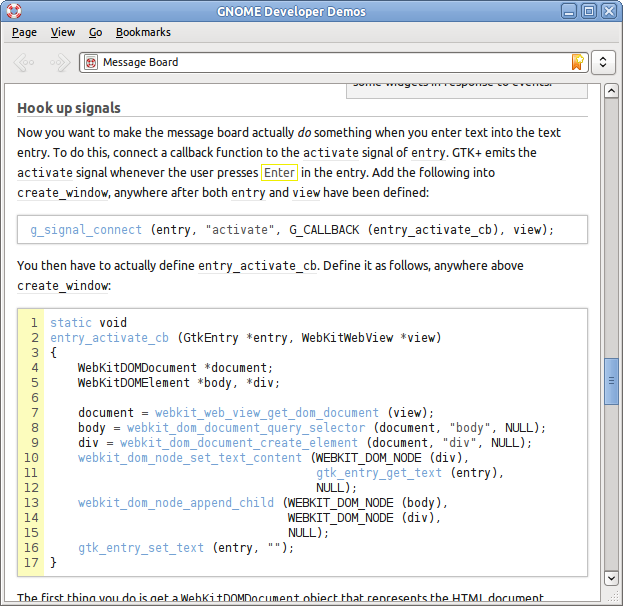
He started off talking about Google’s “suggest” feature, where it shows a list of suggestions as you type in the search field. He thought this was a great feature, and that help systems should do it. I agreed. Fortunately, I had my laptop and emacs close at hand, so I spent the remainder of the talk adding auto-completion on page titles and descriptions to Yelp. Obligatory screenshot:

He also talked about narrowing search results with “facets”. This is a fancy term for the types of selection criteria you often see on shopping sites. An online shoe store, for instance, might allow you to specify size, color, and style, and narrow your results based on that. He suggested using this in help. You could narrow your results based on audience (system administrator) or type of page (troubleshooting, task, overview). This is probably overkill for most application help, but it’s an interesting idea to pursue for larger documents. It could be useful, for example, for the next-generation HIG.

Closing Session

The closing session was a panel of four professionals who gave predictions on various topics. One of the predictions was that we’ll see more help built into applications, using unobtrusive popup help. She said they just needed the tool vendors to make it easy for them. Funny, I was working on a framework for doing exactly that in GTK+ just last month. And I’m planning on talking about it at GUADEC. We don’t wait for vendors. We write our own destiny.

Another panelist suggested that documentation will be increasingly machine translated. While it might not give excellent results, the results may be good enough to justify the savings. She also said that you have no quality control with “crowdsourcing” your translations.

We know better. While proprietary software companies have to make business cases to justify the costs of translating into six languages, we get communities of enthusiastic users translating our software into over 80 languages. And we know how to prevent it from being anarchy. I’ve said before that I believe that GNOME has the best translation teams in the world. I’d lay down money that our translations would meet or excede the quality of those from a proprietary company if sent to an independant reviewer.

In fact, difficulties with translations was a common topic at the conference. A lot of companies are still struggling with managing translations when documents get updated. This is a solved problem to me. Somebody from Transifex or any of the other awesome open source translation tools needs to go next year to show these people what they’re missing.

Next Year

As for me, I’m planning on attending next year and continuing to bridge the gap. We have a lot of really awesome tools and ideas that other people don’t know about. And they have real-world experience, often with real data, that we could learn from.

The conference organizer, Joe Welinski, offered to help me co-host an open source event at next year’s WritersUA. I’m seriously considering running the OpenSourceUA conference the weekend leading into WritersUA. Hopefully at least a few of the WritersUA attendees will be interested enough to come a day or two early. There are no firm plans yet, but I’ll keep people posted.

Yelp and PackageKit

2010-03-17

Mallard was designed from the beginning to make it easy for plugins to add pages into application help documents. This works really well in a lot of cases, but sometimes you want to mention extra functionality even when the plugin isn’t installed. And sometimes, extra functionality is provided by plugins to backend frameworks. A GStreamer plugin isn’t going to install Banshee help files, and a Telepathy plugin isn’t going to install Empathy help files.

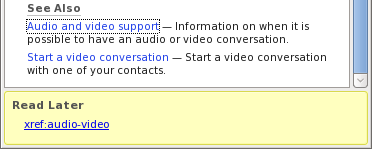
So we have pages in the Empathy help that talk about using IRC. To use IRC in Empathy, you have to have telepathy-idle installed, and it turns out that some distros don’t install it by default. If the help just blindly assumes it’s installed, it just leaves the user confused. So we addressed this by adding a note like this:

This is somewhat helpful. The user at least knows why all those IRC options aren’t showing up. If he’s savvy, he’ll open his package manager and be chatting in no time. If not, he at least has something to Google for. But why not make it easier?

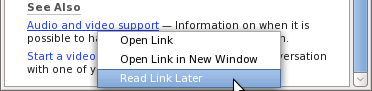
Click the link and you get this:

This is not a mockup. This is yelp-3-0. And it rocks.

I posted before about the magic search+location entry I’m working on for Yelp. The general goal is to reduce Yelp’s interface to the smallest number of elements possible. The drop-down is very terse, though, and doesn’t give you a lot of information.

One of the things I really like about Mallard guide pages is that they present topics to you with more verbose text descriptions. This allows readers to scan titles quickly, while still letting them check the description for assurance before committing to a click. I wanted to bring that to the location dropdown.

Another problem is that the search entries in the dropdown gave no indication of where they’re searching. For 3.0, we want to have searches be per-document by default, with a link to search the entire help system instead. This would give you two entries in your history that look exactly alike, but return different search results.

So I played around with using two-line entries in the drop-down. For normal page entries, this is the same title and description you would see if it were on a guide page. For search entries, you see the search terms and where it’s searching.

Obligatory screenshot:

Mallard and SVG

2010-03-08

I just wrote a short tutorial on how to embed SVG in Mallard. Because Mallard is designed well, you can easily mix other XML vocabularies into it. That means that simple SVG in Mallard wasn’t a good enough challenge. So I made it so that embedded SVG can use Mallard’s linking mechanism. With a bit more work, we could probably even dynamically generate text labels in SVG from Mallard page titles. And that could be the framework for some nice charts and diagrams.

The essence of technical writing is explaining. Whether you’re writing an introductory tutorial or a massive reference manual, your goal is always to explain something to the reader. It follows that to be a better writer, you should be a better explainer. And as with any skill, you get better with practice.

Take opportunities to explain things to people. Remember that guy at the gas station asking for directions? Take a few minutes out of your day to help him. Think about his frame of reference. Will he be able to recognize local landmarks? Does he know which way North is? Think about the different ways he could accomplish his task. The route you would take isn’t necessarily the best route to send him on.

Explaining things to people will help you understand how others might think. You get used to the things you know, and it’s sometimes hard to articulate everything to somebody else. You might leave out steps that seem obvious to you. The more you explain things, the better you will become at anticipating gaps in your explanations.

If a colleague asks you to explain your work or your decisions, do it. Don’t treat it like a challenge or a distraction. Explaining will help you better understand the subject: the best way to learn is to teach. And it will help you create things that make sense to other people.

Try taking things a step further and writing instructions for things in life. Sure, it could be about complicated technology, like programming your VCR. But you can write instructions for low-tech things too. If you like to cook, write instructions for one of your favorite meals. Then ask somebody else to cook from your instructions. Remember that terms that are familiar to you might be lost on your reader. Does your reader know the difference between simmer and sauté?

By explaining things through instructions, you practice explaining without immediate feedback. Face-to-face instruction is wonderful, but it’s not a luxury you have when writing documentation. You have to take your skills in explaining things and put them to use in an environment where you can’t see confused facial expressions or answer questions.

Make a habit of explaining better in everyday life, and you will find you’re more able to create things that other people actually understand.

Embedded Help

2010-02-03

Silke and I have an old Archos DVR.  I’ve never been extremely happy with this device, but it gets the job done.  Last night I recorded the Lost season premiere.  Instead of scheduling a recording, like I usually do, I just started a recording immediately, expecting it to keep recording until I hit Stop.  Instead, it stopped on its own after an hour and fifteen minutes.

Wanting to know why, I checked the built-in manual.  The Archos manual is a 79-page PDF file that you view on-screen.  You can view about half a page at once, and the scrolling is slow.  It doesn’t automatically advance to the next page when you scroll past the bottom; it takes three button presses to do that.  And it takes it about three seconds to render a page.

No matter how good the content is (and, to their credit, I did find the answer), this is a complete failure of a delivery mechanism.  This got me thinking in general about best practices for help embedded in set-top boxes, appliances, mobile devices, and other systems with limited interaction or screen space.

I’m sure it’s no surprise that I think the best thing in this case would be topic-oriented help.  A device like this almost certainly needs a printed setup manual, but beyond that, people are mostly going to look for specific answers.  And they’ll lose any printed material you give them, so the best place to put the help is on the device.

Devices like this present some unique challenges.  Things we take for granted in the desktop world aren’t necessarily so elsewhere.  Any UX people with experience in mobile or embedded devices could probably talk my ear off about this.  (Please do, by the way.)  So what kinds of problems are there?

  • Disk space is often limited.  My Archos has a hefty 80GB hard drive.  That’s huge by embedded standards, but tiny by desktop standards.  Help files take up space, especially once you start adding figures and screenshots.
  • Screen space is limited.  Applications usually run fullscreen, and that would include your help viewer.  The fact that you can’t view the help and the helped application side by side can really affect the way you write.
  • Another effect of limited screen space is that there often isn’t enough space to put lots of context-sensitive help buttons in the UI.
  • Interaction is cumbersome.  Mobile devices almost always use a touch interface these days, and for a lot of things that’s very powerful.  But set-top devices that use your TV usually just use a rocker on a remote.  That’s a terrible substitute for a mouse.  And text entry without a keyboard is never fun.

I don’t buy into the notion that desktop systems as we know them today will die any time soon.  But it’s clear we’re going to see more and more of these sorts of devices in our daily lives.  So I’m very interested in how we can provide better user assistance in this area.

It looks like there are a couple of related talks at the upcoming WritersUA Conference.  Unfortunately, I won’t be able to attend one of them because I’ll be presenting Mallard in the peer showcase.

The Gnome documentation team will hold a team meeting this Sunday the 10th at 18:00 UTC. We will discuss Mallard page templates, the accessibility documentation, and plans for projectmallard.org, plus anything else that people want to discuss.  Feel free to add to the agenda on the wiki.

Please plan to attend, whether you’re an experienced documentation person or not.  The documentation team is a great way to get involved with Gnome, and we have a lot of exciting things happening right now.

(Copied from the documentation team blog.)

This is a fun piece of shell I thought I’d share. For gnome-doc-tool, I need to convert file paths into URLs and back. That means urlencoding and urldecoding them. I searched around and found a few solutions, mostly using a few dozen lines of awk. Now, I’ve been known to write some crazy stuff in awk (like an RNG compact syntax parser), but this seemed like too much work for a simple problem.

Then I remembered printf(1). It can do all the work of converting characters into hex byte representations and back. All you need to write is a loop to iterate over the string.


# This is important to make sure string manipulation is handled
# byte-by-byte.
export LANG=C

urlencode() {
arg="$1"
i="0"
while [ "$i" -lt ${#arg} ]; do
c=${arg:$i:1}
if echo "$c" | grep -q '[a-zA-Z/:_\.\-]'; then
echo -n "$c"
else
echo -n "%"
printf "%X" "'$c'"
fi
i=$((i+1))
done
}

urldecode() {
arg="$1"
i="0"
while [ "$i" -lt ${#arg} ]; do
c0=${arg:$i:1}
if [ "x$c0" = "x%" ]; then
c1=${arg:$((i+1)):1}
c2=${arg:$((i+2)):1}
printf "\x$c1$c2"
i=$((i+3))
else
echo -n "$c0"
i=$((i+1))
fi
done
}

That’s it. If you use these functions on potentially garbage input, you might want to add some error checking. In particular, the decoder should probably check that there are two more characters, and that they are valid hex digits.

Marketing Hackfest

2009-11-20

Last week, eight of us converged on Chicago for a Gnome marketing hackfest. Thanks to Google and Novell for thier generous sponsorship. There are other blogs posts about the event, including posts from Brian Cameron, Paul Cutler, and two posts from Jason “The Chronicler” Clinton.

Unfortunately, I had to leave early on the second day, which seems to be when the dust settled and some real work got done. But we had some great discussions on day one. Others have recapped most of our discussions well, but one thing they haven’t talked about is our discussions about mentoring.

I’ve spent the last eight years trying to build and foster a community of documentation writers, most of whom are not professionals. So I’m particularly interested in how the marketing team can mentor new team members who, like me, don’t really know anything about marketing.

My one contribution was a lesson I’ve learned over the years: Give new contributors achievable and concrete tasks. If you tell them to pick something and do it, they usually won’t.

Stormy, Denise, and I continued this conversation at the bar on Tuesday night. One of my big questions was “What do people need to learn?” If you have no background on something, it might not just be the answers you’re lacking; you might not even know what questions to ask. Not only do I not know things about marketing. I don’t know what I don’t know about marketing.

Stormy and Denise rattled a dozen things off, most of which I’ve already forgotten. (There’s a reason I carry a notebook everywhere. I don’t know why I didn’t take it to the bar.)

So how do we pass knowledge like this along? Sure, we could braindump into a wiki. And somebody who’s skilled at content organization could turn it from a braindump into something useful. But it’s actually really hard to write down everything you know about a subject. The good nuggets of wisdom are things you don’t think to mention until the right situation arises. Real life experience matters.

I’m curious what others have found helpful in bringing new contributors up to speed. This isn’t marketing-specific. It happens in any community where many members aren’t professionally trained in what they’re doing. (And I realize I’m asking about those very good nuggets of wisdom about community mentoring that you don’t think to mention.)

Sponsored by the Gnome Foundation

Earlier this week, DMN Communications posted a blog entry about the Top Open Source technical writers on the Web. This was in response to Ivan Walsh’s Top 50 Technical Writers on the Web, which had a notable lack of any open source technical writers. Karsten Wade—someone I respect very much—followed up with Calling out superrockstars considered harmful, in which he argues that top-ten lists drag down morale.

This is particularly interesting to me, and not just because I happen to be on that list. (Or, at least, one Shaun McGance is.) It’s interesting to me because we discussed recognition programs during the recent Gnome marketing hackfest. (And, by the way, a big thanks to Google and Novell for their sponsorship.) I was generally supportive of the idea, though wary of alienating contributors who don’t get the recognition.

I think Karsten has a valid point, but I don’t want to throw away all individual recognition. I don’t think there’s much point in throwing a parade for our Owens and Federicos. Yes, they rock. We all know they rock. Putting them on a pedestal doesn’t accomplish anything. The only thing it can do is disenfranchise the people who don’t think they can ever reach that status.

But the story is different for people who haven’t yet made a name for themselves. Two of the people on the list are teammates of mine. They’re relative newcomers, compared to an old fart like me. Giving them public recognition can inspire them to stay on. I’ve seen a lot of contributors come and go. Slowing that revolving door is a win in my book.

Furthermore, I think there’s value in lifting up what we do. A list like this shows interested folks that there are open source people out there who love technical writing. People who strive to provide more than dry stereo instructions. People who are earnestly trying to help users. Then again, maybe calling out vibrant communities of writers would do the same.

Lastly, the fact is that open source rides on the shoulders of individuals. We are not interchangeable parts. In open source, we bring our own ideas and inspirations to the table, and we shape what we do. We wouldn’t be where we are if it weren’t for our rockstars. There are people on that list that I admire. Their work inspires me to be a better writer. And I have no doubt their respective projects would be worse off without them.

Maybe the list would have been less alienating if it had been more personal. List the poeple that inspire you, but don’t pass it off as anything but your personal list of heroes.

So back to the idea of recognizing Gnome contributors, is this doomed to be a well-meaning idea gone wrong? Is there any way to publicly recognize people who have done great work without alienating everybody else?

Comments on the blog please. I’m very interested in what you think.