Filtering in gnome-system-log
6. March 2009
Since viewing log files can be some kind of annoying when you are only interested in a special problem I wrote a patch to filter/highlight specific sections of a logfile with gnome-system-log. A screenshot says more than thousand words:
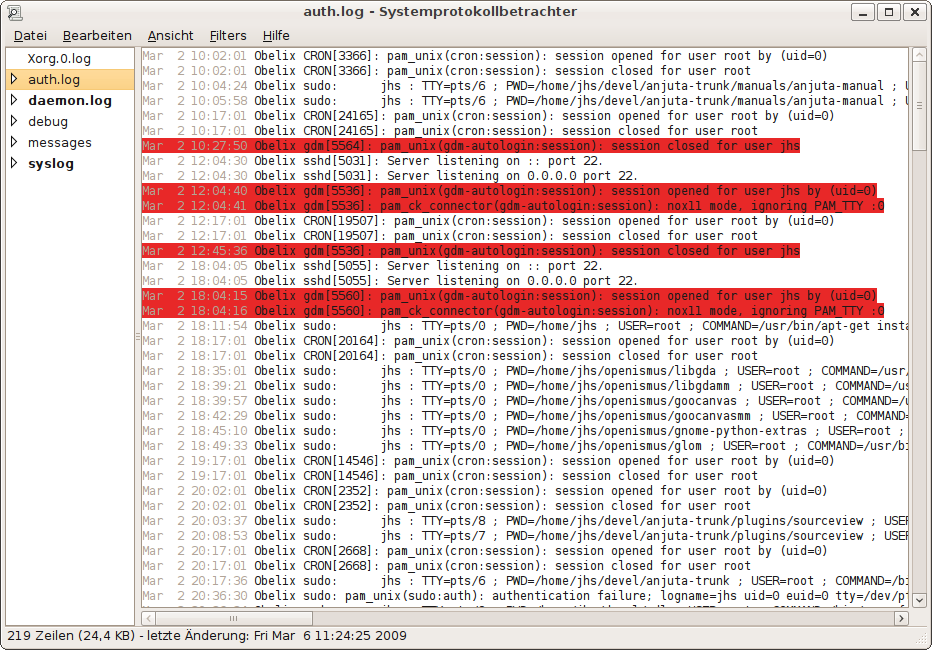
Screenshot of gnome-system-log highlighting all gdm messages
The filters are based on regular expressions and should thus be quite flexible. The work was done (and paid) by Openismus Gmbh!
7. March 2009 at 3:14
That’s OK in this case, but if the messages you want are few and far between, it seems you want to make the irrelevant messages disappear. That is, make it look like what Evolution or Thunderbird does when you search for a pattern (show only the matching messages).
7. March 2009 at 11:14
Well, there is a checkbox to hide all messages that do not match any filter. I think this is what you want. It’s not that great yet as it doesn’t hide the empty lines but I trying to get this working, too.
7. March 2009 at 9:22
Good work mate, just wondering if the patch works for the new rewritten gnome-system-log (2.26)?
7. March 2009 at 11:14
Of course the patch is against trunk.
10. March 2009 at 15:38
This looks good, the red makes it a little hard to read, making it a lot lighter will help.
10. March 2009 at 22:31
The red is just an example. You can configure background and foreground color for each filter.
13. March 2009 at 18:09
[…] Johannes Schmid: Filtering in gnome-system-log […]