
Getting yourself set up in macOS to sign keys using a Nitrokey HSM with gpg is non-trivial. Allegedly (at least some) Nitrokeys are supported by scdaemon (GnuPG’s stand-in abstraction for cryptographic tokens) but it seems that the version of scdaemon in brew doesn’t have support.
However there is gnupg-pkcs11-scd which is a replacement for scdaemon which uses PKCS #11. Unfortunately it’s a bit of a hassle to set up.
There’s a bunch of things you’ll want to install from brew: opensc, gnupg, gnupg-pkcs11-scd, pinentry-mac, openssl and engine_pkcs11.
brew install opensc gnupg gnupg-pkcs11-scd pinentry-mac \
    openssl engine-pkcs11
gnupg-pkcs11-scd won’t create keys, so if you’ve not made one already, you need to generate yourself a keypair. Which you can do with pkcs11-tool:
pkcs11-tool --module /usr/local/lib/opensc-pkcs11.so -l \
    --keypairgen --key-type rsa:2048 \
    --id 10 --label 'Danielle Madeley'
The --id can be any hexadecimal id you want. It’s up to you to avoid collisions.
Then you’ll need to generate and sign a self-signed X.509 certificate for this keypair (you’ll need both the PEM form and the DER form):
/usr/local/opt/openssl/bin/openssl << EOF
engine -t dynamic \
    -pre SO_PATH:/usr/local/lib/engines/engine_pkcs11.so \
    -pre ID:pkcs11 \
    -pre LIST_ADD:1 \
    -pre LOAD \
    -pre MODULE_PATH:/usr/local/lib/opensc-pkcs11.so
req -engine pkcs11 -new -key 0:10 -keyform engine \
    -out cert.pem -text -x509 -days 3640 -subj '/CN=Danielle Madeley/'
x509 -in cert.pem -out cert.der -outform der
EOF
The flag -key 0:10 identifies the token and key id (see above when you created the key) you’re using. If you want to refer to a different token or key id, you can change these.
And import it back into your HSM:
pkcs11-tool --module /usr/local/lib/opensc-pkcs11.so -l \
    --write-object cert.der --type cert \
    --id 10 --label 'Danielle Madeley'
You can then configure gnupg-agent to use gnupg-pkcs11-scd. Edit the file ~/.gnupg/gpg-agent.conf:
scdaemon-program /usr/local/bin/gnupg-pkcs11-scd
pinentry-program /usr/local/bin/pinentry-mac
And the file ~./gnupg/gnupg-pkcs11-scd.conf:
providers nitrokey
provider-nitrokey-library /usr/local/lib/opensc-pkcs11.so
gnupg-pkcs11-scd is pretty nifty in that it will throw up a (pin entry) dialog if your token is not available, and is capable of supporting multiple tokens and providers.
Reload gpg-agent:
gpg-agent --server gpg-connect-agent << EOF
RELOADAGENT
EOF
Check your new agent is working:
gpg --card-status
Get your key handle (grip), which is the 40-character hex string after the phrase KEY-FRIEDNLY (sic):
gpg-agent --server gpg-connect-agent << EOF
SCD LEARN
EOF
Import this key into gpg as an ‘Existing key’, giving the key grip above:
gpg --expert --full-generate-key
You can now use this key as normal, create sub-keys, etc:
gpg -K
/Users/danni/.gnupg/pubring.kbx
-------------------------------
sec> rsa2048 2017-07-07 [SCE]
 1172FC7B4B5755750C65F9A544B80C280F80807C
 Card serial no. = 4B43 53233131
uid [ultimate] Danielle Madeley <danielle@madeley.id.au>

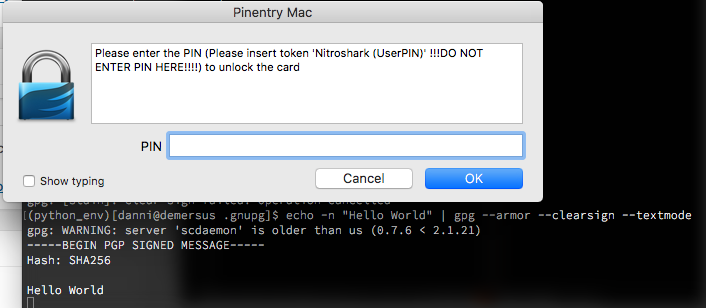
echo -n "Hello World" | gpg --armor --clearsign --textmode
Side note: the curses-based pinentry doesn’t deal with piping content into stdin, which is why you want pinentry-mac.
You can also import your certificate into gpgsm:
gpgsm --import < ca-certificate
gpgsm --learn-card
And that’s it, now you can sign your git tags with your super-secret private key, or whatever it is you do. Remember that you can’t exfiltrate the secret keys from your HSM in the clear, so if you need a backup you can create a DKEK backup (see the SmartcardHSM docs), or make sure you’ve generated that revocation certificate, or just decided disaster recovery is for dweebs.

