On deprecations

If you are paying attention to GTK’s git repository, you may have noticed a change in the last weeks.

We have a directory gtk/deprecations, which is destined to contain source files that implement deprecated APIs and will be dropped in the next major release. For the 4.0 release, we emptied it out, and it has been empty ever since. But recently, it started to accumulate files again.

This is a good opportunity to remind folks how we are using deprecations in GTK. But first, lets take a look at the details.

The details, part 1: cell renderers

In GTK 4, we introduced a new family of list and grid widgets that are based around list models: GtkListView, GtkColumnView, GtkGridView. There is also a new combo box implementation using list models, called GtkDropDown. Taken together, these are meant to provide replacements for everything you can do with cell renderers in GTK 3.

The ultimate goal was to remove cell renderers, since they are a whole separate rendering and layout system that tends to interfere with GTK’s CSS and layout machinery, and makes everything more complicated.

But we did not quite get to the finish line for 4.0, mainly because we still had significant uses of treeviews in GTK itself. First and foremost, the file chooser.  Since the filechooser is getting ported to use a GtkColumnView in 4.10, now is the right time to deprecate the cell renderer machinery and all the widgets that use them.

This is a significant amount of code, more than 75.000 lines.

The details, part 2: dialogs

In GTK 4, we dropped gtk_main() and gtk_dialog_run(), since recursive mainloops are best avoided. Again, we did not get to the finish line and could not remove GtkDialog itself, since it is used as the base class for all our complex dialogs.

GTK 4.10 introduces replacement APIs for our ‘Chooser’ dialogs. The new APIs follow the gio async pattern. Here is an example:

GtkFileDialog * gtk_file_dialog_new (void);

void            gtk_file_dialog_open (GtkFileDialog *self,
                                      GtkWindow *parent,
                                      GFile *current_file,
                                      GCancellable *cancellable,
                                      GAsyncReadyCallback callback,
                                      gpointer user_data);

GFile *        gtk_file_dialog_open_finish (GtkFileDialog *self,
                                            GAsyncResult *result,
                                            GError **error);

This may look a bit unwieldy in C, but it translates very nicely to languages that have a concept of promises and exceptions:

try {
  const file = await dialog.open(parent, ...);
  
  ...
} catch (e) {
  ...
};

To learn more about the new APIs, you can look at their online docs: GtkColorDialog, GtkFontDialog, GtkFileDialog, GtkAlertDialog.

With these replacements in place, we could deprecate the Chooser interfaces, their widget implementations, and their base class GtkDialog.

No need to panic

Deprecations in GTK are an early outlook at changes that will appear in the next major release that is breaking API compatibility.  But the eventual GTK 5 release is still far away. We have not even made a plan for it yet.

There is absolutely no need to rush towards ‘deprecation cleanup’. You only need to remove all uses of deprecations when you want to port to GTK 5 – which does not exist yet.

There are still things you can do, though. We are introducing deprecations in 4.10 as a way to give our users time to adapt, and to provide feedback on our ideas. If you want to do so, you can file an issue in gitlab, start a discussion in discourse, or find us on matrix.

In the meantime…

Deprecation warnings can be annoying, but thankfully there are easy ways to turn them off. For the occasional call to a deprecated function, it is best to just wrap it in G_GNUC_BEGIN/END_IGNORE_DEPRECATIONS:

G_GNUC_BEGIN_IGNORE_DEPRECATIONS
gtk_dialog_add_button (dialog, "Apply", GTK_RESPONSE_APPLY);
G_GNUC_END_IGNORE_DEPRECATIONS

If you are sure that you never ever want to see any deprecation warnings, you can also just pass -Wno-deprecated-declarations to gcc.
Inside the GTK font chooser

I’ve written about the handling of fonts in GTK before. This post is going to focus on how to use the more advanced font (and font chooser) features in your application.

Finding fonts

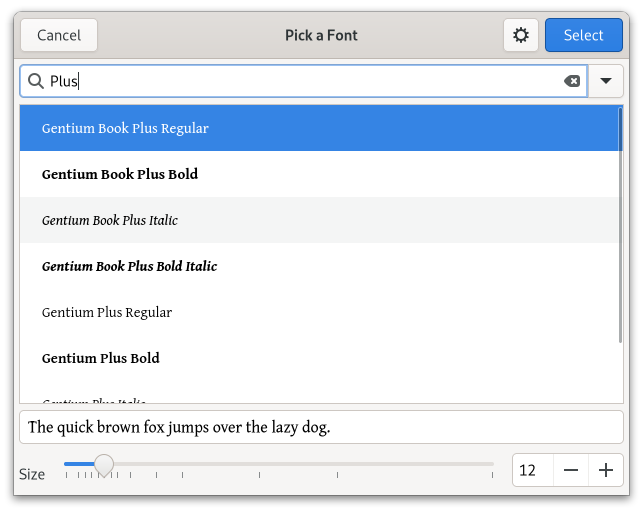
The most prominent end-user feature of the file chooser is of course that you can search for fonts by name, using the search entry:

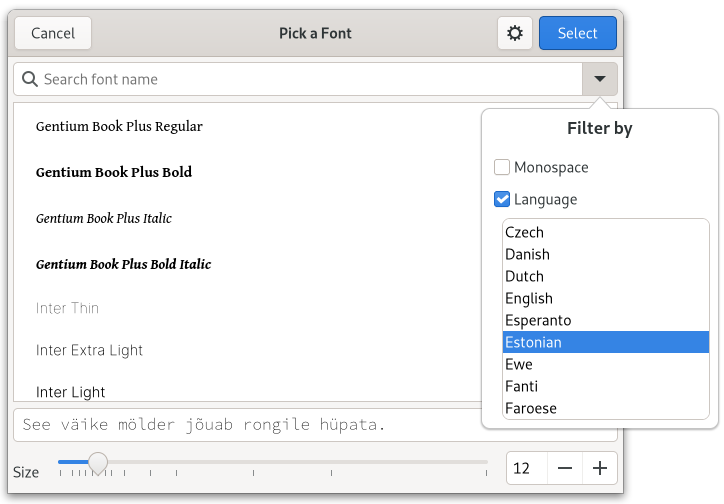
A more hidden feature is that you can filter the list by various criteria. One criterium is to show only monospace fonts, another is to only show fonts covering a certain language:

A little detail to notice here is that GTK automatically changes the preview text to match the language you are filtering by.

Less is more

The font chooser returns a PangoFontDescription which contains the full details of the selected font: family, style, size, etc. If your application only needs the family, then it is confusing to let the user select a style and size only to have them be ignored.

If this is the case for your application, you can instruct GTK about the font details you need, using gtk_font_chooser_set_level(), and the GtkFontChooserLevel flags:

typedef enum {
  GTK_FONT_CHOOSER_LEVEL_FAMILY     = 0,
  GTK_FONT_CHOOSER_LEVEL_STYLE      = 1 << 0, 
  GTK_FONT_CHOOSER_LEVEL_SIZE       = 1 << 1,
  GTK_FONT_CHOOSER_LEVEL_VARIATIONS = 1 << 2,
  GTK_FONT_CHOOSER_LEVEL_FEATURES   = 1 << 3
} GtkFontChooserLevel;

For example, after

gtk_font_chooser_set_level (chooser, 
                            GTK_FONT_CHOOSER_LEVEL_FAMILY);

the font chooser looks like this:

Much simpler!

Into the abyss

Modern fonts are complicated beasts, and there’s much that’s lurking under the surface. The GTK font chooser can make many of these font features available if you tell it to.

First, there are font variations. These let you continuously vary the characteristics of a font (as long as those characteristics are exposed as variation axes).


Typical variation axes are weight, width and slant of a font, but there can others (such as Optical Size in this example).

The selected variations are part of the PangoFontDescription that the font chooser returns, applications don’t have to do any extra work to apply them. Just use the font description as usual.

To enable the font variation support in the GTK file chooser, use GTK_FONT_CHOOSER_LEVEL_VARIATIONS flag:

level = level | GTK_FONT_CHOOSER_LEVEL_VARIATIONS;
gtk_font_chooser_set_level (chooser, level);

More features

Fonts contain not just the glyph contours, but lots of other data that can be applied in various ways when rendering those glyphs. This includes traditional data like kerning and ligatures, but also things like optional glyph shape or positioning variants or even color palettes. Many of these can be enabled by the user with the help of OpenType features.

Here is an example of an OpenType feature for glyph shape variations:


The feature that is toggled on here when going from left to right is called ss12. Thankfully, the font provides the more meaningful name “Single-story g” as well.

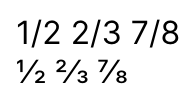
This example shows the effect of the frac feature on the display of fractions.

In the GTK font chooser, OpenType features are presented on the same page as variations. As you see, there can be quite a few of them:

Note that Pango treats OpenType features as separate from the font itself. They are not part of the font description, but have to be applied to text either with PangoAttributes or via Pango markup.

To apply the selected font features from a GTK font chooser, call gtk_font_chooser_get_font_features () and pass the returned string to pango_attr_font_features_new().

To enable the OpenType features support in the GTK file chooser, use GTK_FONT_CHOOSER_LEVEL_FEATURES flag:

level = level | GTK_FONT_CHOOSER_LEVEL_FEATURES;
gtk_font_chooser_set_level (chooser, level);

Summary

In summary, you can use the level property of GtkFontChooser to influence the granularity of font selection you offer to users of your application. If you include font features in it, don’t forget to apply the selected features, using PangoAttributes or markup.

All of this is enabled by harfbuzz providing us with a cross-platform API to fonts and all their features. It would not be possible otherwise. It is worth pointing out that this is done by accessing harfbuzz objects directly, rather than wrapping all the harfbuzz APIs in Pango.