Cambalache’s First Major Milestone!

After more than 5 years,  1780 commits and 20k lines of handcrafted, artisanal Python code I am very pleased to announce Cambalache 1.0 !!!

Cambalache is a WYSIWYG (What You See Is What You Get) tool that allows you to create and edit user interfaces for Gtk 4 and 3 applications.

Gtk provides all the necessary building blocks to create desktop and mobile application such as windows, labels, buttons, text boxes, dialogs.

These blocks are called widgets and you can use this application to arrange them, modify their properties and define event connections to your application source code.

Version 1.0 – what does it means?

Version numbers are subjective and means different things for different projects and different people.

In this case, for me, it means that the application is mature enough and supports enough common features that I feel comfortable saying it is ready for general use.

Etymology

Cambalache (pronounced /kamba’latʃe/) means second-hand shop, junk shop, the windows of such places or something messy.

It is also a very famous Tango from the 30’s by Enrique Discépolo, you can find my favorite interpretation by Julio Sosa.

While I know it is a weird and hard to pronounce name specially for English native speaker I wanted to make it clear just by reading the name that it is an application made in South America and hopefully encourage more people from the area to contribute and be part of the open source community.

Target audience

Cambalache has one simple goal, spare you from writing XML UI files by hand.

Which means the intended audience are developers familiar with Gtk and the GtkBuilder format.

If you are not, I recommend following the excellent Gtk documentation and get familiar with the concepts of widgets, properties, signals and layout/container widgets like GtkBox and GtkGrid.

It is also a good idea to write some simple GtkBuilder files by hand to learn the fundamentals of GtkBuilder before starting to use this application for your day to day work.

Architecture

Cambalache relies heavily on the model view controller design pattern.

Data Model

The data model is a SQLite relational DB which models the GObject type system and uses triggers to keep the undo/redo history stack.

All the type data is populated from GObject introspection files (Gir files) by a script called cmb-catalog-gen and stored in one catalog file per widget library and loaded at initialization time.

Workspace

The workspace view runs in a separate process called Merengue and is responsible to create and update the widgets you are editing according to your actions.

These widgets are embedded in the main UI using a Wayland compositor widget for seamless integration. This allows support not only for Gtk 4 but also version 3.

This split is critical for stability as it prevents the widgets you are creating from taking down the whole application.

Think of widgets that call abort() if a property is not set, which is correct from the type point of view but requires custom code to make sure these conditions are not reached while previewing.

Editor UI

The controller is a regular Gtk 4 application that allows the user to create multiple UI files and edit object properties and signals. It’s design is heavily influenced by Glade’s UI because well… I made it and also did not wanted to spend the little cycles I had in a new UI.


The interface is of course made with Cambalache.

Catalogs

Widget catalogs are XML files containing all the metadata needed to use widgets from different libraries in Cambalache.

This includes object types, interfaces, enumerations, flags, properties and signals.

These are created using GObject introspection data, the actual runtime objects and extra metadata with a tool called cmb-catalog-gen

Projects

Back in the day it was common practice to have one big XML file describing all windows and dialogs of an application.

This started to change with the introduction of composite widgets using XML templates which makes creating custom widgets really easy. This allows you to split UI and logic in smaller and simpler components that can be reused just like any other Gtk widget making things easier to maintain.

For this reason Cambalache workflow is built around projects where you can create or import all files needed to define your application GUI.

Supported types

    • GtkBuilder – XML UI files and templates
    • Blueprint – markup language
    • GResources – XML bundle definitions
    • CSS – Gtk stylesheets

NOTE: Please keep in mind that when importing a UI file there will be differences on the output the first time its saved because Cambalache outputs properties, signals and other elements in a particular order. Once saved the output should be stable, if not, please file an issue.

Creating a new project

To create a new project you can use Ctrl+N shortcut or activate Menu -> New Project menu button to open the “New Project” screen where you can select a filename, location and an initial UI for your project.

All files will be relative to the project file so its better to choose a toplevel directory in your project.

Once created you can start adding UI files to your project or if you already have UI files you can manually import individual files or import everything suported using Menu -> Import directory.

This will scan the selected directory for all supported files and load them in the right order.

Project Settings

The project settings dialog allows you to select which extra widget libraries (Catalogs) will be available to use in the project. So if you are makeing a GNOME application you will need Adwaita widgets.

It also lets you specify a list of directories with icons for named icons to work in the preview.

Creating Widgets

Once the project is setup you can start creating widgets in any UI file.
For convenience a UI file named as the project is created by default but you can add more UI files using the Add button in the header bar or the Add file submenu in the main menu.

Type Chooser

Object types are accessible in the chooser bar by category.

    • Toplevel: Windows, dialogs, popovers, things that do not have a parent
    • Layout: Box, Grid things used to arrage widgets in different layouts
    • Control: Button, entry, spin things used to control thing in your application
    • Display: label, view, things to display information
    • Model: Store, buffers, list models things that store data

Objects in the toplevel category are created immediately after selecting one in the dropdown menu.

Objects in other categories are created by first selecting a type and then clicking on a placeholder or using the context menu in the object hierarchy.

Holding Alt while selecting a type will force the creation of a new object in the currently selected object. This is particularly useful for adding children to types that do not have placeholder support yet.

Placeholders

A placeholder is a workspace widget that looks like a grid added to container objects to hold a place for future widgets.

After selecting a type you can create a new object where the placeholder is by clicking on it.

Another convenient way to add a child is to double click on a placeholder when no type is selected which will open a dropdown menu with a list of possible types to create.

Object Editor

Once you created an object you can set its properties, signals and Accessibility properties in the object editor panel on the right.

Gtk Templates

Templates are a convenient way of creating new UI components made out of other components from a UI XML definition.

A template is bound to a type and will create all the widgets defined in the XML file automatically every time you instantiate an object. It also provide a way to bind objects to instance fields and signals to callbacks.

Creating a new template

To create a new template all you need to do is create a new UI file, add a toplevel widget which will be the parent class of the template type and select the template flag in the property editor.

Using templates

Once a template is defined it will be available immediately to use as a new type in the project.

The type is not associated to any specific category so it will only be available in the global type search, the uncategorized drowdown or on placeholder double click.

Keep in mind that Cambalache only knows the name and parent type, so new properties and signals wont be available. But do not worry I plan to add support for defining properties and signals in Cambalache soon, in the mean time it is possible to define them using XML fragments.

GResources

Cambalache supports editing GResources XML files, while these files are pretty simple to create manually the main purpose of importing them is to let the workspace know about the different resources for the preview to work.

You can import a gresource file accessing Menu -> Import file or add a new one with Menu -> Add file -> Add GResource

A GResources file can have one or multiple prefixes containing multiple files and are added from the resource property editor.
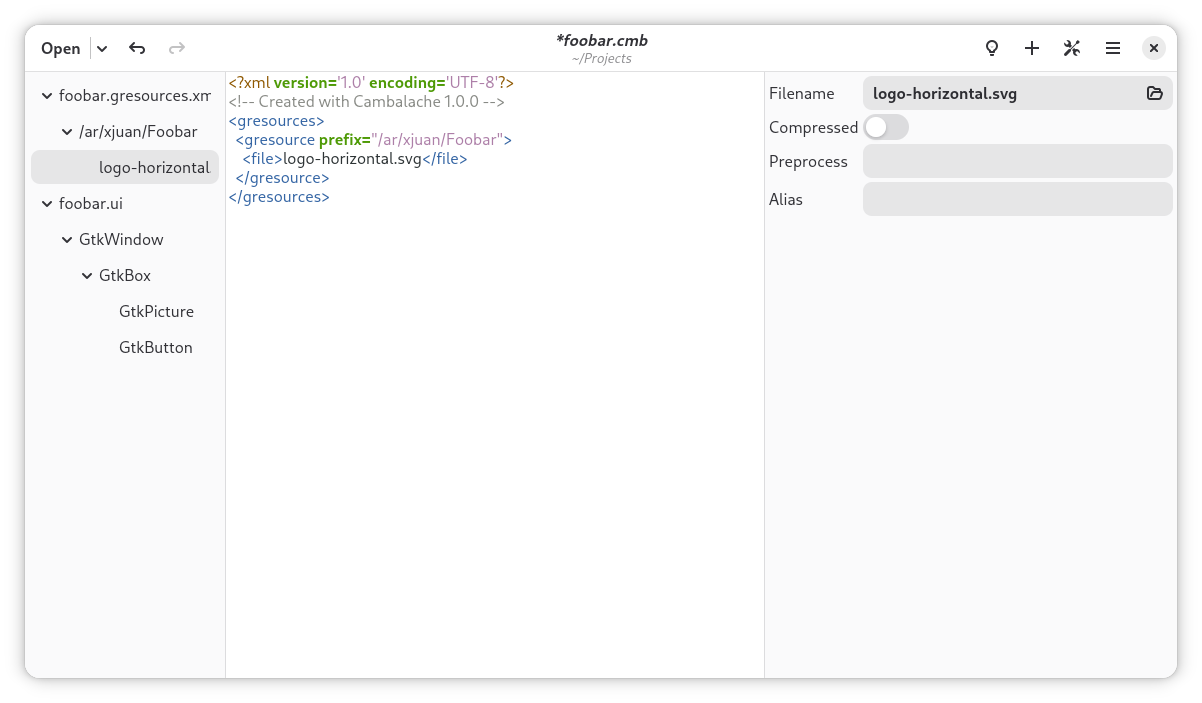
Files can be added from a prefix property editor. Once a new file is added the filename and its properties can be set in the editor.

Once you define a file in a resource prefix it will be available to the workspace for use in GFile uri properties or plain resource properties.

CSS Support

CSS support allows visualizing stylesheets while creating an application UI.

You can import or create as many CSS files as needed and define exactly how they are loaded at runtime using the property editor.

What is next?

Now that all the big parts are in place I will focus more on the UI itself, specially the workspace integration which is currently very basic.

I will also focus on cleaning up the code base and start writing some developer documentation to make contributing easier.

So if you use Cambalache for your project and find something that you would like to add or improve please do not hesitate drop a line on matrix and I will try to help as much as possible.

Special thanks

I would like to thanks everyone involved in making this happen, from contributors to users and supporters, translators,  the Gtk and wlroots community, Matthias for inviting me here and for the spectacular GtkSvg which allowed me to implement the animated logo exactly as I wanted and finally but not least to Martin for his uninterrupted moral support!

Release notes

    • Basic user manual
    • Update widget catalogs to SDK 50
    • Add GtkExpression support
    • Add Blueprint support
    • Project Settings dialog
    • 3rd party libraries selector
    • Icon theme path support
    • CSS editor UX improvements
    • New Project and donate dialogs. Matthieu Lorier
    • Improved workspace rendering
    • GResource preview in workspace
    • Scrollable workspace
    • Monitor files for external changes
    • Add support for more types like GIcon, GdkCursor etc
    • Support loading unknown types and properties
    • Deprecate project format 0.94 and older
    • Add Brazilian Portuguese translation. John Peter Sa
    • Add Romanian translation. Vlad
    • Add Simplified Chinese translation. xu-haozhe
    • Update Swedish translation. Anders Jonsson
    • Fix GResource list model update
    • Fix object data editor

Where to get it?

From Flathub

flatpak remote-add --if-not-exists flathub https://dl.flathub.org/repo/flathub.flatpakrepo

flatpak install flathub ar.xjuan.Cambalache

or directly from gitlab

git clone https://gitlab.gnome.org/jpu/cambalache.git

Matrix channel

Have any question? come chat with us at #cambalache:gnome.org

Mastodon

Follow me in Mastodon @xjuan to get news related to Cambalache development.

As usual happy coding!

Casilda 1.0 released!

Version 1.0!

I am pleased to announce the release of Casilda version 1.0, a simple Wayland compositor widget for GTK 4 which can be used to embed other processes windows in your application.

This version includes lots of rendering improvements and optimizations together with new features and a simple API.

Etymology

Following Wayland tradition, this library is named after my hometown in Santa Fe, Argentina.

Why?

When I started working on Cambalache (a new GUI designer for GTK) one of the main design goals was to create all the preview widgets in a separate process to be able to support GTK 3 and 4 projects and avoid any situation that could take down the whole application.This requires a way to embed another process windows in a GtkWindow, initially I decided to use Broadway backend and a WebView as a stopgap measure until Cambalache was mature enough to justify investing time in making a proper Wayland compositor widget.

wlroots

After a couple of years the WebView approach started to show its limitations, so it was time to give the original idea of creating a Wayland compositor widget a try.

Thankfully, the wlroots library makes it relatively easy, especially with the help of it’s community!

You can read more about the first release of the compositor widget in the following post.

New Cambalache development release 0.91.1!

In a nutshell, Casilda utilizes wlroots to handle most of the wayland protocol, including the creation of virtual input and output devices.

It creates a wayland keyboard and pointer devices which then events are feed from a few GtkEventController in the Compositor widget.

It also creates an output device the same size as the widget allocation, which means each time the compositor widget size changes, wayland clients get a output resolution change event.

Native Rendering

Originally Casilda relied on wlroots to render the whole scene, get a pixel buffer and upload it to a cairo surface to render it in GTK. This worked, but was not optimal, for a number of reasons:

    • Shared memory buffers – Clients had to render in software mode
    • Extra copy to upload wlroots buffer to GTK for rendering

Luckily @valpackett decided to step in and added support for dmabufs which allows clients to use OpenGL or Vulkan to render.

Based on this work, I decided that it would be nice to go one step further and create a GdkTexture from each client window dmabuf and use it directly in the GTK scene graph.

This cuts all the middle men and extra copies/uploads and makes client windows directly accessible to render them in GtkWidget::snapshot()Here you can see the graphics updates of the compositor and how thanks to damage regions we do not need to update the parts that did not change.

Rendering natively adds some complexity but also gives us more flexibility. For example, I was able to easily tint the parent for transient windows.This is the actual code that tints the parent window, a simple color matrix transformation that gets converted somewhere in the rendering pipeline into a simple pixel shader.

  if (has_transient)
    {
      graphene_matrix_t matrix;
      graphene_vec4_t offset;
 
      graphene_matrix_init_from_float (&matrix,
                                       (float[16]) {
                                                     0.8, 0, 0, 0,
                                                     0, 0.8, 0, 0,
                                                     0, 0, 0.8, 0,
                                                     0, 0, 0, 1
                                                   });
 
      graphene_vec4_init (&offset, 0, 0, 0, 0);
      gtk_snapshot_push_color_matrix (data->snapshot, &matrix, &offset);
    }

Scrollable interface

CasildaCompositor now implements GtkScrollable interface, by default it does not have any adjustments set, but if you pack it inside a GtkScrolledWindow it will extend the size of the virtual output depending on the size and position of every client window.Currently it only expands the virtual output when you move a window over the left or bottom edge.

API – How to use it?

Casilda uses gi-docgen to generate it’s API reference documentation and it is available online here.

To embed another process window in your GTK 4 application all you have to do is create a CasildaCompositor widget and add it in the hierarchy just like any other widget.

You can specify which UNIX socket the compositor will listen on for client connections or use casilda_compositor_get_client_socket_fd() to get an already connected socket to the compositor.

compositor = casilda_compositor_new ("/tmp/casilda-example.sock");
gtk_window_set_child (GTK_WINDOW (window), GTK_WIDGET (compositor));

Once the compositor is running you can connect to it by specifying the socket in the WAYLAND_DISPLAY environment variable.

export GDK_BACKEND=wayland
export WAYLAND_DISPLAY=/tmp/casilda-example.sock
gtk4-demo

If you do not want any client being able to connect to the compositor you can pass NULL as socket and spawn the client with casilda_compositor_spawn_async() or get an already connected socket with casilda_compositor_get_client_socket_fd() and pass it to the client with the WAYLAND_SOCKET environment variable.

compositor = casilda_compositor_new (NULL);
gtk_window_set_child (GTK_WINDOW (window), GTK_WIDGET (compositor));
gtk_window_present (GTK_WINDOW (window));
 
gchar *argv[] = { "/usr/bin/gtk4-demo", NULL };
casilda_compositor_spawn_async (
    compositor, NULL, argv, NULL,
    G_SPAWN_DEFAULT, NULL, NULL, NULL, NULL
);

Language Bindings

Casilda uses GObject introspection to enable bindings for other languages.

This is a full example in Python

#!/usr/bin/python3
 
import gi
import sys
 
gi.require_version("Gtk", "4.0")
gi.require_version("Casilda", "1.0")
from gi.repository import GLib, Gtk, Casilda
 
 
class CasildaApplication(Gtk.Application):
    def __init__(self):
        super().__init__(application_id="ar.xjuan.casilda.PyGObject.Example")
 
    def do_activate(self):
        compositor = Casilda.Compositor()
 
        window = Gtk.ApplicationWindow(
            application=self,
            title="Casilda Compositor",
            default_width=800,
            default_height=600,
            child=compositor
        )
 
        compositor.spawn_async (
            None,
            ["/usr/bin/gtk4-demo"],
            None,
            GLib.SpawnFlags.DEFAULT
        )
 
        window.present()
 
 
if __name__ == "__main__":
    app = CasildaApplication()
    sys.exit(app.run(sys.argv))

and in JavaScript

#!/usr/bin/gjs -m
 
import System from 'system';
import GLib from 'gi://GLib';
import GObject from 'gi://GObject';
import Gtk from 'gi://Gtk?version=4.0';
import Casilda from 'gi://Casilda?version=1.0';
 
 
let CasildaApplication = GObject.registerClass({},
    class CasildaApplication extends Gtk.Application {
    constructor() {
        super({
            application_id: 'ar.xjuan.casilda.Gjs.Example'
        });
    }
 
    vfunc_activate() {
        let compositor = new Casilda.Compositor();
 
        let window = new Gtk.ApplicationWindow({
            application: this,
            title: 'Casilda Compositor',
            default_width: 800,
            default_height: 600,
            child: compositor
        });
 
        window.connect('close-request', () => {
            this.quit();
        });
 
        compositor.spawn_async (
            null,
            ["/usr/bin/gtk4-demo"],
            null,
            GLib.SpawnFlags.DEFAULT,
            null
        );
 
        window.present();
    }
});
 
let app = new CasildaApplication();
app.run([System.programInvocationName].concat(ARGV));

This pretty much covers Cambalache use case and the old XEmbed protocol used by GtkSocket/GtkPlug widget classes.

All you need to do is put the widgets you want to embed in a full screen window and launch the process with spawn_async() .

The compositor will take care of the rest, including resizing the fullscreen window when the compositor size changes.

What’s next?

Besides bugfixes future releases will focus on upgrading to new wlroots releases and improving current features like keyboard layout support, touch devices, etc.

Where to get it?

Source code lives on GNOME gitlab here

git clone https://gitlab.gnome.org/jpu/casilda.git

Matrix channel

Have any question? come chat with us at #cambalache:gnome.org

Mastodon

Follow me in Mastodon @xjuan to get news related to Casilda and Cambalache development.

Happy coding!

GTK+ 3.0 Released

GTK+ 3.0 is a major new version of GTK+, containing far too many changes to list them all here.

The major highlights include:

  • Cairo drawing throughout. GDK no longer wraps the antiquated X11 drawing API; we’ve made a clean break and exclusively rely on cairo for all our drawing needs now. This has also enabled us to remove several other X11-centric concepts such as GCs, colormaps and pixmaps.
  • Modern input device handling. The input device handling in GDK has long been a sadly neglected area. This has changed; with 3.0, GTK+ steps into the modern world of XI2 with full support for multiple pointers, keyboards and other gizmos.
  • A new theming API which sports a familiar CSS syntax for theme configuration and other improvements such as animated state transitions.
  • More flexible geometry management, with support for height-for-width, for both widgets and cell renderers.
  • Multiple backend support for GDK. With GTK+ 2.x, you had to recompile your application to have it work with a different GDK backend. In GTK+ 3, multiple GDK backends can be built into a single library and selected at runtime.
  • Easy application support. With the integration of D-Bus support in GIO, we could finally add a GtkApplication class that handles a lot of the platform integration aspects of writing an application, such as keeping track of open Windows, ensuring uniqueness, exporting actions, etc.
  • Of course, there’s some new widgets as well, such as a switch and an application chooser.

GTK+ is the work of hundreds of contributors, far too many to list them all here. But I want to take the time to thank some people who contributed in a major way:

  • Carlos Garnacho (Lanedo), for his work on XI2 support and the new theme system
  • Benjamin Otte (Red Hat), for his work on GDK and cairo drawing
  • Tristan Van Berkom (Openismus), for his work on geometry management
  • Colin Walters (Red Hat), for his work on GtkApplication
  • Ryan Lortie (Codethink), for his work on dconf, GSettings and GtkApplication
  • Javier Jardón, for tireless code, build and documentation cleanup

GLib 2.22 Stable Release

GLib 2.22 is a stable release adding an incremental improvement in functionality over GLib 2.20 while maintaining binary and source compatibility.

Major new features include:

  • GArray, GPtrArray, GByteArray, GTree and GMappedFile can be reference counted.
  • GLib can be forced to reload the XDG user directory mapping.
  • The GLib mainloop supports per-thread default contexts.
  • GIO now provides types and methods for IP addresses and UNIX domain socket addresses.
  • GResolver provides asynchronous and cancellable APIs for resolving hostnames, reverse lookup of IP addresses and resolving SRV records.
  • Support for network IO has been added to GIO, including low-level socket API and high-level API for network connections and services.
  • GIOStream and its subclasses have gained support for read-write access.
  • GIO supports starting and stopping of drives, which can be used in connection with external hard disk enclosures, disk arrays, iSCSI devices, etc.
  • GIO supports user interaction during unmount and eject operations.
  • GIO can store and retrieve per-file metadata.

For more details and lists of fixed bugs, see the announcements of the 2.21.x development releases: 2.21.0, 2.21.1, 2.21.2, 2.21.3, 2.21.4, 2.21.5 and 2.21.6

GTK+ 2.17.8 unstable release

This is a development release leading up to GTK+ 2.18.

Overview of Changes from GTK+ 2.17.7

  • Client-side windows
    • – various fixes to expose handlings
    • fix memory leaks
  • Minor API additions

    • New setter as part of the GSEAL effort: gtk_widget_set_allocation

11 bugs fixed in this release!

GTK 2.17.6 unstable release

This is a development release leading up to GTK+ 2.18.

Overview of Changes from GTK+ 2.17.5

  • Client-side windows:
    • Several optimizations, such as client-side tracking of viewable windows
    • Clipping for drawing pixbufs on windows has been fixed
    • Rendering to large subwindows has been fixed
  • Changes that are relevant for translators:
    • Markup has been removed from several strings

12 bugs fixed in this release!

See the original announcement for more info and downloads.

GTK+ 2.17.5 unstable release

This is a development release leading up to GTK+ 2.18.

Overview of Changes from GTK+ 2.17.4

  • Client-side windows: Quite a few fixes have happened for the win32 and directfb backends
  • GSEAL: Accessors have been added for sealed members in GtkCellRenderer and GtkWidget
  • Changes that are relevant for distributors: The jpeg2000 pixbuf loader is now optional. Pass –with-libjasper to configure to build it

13 bugs fixed in this release!

See the original announcement for more info and downloads.

GTK+ 2.17.4 unstable release

This is a development release leading up to GTK+ 2.18.

Overview of Changes from GTK+ 2.17.3

  • GtkEntry now has model-view separation, with GtkEntryBuffer. One intended use case for this is to support ‘secure memory’ for password entries.
  • The print dialog can now optionally include the page setup controls, avoiding the need for a separate page setup dialog in many applications.
  • Coloring of visited links in GtkLabel can now be turned off, with the ::track-visited-links property.
  • Support for clipmasks in gdk_draw_pixbuf now works, this will introduce visual changes in code that uses clipmasks when drawing pixbufs. However, since this never worked that is unlikely to happen. Old code using gdk_pixbuf_render_threshold_alpha masks when rendering pixbufs will now produce truncated results at the edges.
  • A number of regressions from the client-side window merge have been fixed.

4 bugs fixed in this release!

See the original announcement for more info and downloads.