The embedded color sensor in the ThinkPad P70

Last week at GUADEC Christian gave me a huge laptop to borrow with the request to “make the color sensor work in Fedora”.

This thing is a beast: the display is 17″ and 4K resolution, two GPUs, two hard-disks and a battery. It did not fit in my laptop bag, only just squeezed in my suitcase, and weighed a metric ton. I was pretty confident I could make the color sensor work, as I previously reverse engineered the Huey and we had existing support for the embedded Huey as found in the W700 ThinkPad. Just like the W700, the sensor is located in the palm-rest, and so the laptop lid needs to be shut (and the display kept on) when showing calibration patches. I told Christian it should be a case of adding an unlock code, another PID to the udev rules and then we should be good. How wrong could I be!

Lets look on what’s shipped by default with the Laptop. In Microsoft Windows 10, the Pantone application prompts you to recalibrate your display once per week. When you manually run the calibration wizard, it asks you to choose your display temperature and also the gamma value for the curve, defaulting to D65 whitepoint and 2.2 gamma.

It then asks you to shut the lid and uses a combination of flashing the Thinkpad red-dot LED and using sound effects to show you the progress of the calibration. By opening the lid a tiny fraction we can see the pattern is as follows:

  1. Black offset
  2. Red primary
  3. Green primary
  4. Blue primary
  5. Red gamma ramp, 7 steps
  6. Green gamma ramp, 7 steps
  7. Blue gamma ramp, 7 steps

The USB traffic was intercepted for two runs, and dumped to CSV files. These were further post-processed by a python script to filter down and to help understand the protocol used.

From completely reverse engineering the protocol, we can show that the Pantone X-Rite sensor in the palm-rest of the P70 is nothing more than a brightness sensor with a display-specific primary correction matrix. You can’t actually get a RGB or XYZ color out of the sensor, the only useful thing that it can do is linearize the VCGT ramps, and with only 7 measurements for each channel I’m surprised it can do anything very useful at all.

Is it not known how the sensor and calibration tool can create an ICC profile without hardcoding the primaries in the sensor EEPROM itself, and this is probably what happens here. Whilst the sensor would be able to linearize a display where the hardware-corrected backlight suddenly becomes non-linear, it is completely unable to return a set of display primaries. Said another way, the sensor can’t tell the difference between a 100% red and 100% blue patch.

These findings also correlate with the findings from AnandTech who say that calibrating the display with the embedded sensor actually makes the LCD worse when measuring saturation accuracy, whitepoint and grayscale accuracy.

If you’re serious about color calibration, please don’t use the built-in sensor, and if you are buying a top-end Xeon system save a few dollars and don’t bother with the color sensor. For $20 extra Pantone could have used a calibrated XYZ one-piece sensor from MAZeT, which would have given them a true “color sensor” that could have sampled much quicker and with true XYZ-adapted readings.

The irony is of course, you can’t even use the HueyCOLOR sensor as a ambient light sensor. As the device is in the palm-rest, you frequently cover it with your hand — and any backlight adjustment would feed back into the sensor causing the backlight to flash.

If you actually want to make a colord sensor driver for this hardware we’d need to extend the capability bitfield to show it’s only capable of brightness, and also continue parsing the EEPROM to find the spectral sensitivities, but that’s not something that I think is useful to do.

If you want to know about the low-level protocol used and more information about the device, I’ve written some notes which document the protocol used. Disappointing.

Using a reverse-style application IDs in your application

Many upstream applications are changing their application ID from something like boxes.desktop to org.gnome.Boxes.desktop so they can be packaged as flatpaks. Where upstream doesn’t yet have this, we rewrite the desktop file in flatpak-builder so it can be packaged and deployed safely. However, more and more upstreams are building flatpaks and thus more and more apps seem to be changing desktop ID every month.

This poses a problem for the ODRS review system: When we query using the reverse-DNS-style we don’t match the hundreds of reviews submitted against the old ID. This makes the application look bad, and users file bugs against GNOME Software saying it’s broken either because “no reviews are showing up”, or that “a previously 5 star application with 30 reviews is now 2 stars with just one review”.

This also happens when companies get taken over, or when the little toy project moves from a hosting site to a proper home, e.g. com.github.FeedReader to org.gnome.FeedReader.

So, what can we do? AppData (again) to the rescue. Adding the following XML to the file allows new versions of gnome-software to do the right thing; we then get reviews and ratings for both the old and new names.

  <provides>
    <id>old-name.desktop</id>
  </provides>

If you renamed your application in the last couple of years, I’d love you to help out and add this tag to your .appdata.xml file – in all supported branches if possible. I can’t promise cookies, but your application will have more reviews and that can’t be a bad thing. Thanks!

fwupd 0.9.5 and new goodies

I’ve just released the latest version of fwupd from the development branch. 0.9.5 has the usual bug fixes, translation updates and polish, but also provides two new goodies:

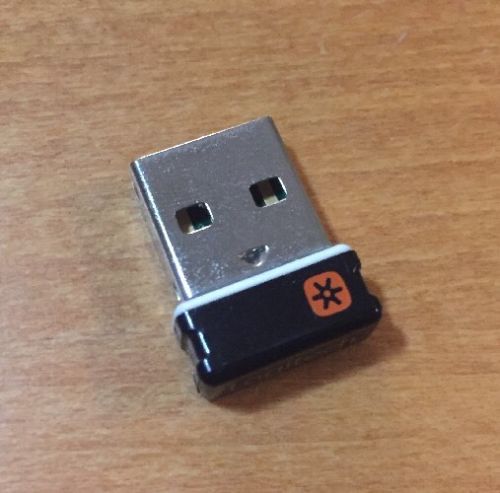
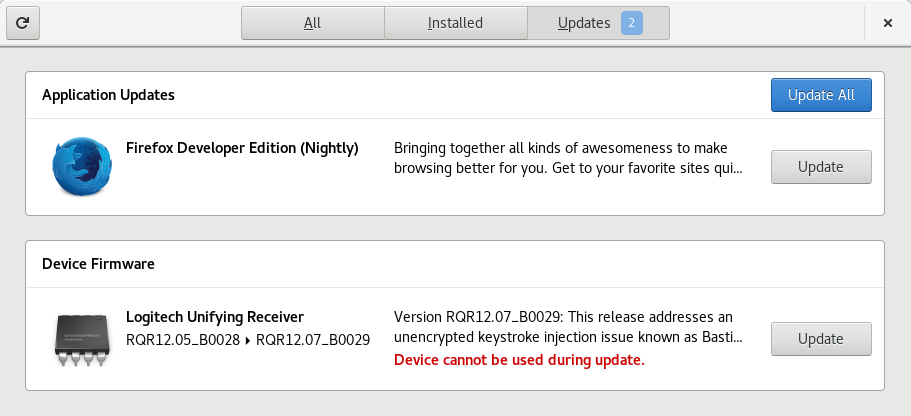
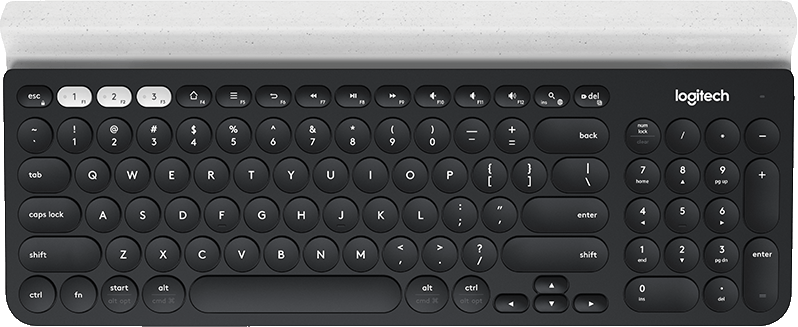
We now support for updating Logitech peripherals over a protocol helpfully called DFU, which is not to be confused with the standard USB DFU protocol. This allows us to update devices such as the K780 keyboard over the Unifying layer. Although it takes a few minutes to complete, it works reliably and allows us to finally fix the receiver end of the MouseJack vulnerability. Once the user has installed the Unifying dongle update and in some cases a peripheral update they are secure again. The K780 update is in “testing” on the LVFS if anyone wants to try this straight away. You should send huge thanks to Logitech as they have provided me access to the documentation, hardware and firmware engineers required to make this possible. All the released Logitech firmwares will move to the “stable” state once this new fwupd release has hit Fedora updates-testing.

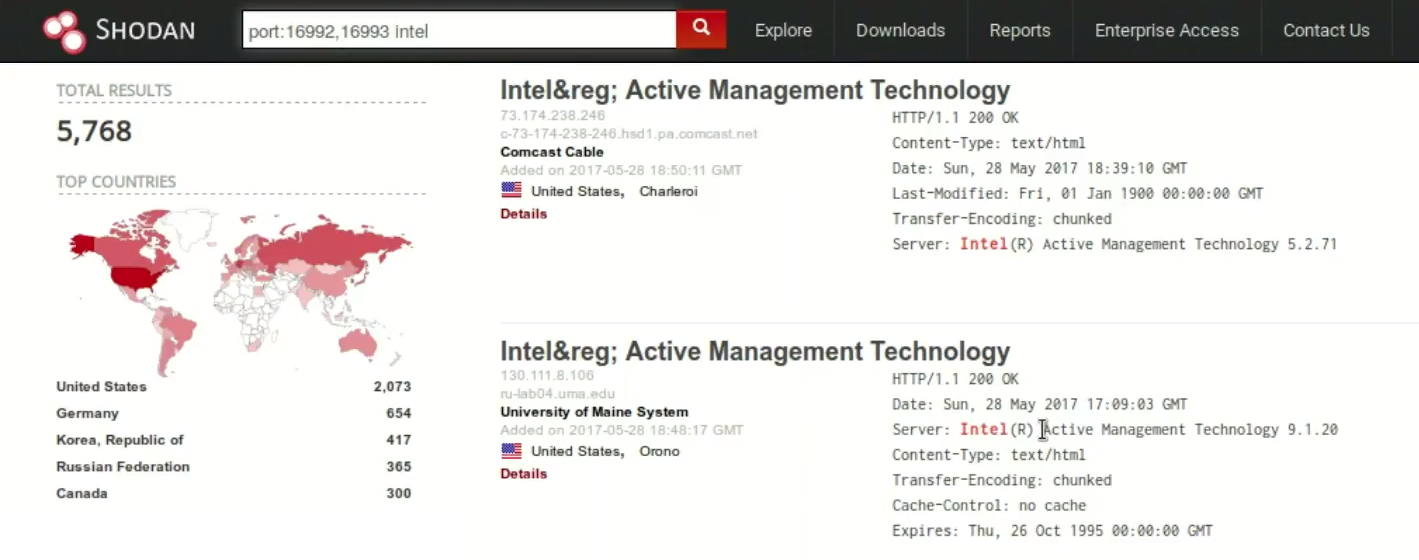
The other main feature in this release is the Intel Management Engine plugin. The IME is the source of the recent AMT vulnerability that affects the “ME blob” that is included in basically every consumer PC sold in the last decade. Although we can’t flash the ME blob using this plugin, it certainly makes it easy to query the hardware and find out if you are running a very insecure system. This plugin is more that inspired by the AMT status checker for Linux by Matthew Garrett, so you should send him cookies, not me. Actually updating the ME blob would be achieved using the standard UEFI UpdateCapsule, but it would mean your vendor does have to upload a new system firmware to the LVFS. If you’ve got a Dell you are loved, other vendors are either still testing this and don’t want to go public yet (you know who you are) or don’t care about their users. If you still don’t know what the LVFS is about, see the whitepaper and then send me an email. Anyway, obligatory technical-looking output:

$ fwupdmgr get-devices
  Guid:                 2800f812-b7b4-2d4b-aca8-46e0ff65814c
  DeviceID:             /dev/mei
  DisplayName:          Intel AMT (unprovisioned)
  Plugin:               amt
  Flags:                internal
  Version:              9.5.30
  VersionBootloader:    9.5.30

If the AMT device is present, and the display name has provisioned and the AMT version is between 6.0.x and 11.2.x, and you have not upgraded your firmware, you are vulnerable to CVE-2017-5689 and you should disable AMT in your system firmware. I’ve not yet decided if this should bubble up to the session in the form of a notification bubble, ideas welcome.

The new release is currently building for Fedora, and might be available in other distributions at some point.

Updating Logitech Hardware on Linux

Just over a year ago Bastille security announced the discovery of a suite of vulnerabilities commonly referred to as MouseJack. The vulnerabilities targeted the low level wireless protocol used by Unifying devices, typically mice and keyboards. The issues included the ability to:

  • Pair new devices with the receiver without user prompting
  • Inject keystrokes, covering various scenarios
  • Inject raw HID commands

This gave an attacker with $15 of hardware the ability to basically take over remote PCs within wireless range, which could be up to 50m away. This makes sitting in a café quite a dangerous thing to do when any affected hardware is inserted, which for the unifying dongle is quite likely as it’s explicitly designed to remain in an empty USB socket. The main manufacturer of these devices is Logitech, but the hardware is also supplied to other OEMs such as Amazon, Microsoft, Lenovo and Dell where they are re-badged or renamed. I don’t think anybody knows the real total, but by my estimations there must be tens of millions of affected-and-unpatched devices being used every day.

Shortly after this announcement, Logitech prepared an update which mitigated some of these problems, and then again a few weeks later prepared another update that worked around and fixed the various issues exploited by the malicious firmware. Officially, Linux isn’t a supported OS by Logitech, so to apply the update you had to start Windows, and download and manually deploy a firmware update. For people running Linux exclusively, like a lot of Red Hat’s customers, the only choice was to stop using the Unifying products or try and find a Windows computer that could be borrowed for doing the update. Some devices are plugged in behind racks of computers forgotten, or even hot-glued into place and unremovable.

The MouseJack team provided a firmware blob that could be deployed onto the dongle itself, and didn’t need extra hardware for programming. Given the cat was now “out of the bag” on how to flash random firmware to this proprietary hardware I asked Logitech if they would provide some official documentation so I could flash the new secure firmware onto the hardware using fwupd. After a few weeks of back-and-forth communication, Logitech released to me a pile of documentation on how to control the bootloader on the various different types of Unifying receiver, and the other peripherals that were affected by the security issues. They even sent me some of the affected hardware, and gave me access to the engineering team that was dealing with this issue.

It took a couple of weeks, but I rewrote the previously-reverse-engineered plugin in fwupd with the new documentation so that it could update the hardware exactly according to the official documentation. This now matches 100% the byte-by-byte packet log compared to the Windows update tool. Magic numbers out, #define’s in. FIXMEs out, detailed comments in. Also, using the documentation means we can report sensible and useful error messages. There were other nuances that were missed in the RE’d plugin (for example, making sure the specified firmware was valid for the hardware revision), and with the blessing of Logitech I merged the branch to master. I then persuaded Logitech to upload the firmware somewhere public, rather than having to extract the firmware out of the .exe files from the Windows update. I then opened up a pull request to add the .metainfo.xml files which allow us to build a .cab package for the Linux Vendor Firmware Service. I created a secure account for Logitech and this allowed them to upload the firmware into a special testing branch.

This is where you come in. If you would like to test this, you first need a version of fwupd that is able to talk to the hardware. For this, you need fwupd-0.9.2-2.fc26 or newer. You can get this from Koji for Fedora.

Then you need to change the DownloadURI in /etc/fwupd.conf to the testing channel. The URI is in the comment in the config file, so no need to list it here. Then reboot, or restart fwupd. Then you can either just launch GNOME Software and click Install, or you can type on the command line fwupdmgr refresh && fwupdmgr update — soon we’ll be able to update more kinds of Logitech hardware.

If this worked, or you had any problems please leave a comment on this blog or send me an email. Thanks should go to Red Hat for letting me work on this for so long, and even more thanks to Logitech to making it possible.

Recently released applications in GNOME Software

By popular request, there is now a list of recently updated applications in the gnome-software overview page.

Upstream applications have to do two things to be featured here:

  1. Have an upstream release within the last 2 months (will be reduced as the number of apps increases)
  2. Have upstream release notes in the AppData file

Quite a few applications from XFCE, GNOME and KDE have already been including <release> tags and this visibility should hopefully encourage other projects to do the same. As a small reminder, the release notes should be small, and easily understandable by end users. You can see lots of examples in the GNOME Software AppData file. Any questions, please just email me or leave comments here. Thanks!

3000 Reviews on the ODRS

The Open Desktop Ratings service is a simple Flask web service that various software centers use to retrieve and submit application reviews. Today it processed the 3000th review, and I thought I should mark this occasion here. I wanted to give a huge thanks to all the people who have submitted reviews; you have made life easier for people unfamiliar with installing software. There are reviews in over a hundred different languages and over 600 different applications have been reviewed.

Over 4000 people have clicked the “was this useful to you” buttons in the reviews, which affect how the reviews are ordered for a particular system. Without people clicking those buttons we don’t really know how useful a review is. Since we started this project, 37 reviews have been reported for abuse, of which 15 have been deleted for things like swearing and racism.

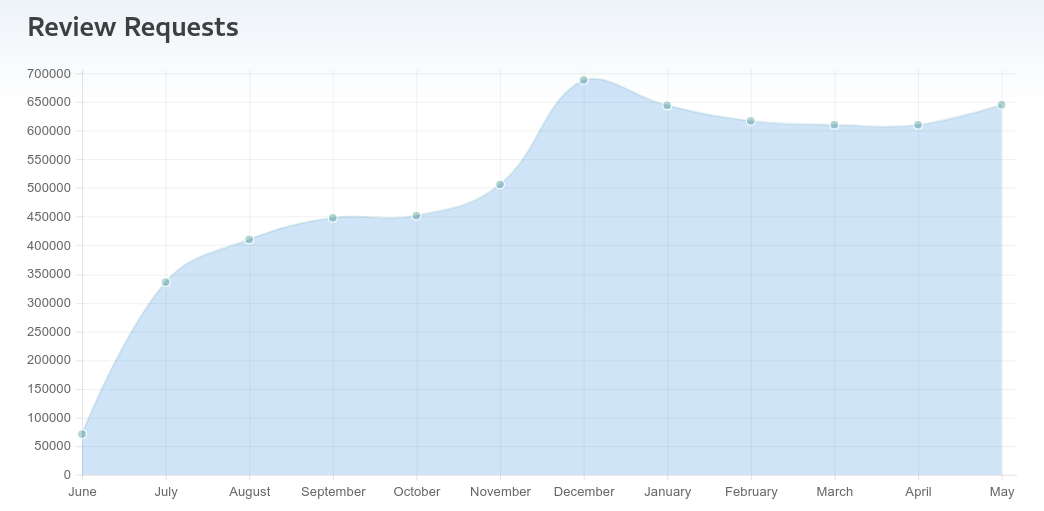
Here are some interesting graphs, first, showing the number of requests we’re handling per month. As you can see we’re handling nearly a million requests a month.

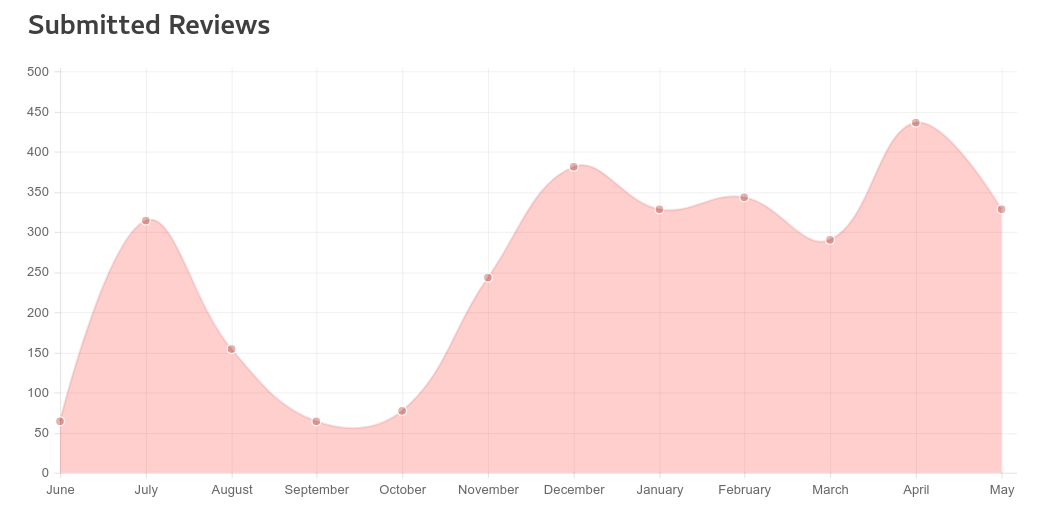
The second show the number of people contributing reviews. At about 350 per month this is a tiny fraction compared to the people requesting reviews, but this is to be expected.

The third shows where reviews come from; the notable absence is Ubuntu, but they use their own review system rather than the ODRS. Recently Debian has been increasing the fastest, I assume because at last they ship a gnome-software package new enough to support user reviews, but the reviews are still coming in fastest from Fedora users. Maybe Fedora users are the kindest in the open source community? Maybe we just shipped the gnome-software package first? :)

One notable thing missing from the ODRS is a community of people moderating reviews; at the moment it’s just me deciding which reviews are indeed abuse, and also fixing up common spelling errors in the submitted text. If this is something you would like to help with, please let me know and I can spend a bit of time adding a user type somewhere in-between benevolent dictator (me) and unauthenticated. Ideas welcome.

Reverse engineering ComputerHardwareIds.exe with winedbg

In an ideal world vendors could use the same GUID value for hardware matching in Windows and Linux firmware. When installing firmware and drivers in Windows vendors can always use some generated HardwareID GUIDs that match useful things like the BIOS vendor and the product SKU. It would make sense to use the same scheme as Microsoft. There are a few issues in an otherwise simple plan.

The first, solved with a simple kernel patch I wrote, exposes a few more SMBIOS fields into /sys/class/dmi/id that are required for the GUID calculation.

The second problem is a little more tricky. We don’t actually know how Microsoft joins the strings, what encoding is used, or more importantly the secret namespace UUID used to seed the GUID. The only thing we have got is the closed source ComputerHardwareIds.exe program in the Windows DDK. This, luckily, runs in Wine although Wine isn’t able to get the system firmware data itself. This can be worked around, and actually makes testing easier.

So, some research. All we know from the MSDN page is that Each hardware ID string is converted into a GUID by using the SHA-1 hashing algorithm which actually tells us quite a bit. Generating a GUID from a SHA-1 hash means this has to be a type 5 UUID.

The reference code for a type-5 UUID is helpfully available in the IETF RFC document so it’s quite quick to get started with research. From a few minutes of searching online, the most likely symbols the program will be using are the BCrypt* set of functions. From the RFC code, we call the checksum generation update function with first the encoded namespace (aha!) and then the encoded joined string (ahaha!). For Win32 programs, BCryptHashData is the function we want to trace.

So, to check:

wine /home/hughsie/ComputerHardwareIds.exe /mfg "To be filled by O.E.M."

…matches the reference HardwareID-14 output from Microsoft. So onto debugging, using +relay shows all the calling values and return values from each Win32 exported symbol:

WINEDEBUG=+relay winedbg --gdb ~/ComputerHardwareIds.exe
Wine-gdb> b BCryptHashData
Wine-gdb> r ~/ComputerHardwareIds.exe /mfg "To be filled by O.E.M." /family "To be filled by O.E.M."
005b:Call bcrypt.BCryptHashData(0011bab8,0033fcf4,00000010,00000000) ret=0100699d
Breakpoint 1, 0x7ffd85f8 in BCryptHashData () from /lib/wine/bcrypt.dll.so
Wine-gdb> 

Great, so this is the secret namespace. The first parameter is the context, the second is the data address, the third is the length (0x10 as a length is indeed SHA-1) and the forth is the flags — so lets print out the data so we can see what it is:

Wine-gdb> x/16xb 0x0033fcf4
0x33fcf4:	0x70	0xff	0xd8	0x12	0x4c	0x7f	0x4c	0x7d
0x33fcfc:	0x00	0x00	0x00	0x00	0x00	0x00	0x00	0x00

Using either the uuid in python, or uuid_unparse in libuuid, we can format the namespace to 70ffd812-4c7f-4c7d-0000-000000000000 — now this doesn’t look like a randomly generated UUID to me! Onto the next thing, the encoding and joining policy:

Wine-gdb> c
005f:Call bcrypt.BCryptHashData(0011bb90,00341458,0000005a,00000000) ret=010069b3
Breakpoint 1, 0x7ffd85f8 in BCryptHashData () from /lib/wine/bcrypt.dll.so
Wine-gdb> x/90xb 0x00341458
0x341458:	0x54	0x00	0x6f	0x00	0x20	0x00	0x62	0x00
0x341460:	0x65	0x00	0x20	0x00	0x66	0x00	0x69	0x00
0x341468:	0x6c	0x00	0x6c	0x00	0x65	0x00	0x64	0x00
0x341470:	0x20	0x00	0x62	0x00	0x79	0x00	0x20	0x00
0x341478:	0x4f	0x00	0x2e	0x00	0x45	0x00	0x2e	0x00
0x341480:	0x4d	0x00	0x2e	0x00	0x26	0x00	0x54	0x00
0x341488:	0x6f	0x00	0x20	0x00	0x62	0x00	0x65	0x00
0x341490:	0x20	0x00	0x66	0x00	0x69	0x00	0x6c	0x00
0x341498:	0x6c	0x00	0x65	0x00	0x64	0x00	0x20	0x00
0x3414a0:	0x62	0x00	0x79	0x00	0x20	0x00	0x4f	0x00
0x3414a8:	0x2e	0x00	0x45	0x00	0x2e	0x00	0x4d	0x00
0x3414b0:	0x2e	0x00
Wine-gdb> q

So there we go. The encoding looks like UTF-16 (as expected, much of the Windows API is this way) and the joining character seems to be &. An extra nugget of information found through bitter experience is that the string has to be stripped of leading and trailing spaces.

I’ve written some code in fwupd so that this happens:

$ fwupdmgr hwids # use /usr/libexec/fwupd/fwupdtool hwids for fwupd > 1.1.1
Computer Information
--------------------
BiosVendor: LENOVO
BiosVersion: GJET75WW (2.25 )
Manufacturer: LENOVO
Family: ThinkPad T440s
ProductName: 20ARS19C0C
ProductSku: LENOVO_MT_20AR_BU_Think_FM_ThinkPad T440s
EnclosureKind: 10
BaseboardManufacturer: LENOVO
BaseboardProduct: 20ARS19C0C

Hardware IDs
------------
{c4159f74-3d2c-526f-b6d1-fe24a2fbc881}   <- Manufacturer + Family + ProductName + ProductSku + BiosVendor + BiosVersion + BiosMajorRelease + BiosMinorRelease
{ff66cb74-5f5d-5669-875a-8a8f97be22c1}   <- Manufacturer + Family + ProductName + BiosVendor + BiosVersion + BiosMajorRelease + BiosMinorRelease
{2e4dad4e-27a0-5de0-8e92-f395fc3fa5ba}   <- Manufacturer + ProductName + BiosVendor + BiosVersion + BiosMajorRelease + BiosMinorRelease
{3faec92a-3ae3-5744-be88-495e90a7d541}   <- Manufacturer + Family + ProductName + ProductSku + BaseboardManufacturer + BaseboardProduct
{660ccba8-1b78-5a33-80e6-9fb8354ee873}   <- Manufacturer + Family + ProductName + ProductSku
{8dc9b7c5-f5d5-5850-9ab3-bd6f0549d814}   <- Manufacturer + Family + ProductName
{178cd22d-ad9f-562d-ae0a-34009822cdbe}   <- Manufacturer + ProductSku + BaseboardManufacturer + BaseboardProduct
{da1da9b6-62f5-5f22-8aaa-14db7eeda2a4}   <- Manufacturer + ProductSku
{059eb22d-6dc7-59af-abd3-94bbe017f67c}   <- Manufacturer + ProductName + BaseboardManufacturer + BaseboardProduct
{0cf8618d-9eff-537c-9f35-46861406eb9c}   <- Manufacturer + ProductName
{f4275c1f-6130-5191-845c-3426247eb6a1}   <- Manufacturer + Family + BaseboardManufacturer + BaseboardProduct
{db73af4c-4612-50f7-b8a7-787cf4871847}   <- Manufacturer + Family
{5e820764-888e-529d-a6f9-dfd12bacb160}   <- Manufacturer + EnclosureKind
{f8e1de5f-b68c-5f52-9d1a-f1ba52f1f773}   <- Manufacturer + BaseboardManufacturer + BaseboardProduct
{6de5d951-d755-576b-bd09-c5cf66b27234}   <- Manufacturer

Which basically matches the output of ComputerHardwareIds.exe on the same hardware. I’ve merged the fwupd branch to master and vendors are already using the Microsoft HardwareID GUID values.
New fwupd release, and why you should buy a Dell

This morning I released the first new release of fwupd on the 0.8.x branch. This has a number of interesting fixes, but more importantly adds the following new features:

  • Adds support for Intel Thunderbolt devices
  • Adds support for some Logitech Unifying devices
  • Adds support for Synaptics MST cascaded hubs
  • Adds support for the Altus-Metrum ChaosKey device
  • Adds Dell-specific functionality to allow other plugins turn on TBT/GPIO

Mario Limonciello from Dell has worked really hard on this release, and I can say with conviction: If you want to support a hardware company that cares about Linux — buy a Dell. They seem to be driving the importance of Linux support into their partners and suppliers. I wish other vendors would do the same.

Open Desktop Review System : One Year Review

This weekend we had the 2,000th review submitted to the ODRS review system. Every month we’re getting an additional ~300 reviews and about 500,000 requests for reviews from the system. The reviews that have been contributed are in 94 languages, and from 1387 different users.

Most reviews have come from Fedora (which installs GNOME Software as part of the default workstation) but other distros like Debian and Arch are catching up all the time. I’d still welcome KDE software center clients like Discover and Apper using the ODRS although we do have quite a lot of KDE software reviews submitted using GNOME Software.

Out of ~2000 reviews just 23 have been marked as inappropriate, of which I agreed with 7 (inappropriate is supposed to be swearing or abuse, not just being unhelpful) and those 7 were deleted. The mean time between a review being posted that is actually abuse and it being marked as such (or me noticing it in the admin panel) is just over 8 hours, which is certainly good enough. In the last few months 5523 people have clicked the “upvote” button on a review, and 1474 people clicked the “downvote” button on a review. Although that’s less voting that I hoped for, that’s certainly enough to give good quality sorting of reviews to end users in most locales. If you have a couple of hours on your hands, gnome-software --mode=moderate is a great way to upvote/downvote a lot of reviews in your locale.

So, onward to 3,000 reviews. Many thanks to those who submitted reviews already — you’re helping new users who don’t know what software they should install.