Social Networking in Ubuntu 11.10

Today I hosted an Ubuntu Open Week session on social networking in Ubuntu 11.10.  I decided to convert my notes from the session into a blog post, enjoy!

Ubuntu includes a social networking desktop service, Gwibber. Gwibber isn’t new to Ubuntu, it has been included for quite a while now. The intent isn’t just to provide a twitter or facebook client, but it is to provide a means for you to interact with your favorite social networks.

Gwibber does include a client application that aggregates the social networking sites you love to use, into one convenient place as well as allow you to post to multiple accounts simultaneously.

For 11.10, the Gwibber client received a complete face lift, in fact a complete re-write. The previous version had many great features, but ended up being quite limiting when we wanted to improve the overall user experience.

With the new Gwibber client, there aren’t really many new “features” however it is important to note not all previous features made it in. The most notable missing feature is the multi-column view, we’ll work hard to make sure it returns in Gwibber 3.4 in Ubuntu 12.04.

Now lets talk a bit about other ways you can use your favorite social networking services from Ubuntu.

Ubuntu Integration

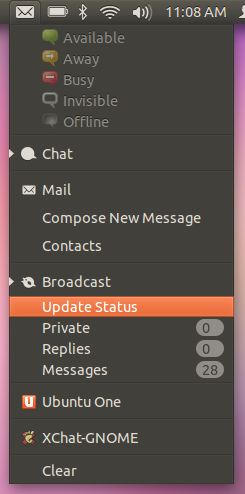
Messaging Menu

  • Displays unseen counts
  • Update Status

Continue reading

Posted in Geek, GNOME, gwibber, ubuntu, unity | Tagged , , , | Leave a comment

Unity meet XChat-GNOME

Everyone already knows there is plenty of nice bling in Unity and we love it.  Well now we can get a little more, in the form of information displayed on top of the launcher icons.

This is a very simple addition that looks nice and adds useful information where it is easily visible without having to focus the application.  This is done using the new Launcher API in libunity.

Using this simple API, I added the unseen message count to the Unity launcher in xchat-indicator.  We’ll get similar support in empathy and evolution soon.  The API currently includes support for adding a count, progress bar, and quicklists.

If you want to try it out in xchat or xchat-gnome, packages are available in Natty.  Simply install xchat-gnome-indicator for xchat-gnome or xchat-indicator for xchat and enable the message indicator plug-in in the preferences.  You will get message notifications in the messaging menu as well as the count in the Unity launcher.

Posted in canonical, Geek, GNOME, ubuntu, unity | Tagged , , , | Comments Off

Gwibber and Facebook, call for help!

For some time now I have been struggling with getting Gwibber working reliably with facebook.  Since Gwibber was included by default in Ubuntu, usage has gone way up and we quickly exceeded our API request allocation with Facebook.  Facebook allocations are per application, not per user, which means Facebook blocks API requests for everyone, not just the users which are refreshing too often, etc.

I have been desperately attempting to contact anyone from facebook to help figure out the best way to solve the problem and have been mostly ignored.  I did get one reply from their developer relations stating that they don’t “support embedding video content in our website at this time”.  Clearly they didn’t even read my email :-(

I understand their need for allocations and to throttle as needed, however the numbers really don’t add up.  They are really skewed, there is one API request that we make which is way over the allocation, but the others are barely even on the chart.

Facebook just announced “Operation Developer Love” where they state they will stop ignoring developers and triage bugs.  Please help us get to the bottom of this by voting on this bug.

Posted in canonical, General, GNOME, gwibber, ubuntu | Tagged , , , | Comments Off

I love what I do!

When people ask me what I do, I frequently answer with “The same thing I would do if I didn’t need to work for a living”.  I feel so lucky to have the opportunity to work full time on free software, and as I love to describe it, “helping to make the world a better place”.  I am just a small part in the effort to make free software common place, and I am proud to do my part.

Enough with the feel good stuff… What do I “really” do? :)

My role with Ubuntu is described as an Integration Engineer, what the heck does that mean?  Glad you asked, I work on the Ubuntu Desktop team, to help integrate the amazing work going on in the Design, Desktop Experience, and Ubuntu One teams into Ubuntu.  I help package their software, distribute updates, and advise and assist with design/architecture as it applies to how the software will be consumed by the user.  I care very much about how new features will affect existing and new users and how they will discover the new features.

As you can probably imagine, this is a lot of fun for someone like me.  I get to play around with new stuff that isn’t ready for the distro yet, helping out with testing and figuring out how it impacts our users.  Being a naturally born tinkerer, this is simply an awesome experience for me.

I also drive the Social from the start initiative in Ubuntu, trying to bring social experiences closer to the desktop, making the integration of their daily computer usage and their social life feel more natural.  I have very strong beliefs about web technologies and experiences, buy me a beer sometime and I can rant for a while.  Long story short, to provide the best possible experiences we need to remove the need to use the browser.  I don’t hate the browser, we can’t live without it.  But the best way to interact with your friends on social networks needs to be more contextual.  For example, you see a friend posted some new photos in an album.  You should be able to view that album in your local photo album viewer, as well as tag friends and comment on photos.  Why not do it in the browser you ask?

  1. Your browser probably already has a dozen tabs open doing anything from shopping for new shoes to making a reservation for dinner this weekend.  Do you really need another tab viewing photos?  What does that have to do with anything else your doing in that browser session?
  2. Perhaps your viewing photos of a friend’s kid’s first birthday party, you might want to view photos of your own child’s first birthday to reminisce.

Trying to make this possible, I spend as much time as I can contributing to Gwibber, trying to generalise as much as I can to make it a desktop service that can be easily used by any application.  Gwibber is a natural fit for this, since it aggregates multiple services, which is key to pulling this all together as a central service to handle this for the user.  Gwibber is also a great upstream project to contribute to, lead by the always awesome Ryan Paul.  He’s very open to my ideas, and easy to work with.  At the beginning of each development cycle I get to brainstorm ideas with him and figure out how I can best contribute to making the road map a reality.

For someone like me, it is pretty easy to have fuzzy lines between what I do during my day job and what I do just for fun.  In the evenings or over weekends, when I am not off hanging out with the family, I usually end up hacking on Gwibber or libgwibber for fun. :)

Posted in canonical, free software, General, gwibber, ubuntu | Tagged , , , | Comments Off

Introducing libgwibber, lets make the Desktop social!

For a while now I have wanted to make it easier for desktop applications to integrate more with social networks, enabling users to easily interact with their friends in many different contexts.  Could be posting a status update based on the context they are in right now, commenting on a friends photo while browsing their Facebook photo album in Shotwell, etc.  Let me introduce libgwibber!

A brief introduction to libgwibber, a library (C, vala, mono, and python) for using the Gwibber Service as well as provide some GTK widgets to easily embed into existing GTK applications.  Bindings for as many languages as possible was very important to me, I really want to make it as easy as possible for any desktop application to use Gwibber as a desktop service.

The API currently provides access to the common things an application developer might care about:

  • signals for service availability and account changes
  • refresh
  • start and stop gwibber-service
  • retrieving accounts
  • toggling send_enabled status on an account
  • looking up an account
  • posting a status update
  • URL shortening
  • retrieving the version of the current running gwibber-service

I just finished porting the MeMenu from the Ayatana project to use libgwibber, which will be in the next release.

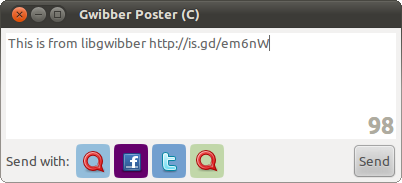
So far libgwibber-gtk includes just one widget, a posting entry.  This widget includes:

  • A TextView
    • with an overlay character counter
    • built in URL shortening
    • integrated with NetworkManager, disabled when in offline mode
  • AccountTargetBar
    • includes toggle buttons for each account, connected to signals to track the current status globally
  • Send button

Some examples of the Gwibber entry widget can already be found embedded in the Ubuntu Software Center and the Ubuntu One Music Store plugin in rhythmbox.

Other widgets I hope to add in the future include:

  • stream view (message view of any stream)
  • stream navigation
  • search
  • friend browser (browse friends based on type of content, like friends with images that can be displayed in shotwell or f-spot)
  • profile (view your own or someone else’s profile)
  • comment (comment on various types of shared content, photos, links, etc)
  • image uploader

I would love suggestions for these or others, please let me know!

Some GTK examples:

C example

entry-c.c
To build entry-c.c:

gcc `pkg-config --cflags gwibber-gtk` entry-c.c `pkg-config --libs gwibber-gtk` -o entry-c

Vala example

entry-vala.vala
To build entry-vala.vala:

valac --pkg gtk+-2.0 --pkg gwibber --pkg gwibber-gtk entry-vala.vala

Mono example

entry-mono.cs
To build entry-mono.cs

gmcs -target:exe -out:entry.exe -pkg:gwibber-gtk-sharp-0.0 entry-mono.cs

Python example

entry-python.py
Nothing to build, so just run it with:

python entry-python.py

Here are some examples of using libgwibber with python and gobject introspection:

# Import Gwibber using introspection
from gi.repository import Gwibber
# Get a service object
service = Gwibber.Service()
# Get the current Gwibber version
version = service.version()
# Make the Gwibber service refresh
service.refresh()
# Post a status update to all your enabled accounts
service.send_message("Something very interesting here, blah, blah, blah")

Some applications I would love to see use libgwibber:

Shotwell and F-Spot: Browse online photos from your social networks from right inside you existing photo library tool.  Including the ability to comment, tag, like and share.

gnome-utils: Add image upload support to gnome-screenshot

Evolution: Display the last status update from a contact when viewing an email or browsing contacts.

GTG: Status updates when tasks are complete

I am generating gtk-doc docs for libgwibber, but they aren’t very useful yet.  libgwibber is written in vala and I haven’t figured out a way to get docstrings to pass from vala to the generated C.  If anyone knows how to do that, please let me know.

Hopefully people find libgwibber useful, please let me know if you have suggestions, bug reports, or want to contribute!

Posted in Geek, General, GNOME, gwibber, ubuntu | Tagged , , | 2 Comments

XChat-Indicator

I recently released a plugin for XChat-GNOME (and XChat) which adds support for the messaging menu in Ubuntu. This was a fun little side project of mine, I use xchat-gnome very heavily and have really been craving integration with the messaging menu.

When I started working on this, I wanted to make sure it was a standalone plugin that didn’t need to be built inline with xchat sources and didn’t require changes to xchat. In the process I ran accross a couple pieces of the XChat plugin API that hadn’t been implemented in xchat-gnome yet. This meant of course I needed to patch xchat-gnome, and send those patches upstream.

Both of these were trivial changes to xchat-gnome, and I didnt expect any problem getting them accepted. I had to implement the “GUI FOCUS” command which has been merged already (bug).   And I had implement the win_ptr argument to xchat_get_info, which lets the plugin get a pointer to the GtkWindow (bug).

Overall I am very impressed with the plugin API for XChat, it is really awesome to be able to get access to the GtkWindow.

Messaging Indicator with XChat-GNOME

If you are running Lucid or Karmic, you can install it from from my xchat-gnome PPA:

sudo add-apt-repository ppa:ken-vandine/xchat-gnome
sudo apt-get update
sudo apt-get install xchat-gnome-indicator

If you use xchat instead of xchat-gnome, just change the package name in that last command:

sudo apt-get install xchat-indicator

To get the source, file bug reports or feature requests, check out the project page on launchpad.

Posted in GNOME, ubuntu | Tagged , , | Comments Off

Gran Canaria Desktop Summit 2009

I really enjoyed my week in Gran Canaria with all the desktop hackers, it was a great event. Such a great location for a conference. It is great to see such innovative stuff going on for the desktop. This year it was a joint event between GNOME and KDE, which I think was a great idea. However, I really don’t feel like I had enough opportunity to mingle with KDE folks and attend their sessions. I hope we can do more in the future to encourage that.

I think the most interesting thing for me was Telepathy. The telepathy sessions were very impressive, and I spent some great time with the awesome team at Collabora, keep up the great work! I’ll just say it… tubes just make me drool, so much potential to be tapped into. Hopefully after this week, more people are inspired to go out and create amazing stuff that uses telepathy.

Zeitgeist really interests me as well, I have been wanting an easier way for users to interact with their data. Personally I think all interaction with data should be contextual, present the data to the user based on what they most likely want. I can’t wait to see Zeitgeist become integrated in the desktop and really start to blow the socks off of our users.

GNOME Shell is certainly interesting, I am very excited to see people trying to really change they way the desktop behaves. Lets not be afraid to shake things up a bit. However, I am not sold on it yet though. I think there are many issues that still need to be worked out, can’t imagine it can be designed properly and implemented in time for 2.28. I know it won’t be default in 2.28, but I think some of the basic work flow stuff needs to be nailed down before it can be released. It really seems far from that now. It will be exciting to watch it evolve and see how it ends up.

Last but certainly not least, CouchDB. There was some cool demos showing live bookmark syncing in firefox as well as contacts shared between both GNOME and KDE applications (evolution and akonadi). Using CouchDB as a common desktop database for storing configuration and application data makes it very easy to synchronise that data between multiple computers. Just imagine having the same bookmarks, contacts, photos, music, etc all shared between all your computers automatically.

Of course there were plenty of great parties and hacking sessions. The Igalia and Collabora parties were a blast, and two nights we spent hacking on stuff in the hacking room all night. Who needs sleep?

Posted in GNOME, ubuntu | Tagged , , , | Comments Off

GNOME Dev Kit gets more help!

The GNOME Developer’s Kit is still alive, thanks to Zhang Sen. My free time has been getting tight, and I am very pleased to have been getting some great help from Zhang. In fact, he is doing the daily maintenance now. I am still wrangling isos and virtual images, and Zhang is doing the daily triage of build failures (the hard work :) .

Not only has he picked up the daily maintenance, but he has also converted the recipes to use git. He has also packaged gnome-shell, very cool stuff.

Posted in conary, Foresight, General, GNOME, GNOMEDeveloperKit | Tagged , | Comments Off

NC Jaunty Release party

The NC Loco has planned a Jaunty release party at the Flying Saucer in Raleigh next week.  If you live close enough to Raleigh, please join us.  Let celebrate, Jaunty is going to be a great release.

What: Jaunty Jackalope Release Party

Where: Flying Saucer
328 West Morgan Street@Harrington
Raleigh, NC 27601
919-821-PINT (7468)

When:
Thursday, April 23, 2009
Time: 6-9pm (or until we just can’t party anymore)

Please RSVP to akgraner [at] gmail [dot] com so we can let the Saucer know if they need rope off more space or not.

And don’t forget… bring your friends!

Posted in General, GNOME, jaunty, ubuntu | Tagged , , | Comments Off

GNOME Journal Needs You!

I am very excited to see GNOME Journal getting some traction again, come join us and make GNOME Journal great again!  Check out Paul Cutler’s post for details.

Posted in GNOME | Tagged , | Comments Off