Iocane powder

May 19, 2012

Do Not Track support in Epiphany

Filed under: Blogroll,General,webkit — xan @ 12:38 pm

Twitter’s last Privacy Policy Update helpfully informs all users that they do now support the Do Not Track (DNT) browser setting, which aims to stop the collection of information at the user’s request (a collection which Twitter is actively engaged into).

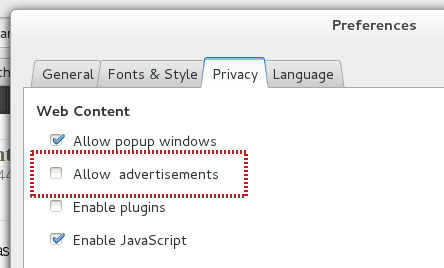
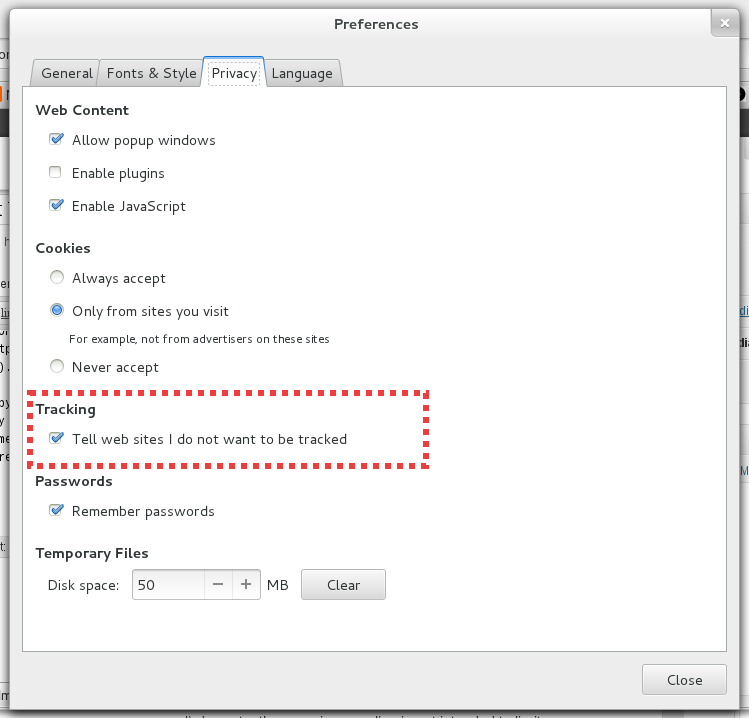
Spurred by all this I sat down and added DNT support in Epiphany, which thankfully is an extremely simple spec to implement. It’s now in master, so anyone willing to enable just needs to go to the Privacy tab in Preferences and click:

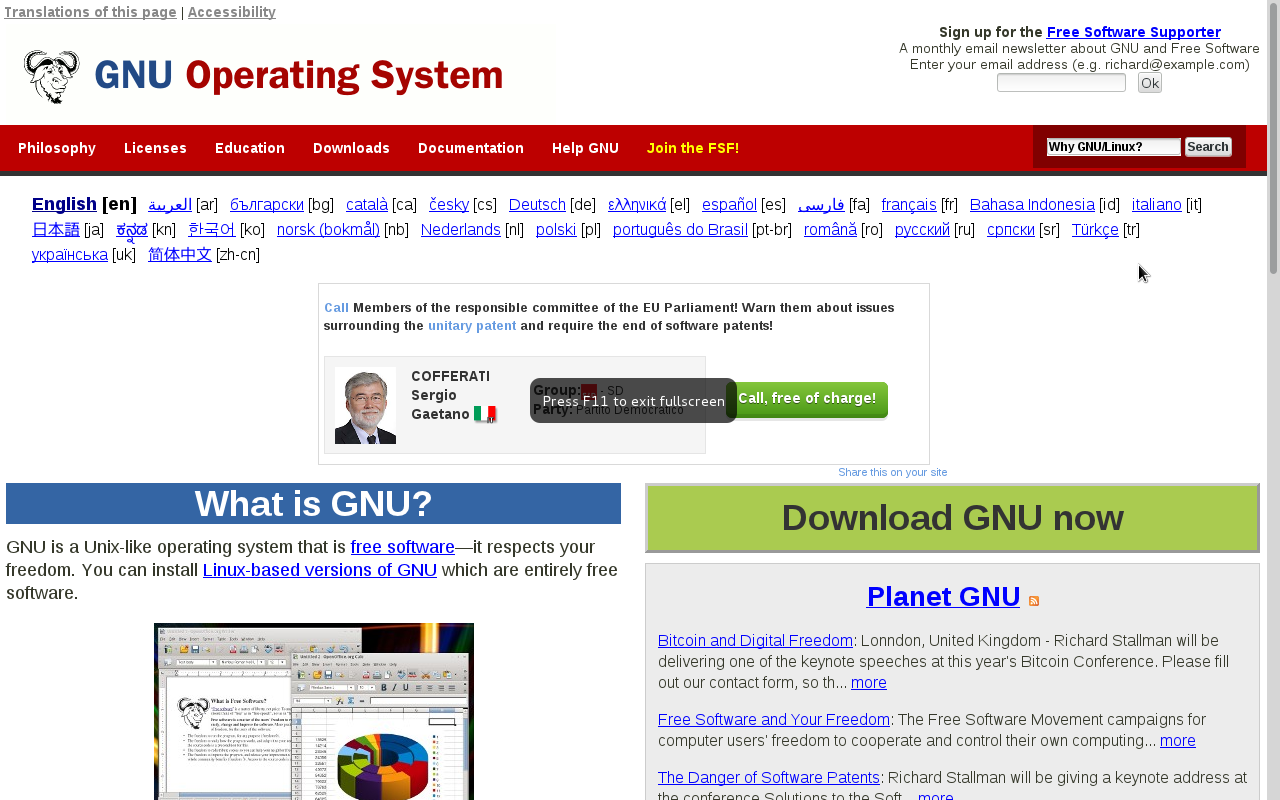
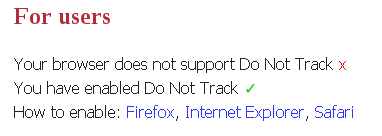
Now the pages that choose to respect this setting (unfortunately not everyone does; by a long shot), should be able to detect your request. We can see that things are working in the donottrack.us page itself.

Note that the page claims our browser does not support the feature, yet it is enabled; this is because DNT being an HTTP header extension the only way for the page to tell you whether your browser supports it in theory is by having a hardcoded list of supported browsers, which does not include Epiphany. Oh well. Either way, enjoy your newly untraceable goodness, which should make its way into the next unstable release.

May 10, 2012

Japan Freedom Hackers: Assemble!

Filed under: Blogroll,General,webkit — xan @ 4:50 pm

Turns out I’ll get to spend the next two weeks in Tokyo, starting next Sunday. It will be third time I visit this weird and fascinating place, but I’m still excited to be there again.

Some time ago, in another trip, I proposed anyone who might be reading me to meet up and talk about all things GNOME or WebKit. Turns out I met some interesting people that way (hi everyone from Caixa Mágica!), so let’s try again: if you are reading this, are in Tokyo, and would like me to talk to your friends/colleagues/whatever about GNOME or WebKit I’d be happy to do so. We can also improvise a hackfest or anything else we can come up with. In exchange I only ask of you to show me around (always better with a local) and an unwavering commitment to freedom and justice.

Drop me a line at xan AT gnome DOT org, or leave a comment in this space.

May 8, 2012

Summer of Code, Web 2012 vintage

Filed under: Blogroll,General — xan @ 5:40 pm

This year’s Summer of Code has already started, and Epiphany has been lucky enough to get two students assigned. Let’s see who they are and what they’ll be working on.

William Ting, Data Synchronization

William is a last year student of Computer Science at the University of Texas, Austin. He’ll be helping to alleviate a paradigmatic first world problem: I use Epiphany from so many computers that all my data is scattered around and I suffer a permanent pseudo-memory loss condition.

The battle plan is easy. We’ll reuse Firefox’s excellent design for a data sync protocol plus their free-to-use servers (we assume that’s what they were hoping for!), and will integrate the feature right into our browser. Since all the specs and implementation are open GNOME could host in the future a sync.gnome.org instance, but for now we leave that out of the scope of our summer project. Hopefully by 3.6 you’ll be able to optionally enable this functionality, cruise through the web from your tablet, bookmark that hilarious XKCD comic strip, and have it show up in your good old laptop just like that.

I’ll be mentoring this project myself, which was initially proposed by Igalia’s very own Joanmarie Diggs.

Yann Soubeyrand, Anti-phishing Support

Yann is a first year student at the École Nationale Supérieure d’Informatique et Mathématiques Appliquées de Grenoble. His task will be to solve a complicated problem that Epiphany has suffered for a long time: for most users the information provided in the URL entry is not enough to judge whether the page they are visiting is safe. The SSL or certification data is useless for most people, and by showing scary warnings about things they don’t understand at best you’ll train them to just click through to get to the content. To make things worse, most of the time those warnings do not actually indicate someone is trying to scam you, just that apparently setting up web servers correctly is difficult. So all in all, while useful, the information we currently show in the UI is really not that great for the 99% out there.

With this in mind, we’ll try to do the following: using the Google Safebrowsing APIs we’ll try to request authoritative information about the potential “phishiness” of the pages you visit. If we get a warning through this channel we can be confident about there being a security threat, so we’ll show a big, clear message on top of the web content. No jargon about outdated certs or VeriSign trying to take over the planet, just “Listen, our best people tell us this page is almost certainly not safe. Let’s not go there.”. We think this will significantly increase the safety of the browser without violating the user’s privacy, since Google’s API do not require you to disclose the pages you are visiting to validate them (magic? no, science).

Sergio Villar will be mentoring this project.

That’s it, let’s roll

That’s it for now. We’ll make sure to keep you updated about these and other developments in GNOME’s very own web browser. Thanks to GNOME for choosing our proposals, to Google for sponsoring Summer of Code again, and of course to Igalia for its continued support for GNOME and for allowing us to spend our time mentoring the fearless next wave. Happy hacking!

March 26, 2012

Web. It’s what’s for dinner.

Filed under: Blogroll,General,webkit — xan @ 8:35 pm

GNOME 3.4 is around the corner, and with it a new version of its little web browser that could. This is for sure one of the most action packed releases in a long time, so let’s do a recap of the last 6 months of development.

New UI


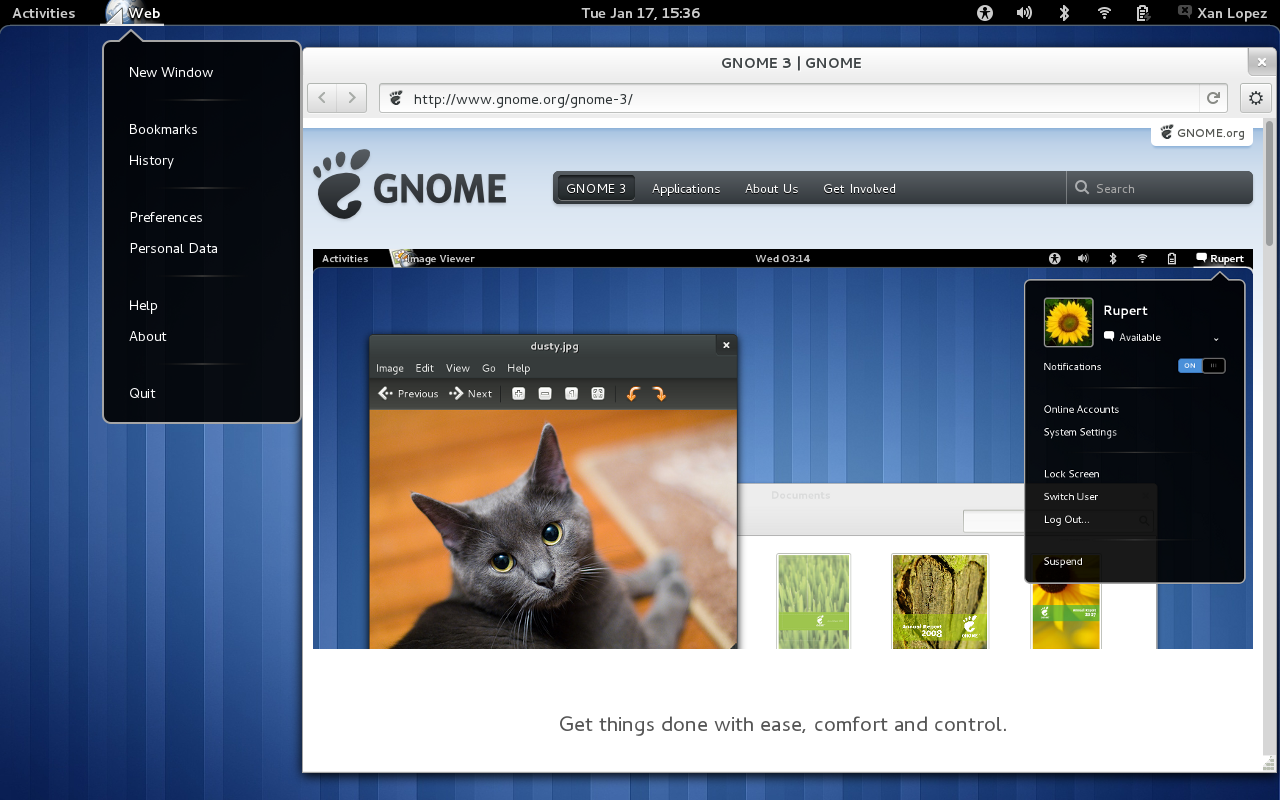
The most obvious change at first glance is the refreshed UI, which was already covered in some detail in this blog post. Thanks to the hard work of the GNOME Design Team, the GNOME platform hackers and the Epiphany team we’ve got ourselves a completely new toolbar layout with elegant widgets (I particularly like the linked-style back/forward buttons), support for the new Shell application menu, the demise of our menubar and the debut of our ‘super-menu’ holding the less frequently used page specific actions. Not only the browser works better than ever, it now looks better than ever too.

New History

We have been talking about rewriting our history backend for many years now; to give just one example, as far back as 2007 we already had a Summer of Code project to try to fix some of its shortcomings, which were many. The old backend served us well for almost a decade, but it was showing its age: a difficult to understand legacy codebase, a bus factor of 1 and poorly scalable architecture that made storing more than a couple of weeks of browsing history a titanic task. Last year a crack team at Igalia was put together to fix this once and for all. Enter the new age:

  • Drop our XML based storage in favor of good ol’ SQLite. Many options were considered other than SQLite, and we could yet again change how things are done internally in the short term, but for the first step we decided to settle on a simple, trusted and performing technology.
  • Never block the UI. All actual history accesses are done in a special service thread which communicates its results when they are ready to the user interface. This way things will remain responsive and snappy, no matter how complex your queries are or how full to the brim your history is of non-stop reddit browsing.
  • Test it! User data is the most important thing the application handles, and losing your browsing history is the modern day lobotomy. Our new backend is thoroughly tested through unit tests, so your data is in good hands with us.

Thanks to the new backend we can now provide infinite history storage and instantaneous non-blocking search both in the URL entry and the history window, both long awaited features. Other than that, for 3.4 we tried to keep the UI as it was: one thing at a time. For 3.6, though, now that the we are beautiful on the inside, expect some surprises in how you interact with your history data.

New WebKit

As with every release, on time, we ship with the all new WebKitGTK+ 1.8. As usual there are way too many thing to list and they deserves their own blog post, but you can look forward to: the debut of the WebKit2 API (still experimental but with some modules already using it, like devhelp), WebGL, Accelerated Compositing, HTML5 History API, support for the last version of WebSockets, WebAudio, a rewritten favicon database class and loads and loads of bugfixes and improvements.

Less is more

A constant thought in my mind as a module maintainer is to focus our efforts in delivering the best experience we can given our available resources. I believe as a project, both GNOME and Epiphany, we are now facing the difficult choices successful software must go through at some point: stop trying to be everything for everybody, decide what you want to do and for whom, and try to do that really well.

Our new ongoing redesign is a great step in that direction, and I’m glad that we are finally focusing on what I think really matters. I believe 3.4 is our best release ever, with both cool new features and fixes for old major deficiencies, and things will only get better from here. And, a favorite pet peeve of mine, we did all that while massively cleaning up our codebase to make it cleaner and more hackable, a task without much glamour but a big payoff. Our last release, ignoring translations, icons and help files, comes with 214 modified files, 14,959 insertions and 24,341 deletions. For those keeping the score at home, that’s almost 10,000 lines less of code to maintain, read, patch and load!

Thanks!

Thanks to all the GNOME contributors that made possible this release, but a special thanks must go to Igalia for its continued support for Epiphany. We are not only the best WebKit consultancy around, but we are also putting our money where our mouth is by supporting web technologies in GNOME through its browser and beyond.

Work on 3.6 is already underway, so expect a lot more from your favorite webkittens 6 months from now. Until then, you can follow us on IRC, our mailing list, identi.ca, twitter, facebook or our new project page (wow!). Happy hacking!

January 17, 2012

Epiphany marches on

Filed under: Blogroll,General,webkit — xan @ 3:56 pm

Previously in this space we saw how the bright future of Epiphany looked like, and vague promises about incremental steps towards it were done. A month later, Epiphany 3.3.4 is out there, so let’s see how well we’ve done.

There’s a lot of new stuff here, so let’s go step by step.

Application menu

The application menu, accessible from its usual location in the Shell, holds actions that affect the entire application as opposed to the currently focused window or tab. You’ll need a fairly recent version of the Shell and gnome-settings-daemon (3.3.4 of both should do, when they are out) to get it working, otherwise the browser will fallback to a lonely “Application” entry in a now deserted menubar.

Also, notice that we now brand ourselves as “Web” in all user visible strings.

New toolbar

The bulk of the changes are here. As you can see the Back and Forward buttons have been visually merged, a fate shared by the location entry and the reload/stop button. The entire menubar is gone, being replaced by a “super menu” triggered by the funny looking button with a gear (more on this later). Everything else that used to be in the default toolbar layout is now gone, as is the ability to edit its contents, making the concept of a default layout more dramatic. Finally, we use a new style for the toolbar, making it seamlessly merge with the window decoration. We think it looks great!

Super menu

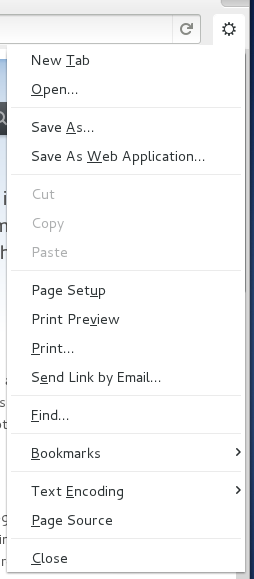
In the quest to save as much vertical space as possible in the default layout we have moved all the remaining actions of our menubar into a side “super menu”. Here will live actions related to the current page, although for the moment we have some visitors there en route to their new destination (like the Bookmarks menu, which will live in the new Overview).

The devil is in the details

A lot of other small tweaks and cleanups have happened, too many to mention. From a renewed floating statusbar (now shared with Nautilus), to spacing tweaks, to more thorough use of symbolic icons throughout the UI. Special thanks go to the Design Team, it’s a pleasure to work with them in both the small details and in the big picture re-designs.

Also, one benefit of having a renewed design focus is that it allows you to do this:

135 files changed, 14988 insertions(+), 26958 deletions(-)

Around 12,000 lines of code have been deleted since 3.3.2; the biggest chunk comes from the demise of EphyToolbarEditor and friends, but in other places we have just managed to do the same, or more, with less. This means more energy devoted to make Epiphany really good at what it should be doing, which is what every core GNOME application should aspire to do.

More to come

This is only the beginning, not the end. The Epiphany team will now continue full steam ahead to implement the new Overview, merge the new SQLite history backend, port our extension system to libpeas and many other exciting features, maybe including some surprise gift in the Web Application camp. Stay tuned to this space and, as usual, happy hacking!

December 4, 2011

A new design for Epiphany: Web

Filed under: General — xan @ 3:21 pm

As you might have heard in many other places a bunch of GNOME and WebKit hackers have met in rainy Coruña for the 3rd WebKitGTK+ hackfest. Many things have been discussed, but today I’m going to give a sneak preview of the new design for Epiphany and its rebirth as the core GNOME Web application.

The design is still very much a work in progress, but I can try to briefly talk about some of the highlights of the refreshed concept:

  • Focus on the current page content. This means, in general, that we’ll get rid of as much chrome as we can (a trend that we started some time ago already), and in particular and more visibly that we won’t have a visible tab bar by default.
  • The tab bar might be gone, but we’ll still offer a convenient, and we think improved, way of switching between pages. All the currently and recently opened pages are visible in the overview (the new start page), and we’ll provide a way of switching between them with the mouse or keyboard shortcuts. You can see an early animated mockup of this in this video of the gnome design youtube channel (link to the video):
  • We have tried to identify and make easier other tasks that have been historically solved with tabs. One of the most common ones is “I want to read this web later, I’ll save it in a tab”. Epiphany will now provide a specialized mechanism for this, called Queues. The design team is working on the details of its implementation, but we have already some interesting ideas; for instance, when you open links in a Google Search results page with middle click a new queue could be automatically created with the results page as the parent and all the links you open as items in the queue.
  • There’s many more ideas that are either refinements of already existing features, like Web Application integration, or nailing down the last details of long-term developments, like improved stability and performance thanks to the upcoming WebKit2 support. Make sure to follow the GNOME Design team or Epiphany channels to keep in touch with things as they evolve.

The mighty Igalians (namely Claudio and myself) are already busy at work implementing the new design. For now we are focusing on a series of incremental patches that will move us closer to the end goal, that way we’ll have something usable even if the design or the full implementation of the Web application are not ready in time for 3.4. You can check the current Roadmap, and as always if you want to help us just drop by #epiphany @ GimpNet or send an email to the epiphany-devel mailing list.

Until the next time, thanks to all the attendants to this year’s WebKitGTK+ hackfest, and to all the sponsors for their support. Happy hacking!


October 19, 2011

The next million apps

Filed under: Blogroll,General — xan @ 3:18 pm

A few months ago the Apple Store accumulated more than 500,000
approved applications available for download. This is a very
remarkable fact for a relatively new platform using somewhat obscure
technologies
. It is, also, a very profitable situation for Apple.

It is a bit besides the point of this post whether a platform is
popular because it has half a million applications or whether it has
half a million applications because it’s popular; the truth is likely
that popularity and a lot of applications go hand in hand in a
self-reinforcing loop. That being said, the fact remains that any
platform that aims to be relevant needs to both convince developers to
create applications for it and to provide them with the means to do
so. If you start with an eye-popping, years ahead of its competition,
money-making miracle thing like the iPhone you might end up convincing
large amounts of people to target your platform specifically, but
usually having a great platform won’t be enough to do so. Think of
WebOS.

The question for us is, then: how are we going to get from where we
stand today to a vibrant constellation of applications centered around
the GNOME platform? Is there a path from today to 500,000 GNOME
applications in the future?

Developing GNOME and for GNOME.

The way things have worked so far is that we expect people to develop
for GNOME in a similar way to what in which we develop its core
applications. This is not only natural, but also has some great
qualities like making us dogfood our own development processes. It has
also some disadvantages, like expecting (perhaps unreasonably) all
developers to appreciate the perhaps too hacker-like tools we use and
routines we follow. Maybe not everyone wants to use the shell, emacs
and git from the command line? Perhaps we can jump without problems
from C or JavaScript to Vala (the 3 languages currently used in the
core module set), although I have my doubts, but surely offering 5
different language alternatives in developer.gnome.org, with tutorials and API documentation, without really telling newcomers which one is recommended, encouraged or best supported might be too much for most people?

To the extent that our core development practices are reflected in our
third party developer story we need to keep our house in order. Being
able to use any language to target GNOME might be a strength, but the
fact that we cannot decide which language we want users to learn first
might perhaps just be the result of our internal confusion. The core
libraries are still overwhelmingly written in C, but all the new
generation applications and UI modules are being written in higher
level languages (finally?!). Which ones? Well, guess it
depends. Some use JavaScript, some use Vala, others might come in the
future, and it seems that the winner mostly depends on the tastes of
the module owners. Surely not all languages would be tacitly accepted
(sawfish was dropped, among other reasons, because it was written in a
dialect of Lisp), but I can see the situation getting worse before it
gets better.

Even if we sort out the language issue there would be further barriers
for new developers. Our platform has been massively cleaned up in
recent times, but the road to GNOME 3 has created new ambiguities: a
parallel, mostly internal, toolkit built on top of Clutter is used by
the Shell or Sushi, and if certain animations or effects are desired
in GTK+ projects the only choice seems to mix and match a bit of the
old and the new in the same application. Efforts are underway to unify
things
, but again it’s not complicated to see how someone new to
the whole thing might be confused.

I could go on mentioning communication channels, tools, etc, but I
think the point has been made: as far as we expect people to develop
native GNOME applications in a way similar to how we work we need to
spend energy in clarifying our internal procedures, documenting them
and publishing easy to follow and simplified instructions for third
party developers. Otherwise GNOME will likely be perceived as a
platform that is difficult to develop for, best suited for expert
hackers, with few quality applications and not much appeal for the
mainstream. This would have been a reasonable conclusion some years
ago, and has been a repeated call to arms in the past. While I think
it still makes sense to do this, I believe we live in a time that
offers us new strategies that we can combine with this one, perhaps
better suited to our current capabilities and resources.

The Web.

The Web is winning. This horse has been beaten to death, so I won’t
dwell on the details at this point, but web technologies are here to
stay and are only becoming more and more important each day. Those who
repeatedly announce the imminent failure of the web as an application
development platform on the basis that it, well, sucks (and it kinda
does) miss two important points: first, the web is winning not because
it’s a beautiful platform, but because of its reach. Second,
whatever its flaws, the web platform has so much momentum and energy
put into it that it’s quickly overcoming most of the defects that it
had at some point, and things will only improve. Do you want an idea
of how big this is getting? Windows 8 applications will be built
using HTML and JavaScript. You don’t get more mainstream than that.

A new array of solutions designed to build web applications (packaged,
delivered to the user, run locally) is being created as we speak. From
Tizen’s endorsed WAC, to Mozilla’s OpenWebApps, to Chrome’s
Applications
the list keeps growing in expansionary fashion, but
all the specs share the same father: a thin layer on top of HTML5, CSS
and JavaScript, bridging the gap between the W3C standard’s and the
needs of the apps. As the standards grow, those platforms will shrink,
and it is likely that in good time a reasonably standardized solution
will emerge.

Why is this relevant for GNOME? Never mind iOS, never mind Android,
one thing is clear: most of the next million apps written will be web
applications. Some huge players like Microsoft are already moving
there as fast as they can, and the rest will follow sooner or
later. Native apps won’t go anywhere for a long time, but developers
willing to maximize their reach will, increasingly, prefer web
applications over anything else. At least as their first choice. This
brings us a great opportunity. If we jump on this bandwagon, support
web applications as first class citizens on top of world-class
runtimes
, and accept and even encourage people to run their web
apps on our operating system we can maximize our reach with a
fraction of the effort of fighting in the native SDK war against Apple
and Google. I think being smart in how we spend our scarce resources
is important, and I believe this is a fight that we can win if we put
our minds to it: let’s not forget our own platform, but let’s embrace
the web as it is emerging.

Most of this was shared with those present at this year’s GNOME Boston
Summit (in Montreal), and although there was a lively debate my
impression is that most of it was well received by the core hackers
present. We at Igalia believe that this is a promising way forward for
GNOME and we happen to have the skills necessary to make it happen, so
we are committed to keep investing in the foundational platform bits
like WebKit and to bring Web Application support to our OS: our plan
for the next months is to explore all the new technologies I have
mentioned, and start to implement a well integrated runtime to run the
next generation of web goodness at home.

September 7, 2011

Joanmarie Diggs joins Igalia

Filed under: Blogroll,General — xan @ 6:52 pm

As announced by the fearless accessibility leader himself Joanmarie Diggs will be joining Igalia. I just want to direct your attention to one tiny detail. From this:

To this:

in less than 4 hours. We are just that cool. Welcome Joanie!

August 31, 2011

Web application mode in GNOME 3.2

Filed under: Blogroll,General — xan @ 8:15 pm

If you attended either of my talks at the Desktop Summit or COSCUP (or both! Although I think only the British Citizen Bastien Nocera might have done so, assuming he was sober enough to go to the former) you might remember my somewhat failed attempts at demoing the new web application mode in Epiphany. Although there are still some improvements to do I’ve landed the bulk of the code for the upcoming 3.1.90 release, so I figured it would be useful to give a brief overview of how this thing works for the global audience of the intertubes.

The main idea here, to give a bit of context, is that some of us use a certain number of web pages as if they were applications: we open them the minute we open the browser, keep them open all the time, check on them periodically, etc. Once you figure this out, the next logical step (sort of “independently discovered” by pretty much anyone doing browsers) is: well, if you use them as applications shouldn’t you try to make them a bit more like actual applications? Right. So let’s see how we have done this in GNOME.

Let’s say you are using a certain micro-blogging service with a blue logo and a tendency to break down from time to time. At some point you figure you use this thing so much that you might as well create an app for it. Press Ctrl-Shift-A, or access the File menu and select “Save as Web Application…”:

Save as Web Application ...

Now a small dialog pops up. It will present you the icon to be used for the new application and a tentative title, which you can edit. If the page is providing a specific high-resolution icon (usually meant for touch devices like the iPhone) we’ll use that, otherwise we fall back to a screenshot that will hopefully be recognizable enough. There’s lots of smalll improvements to do here, from overlaying the normal favicon on top of the screenshot to allowing the user to select the region to snapshot (or even scrapping the page trying to see if we can find the logo somewhere), but those can come later.

Create web application

We click “Create”, and the system informs us that the application is ready to be used.

Launch the web application

If you click “Launch”, or access the newly created application from the Shell, you’ll get a new browser instance in the so called “application mode”.

Very briefly:

  • There’s absolutely no UI chrome other than the title bar.
  • The application is sandboxed to a given domain. If you try to go somewhere else, say by clicking a link, the petition will be forwarded to a normal browser instance.
  • The existing cookies for the application domain are inherited from the main browser profile (so that you don’t have to login again), but other than that this is a completely fresh profile.
  • Finally, this is running in a different process. If you crash your main browser your Twitter app will still be there.

And that’s pretty much it! I have been using this intensively for a while now, and I must say it feels totally natural and, for me at least, it provides a much more convenient way of using the web applications that I’ve come to rely on. I’m eager to get feedback from the early adopters using 3.1.90, and with a bit of luck even patches fixing the low hanging fruit!

Until the next time, happy hacking!

Edit: a bunch of people are asking whether the apps show up in the overview, in the dash, whether they can be pinned, etc. The answer to all of that is: yes. The web apps created through Epiphany behave just like normal apps. You can launch them from the shell, they show up in the dash and you can pin them there as favorites if you want.

June 18, 2011

It’s all in the small things

Filed under: Blogroll,General — xan @ 9:25 pm

A long time ago, in a book whose title I have forgotten, I read something that went like:

Alice: Oh, there’s problems in our relationship, but it’s nothing. Just small things that annoy me.

Bob: Then there’s nothing to be done. Small things are all that matters in the end.

It is, of course, an exaggeration, but one of those that can perhaps hide a deep truth. Maybe because in many cases small things are indicative of bigger problems, or maybe because we very easily take for granted the parts that work and end up obsessing with small details to the point where they ruin the whole experience for us (see: Death by a thousand cuts).

In any case, in the last weeks we Igalians have implemented a few nice improvements in Epiphany, all of which are available in GNOME 3.1.2. Only small things, but they matter.

Spell checking

Spell checking! I know I hate writing long chunks of texts without it, and I’m probably not the only one. We enable the feature by default, and will perform spell check using the languages selected in Preferences→Languages or, if there’s none, the default system language according to GTK+.

But of course knowing that you have made a mistake is only half of the battle. If you right click on the misspelled word you’ll get 4 suggestions from WebKit to use as corrections. Click on any of them and it will replace your blunder.

Warning on leaving pages with unsubmitted forms

A feature that old-time Epiphany users will remember fondly. Has it ever happened to you writing a huge comment on reddit, or perhaps a fantastic resignation letter to your boss, only to accidentally close the tab losing all of it for good? Yeah, me too. We will now detect this unfortunate situation, and warn you one last time before tragedy ensues.

Hide that menubar

An ability I enjoy from our terminal is the possibility of hiding its menubar. It’s nice to regain those pixels if you are rarely using them. Since imitation is the most sincere form of flattery we went ahead and copied the feature almost verbatim. Right click on any chrome area in the browser and you’ll see the option to show or hide the menubar:

When unselected the menubar will just go away, although you can always bring it back by performing the same action again. The result? Well, there’s not a lot more to hide now!

Symbolic icons in the URL entry

Jon McCann (repeatedly) asked for Epiphany to drop its yellow tint in the URL entry for secure sites, and Cosimo Cecchi suggested in a bug that we should also use the new symbolic icons for the security lock. Both great ideas, which combined give us a more modern look.

about:plugins

about: support finally landed, and with it about:plugins. There’s a few more things we should add here, like the full path of the plugin and a checkbox to disable it, but at least now it should be easier for users to figure out whether the browser knows about a particular plugin or not.

Also rumor has it another well-loved about: page made it into the release, but you’ll have to figure out that one for yourselves.

Older Posts »

Powered by WordPress