Entries Tagged 'General' ↓
January 28th, 2013 — General
Some years ago, I wrote (and blogged about) a window switching utility, an Alt-Tab replacement called SuperSwitcher.
Given the trend in Linux UIs like GNOME3 and Unity, I went all in and wrote my own window manager instead, in the Go programming language. Taowm is The Acutely Opinionated Window Manager. It is a minimalist, keyboard driven, low distraction, tiling window manager for someone who uses a computer primarily to run just two GUI programs: a web browser and a terminal emulator.
SuperSwitcher no longer scratches an itch I have, and I haven’t made any substantive code changes in years. The truth is that SuperSwitcher is probably a dead project. In 2010, I said that I’d make a 1.0 release for Ubuntu 10.04 LTS, and I never got around to doing that, but nobody really complained to me about it either.
This blog also isn’t showing much signs of life. If you care, follow me on Google+ instead.
January 25th, 2011 — General
For those of you at linux.conf.au, Andrew Gerrand and his trusty sidekick (me) will be presenting a tour of the Go programming language on Thursday afternoon.
For those of you who aren’t at linux.conf.au, you can still get a taste of the language straight from the homepage at golang.org. Try the Concurrent Prime Sieve example for concurrent programming in the style of Hoare’s CSP, rather than with threads and locks.
May 13th, 2010 — General
In particular, if you’re going to the Google I/O conference next week and want to say hello, I’ll be at the Go programming language office hours. We’re also giving a tech talk and an introductory workshop. The Go language blog has details.
Go is a new, experimental, concurrent, garbage collected systems language. I’ve been programming in it for the last 6-9 months, and recently spoke about it at a number of universities.
“Concurrent” is one thing that distinguishes Go from other mainstream languages like C++, Java, or JavaScript. Goroutines and channels are lightweight in-process built-ins that are conceptually similar to Unix processes and pipes, and trace their roots back to Hoare’s CSP (something that students don’t seem to learn about these days). A colleague described it as programming with goroutines and channels compares to programming with threads, threadpools, mutexes and async callbacks the same way structured programming with if statements, for loops and function calls compares to spaghetti programming with goto.
Go is still a little early for prime time. The package library is still relatively thin, and there’s optimization work still to be done. But if you’re curious to learn more, there’s plenty of documentation on the Go language homepage.
March 14th, 2010 — General
My colleague, Russ Cox, has a series of articles discussing the regular expression work he did for Google Code Search (part 1, part 2, part 3). The commonly used PCRE library wasn’t suitable because it can take exponential time in some cases, which could allow a denial-of-service attack. Part 1 gives this example:
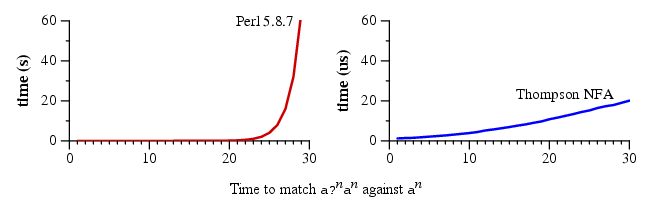
Note that the Y-axis on the left is measured in seconds, the one on the right is measured in microseconds.
RE2 is now open source.
Disclosure: I work for Google, but had no involvement in RE2 or Google Code Search. As always, this is my personal blog, and the views expressed on these pages are mine alone and not those of my employer.
January 31st, 2010 — General
A comment on my previous blog post asks, “when are you going to release a new version of Superswitcher?” For those who don’t know, superswitcher is my window management utility that aims to be a compelling replacement for Alt-Tab.
It’s true that I haven’t made a release in years, and known crashers have been fixed since then. Yes, I’ve been lazy. Let’s fix that. Specifically, I aim to do a superswitcher release for the upcoming Ubuntu 10.04 LTS release (Lucid).
Since there’s been no feature changes in more than two years, let’s call this the 1.0 release. There remains a number of open bugs, but in my experience it’s pretty stable. Calling it 1.0 brings a few points into focus:
First, superswitcher theoretically builds on GTK+ 2.6, libwnck 2.10, and XFree86 (not just X.org), but I’d be surprised if people are still running 2005-era distributions. I’d like to modernize the dependencies to what ships on Lucid — the less #ifdef’s in the code, the better.
Second, compiz has never really got on well with superswitcher. I agree with Havoc Pennington that “it’s a total PITA for apps and pagers if there are two ways to implement workspaces“. I’d started compiz support, but superswitcher-on-compiz is still not really usable, it crashes more often, the code became more complicated, and fundamentally, I personally don’t have an itch to scratch (I like my Cheerios window manager) and nobody’s sending patches. I’m therefore aiming to not support compiz at all (rather than “support” it badly) for superswitcher 1.0.
Third, there is currently a runtime flag for experimental “live window thumbnails”. This might become a compile-time option, but I doubt that I’ll ever finish it, so I’m tempted to remove this entirely too. Again it’s buggy (it doesn’t show thumbnails for windows on other workspaces), my unscientific feeling is that it’s noticably slower to paint, and it isn’t really helpful (visually) unless the thumbnails are so large that the layout is kind of ugly. I’m also not fully confident with how XComposite, XDamage, and XRender are all supposed to work without causing X errors, and comments in the metacity source suggest that I’m not alone.
People have asked about moving superswitcher’s features into metacity (GNOME’s default window manager). The metacity maintainers are certainly aware of superswitcher, but feel that it should remain a separate program, just like Devil’s Pie, which is fair enough. Maybe I’ll write my own window manager one day, but that’s another story for another time.
So, dear superswitcher users, any comments?
September 30th, 2009 — General
Wow, 18 months since my last blog post.
Truth is, the day job’s great, but it involves a lot of good, meaty programming, and the weekends are full of football and giving the sig. oth. sufficient care and attention. This means that I’ve hardly had time or motivation to do anything GNOME related for quite a while, save for the occasional Chromium/Linux patch. Up until now, I’ve tried to keep this blog for my GNOME-facing side, since (last I looked) it was syndicated on planet.gnome.org. Since I haven’t had anything GNOME related to say, I haven’t said anything at all (as opposed to, for example, ranting about how the opposite of “find” is spelled “lose”, not “loose”).
The day job is working for Google, and in particular on Google Wave (and also some work on Gears). As Google Wave is maturing, we’ve reached the stage where I have a limited number of account invites to give away. I’d like to invite some people from the GNOME community to try it out, and I’m asking for nominations, in the comments, for who those people should be.
Suggestions should be for a small group of people (say, 5 to 10, or possibly more), rather than for a particular individual. I think that the most benefit would come to a team that are often faced with having to choose between e-mail (so that the team will read it) and wiki pages (so that the team can collaboratively edit it), but want both.
So, dear interwebs, who should it be?
P.S. It should go without saying that this is my personal blog, and the views expressed on these pages are mine alone and not those of my employer.
February 1st, 2008 — General
So here I am at linux.conf.au, and they’re giving out prizes. Up for grabs is a shiny new Nokia N810, and they’re pulling up names out of a hat, and they pull out my name! Yay, shiny new N810. Now, I already have the previous revision, a N800, so I thought I’d find a good home for the old one and told the crowd that I now have a N800 for sale. Except I don’t think I made it clear that I already had an older model and wanted to upgrade, and probably ended up sounding like I was just being mercenary, taking a free prize and cashing it in immediately. I got some dirty looks, so I just gave the shiny box back. Bugger. In retropsect, if I wanted to keep the newer N810, what I should have done was take the N810, pull out my old N800 and add to the give-away pile.
In the end, though, someone else undoubtedly more deserving got a cool Nokia tablet, and I still get to keep my original pocket full of awesome, which I’m perfectly happy with (I actually missed a boarding call at the airport a couple of weeks ago because I was immersed in pocket West Wing). Nobody really got hurt, except I looked like a tool up on stage. Oh, well, it’s not like that hasn’t happened before…
December 27th, 2007 — General
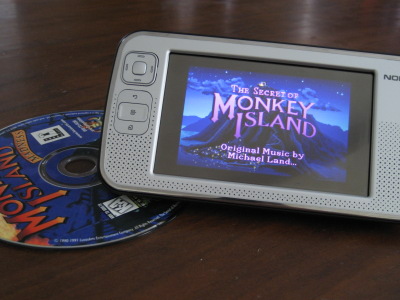
Sorry, haven’t done much lately that’s worth writing about. I’ve been too distracted by my pocket full of awesome.
November 9th, 2007 — General
And now, since I can’t sleep, and I’m sick of staring at the ceiling in the dark, some random drivel about scrolling.
1. I use a Wacom tablet, which comes with it’s own mouse. About a year ago, I upgraded from Ubuntu Dapper 6.04 to Edgy 6.10, and for some reason, my scroll wheel inverted, so that up was down and down was up. I filed a bug, forgot about it, and like a reasonable man, adapted to the world. It was surprisingly easy, sort of like that story about the psych experiment where you give people prism glasses that turn everything upside-down, and after a while, people simply get used to it and end up being just as co-ordinated… until they take them off. Anyway, getting back to my Wacom bug, progress was finally made, when Emanuel Greisen found this in the Linux-Wacom Changelog
2006-03-06 * Swapped USB tablet wheel directions
So, there’s the code change. Now, I presume that it would be trivial to swap the wheel directions back, but what would that ‘break’ that caused the original change in the first place? I’m struggling to think of a good reason why the change was made.
2. But really, should pushing the mouse wheel up scroll the page up? My mum finds this ‘unintuitive’, since her mental model of the scroll wheel is as if the page is printed on a rolling pin, and rolling the pin ‘up’ would show more text from the bottom of the page. On a similar note, with an image viewer, or say a map, should a scroll-wheel-up event zoom in or zoom out? Is ‘up’ pushing the screen (or, if you prefer, image) away from you (zoom out?), or moving you in towards the screen (zoom in?) I thought the ‘intuitive’ answer is obvious, but asking people around me showed that there’s actually a difference of opinion. But, hey, some people see the girl spinning clockwise, some see her spinning anti-clockwise.
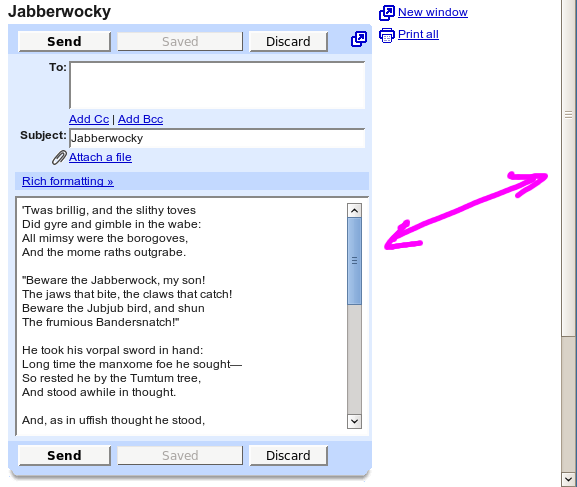
3. I hate it when I’m scrolling down a web page, happily scrolling away, and then an embedded Flash video wanders under my cursor and steals all the scroll events. Sure, sometimes text boxes (e.g. web forms) steal the scroll-wheel too, but they give it back when they’re all outta scroll. Actually, what I would like is a GTK theme that highlights which scrollbar will respond to a scroll-wheel event, just like I have a metacity theme that tells me which window will respond to a keypress event (i.e. which window has focus). I went and made a mockup of what this would look like, but I think this would be hard to implement, because the scroll-wheel recipient isn’t determined by something as simple as the “what window is the mouse cursor over” test that triggers button hover styles. Then again, in the mockup below, presuming that the cursor is over the text box, scrolling up would scroll the page (since the text box can’t scroll up any further), but scrolling down would scroll the text box, so the answer to “which scrollbar is active?” is ambiguous. I don’t suppose there’s a budding theme-engine writer out there who has a better idea?
November 4th, 2007 — General
Some stranger (and former Ion-head) called Sean has nice words to say about Superswitcher, saving him the effort of writing his own “go to window by name” program. Superswitcher wasn’t actually “designed as the ideal test case for libwnck”, but it certainly does give the Window Navigator Construction Kit a workout.