Week 30 Status

My approach to engineering involves an engineers notebook and pen at my side almost all the time. My ADHD is so bad that without writing things down I would very much not remember what I did.

Working at large companies can have a silencing effect on engineers in the community because all our communication energy is burnt on weekly status reports. You see this all the time, and it was famously expected behavior when FOSS people joined Google.

But it is not unique to Google and I certainly suffer from it myself. So I’m going to try to experiment for a while dropping my status reports here too, at least for the things that aren’t extremely specific to my employer.

Open Questions

  • What is the state-of-the-art right now for “I want to provide a completely artisan file-system to a container”. For example, say I wanted to have a FUSE file-system for that build pipeline or other tooling accessed.

    At least when it comes to project sources. Everything else should be read-only anyway.

    It would be nice to allow tooling some read/write access but gate the writes so they are limited to the tools running and not persistent when the tool returns.

Foundry

  • A bit more testing of Foundry’s replacement for Jsonrpc-GLib, which is a new libdex based FoundryJsonrpcDriver. It knows how to talk a few different types (HTTP-style, \0 or \n delimited, etc).

    LSP backend has been ported to this now along with all the JSON node creating helpers so try to put those through their paces.

  • Add pre-load/post-load to FoundryTextDocumentAddin so that we can add hooks for addins early in the loading process. We actually want this more for avoiding things during buffer loading.

  • Found a nasty issue where creating addins was causing long running leaks do to the GParameter arrays getting saved for future addin creation. Need to be a bit more clever about initial property setup so that we don’t create this reference cycle.

  • New word-completion plugin for Foundry that takes a different approach from what we did in GtkSourceView. Instead, this runs on demand with a copy of the document buffer on a fiber on a thread. This allows using regex for word boundaries (\w) with JIT, no synchronization with GTK, and just generally _a lot_ faster. It also allowed for following referenced files from #include style style headers in C/C++/Obj-C which is something VIM does (at least with plugins) that I very much wanted.

    It is nice knowing when a symbol comes from the local file vs an included file as well (again, VIM does this) so I implemented that as well for completeness.

    Make sure it does word de-duplication while I’m at it.

  • Preserve completion activation (user initialized, automatic, etc) to propagate to the completion providers.

  • Live diagnostics tracking is much easier now. You can just create a FoundryOnTypeDiagnostics(document) and it will manage updating things as you go. It is also smart enough to do this with GWeakRef so that we don’t keep underlying buffers/documents/etc alive past the point they should be unloaded (as the worker runs on a fiber).

    You can share a single instance of the live diagnostics using foundry_text_document_watch_diagnostics() to avoid extra work.

  • Add a Git-specific clone API in FoundryGitClone which handles all the annoying things like SSH authentication/etc via the use of our prompt abstraction (TTY, app dialog, etc). This also means there is a new foundry clone ... CLI command to test that infrastructure outside of the IDE. Should help for tracking down weird integration issues.

  • To make the Git cloner API work well I had to remove the context requirement from FoundryAuthPrompt. You’ll never have a loaded context when you want to clone (as there is not yet a project) so that requirement was nonsensical.

  • Add new foundry_vcs_list_commits_with_file() API to get the commit history on a single file. This gives you a list model of FoundryCommit which should make it very easy for applications to browse through file history. One call, bridge the model to a listview and wire up some labels.

  • Add FoundryVcsTree, FoundryVcsDiff, FoundryVcsDelta types and git implementations of them. Like the rest of the new Git abstractions, this all runs threaded using libdex and futures which complete when the thread returns. Still need to iterate on this a bit before the 1.0 API is finalized.

  • New API to generate diffs from trees or find trees by identifiers.

  • Found out that libgit2 does not support the bitmap index of the command line git command. That means that you have to do a lot of diffing to determine what commits contain a specific file. Maybe that will change in the future though. We could always shell out to the git command for this specific operation if it ends up too slow.

  • New CTags parser that allows for read-only memory. Instead of doing the optimization in the past (insert \0 and use strings in place) the new index keeps string offset/run for a few important parts.

    Then the open-coded binary search to find the nearest partial match against (then walking backward to get first potential match) can keep that in mind for memcmp().

    We can also send all this work off to the thread pools easily now with libdex/futures.

    Some work still remains if we want to use CTags for symbol resolution but I highly doubt we do.

    Anyway, having CTags is really more just about having an easy test case for the completion engine than “people will actually use this”.

  • Also write a new CTags miner which can build CTags files using whatever ctags engine is installed (universal-ctags, etc). The goal here is, again, to test the infrastructure in a super easy way rather than have people actually use this.

  • A new FoundrySymbolProvider and FoundrySymbol API which allows for some nice ergonomics when bridging to tooling like LSPs.

    It also makes it a lot easier to implement features like pathbars since you can foundry_symbol_list_to_root() and get a future-populated GListModel of the symbol hierarchy. Attach that to a pathbar widget and you’re done.

Foundry-GTK

  • Make FoundrySourceView final so that we can be a lot more careful about life-cycle tracking of related documents, buffers, and addins.

  • Use FoundryTextDocumentAddin to implement spellchecking with libspelling as it vastly improves life-cycle tracking. We no longer rely on UB in GLib weak reference notifications to do cleanup in the right order.

  • Improve the completion bridge from FoundryCompletionProvider to GtkSourceCompletionProvider. Particularly start on after/comment fields. We still need to get before fields setup for return types.

    Still extremely annoyed at how LSP works in this regards. I mean really, my rage that LSP is what we have has no bounds. It’s terrible in almost every way imaginable.

Builder

  • Make my Builder rewrite use new FoundrySourceView

  • Rewrite search dialog to use FoundrySearchEngine so that we can use the much faster VCS-backed file-listing + fuzzy search.

GtkSourceView

  • Got a nice patch for porting space drawing to GskPath, merged it.

  • Make Ctrl+n/Ctrl+p work in VIM emulation mode.

Sysprof

  • Add support for building introspection/docs. Don’t care about the introspection too much, because I doubt anyone would even use it. But it is nice to have documentation for potential contributors to look at how the APIs work from a higher level.

GUADEC

  • Couldn’t attend GUADEC this year, so wrote up a talk on Foundry to share with those that are interested in where things are going. Given the number of downloads of the PDF, decided that maybe sharing my weekly status round-up is useful.

  • Watched a number of videos streamed from GUADEC. While watching Felipe demo his new boxes work, I fired up the repository with foundry and things seem to work on aarch64 (Asahi Fedora here).

    That was the first time ever I’ve had an easy experience running a virtual machine on aarch64 Linux. Really pleasing!

foundry clone https://gitlab.gnome.org/felipeborges/boxes/
cd boxes/
foundry init
foundry run

LibMKS

  • While testing Boxes on aarch64 I noticed it is using the Cairo framebuffer fallback paintable. That would be fine except I’m running on 150% here and when I wrote that code we didn’t even have real fractional scaling in the Wayland protocol defined.

    That means there are stitch marks showing up for this non-accelerated path. We probably want to choose a tile-size based on the scale- factor and be done with it.

    The accelerated path shouldn’t have this problem since it uses one DMABUF paintable and sets the damage regions for the GSK renderer to do proper damage calculation.
The Foundry of Builder

I won’t be traveling this summer for GUADEC, so here is a quick rundown of what I would talk about if I were there.

Personally, I feel like Foundry has the potential to be far more useful than Builder alone. This is probably a good time to write about how it got here and where I intend to take it. Hopefully with your help!

A screenshot of the title page of the presentation, which is likely more accessible than this web page.
Read the Slides Here

Sysprof in your Mesa

Thanks to the work of Christian Gmeiner, support for annotating time regions using Sysprof marks has landed in Mesa.

That means you’ll be able to open captures with Sysprof and see the data along other useful information including callgraphs and flamegraphs.

I do think there is a lot more we can do around better visualizations in Sysprof. If that is something you’re interested in working on please stop by #gnome-hackers on Libera.chat or drop me an email and I can find things for you to work on.

See the merge request here.

Simplifying LSP Selection

With Foundry I want to make LSP management much easier than it currently is in Builder.

We have the foundry lsp run python3 command where python3 can be replaced with any language for which there is an installed LSP plugin. This will start an LSP using all the abstractions (including cross-container execution) and provide it via stdin/stdout.

But what happens when you have a half-dozen language servers for Python with new ones added every week? There is a simple builtin tool now.

Keep in mind the language identifiers should match GtkSourceView language identifiers.

# Make clangd the preferred LSP for C
foundry lsp prefer clangd c

# Make sourcekit-lsp preferred LSP for C++
foundry lsp prefer sourcekit-lsp cpp

# Make ruff the preferred LSP for Python3
foundry lsp prefer ruff python3

If there is a clear LSP that your project should be using by all contributors, add --project and it will update the value in the projects settings.

Filtering Containers in Ptyxis

Some people seem to have an outrageous number of containers on their system. That can create pretty bad performance with Ptyxis when it is using a GtkPopoverMenu to show you the container list.

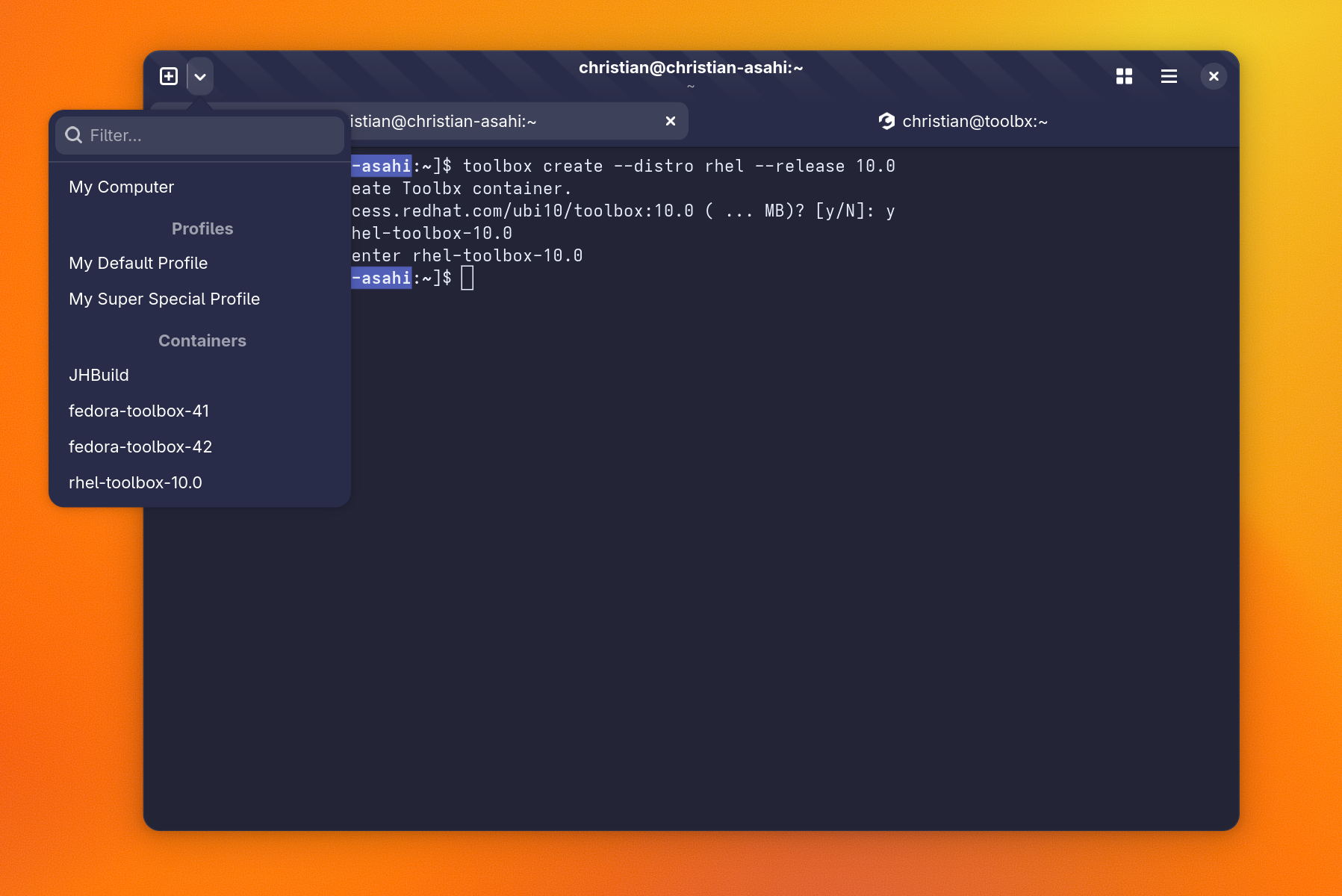
Nightly will now use a custom popover backed by GtkListView which should help with that. Additionally, you can filter them now easily. To bring up the menu, alt+, can be used.

A screenshot of Ptyxis showing the popover menu for terminals including containers and profiles. You can filter them by typing into a search entry.

Qemu in Foundry

Now that libfoundry use has proliferated I need to get all the core abstractions in place for the proverbial 1.0.

There is already a device manager and provider abstraction in libfoundry with the typical back-ends. There are providers for the local system (so native architecture) and deviced which connects to a device on the local network.

Builder supports cross-architecture building and running even when you do not have a cross-toolchain available. So this must be added to Foundry too. The mechanics are handled by qemu-user-static and binfmt when properly packaged on your distribution. Fedora manages to have this setup correctly if you dnf install qemu-user-static.

Practically speaking, that means if you install a Flatpak SDK for another architecture you can use it to build/run your application (at a performance penalty). Qemu-user-static uses a combination of syscall-translation and instruction-translation which can have significant overhead, but it does work.

You can use Foundry now to do this rather easily.

[code]
$ cd project/
$ foundry enter
$ foundry device list
ID Active Name Chassis System
qemu:riscv64 No My Computer (riscv64 Emulation) workstation riscv64
qemu:x86_64 No My Computer (x64_64 Emulation) workstation x86_64
native Yes My Computer workstation aarch64-linux-gnu
$ foundry device switch qemu:x86_64
$ foundry run

[/code]

Since I’m running on an aarch64 laptop right now, qemu:x86_64 device emulation is available.

If you have a cached build you might want to purge that so it doesn’t try to incrementally rebuild your project.

[code]
$ foundry pipeline purge
$ foundry run
[/code]

If you want to export a Flatpak to test on another system, you can export as normal. However this time it will be for your alternate architecture.

[code]
$ foundry export

Artifacts:
/path/to/x86_64-main/app.devsuite.Test.Devel.flatpak
[/code]

Hopefully that makes things easier for people who want to test other devices/architectures such as GNOME on a handheld device.

D-Spy gets a redesign

D-Spy was getting pretty long in the tooth using so much infrastructure in GTK that has been deprecated. Particularly GtkTreeView. Makes sense given that it was originally a GTK 3 application.

Now that we have libadwaita and lots of easy GtkListView data binding, I took the liberty to revamp it. I’m sure it could use design review and lots of paper-cut fixes. But that is why we land this stuff early in the cycle.

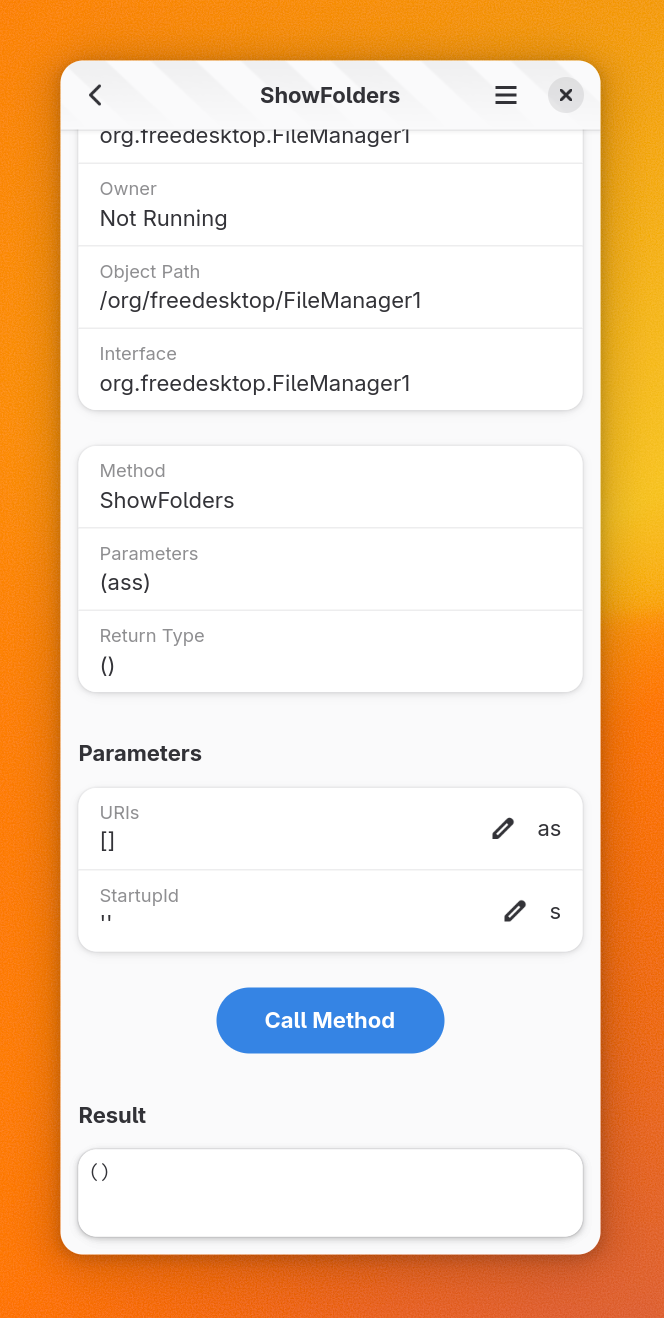
Now that people are testing out GNOME running on mobile devices, I made it shrink to that form factor as well.

Have at it!

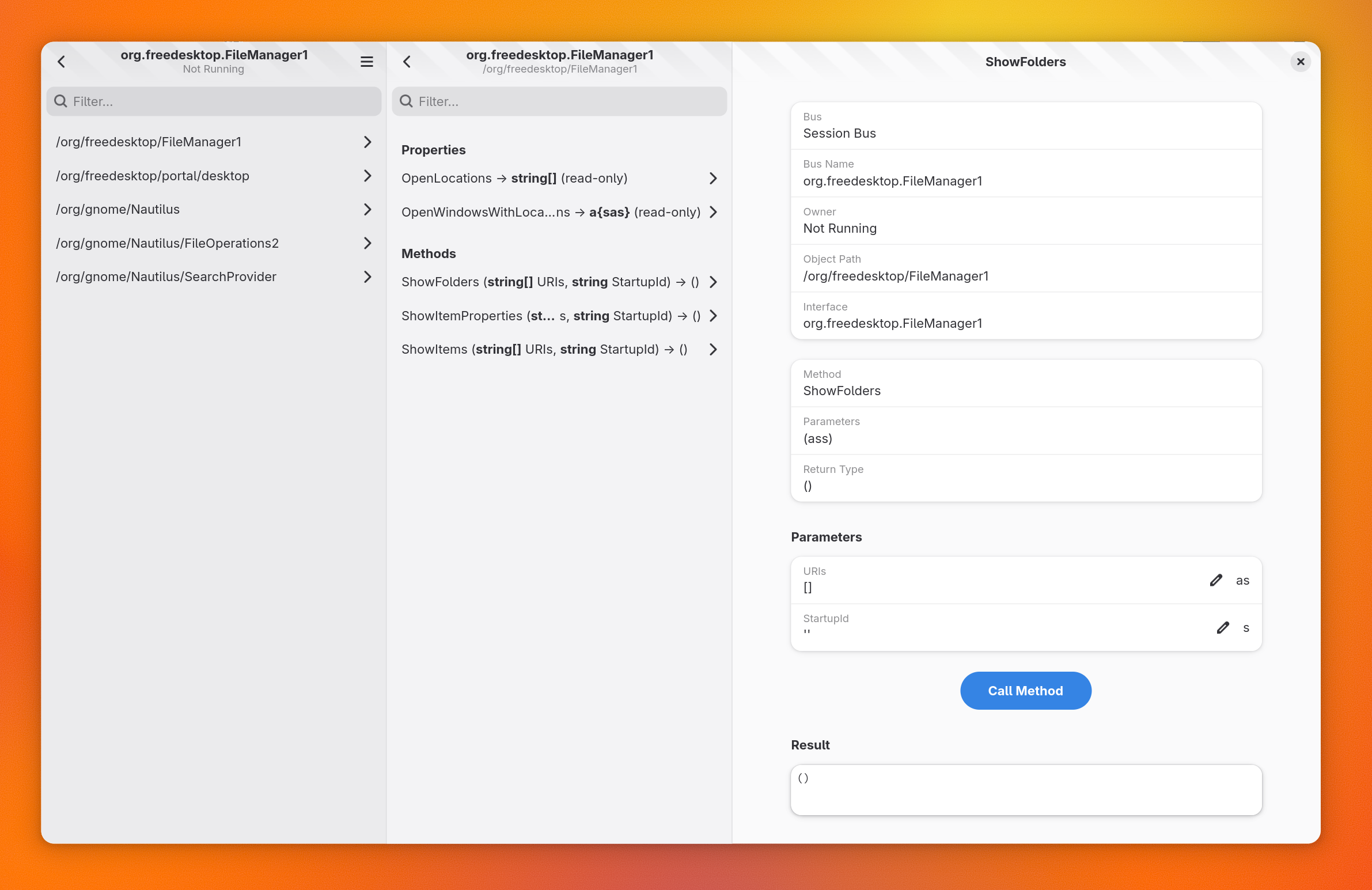
A screenshot of D-Spy in multi-column mode which allows diving down deeper into objects and interfaces like many other modern interfaces.

A screenshot of D-Spy shrunk to the format of a mobile phone and adapting to it just fine

Using Foundry to Build/Run

I know that I will never convince everyone to use Builder for development. Even I have a hard time getting myself out of the terminal at times.

Foundry comes in two forms, an executable and a library. The executable is just a bunch of commands and libfoundry is meant for building your own IDE (like Builder) or specialized tooling.

# initialize .foundry directory if never done before
cd my-project/
foundry init

If you go into most GNOME applications, they likely have a Flatpak manifest. Builder uses this to auto-discover a lot about a project. Foundry is no different.

# Build the project, just like Builder would do
foundry build

You can run this from any directory in your project as it will scan upwards to locate the .foundry/ directory that contains project state. It will also do incremental building just like Builder does.

# Run the project, just like Builder would do
foundry run

# Run a specific command in place of the default program.
# Useful to test something with "runtime" instead of
# build environment.
foundry run -- gtk4-demo

Running the project will setup the necessary incremental flatpak pipelines and auxiliary tooling like an a11y bus, font integration, and what not. Your application will be run in the Flatpak build container based on the finish-args.

This does require building the application to ensure the runtime environment is setup correctly.

# Pull updated project dependencies.
foundry dependencies update

Updating your deps is pretty painless. This is not done automatically unless the dependency is missing so that we don’t have to constantly hammer remote servers on every build request.

# Run a shell in the build pipeline, launches in builddir
foundry devenv

# Run a specific command in build pipeline
foundry devenv -- ps aux

You can get a terminal shell in the build pipeline (much like ctrl+alt+shift+t in Builder.

# Lots of commands to inspect the build pipeline
foundry pipeline info

# Alias to foundry build
foundry pipeline build

# Invalidate all pipeline stages
foundry pipeline invalidate

# Purge (remove build files/artifacts/etc) to force
# a clean build
foundry pipeline purge

# clean, configure, export, rebuild, which, install
# all provide additional pipeline operations

You can interact with the active build pipeline using the above commands.

Sometimes you might want to know what compiler flags will get used with tooling on a specific file. That is made available via the pipeline as well.

foundry pipeline flags path/to/file.c

Maybe you need a language server for integrating with another editor. That is pretty easy to do for the supported languages by using the lsp command.

$ foundry lsp list 
Name                  Languages
zls                   'zig'                                   
vhdl-language-server  'vhdl'                                  
vala-language-server  'vala' 'genie'                          
ts-language-server    'js' 'jsx' 'typescript' 'typescript-jsx'
sourcekit-lsp         'swift'                                 
serve-d               'd'                                     
rust-analyzer         'rust'                                  
ruff                  'python3' 'python'                      
pylsp                 'python3' 'python'                      
mesonlsp              'meson'                                 
lua-language-server   'lua'                                   
jedi-language-server  'python'                                
jdtls                 'java'                                  
intelephense          'php'                                   
gopls                 'go'                                    
glsl-language-server  'glsl'                                  
elixir-ls             'elixir'                                
clangd                'c' 'cpp' 'chdr' 'cpphdr' 'objc'        
blueprint             'blueprint'                             
bash-language-server  'sh'                                    

# use stdin/stdout to communicate with an LSP for python3
$ foundry lsp run python3

If you have multiple project configurations, you can look through them and select the active one. Just switch configs and run, Foundry will do the rest.

foundry config list
...
foundry config switch flatpak:app.devsuite.Manuals.Devel.json
foundry run

Want to get a .flatpak you can copy to another system to test?

foundry export
...
Artifacts:
  file:///.../apps.devsuite.Manuals.Devel.flatpak

You can switch devices in case you have deviced running somewhere like a phone or tablet. Then running should deploy to that system and run it there.

foundry device list 
...
foundry device switch some_device
foundry run

You can get the URI to documentation which could allow you to integrate with other editors. Like many commands, you can use --format=json to get the output in an easy-to-parse format for editor plugins.

# list available doc bundles to install
foundry doc bundle list
...

# install docs for GNOME 48
foundry doc bundle install flatpak/org.gnome.Sdk.Docs/48/user

# Find GtkWidget documentation
foundry doc query --format=json GtkWidget

Many settings can be tweaked using foundry settings set .... Just tab-complete around to explore.

Anyway, hopefully that serves as a quick intro into some of the things you can do with Foundry already as it progresses towards being a fully-fledged replacement for Builder’s internals.

Manuals on libfoundry

I finally got around this past week to getting Manuals ported to libfoundry.

That was something I wanted to do early so that I can rapidly get away from 3 versions of the documentation engine and Flatpak SDK management code. Currently it existed in Manuals, Builder, and Foundry, and soon we’ll get it to just Foundry.

That also makes Manuals the first application to use libfoundry which resulted in lots of tree-shaking and things are looking bright! I very much look forward to getting Builder rebased on libfoundry.

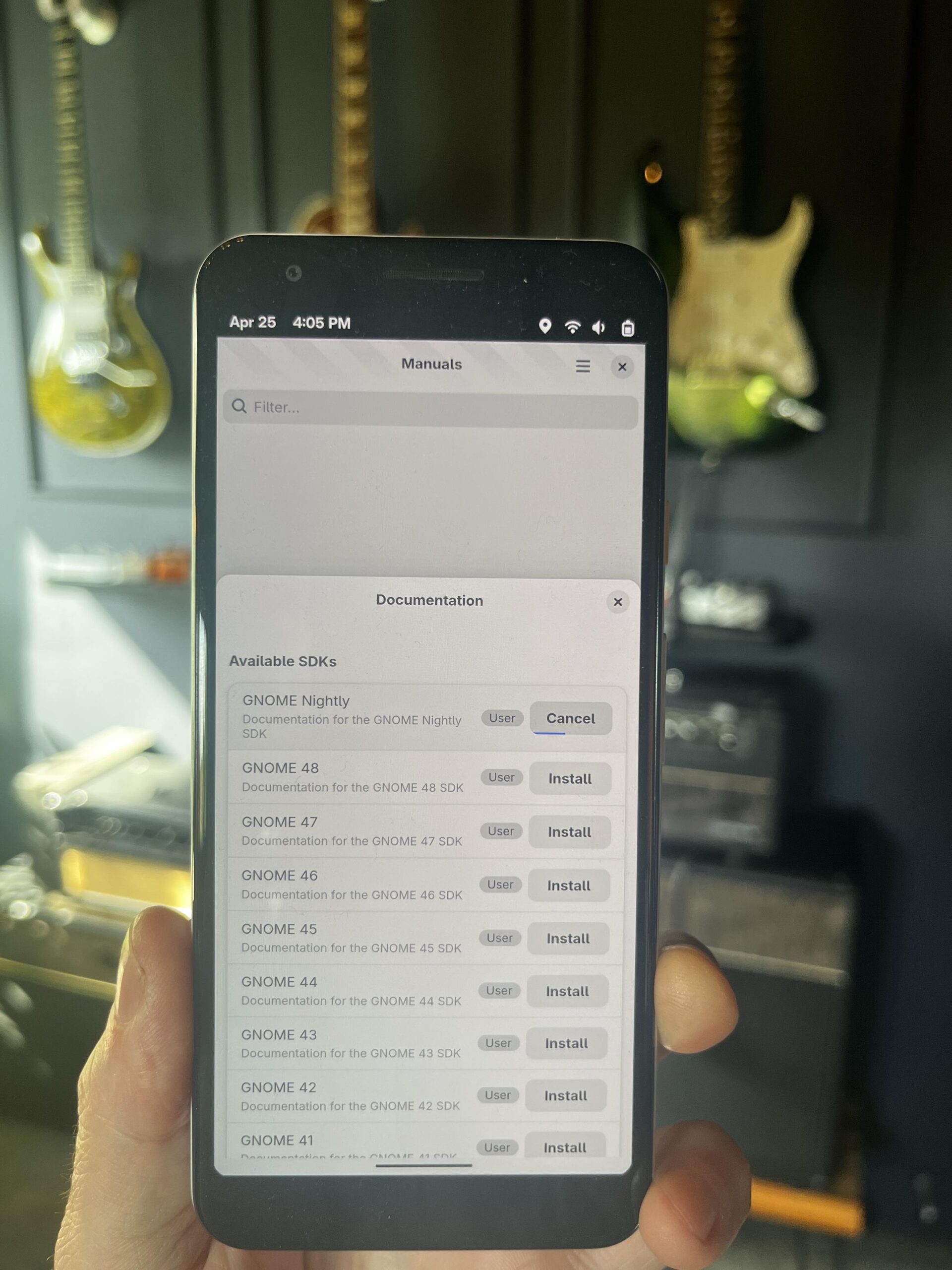
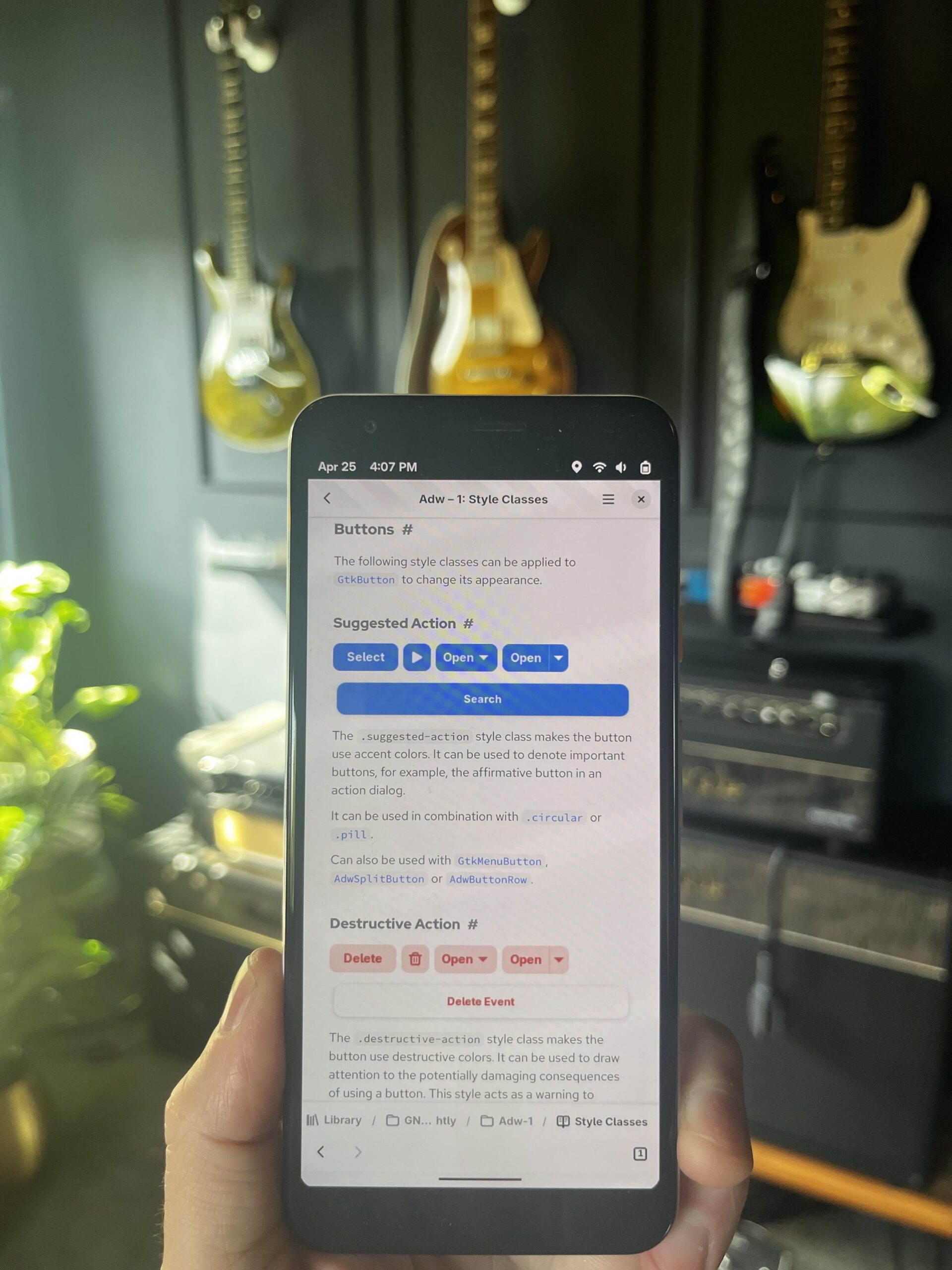
While I was at it, I ticked off a number of requested design issues as part of the Incubator submission. This afternoon it also got support for narrow views meaning you can run it on a GNOME-enabled phone.

Probably not how most people will use it, but hey, maybe you have actually good public transportation where you are and some free time.

Using the SDK documentation installation dialog. The Nightly SDK documentation is actively installing.

Browsing Adwaita documentation inside the Manuals app. The page on button styles is displayed.

Foundry.DocumentationManager

Back in December (before I caught the flu working at a farmers market, then Covid two weeks later, then two months of long-Covid) I mentioned that we’d discuss the various subsystems needed in libfoundry to build an IDE as a library.

I used the little bit of energy I had to work on some core abstractions. In an effort to live up to my word lets talk a bit about what went into libfoundry last night.

There is now a DocumentationManager sub-system which handles documentation installed on the host system, chroots, and Flatpak SDKs. It’s a bit tricky to make this all work without blurring the lines of abstraction so lets cover how that works.

Generally speaking, we try to avoid plugins depending on other plugins. Sometimes it happens but usually it is an opportunity to make a better abstraction in libfoundry. Lets look at what is needed around documentation.

  • We have many SDKs and they all might have documentation available at different locations.
  • We primarily have one format we need to support in GNOME, which is the venerable Devhelp2 XML format serving as an index.
  • SDKs might contain the same documentation but at different versions (Nightly vs GNOME 48 vs jhbuild for example)
  • There may be more formats that matter in the future especially as we look at pulling in support for new languages.
  • Adding new search capabilities shouldn’t break the API.
  • Querying needs to be fast enough to update as you type.

So lets dive into the abstractions.

DocumentationManager

This is the core abstraction you start interfacing with. It is a service of the FoundryContext and therefore can be accessed with Foundry.Context:documentation-manager property.

The documentation manager manages the Foundry.DocumentationProvider plug-in abstractions. Plug-ins that which to contribute to the documentation pipeline must subclass this in their plug-in.

To query documentation, use Foundry.DocumentationManager.query(). As I noted earlier, I don’t want new capabilities to break the API so a Foundry.DocumentationQuery object is used rather than a sequence of parameters which would need to be modified.

Avoiding Formats in the API

Since we want to be able to support other documentation formats in the future, it is important that we do not force anything about devhelp2 XML into the core abstraction.

The core result object from queries is a simple Foundry.Documentation object. Like above, we want to avoid breaking API/ABI when new capabilities are added so this object serves as our abstraction to do so. Navigating a tree structure will live here and can be implemented by plug-ins through subclassing.

Additionally, a “devhelp” plug-in provides support for crawling the devhelp2-style directories on disk. But this plug-in knows nothing about where to find documentation as that is relevant only to the SDKs.

This is where the Foundry.DocumentationRoot object becomes useful. SDK plug-ins can implement DocumentationProvider in their plug-in to expose documentation roots. The host-sdk, jhbuild, and Flatpak plug-ins all do this to expose the location of their documentation.

Now the devhelp plug-in can be provided the information it needs for crawling without any knowledge of SDKs.

Fast Querying

The old adage is that the only way to go faster on a computer is to do less work. This is particularly important in search systems where doing an entire query of a database means a lot of wasted CPU, memory, and storage I/O.

To make querying fast the devhelp plug-in indexes information about SDKs in SQLite. Way back in Builder we’d avoid this and just make an optimized fuzzy search index, mmap that, and search it. But now days we’ve gone from one set of documentation to multiple sets of documentation across SDK versions. The problem domain explodes quite a bit. SQLite seemed like a nice way to do this while also allowing us to be lazy in our searching.

By lazy what I mean is that while we’ll start your query, we only retrieve the first few results from the cursor. The rest are lazily fetched as the GListModel is scanned by scrolling. As that is not a very common operation compared to typing, you can throw away a lot of work naturally while still sitting behind the comfortable GListModel interface.

What now?

Since libfoundry already supports SDK management (including Flatpak) you could probably re-implement Manuals in a week-end. Hopefully this also breaks down a bit of the knowledge used to build such an application and the deceptive complexity behind doing it well.

This should also, hopefully soon, allow us to share a documentation implementation across Builder, Manuals, and an upcoming project I have which will benefit from easy access to documentation of object properties.