Uh, it’s been a while. Let me try to pick up blogging again…
I got in touch with ISO standards, also called “norms”. In particular, the information security norms from the ISO 27000 family. I won’t talk much about them in particular but rather about their delivery and how to improve their visual appearance.
During the last three years, many things were converted to online-only formats. Conferences were held exclusively online, work was performed from the hopefully cosy places of one’s home, and trainings were given remotely, with no physical interaction whatsoever.
As part of one of those trainings, I received a set of ISO norms as a PDF file. The PDF renders nicely, despite some fonts not being embedded (looking at you, Helvetica!). One annoying problem, though, is that the document contains more ink than necessary. In particular, some tracking information is printed on the left border of each page. It’s also true for documents obtained via “Perinorm” or “Nautos” by German scholars.

I prefer real paper for reading so I intend to print the PDF but at the same time, I only want to make printing as expensive as it needs to be. Because I will keep the printed pages safely at home, I have no need to print the tracking information on the left border of each page, if only, because I don’t want to worry and run to the printer straight away, before a colleague can fetch it out of there and get me in trouble for sharing it somewhere. So I decided to save myself some toner and some electricity by removing all that information that is not part of the actual standard.
One approach is to open the document up in some PDF modification software and delete the offending objects from each page. But there are some obstacles. Firstly, the documents are “encrypted”, so my Master PDF editor complains:

Bummer. The encryption, depending on the standard, is anything from a weak RC4 to modern AES. Ignoring the problems with cryptography in PDF, it can actually be pretty secure. So my best guess was to launch “pdfcrack“. I was prepared to wait for a few days or weeks. After all, I could wait for reading those documents for so many years, a few weeks more or later wouldn’t matter much to me. To my surprise, though, pdfcrack returned immediately. Reporting that the password was the empty string. Well.. Okay.. Then I could launch pdfcpu decrypt and finally edit the document. Selecting and deleting the object on one page was easily done.
The next problem, though, was that I had to deal with about 100 pages. Unfortunately, I could not find anything like a macro for MasterPDF-Editor. As in “Select this text”, “Delete”, “Scroll to next page”, “repeat”. Surely, going through each page and manually selecting the offending object and deleting it would be a waste of my time, as XKCD readers will appreciate.
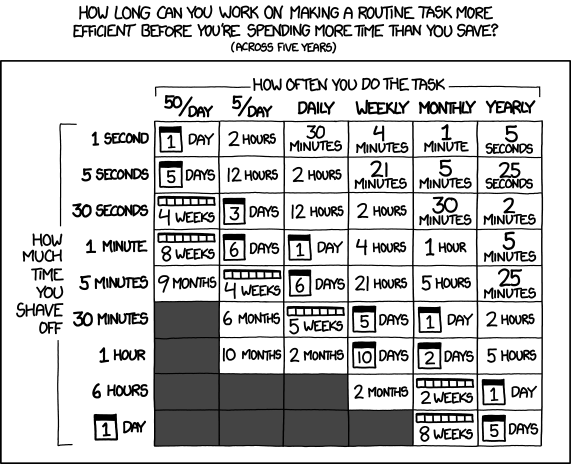
Fortunately, removing content from the left border is a somewhat solved problem. I played around with pdfcrop, trying to first remove and then re-add the border. But that was all messy and didn’t work out, anyway.
I resorted to using “iText: The Leading PDF Library for Developers”:
$ cat RemoveContentInRectangle.java
package com.itextpdf.samples.sandbox.parse;

import com.itextpdf.kernel.colors.ColorConstants;
import com.itextpdf.kernel.geom.Rectangle;
import com.itextpdf.kernel.pdf.PdfDocument;
import com.itextpdf.kernel.pdf.PdfReader;
import com.itextpdf.kernel.pdf.PdfWriter;
import com.itextpdf.pdfcleanup.PdfCleanUpLocation;
import com.itextpdf.pdfcleanup.PdfCleaner;

import java.io.File;
import java.io.FileInputStream;
import java.io.IOException;
import java.util.ArrayList;
import java.util.List;

public class RemoveContentInRectangle {
public static String DEST = "./target/sandbox/parse/remove_content_in_rectangle.pdf";

public static String SRC = "./page229.pdf";

public static void main(String[] args) throws IOException {
for (String arg: args) {
System.out.println("Arg: " + arg);
}
SRC = args[0];
DEST = args[1];
File file = new File(DEST);
//file.getParentFile().mkdirs();

new RemoveContentInRectangle().manipulatePdf(DEST);
}

protected void manipulatePdf(String dest) throws IOException {
PdfDocument pdfDoc = new PdfDocument(new PdfReader(SRC), new PdfWriter(dest));

List cleanUpLocations = new ArrayList();

int ppage = 1;
for (var page = 1; page <= pdfDoc.getNumberOfPages(); page++) {
// The arguments of the PdfCleanUpLocation constructor: the number of page to be cleaned up,
// a Rectangle defining the area on the page we want to clean up,
// a color which will be used while filling the cleaned area.
PdfCleanUpLocation location = new PdfCleanUpLocation(page, new Rectangle(5, 5, 15, 990),
ColorConstants.WHITE);
cleanUpLocations.add(location);
}

PdfCleaner.cleanUp(pdfDoc, cleanUpLocations);

pdfDoc.close();
}
}
I tried to adjust the rectangle arguments until I had a satisfactory result. That’s a bit annoying but worked well enough for me. Another annoyance is to get hold of the dependencies, but with a bit of searching it should be possible to obtain the jar files:
$ java -cp /usr/share/java/slf4j-api.jar:itext/kernel-7.2.2.jar:itext/commons-7.2.2.jar:itext/io-7.2.2.jar:itext/layout-7.2.2.jar:itext/cleanup-3.0.0.jar RemoveContentInRectangle.java iso.pdf foo.pdf
Before being able to process the files, I gave them a good rinse, because some files were causing trouble:
$ for pdf in ../*.PDF; do gs -dNOPAUSE -dBATCH -sDEVICE=pdfwrite -dCompatibilityLevel=1.4 -dPDFSETTINGS="/ebook" -sOutputFile=$pdf.rewrite.pdf $pdf; done
And finally, for good measure, try to get rid of some metadata, to make a file weigh a bit less on the hard-drive:
If you want to restore the document’s metadata because you don’t like how pdfcpu messed with it, the following could help:
$ for pdf in *.PDF; do exiftool -tagsFromFile $pdf $pdf.cleaned.pdf ; done
But you could also delete all metadata (don’t use exiftool for cleaning PDF metadata without flattening the PDF afterwards).
After that treatment, I can print the PDF on the central office printer without fearing anybody taking my printout and getting me in trouble.
If you happen to have some documents that you want to free from tracking data, especially such standards, I’d be happy to assist you.


