Redacting PDFs to remove tracking information

Uh, it’s been a while. Let me try to pick up blogging again…

I got in touch with ISO standards, also called “norms”. In particular, the information security norms from the ISO 27000 family. I won’t talk much about them in particular but rather about their delivery and how to improve their visual appearance.

During the last three years, many things were converted to online-only formats. Conferences were held exclusively online, work was performed from the hopefully cosy places of one’s home, and trainings were given remotely, with no physical interaction whatsoever.

As part of one of those trainings, I received a set of ISO norms as a PDF file. The PDF renders nicely, despite some fonts not being embedded (looking at you, Helvetica!). One annoying problem, though, is that the document contains more ink than necessary. In particular, some tracking information is printed on the left border of each page. It’s also true for documents obtained via “Perinorm” or “Nautos” by German scholars.

Document with tracking in the left margin

I prefer real paper for reading so I intend to print the PDF but at the same time, I only want to make printing as expensive as it needs to be. Because I will keep the printed pages safely at home, I have no need to print the tracking information on the left border of each page, if only, because I don’t want to worry and run to the printer straight away, before a colleague can fetch it out of there and get me in trouble for sharing it somewhere. So I decided to save myself some toner and some electricity by removing all that information that is not part of the actual standard.

One approach is to open the document up in some PDF modification software and delete the offending objects from each page. But there are some obstacles. Firstly, the documents are “encrypted”, so my Master PDF editor complains:

MasterPDF complaining about the "encryption"

Bummer. The encryption, depending on the standard, is anything from a weak RC4 to modern AES. Ignoring the problems with cryptography in PDF, it can actually be pretty secure. So my best guess was to launch “pdfcrack“. I was prepared to wait for a few days or weeks. After all, I could wait for reading those documents for so many years, a few weeks more or later wouldn’t matter much to me. To my surprise, though, pdfcrack returned immediately. Reporting that the password was the empty string. Well.. Okay.. Then I could launch pdfcpu decrypt and finally edit the document. Selecting and deleting the object on one page was easily done.

The next problem, though, was that I had to deal with about 100 pages. Unfortunately, I could not find anything like a macro for MasterPDF-Editor. As in “Select this text”, “Delete”, “Scroll to next page”, “repeat”. Surely, going through each page and manually selecting the offending object and deleting it would be a waste of my time, as XKCD readers will appreciate.
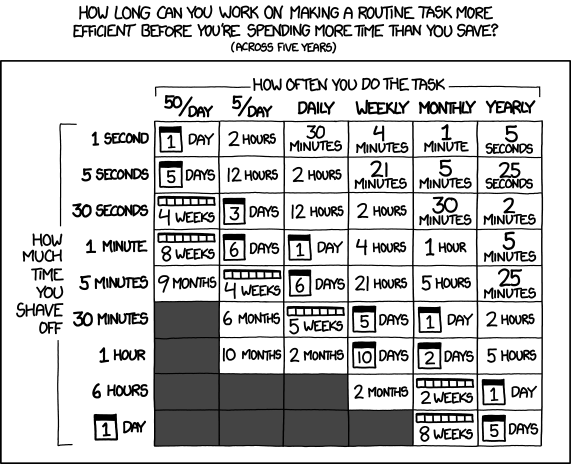
Fortunately, removing content from the left border is a somewhat solved problem. I played around with pdfcrop, trying to first remove and then re-add the border. But that was all messy and didn’t work out, anyway.

I resorted to using “iText: The Leading PDF Library for Developers”:
$ cat RemoveContentInRectangle.java


package com.itextpdf.samples.sandbox.parse;

import com.itextpdf.kernel.colors.ColorConstants;
import com.itextpdf.kernel.geom.Rectangle;
import com.itextpdf.kernel.pdf.PdfDocument;
import com.itextpdf.kernel.pdf.PdfReader;
import com.itextpdf.kernel.pdf.PdfWriter;
import com.itextpdf.pdfcleanup.PdfCleanUpLocation;
import com.itextpdf.pdfcleanup.PdfCleaner;

import java.io.File;
import java.io.FileInputStream;
import java.io.IOException;
import java.util.ArrayList;
import java.util.List;

public class RemoveContentInRectangle {
public static String DEST = "./target/sandbox/parse/remove_content_in_rectangle.pdf";

public static String SRC = "./page229.pdf";

public static void main(String[] args) throws IOException {
for (String arg: args) {
System.out.println("Arg: " + arg);
}
SRC = args[0];
DEST = args[1];
File file = new File(DEST);
//file.getParentFile().mkdirs();

new RemoveContentInRectangle().manipulatePdf(DEST);
}

protected void manipulatePdf(String dest) throws IOException {
PdfDocument pdfDoc = new PdfDocument(new PdfReader(SRC), new PdfWriter(dest));

List cleanUpLocations = new ArrayList();

int ppage = 1;
for (var page = 1; page <= pdfDoc.getNumberOfPages(); page++) {
// The arguments of the PdfCleanUpLocation constructor: the number of page to be cleaned up,
// a Rectangle defining the area on the page we want to clean up,
// a color which will be used while filling the cleaned area.
PdfCleanUpLocation location = new PdfCleanUpLocation(page, new Rectangle(5, 5, 15, 990),
ColorConstants.WHITE);
cleanUpLocations.add(location);
}

PdfCleaner.cleanUp(pdfDoc, cleanUpLocations);

pdfDoc.close();
}
}


I tried to adjust the rectangle arguments until I had a satisfactory result. That’s a bit annoying but worked well enough for me. Another annoyance is to get hold of the dependencies, but with a bit of searching it should be possible to obtain the jar files:
$ java -cp /usr/share/java/slf4j-api.jar:itext/kernel-7.2.2.jar:itext/commons-7.2.2.jar:itext/io-7.2.2.jar:itext/layout-7.2.2.jar:itext/cleanup-3.0.0.jar RemoveContentInRectangle.java iso.pdf foo.pdf

Before being able to process the files, I gave them a good rinse, because some files were causing trouble:

$ for pdf in ../*.PDF; do gs -dNOPAUSE -dBATCH -sDEVICE=pdfwrite -dCompatibilityLevel=1.4 -dPDFSETTINGS="/ebook" -sOutputFile=$pdf.rewrite.pdf $pdf; done

And finally, for good measure, try to get rid of some metadata, to make a file weigh a bit less on the hard-drive:

If you want to restore the document’s metadata because you don’t like how pdfcpu messed with it, the following could help:
$ for pdf in *.PDF; do exiftool -tagsFromFile $pdf $pdf.cleaned.pdf ; done

But you could also delete all metadata (don’t use exiftool for cleaning PDF metadata without flattening the PDF afterwards).
After that treatment, I can print the PDF on the central office printer without fearing anybody taking my printout and getting me in trouble.

If you happen to have some documents that you want to free from tracking data, especially such standards, I’d be happy to assist you.

Talking at GI Tracking Workshop in Darmstadt, Germany

Uh, I almost forgot about blogging about having talked at the GI Tracking Workshop in Darmstadt, Germany. The GI is, literally translated, the “informatics society” and sort of a union of academics in the field of computer science (oh boy, I’ll probably get beaten up for that description). And within that body several working groups exist. And one of these groups working on privacy organised this workshop about tracking on the Web.

I consider “workshop” a bit of a misnomer for this event, because it was mainly talks with a panel at the end. I was an invited panellist for representing the Free Software movement contrasting a guy from affili.net, someone from eTracker.com, a lady from eyeo (the AdBlock Plus people), and professors representing academia. During the panel discussion I tried to focus on Free Software being the only tool to enable the user to exercise control over what data is being sent in order to control tracking. Nobody really disagreed, which made the discussion a bit boring for me. Maybe I should have tried to find another more controversial argument to make people say more interesting things. Then again, it’s probably more the job of the moderator to make the participants discuss heatedly. Anyway, we had a nice hour or so of talking about the future of tracking, not only the Web, but in our lives.

One of the speakers was Lars Konzelmann who works at Saxony’s data protection office. He talked about the legislative nature of data protection issues. The GDPR is, although being almost two years old, a thing now. Several types of EU-wide regulations exist, he said. One is “Regulation” and the other is “Directive”. The GDPR has been designed as a Regulation, because the EU wanted to keep a minimum level of quality across the EU and prevent countries to implement their own legislation with rather lax rules, he said. The GDPR favours “privacy by design” but that has issues, he said, as the usability aspects are severe. Because so far, companies can get the user’s “informed consent” in order to do pretty much anything they want. Although it’s usefulness is limited, he said, because people generally don’t understand what they are consenting to. But with the GDPR, companies should implement privacy by design which will probably obsolete the option for users to simply click “agree”, he said. So things will somehow get harder to agree to. That, in turn, may cause people to be unhappy and feel that they are being patronised and being told what they should do, rather than expressing their free will with a simple click of a button.

Next up was a guy with their solution against tracking in the Web. They sell a little box which you use to surf the Web with, similar to what Pi Hole provides. It’s a Raspberry Pi with a modified (and likely GPL infringing) modification of Raspbian which you plug into your network and use as a gateway. I assume that the device then filters your network traffic to exclude known bad trackers. Anyway, he said that ads are only the tip of the iceberg. Below that is your more private intimate sphere which is being pried on by real time bidding for your screen estate by advertising companies. Why would that be a problem, you ask. And he said that companies apply dynamic pricing depending on your profile and that you might well be interested in knowing that you are being treated worse than other people. Other examples include a worse credit- or health rating depending on where you browse or because your bank knows that you’re a gambler. In fact, micro targeting allows for building up a political profile of yours or to make identity theft much easier. He then went on to explain how Web tracking actually works. He mentioned third party cookies, “social” plugins (think: Like button), advertisement, content providers like Google Maps, Twitter, Youtube, these kind of things, as a means to track you. And that it’s possible to do non invasive customer recognition which does not involve writing anything to the user’s disk, e.g. no cookies. In fact, such a fingerprinting of the users’ browser is the new thing, he said. He probably knows, because he is also in the business of providing a tracker. That’s probably how he knows that “data management providers” (DMP) merge data sets of different trackers to get a more complete picture of the entity behind a tracking code. DMPs enrich their profiles by trading them with other DMPs. In order to match IDs, the tracker sends some code that makes the user’s browser merge the tracking IDs, e.g. make it send all IDs to all the trackers. He wasn’t really advertising his product, but during Q&A he was asked what we can do against that tracking behaviour and then he was forced to praise his product…

Eye/o’s legal counsel Judith Nink then talked about the juristic aspects of blocking advertisements. She explained why people use adblockers in first place. I commented on that before, claiming that using an adblocker improves your security. She did indeed mention privacy and security being reasons for people to run adblockers and explicitly mentionedmalvertising. She said that Jerusalem Post had ads which were actually malware. That in turn caused some stir-up in Germany, because it was coined as attack on German parliament… But other reasons for running and adblocker were data consumption and the speed of loading Web pages, she said. And, of course, the simple annoyance of certain advertisements. She presented some studies which showed that the typical Web site has 50+ or so trackers and that the costs of downloading advertising were significant compared to downloading the actual content. She then showed a statement by Edward Snowden saying that using an ad-blocker was not only a right but is a duty.

Everybody should be running adblock software, if only from a safety perspective

Browser based ad blockers need external filter lists, she said. The discussion then turned towards the legality of blocking ads. I wasn’t aware that it’s a thing that law people discuss. How can it possibly not be legal to control what my client does when being fed a bunch of HTML and JavaScript..? Turns out that it’s more about the entity offering these lists and a program to evaluate them *shrug*. Anyway, ad-blockers use either blocking or hiding of elements, she said where “blocking” is to stop the browser from issuing the request in first place while “hiding” is to issue the request, but to then hide the DOM element. Yeah, law people make exactly this distinction. She then turned to the question of how legal either of these behaviours is. To the non German folks that question may seem silly. And I tend to agree. But apparently, you cannot simply distribute software which modifies a Browser to either block requests or hide DOM elements without getting sued by publishers. Those, she said, argue that gratis content can only be delivered along with ads and that it’s part of the deal with the customer. Like that they also transfer ads along with the actual content. If you think that this is an insane argument, especially in light of the customer not having had the ability to review that deal before loading that page, you’re in good company. She argued, that the simple act of loading a page cannot be a statement of consent, let alone be a deal of some sorts. In order to make it a deal, the publishers would have to show their terms of service first, before showing anything, she said. Anyway, eye/o’s business is to provide those filter lists and a browser plugin to make use of those lists. If you pay them, however, they think twice before blocking your content and make exceptions. That feels a bit mafiaesque and so they were sued for “aggressive geschäftliche Handlung”, an “aggressive commercial behaviour”. I found the history of cases interesting, but I’ll spare the details for the reader here. You can follow that, and other cases, by looking at OLG Koeln 6U149/15.

Next up was Dominik Herrmann to present on PrivacyScore.org, a Web portal for scanning Web sites for security and privacy issues. It is similar to other scanners, he said, but the focus of PrivacyScore is publicity. By making results public, he hopes that a race to the top will occur. Web site operators might feel more inclined to implement certain privacy or security mechanisms if they know that they are the only Web site which doesn’t protect the privacy of their users. Similarly, users might opt to use a Web site providing a more privacy friendly service. With the public portal you can create lists in order to create public benchmarks. I took the liberty to create a list of Free Desktop environments. At the time of creation, GNOME fell behind many others, because the mail server did not implement TLS 1.2. I hope that is being taking as a motivational factor to make things more secure.

Creative Commons Attribution-ShareAlike 3.0 Unported
This work by Muelli is licensed under a Creative Commons Attribution-ShareAlike 3.0 Unported.