Using Artificial Intelligence to reverse engineer hardware

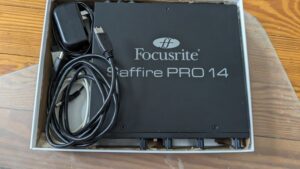
After my mother passed away I ended up with a big box full of old film negatives containing photos from childhood family trips and similar. So I decided to buy a negative photo scanner and found that the Plustek 8200i was supported under Linux so I bought that. Only to discover that the chipset in the scanner had changed to one that wasn’t supported under Linux anymore. So I had some success making Linux configuration tools for some of my hardware using Claude code, like my Dell Camera controller app so I thought, maybe Claude can help me get a working SANE driver. I basically got stuck and got nowhere for the longest time and even basically gave up on the project for a few Months.

Then I saw a post on X from Tom Crider aka Glorious Eggroll talking about how he had managed to fix a mouse driver using AI tooling. He basically described how he set it up so that the AI agent had full control of a Windows instance to capture data needed to fix the driver. So I pasted his tweet into Claude and asked it to help me set up a windows virtual machine to do the same things Tom as doing for my scanner. I think the combination of having the ability to run scans under windows and capture the USB data while doing so worked wonders, probably combined with improvements to Claude code made a huge difference. Within a few hours I had my first ever working scan under Linux, sure with some quality issues, but 100% recognizable as the image in the negative. Some days later I had a near perfect driver, including support for Infrared scanning ready to go, only to discover that in the time between me giving up and then trying again someone had committed code to SANE to support the scanner already…..it happens sometimes. I also used Claude to write an application for doing negative scanning, which I named Negative Vibes, thought that was a cute name.

Anyway, with the success of my scanner effort I thought, I wonder if I can use this to finally fix the last issues with MIPI camera support on my laptop. So I told claude to re-use the harness I had created and try to fix the MIPI camera on my laptop by updating the kernel driver and libcamera as needed. I started the job in the morning and by the end of the day I had a much improved situation with patches for both the kernel and libcamera ready.

So I thought that this might be worthwhile sharing with the world, and while anyone could start from scratch I did ask Claude to make the harness generic and document it to make the pathway for anyone else who wants to try this on their hardware a little easier. Writing a driver for undocumented hardware has always been tedious. You capture bus traffic, stare at hex dumps, and form hypotheses about what each register or control transfer does. You then test them one at a time, usually for weeks. None of it is conceptually hard, but it takes a lot of patience and skills.

That kind of work suits an AI model well. It can read thousands of lines of USB capture, notice that a sequence repeats with one byte changing, and propose what that byte means. It can write the test to confirm it, and it doesn’t get bored. The human still decides what to build and checks that it works on real hardware, but the slog shrinks a lot.

hw-harness

Be aware that I did not use hw-harness in this form for my projects as this was basically bespoke code at that time, so this project is an attempt to make the harness more generic and shareable from the scripts I was using while doing the work. What hw-harness is meant to help your Claude or Codex session with:

1. Record a reference session. Run the vendor’s Windows driver in a KVM virtual machine, with the real device passed through to the guest.
2. Capture from outside the VM. Record the traffic on the Linux host with usbmon. It sits below the passthrough layer, so the guest can’t see it.
3. Repeat the same operation on Linux with your own driver, and capture that the same way.
4. Diff the two traces. Both come from the same instrument, so they compare directly. The differences are your list of driver bugs.

For devices with no bus to tap, such as an internal MIPI camera, the harness uses Windows-side inspection instead. That means INF files, registry data, ACPI tables and device properties.

The approach should be fine in the sense it doesn’t rely on copying any code instead it observes what the hardware does and only extract configuration data from the Windows drivers, so every constant in the new driver traces back to something recorded.

So for those interested I have 3 short descriptions of the projects I did and what was needed.

Project 1: a SANE backend for the Plustek OpticFilm 8200i

comparison of two scanner drivers on same negative-

Comparing the driver output of two drivers available.


The first project is a SANE backend for the newer Plustek OpticFilm 8200i. It uses the Genesys GL128 controller (USB 07b3:1825) and had no Linux support. The older model with the same name uses a GL845 and is already handled by SANE.

The backend supports:

  • Color, gray, infrared and color+infrared modes
  • Resolutions from 300 to 7200 dpi, at 8 or 16 bits per channel
  • Dust and scratch removal from the infrared channel
  • An exposure multiplier for dense negatives

It’s packaged as a Fedora RPM, built automatically on every push. I mostly tested it with my own Negative Vibes application as there are not that many options under Linux for negative scanning.

Upstream SANE’s genesys backend also gained support for this scanner in September 2026, so I compared the two. Both resolve the same fine detail at 3600 dpi. Mine is faster at full resolution (34.6 s against 54.4 s) and supports infrared dust removal. Upstream offers more resolution steps. The webpage has an interactive side-by-side comparison you can check out. These are single-unit, single-frame results, so treat them as one data point. Check out the interactive page I made showing the current state of the two drivers, hopefully the discoveries I made can be used by the SANE project to fix some smaller items in the upstream driver. Anyway, I put this project up more as a proof of concept due to that since I expect everyone including myself will use the upstream driver once it reaches parity with this one.

Project 2: Negative Vibes

Full scan of negative completed including infrared cleaning of image.


A driver alone isn’t much use if scanning negatives is still painful, so I built Negative Vibes. It’s a GNOME app, written in Rust, for scanning colour and black-and-white negatives and slides on any film-capable SANE scanner.

The scan is kept exactly as the scanner delivered it: 16-bit, linear, with the infrared plane. Everything else is a stack of non-destructive settings on top, so you can change the look and export again. It includes:

  • Density-space negative inversion with film base and dye-crosstalk correction
  • Roll-wide settings with per-frame overrides
  • Infrared and software dust removal
  • IT8 calibration through ArgyllCMS
  • Export to TIFF, JPEG, PNG and DNG, with ICC profiles and metadata

It ships as a Flatpak that includes the scanner backend. It’s tested on the 8200i so far. The goal is to support any film scanner SANE supports. For that, SANE needs a standard way to expose infrared channels, which it doesn’t have yet.

Project 3: Fixing the MIPI camera on my ThinkPad

Showing MIPI output before and after fixes. Colors are better than they look as I was sitting in a relatively dark room by the end of the session.

Showing MIPI output before and after fixes. Colors are better than they look as I was sitting in a relatively dark room by the end of the session.


The camera in my Lenovo ThinkPad X1 Carbon Gen 14 (Aura Edition) uses a Sony IMX471 sensor behind an Intel IPU7. On Linux it produced dark images with heavy vignetting and a strong yellow-green cast. mipi-fixes-x1-aura collects the fixes. It’s only relevant to this laptop, which is why it isn’t one of the bigger packaged projects, but I have already submitted the kernel patches to Kate Hsuan and the libcamera patches is being reviewed by Wim Taymans for submission to Libcamera.

Kernel (IMX471 driver):

  • A crop-selection bug returned an error before storing the crop rectangle, so libcamera assumed the full pixel array.
  • The test-pattern register was declared with the wrong width.
  • The analogue gain cap was too low, which cost about 1.8 stops of sensitivity.

libcamera software ISP:

  • Lens shading correction was missing entirely, leaving the corners about 2.7 stops darker.
  • White-balance statistics were summed at the sensor’s native bit depth against an 8-bit black level. That skewed white balance, and the fix applies to any RAW10/RAW12 sensor.

In a controlled low-light test, frame brightness rose from 31.1 to 90.9. The red/green and blue/green ratios moved from 0.890 and 0.672 to 1.047 and 0.823, close to a USB webcam reference. Blue is still about 17% short in low light, which I put down to grey-world white balance. Fedora 44 RPMs are on the releases page.

What I learned

  • Reference captures are a big step. Having the AI compare a known-good trace against a failing one turns a vague “it doesn’t work” into a concrete list of differences. For example for the MIPI camera having a USB camera also connected so Claude could compare the two captures was critical.
  • The AI is good at the tedium. That covers decoding captures, writing probes and cross-checking constants. I still have to be the one holding the physical hardware.
  • Real hardware is the only judge. Every claim above was checked on the actual scanner or laptop.

If you have hardware with no Linux driver, try hw-harness. Thanks again to Glorious Eggroll for the inspiration.

NOTE: I am not claiming that my scans or MIPI camera is perfect now, but the scanner gives me decent looking scans and the MIPI camera looks a lot better than before. So over time I am sure we be able to tweak and polish further, but I am happy that it allowed me to move the needle despite lacking the in-depth knowledge for this type of work.

—

Using AI to create some hardware tools and bring back the past

As I talked about in a couple of blog posts now I been working a lot with AI recently as part of my day to day job at Red Hat, but also spending a lot of evenings and weekend time on this (sorry kids pappa has switched to 1950’s mode for now). One of the things I spent time on is trying to figure out what the limitations of AI models are and what kind of use they can have for Open Source developers.

One thing to mention before I start talking about some of my concrete efforts is that I more and more come to conclude that AI is an incredible tool to hypercharge someone in their work, but I feel it tend to fall short for fully autonomous systems. In my experiments AI can do things many many times faster than you ordinarily could, talking specifically in the context of coding here which is what is most relevant for those of us in the open source community.

So one annoyance I had for years as a Linux user is that I get new hardware which has features that are not easily available to me as a Linux user. So I have tried using AI to create such applications for some of my hardware which includes an Elgato Light and a Dell Ultrasharp Webcam.

I found with AI and this is based on using Google Gemini, Claude Sonnet and Opus and OpenAI codex, they all required me to direct and steer the AI continuously, if I let the AI just work on its own, more often than not it would end up going in circles or diverging from the route it was supposed to go, or taking shortcuts that makes wanted output useless.On the other hand if I kept on top of the AI and intervened and pointed it in the right direction it could put together things for me in very short time spans.
My projects are also mostly what I would describe as end leaf nodes, the kind of projects that already are 1 person projects in the community for the most part. There are extra considerations when contributing to bigger efforts, and I think a point I seen made by others in the community too is that you need to own the patches you submit, meaning that even if an AI helped your write the patch you still need to ensure that what you submit is in a state where it can be helpful and is merge-able. I know that some people feel that means you need be capable of reviewing the proposed patch and ensuring its clean and nice before submitting it, and I agree that if you expect your patch to get merged that has to be the case. On the other hand I don’t think AI patches are useless even if you are not able to validate them beyond ‘does it fix my issue’.

My friend and PipeWire maintainer Wim Taymans and I was talking a few years ago about what I described at the time as the problem of ‘bad quality patches’, and this was long before AI generated code was a thing. Wim response to me which I often thought about afterwards was “a bad patch is often a great bug report”. And that would hold true for AI generated patches to. If someone makes a patch using AI, a patch they don’t have the ability to code review themselves, but they test it and it fixes their problem, it might be a good bug report and function as a clearer bug report than just a written description by the user submitting the report. Of course they should be clear in their bug report that they don’t have the skills to review the patch themselves, but that they hope it can be useful as a tool for pinpointing what isn’t working in the current codebase.

Anyway, let me talk about the projects I made. They are all found on my personal website Linuxrising.org a website that I also used AI to update after not having touched the site in years.

Elgato Light GNOME Shell extension

Elgato Light GNOME Shell extension

Elgato Light GNOME Shell extension

The first project I worked on is a GNOME Shell extension for controlling my Elgato Key Wifi Lamp. The Elgato lamp is basically meant for podcasters and people doing a lot of video calls to be able to easily configure light in their room to make a good recording. The lamp announces itself over mDNS, and thus can be controlled via Avahi. For Windows and Mac the vendor provides software to control their lamp, but unfortunately not for Linux.

There had been GNOME Shell extensions for controlling the lamp in the past, but they had not been kept up to date and their feature set was quite limited. Anyway, I grabbed one of these old extensions and told Claude to update it for latest version of GNOME. It took a few iterations of testing, but we eventually got there and I had a simple GNOME Shell extension that could turn the lamp off and on and adjust hue and brightness. This was a quite straightforward process because I had code that had been working at some point, it just needed some adjustments to work with current generation of GNOME Shell.

Once I had the basic version done I decided to take it a bit further and try to recreate the configuration dialog that the windows application offers for the full feature set which took me quite a bit of back and forth with Claude. I found that if I ask Claude to re-implement from a screenshot it recreates the functionality of the user interface first, meaning that it makes sure that if the screenshot has 10 buttons, then you get a GUI with 10 buttons. You then have to iterate both on the UI design, for example telling Claude that I want a dark UI style to match the GNOME Shell, and then I also had to iterate on each bit of functionality in the UI. Like most of the buttons in the UI didn’t really do anything from the start, but when you go back and ask Claude to add specific functionality per button it is usually able to do so.

Elgato Light Settings Application

Elgato Light Settings Application

So this was probably a fairly easy thing for the AI because all the functionality of the lamp could be queried over Avahi, there was no ‘secret’ USB registers to be set or things like that.
Since the application was meant to be part of the GNOME Shell extension I didn’t want to to have any dependency requirements that the Shell extension itself didn’t have, so I asked Claude to make this application in JavaScript and I have to say so far I haven’t seen any major differences in terms of the AIs ability to generate different languages. The application now reproduce most of the functionality of the Windows application. Looking back I think it probably took me a couple of days in total putting this tool together.

Dell Ultrasharp Webcam 4K

Dell UltraSharp 4K settings application for Linux

Dell UltraSharp 4K settings application for Linux

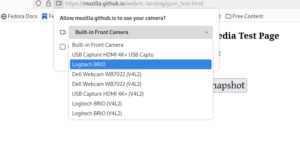
The second application on the list is a controller application for my Dell UltraSharp Webcam 4K UHD (WB7022). This is a high end Webcam I that have been using for a while and it is comparable to something like the Logitech BRIO 4K webcam. It has mostly worked since I got it with the generic UVC driver and I been using it for my Google Meetings and similar, but since there was no native Linux control application I could not easily access a lot of the cameras features. To address this I downloaded the windows application installer and installed it under Windows and then took a bunch of screenshots showcasing all features of the application. I then fed the screenshots into Claude and told it I wanted a GTK+ version for Linux of this application. I originally wanted to have Claude write it in Rust, but after hitting some issues in the PipeWire Rust bindings I decided to just use C instead.

I took me probably 3-4 days with intermittent work to get this application working and Claude turned out to be really good and digging into Windows binaries and finding things like USB property values. Claude was also able to analyze the screenshots and figure out the features the application needed to have. It was a lot of trial and error writing the application, but one way I was able to automate it was by building a screenshot option into the application, allowing it to programmatically take screenshots of itself. That allowed me to tell Claude to try fixing something and then check the screenshot to see if it worked without me having to interact with the prompt. Also to get the user interface looking nicer, once I had all the functionality in I asked Claude to tweak the user interface to follow the guidelines of the GNOME Human Interface Guidelines, which greatly improved the quality of the UI.

At this point my application should have almost all the features of the Windows application. Since it is using PipeWire underneath it is also tightly integrated with the PipeWire media graph, allowing you to see it connect and work with your application in PipeWire patchbay applications like Helvum. The remaining features are software features of Dell’s application, like background removal and so on, but I think that if I decided to to implement that it should be as a standalone PipeWire tool that can be used with any camera, and not tied to this specific one.

Red Hat Planet

Red Hat Vulkan Globe

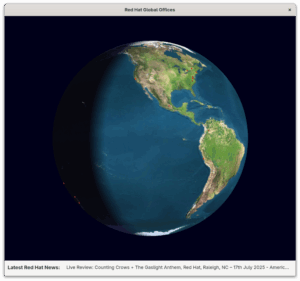
The application shows the worlds Red Hat offices and include links to latest Red Hat news.


The next application on my list is called Red Hat Planet. It is mostly a fun toy, but I made it to partly revisit the Xtraceroute modernisation I blogged about earlier. So as I mentioned in that blog, Xtraceroute while cute isn’t really very useful IMHO, since the way the modern internet works rarely have your packets jump around the world. Anyway, as people pointed out after I posted about the port is that it wasn’t an actual Vulkan application, it was a GTK+ application using the GTK+ Vulkan backend. The Globe animation itself was all software rendered.

I decided if I was going to revisit the Vulkan problem I wanted to use a different application idea than traceroute. The idea I had was once again a 3D rendered globe, but this one reading the coordinates of Red Hats global offices from a file and rendering them on the globe. And alongside that provide clickable links to recent Red Hat news items. So once again maybe not the worlds most useful application, but I thought it was a cute idea and hopefully it would allow me to create it using actual Vulkan rendering this time.

Creating this turned out to be quite the challenge (although it seems to have gotten easier since I started this effort), with Claude Opus 4.6 being more capable at writing Vulkan code than Claude Sonnet, Google Gemini or OpenAI Codex was when I started trying to create this application.
When I started this project I had to keep extremely close tabs on the AI and what is was doing in order to force it to keep working on this as a Vulkan application, as it kept wanting to simplify with Software rendering or OpenGL and sometimes would start down that route without even asking me. That hasn’t happened more recently, so maybe that was a problem of AI of 5 Months ago.

I also discovered as part of this that rendering Vulkan inside a GTK4 application is far from trivial and would ideally need the GTK4 developers to create such a widget to get rendering timings and similar correct. It is one of the few times I have had Claude outright say that writing a widget like that was beyond its capabilities (haven’t tried again so I don’t know if I would get the same response today). So I started moving the application to SDL3 first, which worked as I got a spinning globe with red dots on, but came with its own issues, in the sense that SDL is not a UI toolkit as such. So while I got the globe rendered and working the AU struggled badly with the news area when using SDL.

So I ended up trying to port the application to Qt, which again turned out to be non-trivial in terms of how much time it took with trial and error to get it right. I think in my mind I had a working globe using Vulkan, how hard could it be to move it from SDL3 to Qt, but there was a million rendering issues. In fact I ended up using the Qt Vulkan rendering example as a starting point in the end and then ‘porting’ the globe over bit by bit, testing it for each step, to finally get a working version. The current version is a Vulkan+Qt app and it basically works, although it seems the planet is not spinning correctly on AMD systems at the moment, while it seems to work well on Intel and NVIDIA systems.

WMDock

WmDock fullscreen with config application

WmDock fullscreen with config application.


This project came out of a chat with Matthias Clasen over lunch where I mused about if Claude would be able to bring the old Window Maker dockapps to GNOME and Wayland. Turns out the answer is yes although the method of doing so changed as I worked on it.

My initial thought was for Claude to create a shim that the old dockapps could be compiled against, without any changes. That worked, but then I had a ton of dockapps showing up in things like the alt+tab menu. It also required me to restart my GNOME Shell session all the time as I was testing the extension to house the dockapps. In the end I decided that since a lot of the old dockapps don’t work with modern Linux versions anyway, and thus they would need to be actively ported, I should accept that I ship the dockapps with the tool and port them to work with modern linux technologies. This worked well and is what I currently have in the repo, I think the wildest port was porting the old dockapp webcam app from V4L1 to PipeWire. Although updating the soundcontroller from ESD to PulesAudio was also a generational jump.

XMMS resuscitated

XMMS brought back to life

XMMS brought back to life


So the last effort I did was reviving the old XMMS media player. I had tried asking Claude to do this for Months and it kept failing, but with Opus 4.6 it plowed through it and had something working in a couple of hours, with no input from me beyond kicking it off. This was a big lift,moving it from GTK2 and Esound, to GTK4, GStreamer and PipeWire. One thing I realized is that a challenge with bringing an old app back is that since keeping the themeable UI is a big part of this specific application adding new features is a little kludgy. Anyway I did set it up to be able to use network speakers through PipeWire and also you can import your Spotify playlists and play those, although you need to run the Spotify application in the background to be able to play sound on your local device.

Monkey Bubble
Monkey Bubble game
Monkey Bubble was a game created in the heyday of GNOME 2 and while I always thought it was a well made little game it had never been updated to never technologies. So I asked Claude to port it to GTK4 and use GStreamer for audio.This port was fairly straightforward with Claude having little problems with it. I also asked Claude to add highscores using the libmanette library and network game discovery with Avahi. So some nice little.improvements.

All the applications are available either as Flatpaks or Fedora RPMS, through the gitlab project page, so I hope people enjoy these applications and tools. And enoy the blasts from the past as much as I did.

Worries about Artifical Intelligence

When I speak to people both inside Red Hat and outside in the community I often come across negativity or even sometimes anger towards Artificial Intelligence in the coding space. And to be clear I to worry about where things could be heading and how it will affect my livelihood too, so I am not unsympathetic to those worries at all. I probably worry about these things at least a few times a day. At the same time I don’t think we can hide from or avoid this change, it is happening with or without us. We have to adapt to a world where this tool exists, just like our ancestors have adapted to jobs changing due to industrialization and science before. So do I worry about the future, yes I do. Do I worry about how I might personally get affected by this? yes, I do. Do I worry about how society might change for the worse due to this? yes, I do. But I also remind myself that I don’t know the future and that people have found ways to move forward before and society has survived and thrived. So what I can control is that I try to be on top of these changes myself and take advantage of them where I can and that is my recommendation to the wider open source community on this too. By leveraging them to move open source forward and at the same time trying to put our weight on the scale towards the best practices and policies around Artificial Intelligence.

The Next Test and where AI might have hit a limit for me.

So all these previous efforts did teach me a lot of tricks and helped me understand how I can work with an AI agent like Claude, but especially after the success with the webcam I decided to up the stakes and see if I could use Claude to help me create a driver for my Plustek OpticFilm 8200i scanner. So I have zero backround in any kind of driver development and probably less than zero in the field of scanner driver specifically. So I ended up going down a long row of deadends on this journey and I to this day has not been able to get a single scan out of the scanner with anything that even remotely resembles the images I am trying to scan.

My idea was to have Claude analyse the Windows and Mac driver and build me a SANE driver based on that, which turned out to be horribly naive and lead nowhere. One thing I realized is that I would need to capture USB traffic to help Claude contextualize some of the findings it had from looking at the Windows and Mac drivers.I started out with Wireshark and feeding Claude with the Wireshark capture logs. Claude quite soon concluded that the Wireshark logs wasn’t good enough and that I needed lower level traffic capture. Buying a USB packet analyzer isn’t cheap so I had the idea that I could use one of the ARM development boards floating around the house as a USB relay, allowing me to perfectly capture the USB traffic. With some work I did manage to set up my LibreComputer Solitude AML-S905D3-CC arm board going and setting it in device mode. I also had a usb-relay daemon going on the board. After a lot of back and forth, and even at one point trying to ask Claude to implement a missing feature in the USB kernel stack, I realized this would never work and I ended up ordering a Beagle USB 480 USB hardware analyzer.

At about the same time I came across the chipset documentation for the Genesys Logic GL845 chip in the scanner. I assumed that between my new USB analyzer and the chipset docs this would be easy going from here on, but so far no. I even had Claude decompile the windows driver using ghidra and then try to extract the needed information needed from the decompiled code.
I bought a network controlled electric outlet so that Claude can cycle the power of the scanner on its own.

So the problem here is that with zero scanner driver knowledge I don’t even know what I should be looking for, or where I should point Claude to, so I keept trying to brute force it by trial and error. I managed to make SANE detect the scanner and I managed to get motor and lamp control going, but that is about it. I can hear the scanner motor running and I ask for a scan, but I don’t know if it moves correctly. I can see light turning on and off inside the scanner, but I once again don’t know if it is happening at the correct times and correct durations. And Claude has of course no way of knowing either, relying on me to tell it if something seems like it has improved compared to how it was.

I have now used Claude to create two tools for Claude to use, once using a camera to detect what is happening with the light inside the scanner and the other recording sound trying to compare the sound this driver makes compared to the sounds coming out when doing a working scan with the MacOS X application. I don’t know if this will take me to the promised land eventually, but so far I consider my scanner driver attempt a giant failure. At the same time I do believe that if someone actually skilled in scanner driver development was doing this they could have guided Claude to do the right things and probably would have had a working driver by now.

So I don’t know if I hit the kind of thing that will always be hard for an AI to do, as it has to interact with things existing in the real world, or if newer versions of Claude, Gemini or Codex will suddenly get past a threshold and make this seem easy, but this is where things are at for me at the moment.

Can AI help ‘fix’ the patent system?

So one thing I think anyone involved with software development for the last decades can see is the problem of “forest of bogus patents”. I have recently been trying to use AI to look at patents in various ways. So one idea I had was “could AI help improve the quality of patents and free us from obvious ones?”

Lets start with the justification for patents existing at all. The most common argument for the patent system I hear is this one : “Patents require public disclosure of inventions in exchange for protection. Without patents, inventors would keep innovations as trade secrets, slowing overall technological progress.”. This reasoning is something that makes sense to me, but it is also screamingly obvious to me that for it to hold true you need to ensure the patents granted are genuinely inventions that otherwise would stay hidden as trade secrets. If you allow patents on things that are obvious to someone skilled in the art, you are not enhancing technological progress, you are hampering it because the next person along will be blocking from doing it.

So based on this justification the question then becomes does for example the US Patents Office do a good job filtering out obvious patents? And I believe the answer is “No they don’t”. Having been working in the space of software for many decades now it is very clear to me that the patent office do very little to avoid patents getting approved for obvious things. And there are many reasons for why that happens I think. First of all if you are an expert in a field you would likely not be working as a case worker in the patent office, no disrespect for the people working there, but for instance if you are a really good software engineer there are much better paying options to be found elsewhere, same goes for medical researchers for example. So we have people who have limited understanding of the field of the patent trying to evaluate if the patent is obvious or not.

Secondly the patent office is not really incentivized to deny patents as they are a self funded entity and their ‘success’ and revenue is based on how many patent applications are submitted. So the lower the bar of approval, the more patents applications get submitted and thus the patent office makes more money and is more “successful”. This is a problem, but maybe if we fix the first issue I mention it is maybe possible to reduce the impact of this second issue.

So what can AI do to help here? It can help patent reviewers at the patent office with evaluating patents for obviousness due to having been trained on these fields. If we required every patent applied for to be run through a AI engine for review then the patent office reviewer would have to justify why he or she believes something is non-obvious after the AI has looked at it and concluded it is not. My assumption would be that they would very rarely do so.

To test out this I decided to ask Gemini to review a H264 video patent that is still valid and which has been used in litigation before, to see if it could do a decent job of reviewing the patent application and judge if this is a true invention or not. Here is what Gemini came up with.

US Patent 7,916,782 (Samsung Electronics) is one of the most famous “battleground” patents in the history of smartphone litigation. It has been asserted against Apple, Huawei, and others.

It covers a specific part of the H.264 standard known as CAVLC (Context-Adaptive Variable Length Coding).

The Patent: US 7,916,782 : Method and apparatus for video coding and decoding The Mechanism: Efficiently coding the count of zero-valued pixels in a video block (“TotalZeros”).

The Problem
In video compression, you divide the image into small 4×4 pixel blocks. After processing (transform and quantization), most of the 16 pixels in the block end up being zero. You only have a few non-zero numbers left.
Goal: You need to tell the decoder how many zeros are in the block so it can reconstruct the empty space.
Constraint: You already told the decoder how many non-zero coefficients exist (let’s say you have 5 non-zeros).
The “Invention” The patent claims a method where the encoder selects a specific lookup table (VLC table) to encode the “TotalZeros” value, and—crucially—this selection is based on the number of non-zero coefficients (TotalCoeff) that were just processed. If TotalCoeff is 1, use Table A (allows for many zeros).If TotalCoeff is 10, use Table B (allows for fewer zeros).

The “Skilled Engineer” Test
Imagine you are a video coding engineer in 2002. You are tasked with compressing the “TotalZeros” value. Here is the logical deduction chain you would inevitably follow:

  • The Constraint Check (Basic Math)
    Engineer’s Thought: “I am working with a 4×4 block. That’s 16 pixels total.”
    Engineer’s Thought: “I just transmitted the number of non-zero pixels. Let’s say there are 5 non-zeros.
    Deduction: “Therefore, the maximum number of zeros possible is 16−5=11.”
  • The Optimization (Common Sense)
    Engineer’s Thought: “I need a Huffman table (lookup table) to compress the TotalZeros value.”
    Engineer’s Thought: “Should I use a generic table that goes from 0 to 16?”
    Deduction: “No, that’s wasteful. I know for a fact the value cannot be 12, 13, 14, 15, or 16. If I use a table that includes those impossible numbers, I’m wasting bits on shorter codes for values that will never happen.”
  • The Solution (The “Invention”)
  • Engineer’s Thought: “I should use a smaller, custom table that only contains values 0 through 11.”
    Engineer’s Thought: “Actually, I should just make a different table for every possible number of non-zeros. If I have 15 non-zeros, the only possible zero count is 1. I don’t even need a table for that; it’s implicit!”

    The Verdict: Valid or Broken?
    Engineer’s View (Obvious): This is not an invention; it is constraint propagation. If you have a container of capacity 16, and you fill it with 5 rocks, it is “obvious” that the remaining space for air is 11. Creating a table sized to “11” isn’t a creative spark; it is the mathematical consequence of the block size. To an engineer, failing to do this would be incompetence, not a design choice.

    Patent Office View (Novel): The USPTO granted this because the patent didn’t just claim “optimizing tables.” It claimed the specific structure of the solution: Check TotalCoeff.If TotalCoeff is 1, select Table_1. If TotalCoeff is 2, select Table_2. …and so on. Because no prior paper had explicitly written down “Use these specific tables in this specific order for H.264,” it was deemed novel.

    Conclusion US 7,916,782 is a prime example of the “broken” system because it effectively patents arithmetic efficiency. By granting a monopoly on the logic “Use a small table when you have small space,” the patent office allowed Samsung to assert ownership over the only logical way to implement the H.264 standard efficiently. An engineer trying to solve this problem without seeing the patent would essentially be forced to “re-invent” it, because the math leaves no other optimal path.

    Conclusion: I have a hard time believing a USPTO reviewer would have green lighted this patent after getting this feedback from the AI engine and thus hopefully over time having something like this in place could help us reduce the patent pool to things that genuinly deserve patent protection.

More adventures in the land of AI and Open Source

I been doing a lot of work with AI recently, both as part of a couple of projects I am part of at work, but I have also taken a personal interest in understanding the current state and what is possible. My favourite AI tool currently is Claude.ai. Anyway I have a Prusa Core One 3D printer now that I also love playing with and one thing I been wanting to do is to print some multicolor prints with it. So the Prusa Core One is a single extruder printer, which means it only has 1 filament loaded at any given time. Other printers on the market, like the PrusaXL has 5 extruders, so it can have 5 filaments or colors loaded at the same time.

Prusa Single Extruder Multimaterial setting

Prusa Single Extruder Multimaterial setting


The thing is that the Prusa Slicer (the slicer is the software that takes a 3d model and prepares the instructions for the printer based on that 3d model) got this feature called Single Extruder Multi Material. And while it is a process that wastes a lot of filament and takes a lot of manual intervention during the print, it does basically work.

What I quickly discovered was that using this feature is non-trivial. First of all I had to manually add some G Code to the model to actually get it to ask me to switch filament for each color in my print, but the bigger issue is that the printer will ask you to change the color or filament, but you have no way of knowing which one to switch to, so for my model I had 15 filament changes and no simple way of knowing which order to switch in. So people where solving this among other things through looking through the print layer by layer and writing down the color changes, but I thought that this must be possible to automate with an application. So I opened Claude and started working on this thing I ended up calling Prusa Color Mate..

So the idea for the application was simple enough, have it analyze the project file, extract information about the order of color changes and display them for the user in a way that allows them to manually check of each color as its inserted. So I started off with doing a simple python script that would just print to the console. So it quickly turned out that the hard part of this project was to parse the input files and it was made worse by my ignorance. So what I learned the hard way is that if you store a project in Prusa Slicer it will use this format called 3mf. So my thought was, lets just analyze the 3mf file and extract the information I need. It took my quite a bit of back and forth with Claude, feeding claude source code from Prusa’s implementation and pdf files with specifications, but eventually the application did spit out a list of 15 toolchanges and the colors associated with them. So I happily tried to use it to print my model. I quickly discovered that the color ordering was all wrong. And after even more back and forth with Claude and reading online I realized that the 3mf file is a format for storing 3d models, but that is not what is being fed your 3d printer, instead for the printer the file provided is a bgcode file. And while the 3mf file did contain the information that you had to change filament 15 times, the information on in which order is simply not stored in the 3mf file as that is something chosen as part of composing your print. That print composition file is using a file format called bgcode. So I now had to extract the information from the bgcode file which took me basically a full day to figure out with the help of Claude. I could probably have gotten over the finish line sooner by making some better choices underway, but the extreme optimism of the AI probably lead me to believe it was going to be easier than it was to for instance just do everything in Python.
At first I tried using this libbgcode library written in C++, but I had a lot of issues getting Claude to incorporate it properly into my project, with Meson and CMAKE interaction issues (in retrospect I should have just made a quick RPM of libbgcode and used that). After a lot of struggles with this Claude thought that parsing the bgcode file in python natively would be easier than trying to use the C++ library, so I went down that route. I started by feeding Claude a description of the format that I found online and asked it to write me a parser for it. It didn’t work very well and I ended up having a lot of back and forth, testing and debugging, finding more documentation, including a blog post about this meatpack format used inside the file, but it still didn’t really work very well. In the end what probably helped the most was asking it to use the relevant files from libbgcode and Prusa Slicer as documentation, because even if that too took a lot of back and forth, eventually I had a working application that was able to extract the tool change data and associated colors from the file. I ended up using one external dependency which was the heatshrink2 library that I PIP installed, but while that worked correctly, it took a look time for me and Claude to figure out exactly what parameters to feed it to work with the Prusa generated file.

Screenshot of Prusa Color Mate

Screenshot of Prusa Color Mate

So know I had the working application going and was able to verify it with my first print. I even polished it up a little, by also adding detection of the manual filament change code, so that people who try to use the application will be made aware they need to add that through Prusa Slicer. Maybe I could bake that into the tool, but atm I got only bgcode decoders, not encoders, in my project.

Missing G Code warning

Warning showed for missing G Code Dialog that gives detailed instructions for how to add G Code Dialog that gives detailed instructions for how to add G Code
So to conclude, it probably took me 2.5 days to write this application using Claude, it is a fairly niche tool, so I don’t expect a lot of users, but I made it to solve a problem for myself. If I had to write this pre-AI myself it would have taken me weeks, like figuring out the different formats and how library APIs worked etc. would have taken me a long time. So I am not an especially proficient coder, so a better coder than me could probably put this together quicker than I would, but I think this is part of what I think will change with AI, that even with limited time and technical skills you can put together simple applications like this to solve your own problems.

If you are a Prusa Core One user and would like to play with multicolor prints you can find Prusa Color Mate on Gitlab. I have not tested it on any other system or printer than my own, so I don’t even know if it will work with other non-Core One Prusa printers. There are rpms for Fedora you can download in the packaging directory of the gitlab repo, which also includes a RPM for the heatshrink2 library.

As for future plans for this application I don’t really have any. It solves my issue the way it is today, but if there turns out to be an interested user community out there maybe I will try to clean it up and create a proper flatpak for it.

Artificial Intelligence and the Linux Community

I have wanted to write this blog post for quite some time, but been unsure about the exact angle of it. I think I found that angle now where I will root the post in a very tangible concrete example.

So the reason I wanted to write this was because I do feel there is a palpable skepticism and negativity towards AI in the Linux community, and I understand that there are societal implications that worry us all, like how deep fakes have the potential to upend a lot of things from news disbursement to court proceedings. Or how malign forces can use AI to drive narratives in social media etc., is if social media wasn’t toxic enough as it is. But for open source developers like us in the Linux community there is also I think deep concerns about tooling that deeply incurs into something that close to the heart of our community, writing code and being skilled at writing code. I hear and share all those concerns, but at the same time having spent time the last weeks using Claude.ai I do feel it is not something we can afford not to engage with. So I know people have probably used a lot of different AI tools in the last year, some being more cute than useful others being somewhat useful and others being interesting improvements to your Google search for instance. I think I shared a lot of those impressions, but using Claude this last week has opened my eyes to what AI enginers are going to be capable of going forward.

So my initial test was writing a python application for internal use at Red Hat, basically connecting to a variety of sources and pulling data and putting together reports, typical management fare. How simple it was impressed me though, I think most of us having to deal with pulling data from a new source know how painful it can be, with issues ranging from missing, outdated or hard to parse API documentation. I think a lot of us also then spend a lot of time experimenting to figure out the right API calls to make in order to pull the data we need. Well Claude was able to give me python scripts that pulled that data right away, I still had to spend some time with it to fine tune the data being pulled and ensuring we pulled the right data, but I did it in a fraction of the time I would have spent figuring that stuff out on my own. The one data source Claude struggled with Fedora’s Bohdi, well once I pointed it to the URL with the latest documentation for that it figured out that it would be better to use the bohdi client library to pull data and once it had that figured out it was clear sailing.

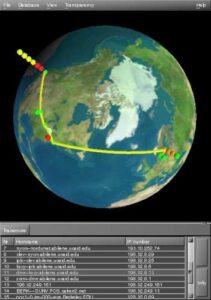
So coming of pretty impressed by that experience I wanted to understand if Claude would be able to put together something programmatically more complex, like a GTK+ application using Vulkan. [Note: should have checked the code better, but thanks to the people who pointed this out. I told the AI to use Vulkan, which it did, but not in the way I expected, I expected it to render the globe using Vulkan, but it instead decided to ensure GTK used its Vulkan backend, an important lesson in both prompt engineering and checking the code afterwards).]So I thought what would be a good example of such an application and I also figured it would be fun if I found something really old and asked Claude to help me bring it into the current age. So I suddenly remembered xtraceroute, which is an old application orginally written in GTK1 and OpenGL showing your traceroute on a 3d Globe.

Screenshot of original xtraceroute

Screenshot of the original Xtraceroute application

I went looking for it and found that while it had been updated to GTK2 since last I looked at it, it had not been touched in 20 years. So I thought, this is a great testcase. So I grabbed the code and fed it into Claude, asking Claude to give me a modern GTK4 version of this application using Vulkan. Ok so how did it go? Well it ended up being an iterative effort, with a lot of back and forth between myself and Claude. One nice feature Claude has is that you can upload screenshots of your application and Claude will use it to help you debug. Thanks to that I got a long list of screenshots showing how this application evolved over the course of the day I spent on it.

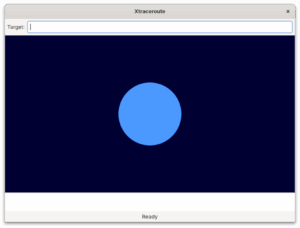
First output of Claude

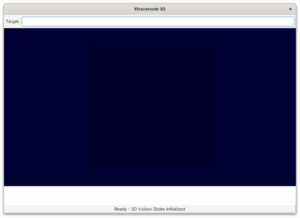
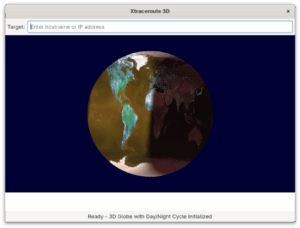
This screenshot shows Claudes first attempt of transforming the 20 year old xtraceroute application into a modern one using GTK4, Vulkan and also adding a Meson build system. My prompt to create this was feeding in the old code and asking Claude to come up with a GTK4 and Vulkan equivalent. As you can see the GTK4 UI is very simple, but ok as it is. The rendered globe leaves something to be desired though. I assume the old code had some 2d fall backcode, so Claude latched onto that and focused on trying to use the Cairo API to recreate this application, despite me telling it I wanted a Vulkan application. What what we ended up with was a 2d circle that I could spin around like a wheel of fortuen. The code did have some Vulkan stuff, but defaulted to the Cairo code.

Second attempt image

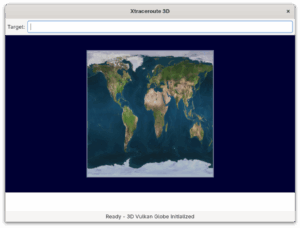
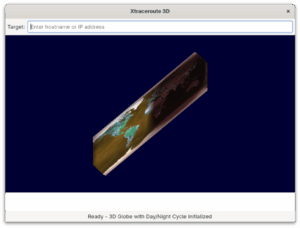
Second attempt at updating this application Anyway, I feed the screenshot of my first version back into Claude and said that the image was not a globe, it was missing the texture and the interaction model was more like a wheel of fortune. As you can see the second attempt did not fare any better, in fact we went from circle to square. This was also the point where I realized that I hadn’t uploaded the textures into Claude, so I had to tell it to load the earth.png from the local file repository.

Third attempt by Claude

Third attempt from Claude.Ok, so I feed my second screenshot back into Claude and pointed out that it was no globe, in fact it wasn’t even a circle and the texture was still missing. With me pointing out it needed to load the earth.png file from disk it came back with the texture loading. Well, I really wanted it to be a globe, so I said thank you for loading the texture, now do it on a globe.

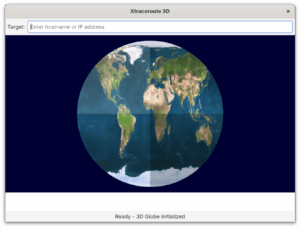
This is the output of the 4th attempt. As you can see, it did bring back a circle, but the texture was gone again. At this point I also decided I didn’t want Claude to waste anymore time on the Cairo code, this was meant to be a proper 3d application. So I told Claude to drop all the Cairo code and instead focus on making a Vulkan application.

Fifth attempt

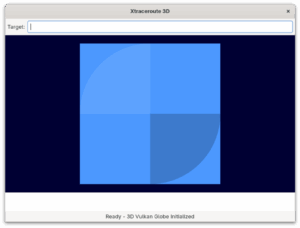
So now we finally had something that started looking like something, although it was still a circle, not a globe and it got that weird division of 4 thing on the globe. Anyway, I could see it using Vulkan now and it was loading the texture. So I was feeling like we where making some decent forward movement. So I wrote a longer prompt describing the globe I wanted and how I wanted to interact with it and this time Claude did come back with Vulkan code that rendered this as a globe, thus I didn’t end up screenshoting it unfortunately.

So with the working globe now in place, I wanted to bring in the day/night cycle from the original application. So I asked Claude to load the night texture and use it as an overlay to get that day/night effect. I also asked it to calculate the position of the sun to earth at the current time, so that it could overlay the texture in the right location. As you can see Claude did a decent job of it, although the colors was broken.

7th attempt

So I kept fighting with the color for a bit, Claude could see it was rendering it brown, but could not initally figure out why. I could tell the code was doing things mostly right so I also asked it to look at some other things, like I realized that when I tried to spin the globe it just twisted the texture. We got that fixed and also I got Claude to create some tests scripts that helped us figure out that the color issue was a RGB vs BRG issue, so as soon as we understood that then Claude was able to fix the code to render colors correctly. I also had a few iterations trying to get the scaling and mouse interaction behaving correctly.

10th attempt

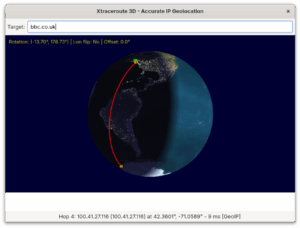
So at this point I had probably worked on this for 4-5 hours, the globe was rendering nicely and I could interact with it using the mouse. Next step was adding the traceroute lines back. By default Claude had just put in code to render some small dots on the hop points, not draw the lines. Also the old method for getting the geocoordinates, but I asked Claude to help me find some current services which it did and once I picked one it on first try gave me code that was able to request the geolocation of the ip addresses it got back. To polish it up I also asked Claude to make sure we drew the lines following the globes curvature instead of just drawing straight lines.

Final version

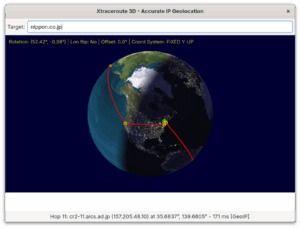
Final version of the updated Xtraceroute application. It mostly works now, but I did realize why I always thought this was a fun idea, but less interesting in practice, you often don’t get very good traceroutes back, probably due to websites being cached or hosted globally. But I felt that I had proven that with a days work Claude was able to help me bring this old GTK application into the modern world.

Conclusions

So I am not going to argue that Xtraceroute is an important application that deserved to be saved, in fact while I feel the current version works and proves my point I also lost motivation to try to polish it up due to the limitations of tracerouting, but the code is available for anyone who finds it worthwhile.

But this wasn’t really about Xtraceroute, what I wanted to show here is how someone lacking C and Vulkan development skills can actually use a tool like Claude to put together a working application even one using more advanced stuff like Vulkan, which I know many more than me would feel daunting. I also found Claude really good at producing documentation and architecture documents for your application. It was also able to give me a working Meson build system and create all the desktop integration files for me, like the .desktop file, the metainfo file and so on. For the icons I ended up using Gemini as Claude do not do image generation at this point, although it was able to take a png file and create a SVG version of it (although not a perfect likeness to the original png).

Another thing I want to say is that the way I think about this, it is not that it makes coding skills less valuable, AIs can do amazing things, but you need to keep a close eye on them to ensure the code they create actually do what you want and that it does it in a sensible manner. For instance in my reporting application I wanted to embed a pdf file and Claude initial thought was to bring in webkit to do the rendering. That would have worked, but would have added a very big and complex dependency to my application, so I had to tell it that it could just use libpoppler to do it, something Claude agreed was a much better solution. The bigger the codebase the harder it also becomes for the AI to deal with it, but I think it hose circumstances what you can do is use the AI to give you sample code for the functionality you want in the programming language you want and then you can just work on incorporating that into your big application.

The other part here if course in terms of open source is how should contributors and projects deal with this? I know there are projects where AI generated CVEs or patches are drowning them and that helps nobody. But I think if we see AI as a developers tool and that the developer using the tool is responsible for the code generated, then I think that mindset can help us navigate this. So if you used an AI tool to create a patch for your favourite project, it is your responsibility to verify that patch before sending it in, and with that I don’t mean just verifying the functionality it provides, but that the code is clean and readable and following the coding standards of said upstream project. Maintainers on the other hand can use AI to help them review and evaluate patches quicker and thus this can be helpful on both sides of the equation. I also found Claude and other AI tools like Gemini pretty good at generating test cases for the code they make, so this is another area where open source patch contributions can improve, by improving test coverage for the code.

I do also believe there are many areas where projects can greatly benefit from AI, for instance in the GNOME project a constant challenge for extension developers have been keeping their extensions up-to-date, well I do believe a tool like Claude or Gemini should be able to update GNOME Shell extensions quite easily. So maybe having a service which tries to provide a patch each time there is a GNOME Shell update might be a great help there. At the same time having a AI take a look at updated extensions and giving an first review of the update might help reduce the load on people doing code reviews on extensions and help flag problematic extensions.

I know for a lot of cases and situations uploading your code to a webservice like Claude, Gemini or Copilot is not something you want or can do. I know privacy is a big concern for many people in the community. My team at Red Hat has been working on a code assistant tool using the IBM Granite model, called Granite.code. What makes Granite different is that it relies on having the model run locally on your own system, so you don’t send your code or data of somewhere else. This of course have great advantages in terms of improving privacy and security, but it has challenges too. The top end AI models out there at the moment, of which Claude is probably the best at the time of writing this blog post, are running on hardware with vast resources in terms of computing power and memory available. Most of us do not have those kind of capabilities available at home, so the model size and performance will be significantly lower. So at the moment if you are looking for a great open source tool to use with VS Code to do things like code completion I recommend giving Granite.code a look. If you on the other hand want to do something like I have described here you need to use something like Claude, Gemini or ChatGPT. I do recommend Claude, not just because I believe them to be the best at it at the moment, but they also are a company trying to hold themselves to high ethical standards. Over time we hope to work with IBM and others in the community to improve local models, and I am also sure local hardware will keep improving, so over time the experience you can get with a local model on your laptop at least has less of a gap than what it does today compared to the big cloud hosted models. There is also the middle of the road option that will become increasingly viable, where you have a powerful server in your home or at your workplace that can at least host a midsize model, and then you connect to that on your LAN. I know IBM is looking at that model for the next iteration of Granite models where you can choose from a wide variety of sizes, some small enough to be run on a laptop, others of a size where a strong workstation or small server can run them or of course the biggest models for people able to invest in top of the line hardware to run their AI.

Also the AI space is moving blazingly fast, if you are reading this 6 Months from now I am sure the capabilities of online and local models will have changed drastically already.

So to all my friends in the Linux community I ask you to take a look at AI and what it can do and then lets work together on improving it, not just in terms of capabilities, but trying to figure out things like societal challenges around it and sustainability concerns I also know a lot of us got.

Whats next for this code

As I mentioned I while I felt I got it to a point where I proved to myself it worked, I am not planning on working anymore on it. But I did make a cute little application for internal use that shows a spinning globe with all global Red Hat offices showing up as little red lights and where it pulls Red Hat news at the bottom. Not super useful either, but I was able to use Claude to refactor the globe rendering code from xtraceroute into this in just a few hours.

Red Hat Globe

Red Hat Offices Globe and news.

Fedora Workstation 42 is upon us!

We are excited about the Fedora Workstation 42 released today. Having worked on some great features for it.

Fedora Workstation 42 HDR edition
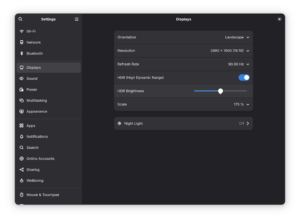
I would say that the main feature that landed was HDR or High Dynamic Range. It is a feature we spent years on with many team members involved and a lot of collaboration with various members of the wider community.

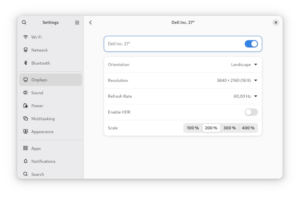
GNOME Settings menu showing HDR settings

GNOME Settings menu showing HDR settings

The fact that we got this over the finish line was especially due to all the work Sebastian Wick put into it in collaboration with Pekka Paalanen around HDR Wayland specification and implementations.
Another important aspect was tools like libdisplay which was co-created with Simon Ser, with others providing more feedback and assistance in the final stretch of the effort.

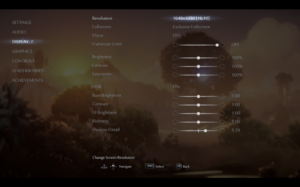
Ori and the Will of the Wisps screenshot

HDR setup in Ori and Will of the Wisps


That said a lot of other people at Red Hat and in the community deserve shout outs for this too. Like Xaver Hugl whose work on HDR in Kwin was a very valuable effort that helped us move the GNOME support forward too. Matthias Clasen and Benjamin Otte for their work on HDR support in GTK+, Martin Stransky for his work on HDR support in Firefox, Jonas Aadahl and Olivier Fourdan for their protocol and patch reviews. Jose Exposito for packaging up the Mesa Vulkan support for Fedora 42.

One area that should benefit from HDR support are games. In the screenshot about you see the game Ori and the Will of the Wisps which is known for great HDR support. Valve will need to update to a Wine version for Proton that supports Wayland natively though before this just works, at the moment you can get it working using gamescope, but hopefully soon it will just work under both Mutter and Kwin.

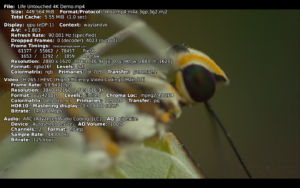
Also a special shoutout to the MPV community for quickly jumping on this and releasing a HDR capable video player recently.

MPV video player playing HDR content

MPV video player playing HDR content

Of course getting Fedora Workstation 42 to out with these features is just the beginning, with the baseline support it now is really the time when application maintainers have a real chance of starting to make use of these features, so I would expect various content creative applications for instance to start having support over the next year.

For the desktop itself there are also open questions we need to decide on like:

  • Format to use for HDR screenshots
  • Better backlight and brightness handling
  • Better offloading
  • HDR screen recording video format
  • How to handle HDR webcams (seems a lot of them are not really capable of producing HDR output).
  • Version of the binary NVIDIA driver released supporting the VK_EXT_hdr_metadata and VK_COLOR_SPACE_HDR10_ST2084_EXT Vulkan extension on Linux
  • A million smaller issues we will need to iron out

Accessibility
Our accessibility team has been hard at work trying to ensure we have a great accessibility story in Fedora Workstation 42. Our accessibility team with Lukas Tyrychtr and Bohdan Milar has been working hard together with others to ensure that Fedora Workstation 42 has the best accessibility support you can get on Linux. One major effort that landed was the new keyboard monitoring interface which is critical for making Orca work well under Wayland. This was a collaboration of between Lukas Tyrychtr, Matthias Clasen and Carlos Garnacho on our team. If you are interested in Accessibility, as a user or a developer or both then make sure to join in by reaching out to the Accessibility Working group

PipeWire
PipeWire also keeps going strong with continuous improvements and bugfixes. Thanks to the great work by Jan Grulich the support for PipeWire in Firefox and Chrome is now working great, including for camera handling. It is an area where we want to do an even better job though, so Wim Taymans is currently looking at improving video handling to ensure we are using the best possible video stream the camera can provide and handle conversion between formats transparently. He is currently testing it out using a ffmpeg software backend, but the end goal is to have it all hardware accelerated through directly using Vulkan.

Another feature Wim Taymans added recently is MIDI2 support. This is the next generation of MIDI with only a limited set of hardware currently supporting it, but on the other hand it feels good that we are now able to be ahead of the curve instead of years behind thanks to the solid foundation we built with Pipewire.

Wayland
For a long time the team has been focused on making sure Wayland has all the critical pieces and was functionality wise on the same level as X11. For instance we spent a lot of time and effort on ensuring proper remote desktop support. That work all landed in the previous Fedora release which means that over the last 6 Months the team has had more time to look at things like various proposed Wayland protocols and get them supported in GNOME. Thanks to that we helped ensure the Cursor Shape Protocol and Toplevel Drag protocols got landed in time for this release. We are already looking and what to help land for the next release, so expect a continued acceleration in Wayland protocol adoption going forward.

First steps into AI
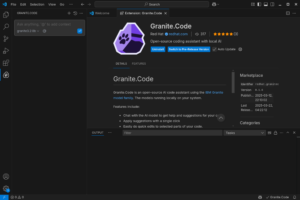
So an effort we been plugging away at recently is starting to bring AI tooling to Open Source desktop applications. Our first effort in this regard is Granite.code. Granite.code is a extension for Visual Studio Code that sets up a local AI engine on your system to help with various tasks including code generation and chat inside Visual Studio Code. So what is special about this effort is that it relies on downloading and running a copy of the open source AI Granite LLM model to your system instead on relying on it being run in a cloud instance somewhere. That means you can use Granite.code without having to share your data and work with someone else. Granite.code is still very early stage and it requires a NVIDIA or AMD GPU with over 8GB of video ram to use under Linux. (It also runs under Windows and MacOS X). It is still in a pre-release stage, we are waiting for the Granite 3.3 model update to enable some major features for us before we make the first formal release, but for those willing to help us test you can search for Granite in the Visual Studio Code extension marketplace and install it.
We are hoping though that this will just the starting point where our work can get picked up and used by other IDEs out there too and also we are thinking about how we can offer AI features in other parts of the desktop too.

Granite.code

Granite.code running on Linux

Looking ahead at 2025 and Fedora Workstation and jobs on offer!

So a we are a little bit into the new year I hope everybody had a great break and a good start of 2025. Personally I had a blast having gotten the kids an air hockey table as a Yuletide present :). Anyway, wanted to put this blog post together talking about what we are looking at for the new year and to let you all know that we are hiring.

Artificial Intelligence
One big item on our list for the year is looking at ways Fedora Workstation can make use of artificial intelligence. Thanks to IBMs Granite effort we know have an AI engine that is available under proper open source licensing terms and which can be extended for many different usecases. Also the IBM Granite team has an aggressive plan for releasing updated versions of Granite, incorporating new features of special interest to developers, like making Granite a great engine to power IDEs and similar tools. We been brainstorming various ideas in the team for how we can make use of AI to provide improved or new features to users of GNOME and Fedora Workstation. This includes making sure Fedora Workstation users have access to great tools like RamaLama, that we make sure setting up accelerated AI inside Toolbx is simple, that we offer a good Code Assistant based on Granite and that we come up with other cool integration points.

Wayland
The Wayland community had some challenges last year with frustrations boiling over a few times due to new protocol development taking a long time. Some of it was simply the challenge of finding enough people across multiple projects having the time to follow up and help review while other parts are genuine disagreements of what kind of things should be Wayland protocols or not. That said I think that problem has been somewhat resolved with a general understanding now that we have the ‘ext’ namespace for a reason, to allow people to have a space to review and make protocols without an expectation that they will be universally implemented. This allows for protocols of interest only to a subset of the community going into ‘ext’ and thus allowing protocols that might not be of interest to GNOME and KDE for instance to still have a place to live.

The other more practical problem is that of having people available to help review protocols or providing reference implementations. In a space like Wayland where you need multiple people from multiple different projects it can be hard at times to get enough people involved at any given time to move things forward, as different projects have different priorities and of course the developers involved might be busy elsewhere. One thing we have done to try to help out there is to set up a small internal team, lead by Jonas Ådahl, to discuss in-progress Wayland protocols and assign people the responsibility to follow up on those protocols we have an interest in. This has been helpful both as a way for us to develop internal consensus on the best way forward, but also I think our contribution upstream has become more efficient due to this.

All that said I also believe Wayland protocols will fade a bit into the background going forward. We are currently at the last stage of a community ‘ramp up’ on Wayland and thus there is a lot of focus on it, but once we are over that phase we will probably see what we saw with X.org extensions over time, that for the most time new extensions are so niche that 95% of the community don’t pay attention or care. There will always be some new technology creating the need for important new protocols, but those are likely to come along a relatively slow cadence.

High Dynamic Range

HDR support in GNOME Control Center

HDR support in GNOME Control Center

As for concrete Wayland protocols the single biggest thing for us for a long while now has of course been the HDR support for Linux. And it was great to see the HDR protocol get merged just before the holidays. I also want to give a shout out to Xaver Hugl from the KWin project. As we where working to ramp up HDR support in both GNOME Shell and GTK+ we ended up working with Xaver and using Kwin for testing especially the GTK+ implementation. Xaver was very friendly and collaborative and I think HDR support in both GNOME and KDE is more solid thanks to that collaboration, so thank you Xaver!

Talking about concrete progress on HDR support Jonas Adahl submitted merge requests for HDR UI controls for GNOME Control Center. This means you will be able to configure the use of HDR on your system in the next Fedora Workstation release.

PipeWire
I been sharing a lot of cool PipeWire news here in the last couple of years, but things might slow down a little as we go forward just because all the major features are basically working well now. The PulseAudio support is working well and we get very few bug reports now against it. The reports we are getting from the pro-audio community is that PipeWire works just as well or better as JACK for most people in terms of for instance latency, and when we do see issues with pro-audio it tends to be more often caused by driver issues triggered by PipeWire trying to use the device in ways that JACK didn’t. We been resolving those by adding more and more options to hardcode certain options in PipeWire, so that just as with JACK you can force PipeWire to not try things the driver has problems with. Of course fixing the drivers would be the best outcome, but for some of these pro-audio cards they are so niche that it is hard to find developers who wants to work on them or who has hardware to test with.

We are still maturing the video support although even that is getting very solid now. The screen capture support is considered fully mature, but the camera support is still a bit of a work in progress, partially because we are going to a generational change the camera landscape with UVC cameras being supplanted by MIPI cameras. Resolving that generational change isn’t just on PipeWire of course, but it does make the a more volatile landscape to mature something in. Of course an advantage here is that applications using PipeWire can easily switch between V4L2 UVC cameras and libcamera MIPI cameras, thus helping users have a smooth experience through this transition period.
But even with the challenges posed by this we are moving rapidly forward with Firefox PipeWire camera support being on by default in Fedora now, Chrome coming along quickly and OBS Studio having PipeWire support for some time already. And last but not least SDL3 is now out with PipeWire camera support.

MIPI camera support
Hans de Goede, Milan Zamazal and Kate Hsuan keeps working on making sure MIPI cameras work under Linux. MIPI cameras are a step forward in terms of technical capabilities, but at the moment a bit of a step backward in terms of open source as a lot of vendors believe they have ‘secret sauce’ in the MIPI camera stacks. Our works focuses mostly on getting the Intel MIPI stack fully working under Linux with the Lattice MIPI aggregator being the biggest hurdle currently for some laptops. Luckily Alan Stern, the USB kernel maintainer, is looking at this now as he got the hardware himself.

Flatpak
Some major improvements to the Flatpak stack has happened recently with the USB portal merged upstream. The USB portal came out of the Sovereign fund funding for GNOME and it gives us a more secure way to give sandboxed applications access to you USB devcices. In a somewhat related note we are still working on making system daemons installable through Flatpak, with the usecase being applications that has a system daemon to communicate with a specific piece of hardware for example (usually through USB). Christian Hergert got this on his todo list, but we are at the moment waiting for Lennart Poettering to merge some pre-requisite work into systemd that we want to base this on.

Accessibility
We are putting in a lot of effort towards accessibility these days. This includes working on portals and Wayland extensions to help facilitate accessibility, working on the ORCA screen reader and its dependencies to ensure it works great under Wayland. Working on GTK4 to ensure we got top notch accessibility support in the toolkit and more.

GNOME Software
Last year Milan Crha landed the support for signing the NVIDIA driver for use on secure boot. The main feature Milan he is looking at now is getting support for DNF5 into GNOME Software. Doing this will resolve one of the longest standing annoyances we had, which is that the dnf command line and GNOME Software would maintain two separate package caches. Once the DNF5 transition is done that should be a thing of the past and thus less risk of disk space being wasted on an extra set of cached packages.

Firefox
Martin Stransky and Jan Horak has been working hard at making Firefox ready for the future, with a lot of work going into making sure it supports the portals needed to function as a flatpak and by bringing HDR support to Firefox. In fact Martin just got his HDR patches for Firefox merged this week. So with the PipeWire camera support, Flatpak support and HDR support in place, Firefox will be ready for the future.

We are hiring! looking for 2 talented developers to join the Red Hat desktop team
We are hiring! So we got 2 job openings on the Red Hat desktop team! So if you are interested in joining us in pushing the boundaries of desktop linux forward please take a look and apply. For these 2 positions we are open to remote workers across the globe and while the job adds list specific seniorities we are somewhat flexible on that front too for the right candidate. So be sure to check out the two job listings and get your application in! If you ever wanted to work fulltime on GNOME and related technologies this is your chance.

Fedora Workstation development update – Artificial Intelligence edition

There are times when you feel your making no progress and there are other times when things feel like they are landing in quick succession. Luckily this definitely is the second when a lot of our long term efforts are finally coming over the finish line. As many of you probably know our priorities tend to be driven by a combination of what our RHEL Workstation customers need, what our hardware partners are doing and what is needed for Fedora Workstation to succeed. We also try to be good upstream partners and do patch reviews and participate where we can in working on upstream standards, especially those of course of concern to our RHEL Workstation and Server users. So when all those things align we are at our most productive and that seems to be what is happening now. Everything below is features in flight that will at the latest land in Fedora Workstation 41.

Artificial Intelligence

Granite LLM

IBM Granite LLM models usher in a new era of open source AI.


One of the areas of great importance to Red Hat currently is working on enabling our customers and users to take advantage of the advances in Artificial Intelligence. We do this in a lot of interesting ways like our recently announced work with IBM to release the high quality Granite AI models under terms that make them the most open major vendor AI models according to the Stanford Foundation Model Transparency Index , but not only are we releasing the full LLM source code, we are also creating a project to make modifying and teaching the LLM a lot easier through a project we call Instructlab. Instructlab is enabling almost anyone to quickly download a Granite LLM model and start teaching it specific things relevant to you or your organization. This put you in control of the AI and what it knows and can do as opposed to being demoted to a pure consumer.

And it is not just Granite, we are ensuring other other major AI projects will work with Fedora too, like Meta’s popular Llama LLM. And a big step for that is how Tom Rix has been working on bringing in AMD accelerated support (ROCm) for PyTorch to Fedora. PyTorch is an optimized tensor library for deep learning using GPUs and CPUs. The long term goal is that you should be able to just install PyTorch on Fedora and have it work hardware accelerated with any of the 3 major GPU vendors chipsets.

NVIDIA in Fedora
Fedora Workstation
So the clear market leader at the moment for powering AI workloads in NVIDIA so I am also happy to let you know about two updates we are working on that will make you life better on Fedora when using NVIDIA GPUs, be that for graphics or for compute or Artificial Intelligence. So for the longest time we have had easy install of the NVIDIA driver through GNOME Software in Fedora Workstation, unfortunately this setup never dealt with what is now the default usecase, which is using it with a system that has secure boot enabled. So the driver install was dropped from GNOME Software in our most recent release as the only way for people to get it working was through using mokutils on the command line, but the UI didn’t tell you that. Well we of course realize that sending people back to the command line to get this driver installed is highly unfortunate so Milan Crha has been working together with Alan Day and Jakub Steiner to come up with a streamlined user experience in GNOME Software to let you install the binary NVIDIA driver and provide you with an integrated graphical user interface help to sign the kernel module for use with secure boot. This is a bit different than what we for instance are doing in RHEL, where we are working with NVIDIA to provide pre-signed kernel modules, but that is a lot harder to do in Fedora due to the rapidly updating kernel versions and which most Fedora users appreciate as a big plus. So instead what we are for opting in Fedora is as I said to make it simple for you to self-sign the kernel module for use with secure boot. We are currently looking at when we can make this feature available, but no later than Fedora Workstation 41 for sure.

Toolbx getting top notch NVIDIA integration

Toolbx

Container Toolbx enables developers quick and easy access to their favorite development platforms


Toolbx, our incredible developer focused containers tool, is going from strength to strength these days with the rewrite from the old shell scripts to Go starting to pay dividends. The next major feature that we are closing in on is full NVIDIA driver support with Toolbx. As most of you know Toolbx is our developer container solution which makes it super simple to set up development containers with specific versions of Fedora or RHEL or many other distributions. Debarshi Ray has been working on implementing support for the official NVIDIA container device interface module which should enable us to provide full NVIDIA and CUDA support for Toolbx containers. This should provide reliable NVIDIA driver support going forward and Debarshi is currently testing various AI related container images to ensure they run smoothly on the new setup.

We are also hoping the packaging fixes to subscription manager will land soon as that will make using RHEL containers on Fedora a lot smoother. While this feature basically already works as outlined here we do hope to make it even more streamlined going forward.

Open Source NVIDIA support
Of course being Red Hat we haven’t forgotten about open source here, you probably heard about Nova our new Rust based upstream kernel driver for NVIDIA hardware which will provided optimized support for the hardware supported by NVIDIAs firmware (basically all newer ones) and accelerate Vulkan through the NVK module and provide OpenGL through Zink. That effort is still quite early days, but there is some really cool developments happening around Nova that I am not at liberty to share yet, but I hope to be able to talk about those soon.

High Dynamic Range (HDR)
Jonas Ådahl after completing the remote access work for GNOME under Wayland has moved his focus to help land the HDR support in mutter and GNOME Shell. He recently finished rebasing his HDR patches onto a wip merge request from
Georges Stavracas which ported gnome-shell to using paint nodes,

So the HDR enablement in mutter and GNOME shell is now a set of 3 patches.

With this the work is mostly done, what is left is avoiding over exposure of the cursor, and inhibiting direct scanout.

We also hope to help finalize the upstream Wayland specs soon so that everyone can implement this and know the protocols are stable and final.

DRM leasing – VR Headsets
VR Googles
The most common usecase for DRM leasing is VR headsets, but it is also a useful feature for things like video walls. José Expósito is working on finalizing a patch for it using the Wayland protocol adopted by KDE and others. We where somewhat hesitant to go down this route as we felt a portal would have been a better approach, especially as a lot of our experienced X.org developers are worried that Wayland is in the process of replicating one of the core issues with X through the unmanageable plethora of Wayland protocols that is being pushed. That said, the DRM leasing stuff was not a hill worth dying on here, getting this feature out to our users in a way they could quickly use was more critical, so DRM leasing will land soon through this merge request.

Explicit sync
Another effort that we have put a lot of effort into together with our colleagues at NVIDIA is landing support for what is called explicit sync into the Linux kernel and the graphics drivers.The linux graphics stack was up to this point using something called implicit sync, but the NVIDIA drivers did not work well with that and thus people where experiencing ‘blinking’ applications under Wayland. So we worked with NVIDIA and have landed the basic support in the kernel and in GNOME and thus once the 555 release of the NVIDIA driver is out we hope the ‘blinking’ issues are fully resolved for your display. There has been some online discussion about potential performance gains from this change too, across all graphics drivers, but the reality of this is somewhat uncertain or at least it is still unclear if there will be real world measurable gains from adding explicit sync. I heard knowledgeable people argue both sides with some saying there should be visible performance gains while others say the potential gains will be so specific that unless you write a test to benchmark it explicitly you will not be able to detect a difference. But what is beyond doubt is that this will make using the NVIDIA stack with Wayland a lot better a that is a worthwhile goal in itself. The one item we are still working on is integrating the PipeWire support for explicit sync into our stack, because without it you might have the same flickering issues with PipeWire streams on top of the NVIDIA driver that you have up to now seen on your screen. So for instance if you are using PipeWire for screen capture it might look fine on screen with the fixes already merged, but the captured video has flickering. Wim Taymans landed some initial support in PipeWire already so now Michel Dänzer is working on implementing the needed bits for PipeWire in mutter. At the same time Wim is working on ensuring we have a testing client available to verify the compositor support. Once everything has landed in mutter and we been able to verify that it works with the sample client we will need to add support to client applications interacting with PipeWire, like Firefox, Chrome, OBS Studio and GNOME-remote-desktop.

Fedora Workstation 40 – what are we working on

So Fedora Workstation 40 Beta has just come out so I thought I share a bit about some of the things we are working on for Fedora Workstation currently and also major changes coming in from the community.

Flatpak

Flatpaks has been a key part of our strategy for desktop applications for a while now and we are working on a multitude of things to make Flatpaks an even stronger technology going forward. Christian Hergert is working on figuring out how applications that require system daemons will work with Flatpaks, using his own Sysprof project as the proof of concept application. The general idea here is to rely on the work that has happened in SystemD around sysext/confext/portablectl trying to figure out who we can get a system service installed from a Flatpak and the necessary bits wired up properly. The other part of this work, figuring out how to give applications permissions that today is handled with udev rules, that is being worked on by Hubert Figuière based on earlier work by Georges Stavracas on behalf of the GNOME Foundation thanks to the sponsorship from the Sovereign Tech Fund. So hopefully we will get both of these two important issues resolved soon. Kalev Lember is working on polishing up the Flatpak support in Foreman (and Satellite) to ensure there are good tools for managing Flatpaks when you have a fleet of systems you manage, building on the work of Stephan Bergman. Finally Jan Horak and Jan Grulich is working hard on polishing up the experience of using Firefox from a fully sandboxed Flatpak. This work is mainly about working with the upstream community to get some needed portals over the finish line and polish up some UI issues in Firefox, like this one.

Toolbx

Toolbx, our project for handling developer containers, is picking up pace with Debarshi Ray currently working on getting full NVIDIA binary driver support for the containers. One of our main goals for Toolbx atm is making it a great tool for AI development and thus getting the NVIDIA & CUDA support squared of is critical. Debarshi has also spent quite a lot of time cleaning up the Toolbx website, providing easier access to and updating the documentation there. We are also moving to use the new Ptyxis (formerly Prompt) terminal application created by Christian Hergert, in Fedora Workstation 40. This both gives us a great GTK4 terminal, but we also believe we will be able to further integrate Toolbx and Ptyxis going forward, creating an even better user experience.

Nova

So as you probably know, we have been the core maintainers of the Nouveau project for years, keeping this open source upstream NVIDIA GPU driver alive. We plan on keep doing that, but the opportunities offered by the availability of the new GSP firmware for NVIDIA hardware means we should now be able to offer a full featured and performant driver. But co-hosting both the old and the new way of doing things in the same upstream kernel driver has turned out to be counter productive, so we are now looking to split the driver in two. For older pre-GSP NVIDIA hardware we will keep the old Nouveau driver around as is. For GSP based hardware we are launching a new driver called Nova. It is important to note here that Nova is thus not a competitor to Nouveau, but a continuation of it. The idea is that the new driver will be primarily written in Rust, based on work already done in the community, we are also evaluating if some of the existing Nouveau code should be copied into the new driver since we already spent quite a bit of time trying to integrate GSP there. Worst case scenario, if we can’t reuse code, we use the lessons learned from Nouveau with GSP to implement the support in Nova more quickly. Contributing to this effort from our team at Red Hat is Danilo Krummrich, Dave Airlie, Lyude Paul, Abdiel Janulgue and Phillip Stanner.

Explicit Sync and VRR

Another exciting development that has been a priority for us is explicit sync, which is critical for especially the NVidia driver, but which might also provide performance improvements for other GPU architectures going forward. So a big thank you to Michel Dänzer , Olivier Fourdan, Carlos Garnacho; and Nvidia folks, Simon Ser and the rest of community for working on this. This work has just finshed upstream so we will look at backporting it into Fedora Workstaton 40. Another major Fedora Workstation 40 feature is experimental support for Variable Refresh Rate or VRR in GNOME Shell. The feature was mostly developed by community member Dor Askayo, but Jonas Ådahl, Michel Dänzer, Carlos Garnacho and Sebastian Wick have all contributed with code reviews and fixes. In Fedora Workstation 40 you need to enable it using the command

gsettings set org.gnome.mutter experimental-features "['variable-refresh-rate']"

PipeWire

Already covered PipeWire in my post a week ago, but to quickly summarize here too. Using PipeWire for video handling is now finally getting to the stage where it is actually happening, both Firefox and OBS Studio now comes with PipeWire support and hopefully we can also get Chromium and Chrome to start taking a serious look at merging the patches for this soon. Whats more Wim spent time fixing Firewire FFADO bugs, so hopefully for our pro-audio community users this makes their Firewire equipment fully usable and performant with PipeWire. Wim did point out when I spoke to him though that the FFADO drivers had obviously never had any other consumer than JACK, so when he tried to allow for more functionality the drivers quickly broke down, so Wim has limited the featureset of the PipeWire FFADO module to be an exact match of how these drivers where being used by JACK. If the upstream kernel maintainer is able to fix the issues found by Wim then we could look at providing a more full feature set. In Fedora Workstation 40 the de-duplication support for v4l vs libcamera devices should work as soon as we update Wireplumber to the new 0.5 release.

To hear more about PipeWire and the latest developments be sure to check out this interview with Wim Taymans by the good folks over at Destination Linux.

Remote Desktop

Another major feature landing in Fedora Workstation 40 that Jonas Ådahl and Ray Strode has spent a lot of effort on is finalizing the remote desktop support for GNOME on Wayland. So there has been support for remote connections for already logged in sessions already, but with these updates you can do the login remotely too and thus the session do not need to be started already on the remote machine. This work will also enable 3rd party solutions to do remote logins on Wayland systems, so while I am not at liberty to mention names, be on the lookout for more 3rd party Wayland remoting software becoming available this year.

This work is also important to help Anaconda with its Wayland transition as remote graphical install is an important feature there. So what you should see there is Anaconda using GNOME Kiosk mode and the GNOME remote support to handle this going forward and thus enabling Wayland native Anaconda.

HDR

Another feature we been working on for a long time is HDR, or High Dynamic Range. We wanted to do it properly and also needed to work with a wide range of partners in the industry to make this happen. So over the last year we been contributing to improve various standards around color handling and acceleration to prepare the ground, work on and contribute to key libraries needed to for instance gather the needed information from GPUs and screens. Things are coming together now and Jonas Ådahl and Sebastian Wick are now going to focus on getting Mutter HDR capable, once that work is done we are by no means finished, but it should put us close to at least be able to start running some simple usecases (like some fullscreen applications) while we work out the finer points to get great support for running SDR and HDR applications side by side for instance.

PyTorch

We want to make Fedora Workstation a great place to do AI development and testing. First step in that effort is packaging up PyTorch and making sure it can have working hardware acceleration out of the box. Tom Rix has been leading that effort on our end and you will see the first fruits of that labor in Fedora Workstation 40 where PyTorch should work with GPU acceleration on AMD hardware (ROCm) out of the box. We hope and expect to be able to provide the same for NVIDIA and Intel graphics eventually too, but this is definitely a step by step effort.

PipeWire camera handling is now happening!

We hit a major milestones this week with the long worked on adoption of PipeWire Camera support finally starting to land!

Not long ago Firefox was released with experimental PipeWire camera support thanks to the great work by Jan Grulich.

Then this week OBS Studio shipped with PipeWire camera support thanks to the great work of Georges Stavracas, who cleaned up the patches and pushed to get them merged based on earlier work by himself, Wim Taymans and Colulmbarius. This means we now have two major applications out there that can use PipeWire for camera handling and thus two applications whose video streams that can be interacted with through patchbay applications like Helvum and qpwgraph.
These applications are important and central enough that having them use PipeWire are in itself useful, but they will now also provide two examples of how to do it for application developers looking at how to add PipeWire camera support to their own applications; there is no better documentation than working code.

The PipeWire support is also paired with camera portal support. The use of the portal also means we are getting closer to being able to fully sandbox media applications in Flatpaks which is an important goal in itself. Which reminds me, to test out the new PipeWire support be sure to grab the official OBS Studio Flatpak from Flathub.

PipeWire camera handling with OBS Studio, Firefox and Helvum.

PipeWire camera handling with OBS Studio, Firefox and Helvum.


Let me explain what is going on in the screenshot above as it is a lot. First of all you see Helvum there on the right showning all the connections made through PipeWire, both the audio and in yellow, the video. So you can see how my Logitech BRIO camera is feeding a camera video stream into both OBS Studio and Firefox. You also see my Magewell HDMI capture card feeding a video stream into OBS Studio and finally gnome-shell providing a screen capture feed that is being fed into OBS Studio. On the left you see on the top Firefox running their WebRTC test app capturing my video then just below that you see the OBS Studio image with the direct camera feed on the top left corner, the screencast of Firefox just below it and finally the ‘no signal’ image is from my HDMI capture card since I had no HDMI device connected to it as I was testing this.

For those wondering work is also underway to bring this into Chromium and Google Chrome browsers where Michael Olbrich from Pengutronix has been pushing to get patches written and merged, he did a talk about this work at FOSDEM last year as you can see from these slides with this patch being the last step to get this working there too.

The move to PipeWire also prepared us for the new generation of MIPI cameras being rolled out in new laptops and helps push work on supporting those cameras towards libcamera, the new library for dealing with the new generation of complex cameras. This of course ties well into the work that Hans de Goede and Kate Hsuan has been doing recently, along with Bryan O’Donoghue from Linaro, on providing an open source driver for MIPI cameras and of course the incredible work by Laurent Pinchart and Kieran Bingham from Ideas on board on libcamera itself.

The PipeWire support is of course fresh and I am sure we will find bugs and corner cases that needs fixing as more people test out the functionality in both Firefox and OBS Studio and there are some interface annoyances we are working to resolve. For instance since PipeWire support both V4L and libcamera as a backend you do atm get double entries in your selection dialogs for most of your cameras. Wireplumber has implemented de-deplucation code which will ensure only the libcamera listing will show for cameras supported by both v4l and libcamera, but is only part of the development version of Wireplumber and thus it will land in Fedora Workstation 40, so until that is out you will have to deal with the duplicate options.

Camera selection dialog

Camera selection dialog


We are also trying to figure out how to better deal with infraread cameras that are part of many modern webcams. Obviously you usually do not want to use an IR camera for your video calls, so we need to figure out the best way to identify them and ensure they are clearly marked and not used by default.

Another recent good PipeWire new tidbit that became available with the PipeWire 1.0.4 release PipeWire maintainer Wim Taymans also fixed up the FireWire FFADO support. The FFADO support had been in there for some time, but after seeing Venn Stone do some thorough tests and find issues we decided it was time to bite the bullet and buy some second hand Firewire hardware for Wim to be able to test and verify himself.

Focusrite firewire device

Focusrite firewire device

.
Once the Focusrite device I bought landed at Wims house he got to work and cleaned up the FFADO support and make it both work and be performant.
For those unaware FFADO is a way to use Firewire devices without going through ALSA and is popular among pro-audio folks because it gives lower latencies. Firewire is of course a relatively old technology at this point, but the audio equipment is still great and many audio engineers have a lot of these devices, so with this fixed you can plop a Firewire PCI card into your PC and suddenly all those old Firewire devices gets a new lease on life on your Linux system. And you can buy these devices on places like ebay or facebook marketplace for a fraction of their original cost. In some sense this demonstrates the same strength of PipeWire as the libcamera support, in the libcamera case it allows Linux applications a way to smoothly transtion to a new generation of hardware and in this Firewire case it allows Linux applications to keep using older hardware with new applications.

So all in all its been a great few weeks for PipeWire and for Linux Audio AND Video, and if you are an application maintainer be sure to look at how you can add PipeWire camera support to your application and of course get that application packaged up as a Flatpak for people using Fedora Workstation and other distributions to consume.