Using AI to create some hardware tools and bring back the past

As I talked about in a couple of blog posts now I been working a lot with AI recently as part of my day to day job at Red Hat, but also spending a lot of evenings and weekend time on this (sorry kids pappa has switched to 1950’s mode for now). One of the things I spent time on is trying to figure out what the limitations of AI models are and what kind of use they can have for Open Source developers.

One thing to mention before I start talking about some of my concrete efforts is that I more and more come to conclude that AI is an incredible tool to hypercharge someone in their work, but I feel it tend to fall short for fully autonomous systems. In my experiments AI can do things many many times faster than you ordinarily could, talking specifically in the context of coding here which is what is most relevant for those of us in the open source community.

So one annoyance I had for years as a Linux user is that I get new hardware which has features that are not easily available to me as a Linux user. So I have tried using AI to create such applications for some of my hardware which includes an Elgato Light and a Dell Ultrasharp Webcam.

I found with AI and this is based on using Google Gemini, Claude Sonnet and Opus and OpenAI codex, they all required me to direct and steer the AI continuously, if I let the AI just work on its own, more often than not it would end up going in circles or diverging from the route it was supposed to go, or taking shortcuts that makes wanted output useless.On the other hand if I kept on top of the AI and intervened and pointed it in the right direction it could put together things for me in very short time spans.
My projects are also mostly what I would describe as end leaf nodes, the kind of projects that already are 1 person projects in the community for the most part. There are extra considerations when contributing to bigger efforts, and I think a point I seen made by others in the community too is that you need to own the patches you submit, meaning that even if an AI helped your write the patch you still need to ensure that what you submit is in a state where it can be helpful and is merge-able. I know that some people feel that means you need be capable of reviewing the proposed patch and ensuring its clean and nice before submitting it, and I agree that if you expect your patch to get merged that has to be the case. On the other hand I don’t think AI patches are useless even if you are not able to validate them beyond ‘does it fix my issue’.

My friend and PipeWire maintainer Wim Taymans and I was talking a few years ago about what I described at the time as the problem of ‘bad quality patches’, and this was long before AI generated code was a thing. Wim response to me which I often thought about afterwards was “a bad patch is often a great bug report”. And that would hold true for AI generated patches to. If someone makes a patch using AI, a patch they don’t have the ability to code review themselves, but they test it and it fixes their problem, it might be a good bug report and function as a clearer bug report than just a written description by the user submitting the report. Of course they should be clear in their bug report that they don’t have the skills to review the patch themselves, but that they hope it can be useful as a tool for pinpointing what isn’t working in the current codebase.

Anyway, let me talk about the projects I made. They are all found on my personal website Linuxrising.org a website that I also used AI to update after not having touched the site in years.

Elgato Light GNOME Shell extension

Elgato Light GNOME Shell extension

Elgato Light GNOME Shell extension

The first project I worked on is a GNOME Shell extension for controlling my Elgato Key Wifi Lamp. The Elgato lamp is basically meant for podcasters and people doing a lot of video calls to be able to easily configure light in their room to make a good recording. The lamp announces itself over mDNS, and thus can be controlled via Avahi. For Windows and Mac the vendor provides software to control their lamp, but unfortunately not for Linux.

There had been GNOME Shell extensions for controlling the lamp in the past, but they had not been kept up to date and their feature set was quite limited. Anyway, I grabbed one of these old extensions and told Claude to update it for latest version of GNOME. It took a few iterations of testing, but we eventually got there and I had a simple GNOME Shell extension that could turn the lamp off and on and adjust hue and brightness. This was a quite straightforward process because I had code that had been working at some point, it just needed some adjustments to work with current generation of GNOME Shell.

Once I had the basic version done I decided to take it a bit further and try to recreate the configuration dialog that the windows application offers for the full feature set which took me quite a bit of back and forth with Claude. I found that if I ask Claude to re-implement from a screenshot it recreates the functionality of the user interface first, meaning that it makes sure that if the screenshot has 10 buttons, then you get a GUI with 10 buttons. You then have to iterate both on the UI design, for example telling Claude that I want a dark UI style to match the GNOME Shell, and then I also had to iterate on each bit of functionality in the UI. Like most of the buttons in the UI didn’t really do anything from the start, but when you go back and ask Claude to add specific functionality per button it is usually able to do so.

Elgato Light Settings Application

Elgato Light Settings Application

So this was probably a fairly easy thing for the AI because all the functionality of the lamp could be queried over Avahi, there was no ‘secret’ USB registers to be set or things like that.
Since the application was meant to be part of the GNOME Shell extension I didn’t want to to have any dependency requirements that the Shell extension itself didn’t have, so I asked Claude to make this application in JavaScript and I have to say so far I haven’t seen any major differences in terms of the AIs ability to generate different languages. The application now reproduce most of the functionality of the Windows application. Looking back I think it probably took me a couple of days in total putting this tool together.

Dell Ultrasharp Webcam 4K

Dell UltraSharp 4K settings application for Linux

Dell UltraSharp 4K settings application for Linux

The second application on the list is a controller application for my Dell UltraSharp Webcam 4K UHD (WB7022). This is a high end Webcam I that have been using for a while and it is comparable to something like the Logitech BRIO 4K webcam. It has mostly worked since I got it with the generic UVC driver and I been using it for my Google Meetings and similar, but since there was no native Linux control application I could not easily access a lot of the cameras features. To address this I downloaded the windows application installer and installed it under Windows and then took a bunch of screenshots showcasing all features of the application. I then fed the screenshots into Claude and told it I wanted a GTK+ version for Linux of this application. I originally wanted to have Claude write it in Rust, but after hitting some issues in the PipeWire Rust bindings I decided to just use C instead.

I took me probably 3-4 days with intermittent work to get this application working and Claude turned out to be really good and digging into Windows binaries and finding things like USB property values. Claude was also able to analyze the screenshots and figure out the features the application needed to have. It was a lot of trial and error writing the application, but one way I was able to automate it was by building a screenshot option into the application, allowing it to programmatically take screenshots of itself. That allowed me to tell Claude to try fixing something and then check the screenshot to see if it worked without me having to interact with the prompt. Also to get the user interface looking nicer, once I had all the functionality in I asked Claude to tweak the user interface to follow the guidelines of the GNOME Human Interface Guidelines, which greatly improved the quality of the UI.

At this point my application should have almost all the features of the Windows application. Since it is using PipeWire underneath it is also tightly integrated with the PipeWire media graph, allowing you to see it connect and work with your application in PipeWire patchbay applications like Helvum. The remaining features are software features of Dell’s application, like background removal and so on, but I think that if I decided to to implement that it should be as a standalone PipeWire tool that can be used with any camera, and not tied to this specific one.

Red Hat Planet

Red Hat Vulkan Globe

The application shows the worlds Red Hat offices and include links to latest Red Hat news.


The next application on my list is called Red Hat Planet. It is mostly a fun toy, but I made it to partly revisit the Xtraceroute modernisation I blogged about earlier. So as I mentioned in that blog, Xtraceroute while cute isn’t really very useful IMHO, since the way the modern internet works rarely have your packets jump around the world. Anyway, as people pointed out after I posted about the port is that it wasn’t an actual Vulkan application, it was a GTK+ application using the GTK+ Vulkan backend. The Globe animation itself was all software rendered.

I decided if I was going to revisit the Vulkan problem I wanted to use a different application idea than traceroute. The idea I had was once again a 3D rendered globe, but this one reading the coordinates of Red Hats global offices from a file and rendering them on the globe. And alongside that provide clickable links to recent Red Hat news items. So once again maybe not the worlds most useful application, but I thought it was a cute idea and hopefully it would allow me to create it using actual Vulkan rendering this time.

Creating this turned out to be quite the challenge (although it seems to have gotten easier since I started this effort), with Claude Opus 4.6 being more capable at writing Vulkan code than Claude Sonnet, Google Gemini or OpenAI Codex was when I started trying to create this application.
When I started this project I had to keep extremely close tabs on the AI and what is was doing in order to force it to keep working on this as a Vulkan application, as it kept wanting to simplify with Software rendering or OpenGL and sometimes would start down that route without even asking me. That hasn’t happened more recently, so maybe that was a problem of AI of 5 Months ago.

I also discovered as part of this that rendering Vulkan inside a GTK4 application is far from trivial and would ideally need the GTK4 developers to create such a widget to get rendering timings and similar correct. It is one of the few times I have had Claude outright say that writing a widget like that was beyond its capabilities (haven’t tried again so I don’t know if I would get the same response today). So I started moving the application to SDL3 first, which worked as I got a spinning globe with red dots on, but came with its own issues, in the sense that SDL is not a UI toolkit as such. So while I got the globe rendered and working the AU struggled badly with the news area when using SDL.

So I ended up trying to port the application to Qt, which again turned out to be non-trivial in terms of how much time it took with trial and error to get it right. I think in my mind I had a working globe using Vulkan, how hard could it be to move it from SDL3 to Qt, but there was a million rendering issues. In fact I ended up using the Qt Vulkan rendering example as a starting point in the end and then ‘porting’ the globe over bit by bit, testing it for each step, to finally get a working version. The current version is a Vulkan+Qt app and it basically works, although it seems the planet is not spinning correctly on AMD systems at the moment, while it seems to work well on Intel and NVIDIA systems.

WMDock

WmDock fullscreen with config application

WmDock fullscreen with config application.


This project came out of a chat with Matthias Clasen over lunch where I mused about if Claude would be able to bring the old Window Maker dockapps to GNOME and Wayland. Turns out the answer is yes although the method of doing so changed as I worked on it.

My initial thought was for Claude to create a shim that the old dockapps could be compiled against, without any changes. That worked, but then I had a ton of dockapps showing up in things like the alt+tab menu. It also required me to restart my GNOME Shell session all the time as I was testing the extension to house the dockapps. In the end I decided that since a lot of the old dockapps don’t work with modern Linux versions anyway, and thus they would need to be actively ported, I should accept that I ship the dockapps with the tool and port them to work with modern linux technologies. This worked well and is what I currently have in the repo, I think the wildest port was porting the old dockapp webcam app from V4L1 to PipeWire. Although updating the soundcontroller from ESD to PulesAudio was also a generational jump.

XMMS resuscitated

XMMS brought back to life

XMMS brought back to life


So the last effort I did was reviving the old XMMS media player. I had tried asking Claude to do this for Months and it kept failing, but with Opus 4.6 it plowed through it and had something working in a couple of hours, with no input from me beyond kicking it off. This was a big lift,moving it from GTK2 and Esound, to GTK4, GStreamer and PipeWire. One thing I realized is that a challenge with bringing an old app back is that since keeping the themeable UI is a big part of this specific application adding new features is a little kludgy. Anyway I did set it up to be able to use network speakers through PipeWire and also you can import your Spotify playlists and play those, although you need to run the Spotify application in the background to be able to play sound on your local device.

Monkey Bubble
Monkey Bubble game
Monkey Bubble was a game created in the heyday of GNOME 2 and while I always thought it was a well made little game it had never been updated to never technologies. So I asked Claude to port it to GTK4 and use GStreamer for audio.This port was fairly straightforward with Claude having little problems with it. I also asked Claude to add highscores using the libmanette library and network game discovery with Avahi. So some nice little.improvements.

All the applications are available either as Flatpaks or Fedora RPMS, through the gitlab project page, so I hope people enjoy these applications and tools. And enoy the blasts from the past as much as I did.

Worries about Artifical Intelligence

When I speak to people both inside Red Hat and outside in the community I often come across negativity or even sometimes anger towards Artificial Intelligence in the coding space. And to be clear I to worry about where things could be heading and how it will affect my livelihood too, so I am not unsympathetic to those worries at all. I probably worry about these things at least a few times a day. At the same time I don’t think we can hide from or avoid this change, it is happening with or without us. We have to adapt to a world where this tool exists, just like our ancestors have adapted to jobs changing due to industrialization and science before. So do I worry about the future, yes I do. Do I worry about how I might personally get affected by this? yes, I do. Do I worry about how society might change for the worse due to this? yes, I do. But I also remind myself that I don’t know the future and that people have found ways to move forward before and society has survived and thrived. So what I can control is that I try to be on top of these changes myself and take advantage of them where I can and that is my recommendation to the wider open source community on this too. By leveraging them to move open source forward and at the same time trying to put our weight on the scale towards the best practices and policies around Artificial Intelligence.

The Next Test and where AI might have hit a limit for me.

So all these previous efforts did teach me a lot of tricks and helped me understand how I can work with an AI agent like Claude, but especially after the success with the webcam I decided to up the stakes and see if I could use Claude to help me create a driver for my Plustek OpticFilm 8200i scanner. So I have zero backround in any kind of driver development and probably less than zero in the field of scanner driver specifically. So I ended up going down a long row of deadends on this journey and I to this day has not been able to get a single scan out of the scanner with anything that even remotely resembles the images I am trying to scan.

My idea was to have Claude analyse the Windows and Mac driver and build me a SANE driver based on that, which turned out to be horribly naive and lead nowhere. One thing I realized is that I would need to capture USB traffic to help Claude contextualize some of the findings it had from looking at the Windows and Mac drivers.I started out with Wireshark and feeding Claude with the Wireshark capture logs. Claude quite soon concluded that the Wireshark logs wasn’t good enough and that I needed lower level traffic capture. Buying a USB packet analyzer isn’t cheap so I had the idea that I could use one of the ARM development boards floating around the house as a USB relay, allowing me to perfectly capture the USB traffic. With some work I did manage to set up my LibreComputer Solitude AML-S905D3-CC arm board going and setting it in device mode. I also had a usb-relay daemon going on the board. After a lot of back and forth, and even at one point trying to ask Claude to implement a missing feature in the USB kernel stack, I realized this would never work and I ended up ordering a Beagle USB 480 USB hardware analyzer.

At about the same time I came across the chipset documentation for the Genesys Logic GL845 chip in the scanner. I assumed that between my new USB analyzer and the chipset docs this would be easy going from here on, but so far no. I even had Claude decompile the windows driver using ghidra and then try to extract the needed information needed from the decompiled code.
I bought a network controlled electric outlet so that Claude can cycle the power of the scanner on its own.

So the problem here is that with zero scanner driver knowledge I don’t even know what I should be looking for, or where I should point Claude to, so I keept trying to brute force it by trial and error. I managed to make SANE detect the scanner and I managed to get motor and lamp control going, but that is about it. I can hear the scanner motor running and I ask for a scan, but I don’t know if it moves correctly. I can see light turning on and off inside the scanner, but I once again don’t know if it is happening at the correct times and correct durations. And Claude has of course no way of knowing either, relying on me to tell it if something seems like it has improved compared to how it was.

I have now used Claude to create two tools for Claude to use, once using a camera to detect what is happening with the light inside the scanner and the other recording sound trying to compare the sound this driver makes compared to the sounds coming out when doing a working scan with the MacOS X application. I don’t know if this will take me to the promised land eventually, but so far I consider my scanner driver attempt a giant failure. At the same time I do believe that if someone actually skilled in scanner driver development was doing this they could have guided Claude to do the right things and probably would have had a working driver by now.

So I don’t know if I hit the kind of thing that will always be hard for an AI to do, as it has to interact with things existing in the real world, or if newer versions of Claude, Gemini or Codex will suddenly get past a threshold and make this seem easy, but this is where things are at for me at the moment.

Back from GStreamer Conference 2012

Came back last evening from the GStreamer Conference and I am now back in Cambridge for the weekend. The GStreamer Conference was a lot of fun this year and it was great seeing everyone again. I think the mixture of talks we had this year was really good and I think everyone attending enjoyed themselves. For those who missed the conference this year then Phoronix and Lwn.net posted articles from the Conference. The talks where also recorded and will soon be available at the Ubicast GStreamer Conference website. We did try to get livestreaming going this year, but due to technical problems it didn’t work out, but maybe next year.

A big thank you again to our Gold Sponsor Collabora and our Silver Sponsors Entropy Wave, Fluendo, Igalia and Google. Thanks also goes to LWN.net, Phoronix and Ubicast for making sure the talks and sessions at the GStreamer Conference can reach a wide an audience as possible. And last but not least a big thanks to all our conference speakers who took the time and effort to prepare presentations for this years GStreamer Conference.

For me personally the GStreamer Conference this year also marks the end of my life in Cambridge, UK. Starting from next week I will have completed my period of comuting to Brno, and will instead be living in Brno, Czech Republic on a permanent basis. Which reminds me, we are looking to hire more members to our Brno desktop engineering team, so I will be posting a blog soon outlining what kind of experience we are looking for.

The Future of GNOME

Having just returned from GUADEC and now having the desktop as my job focus I been thinking about where we are going and what to do next. Benjamin managed to get quite a bit of press for his abysmally negative post, but I think his mis-stated the situation quite badly. As Dave Mason said during the history of GNOME talk, we have more or less always feel threatned and felt at times that we had an insurmountable task competing against systems with a lot more developers available than we do. There are some dark clouds in the skies, no doubt about that, but when hasn’t there been in the 15 years of GNOMEs existence? For instance the current tug of war between the GNOME shell and Unity? We have been there before, with Ximian and Eazel pushing competing visions for the GNOME desktop back in the day. Major corporate backers leaving (Nokia) or being in trouble(Novell)? Eazel and Ximian again. GNOME being perceived as being Red Hat only? That was the exact story that was being pushed before Sun and Ximian came on the scene. GNOME 3 turning away users? Hey, I can tell you that the amount of flames we got for GNOME 2 easily beats the GNOME 3 flames.

But for each of those events in the past we ended up bouncing back stronger afterwards, and I suspect we will come back with a vengance this time too. The thing is a lot of things are actually going very well. First of all the are a lot more shared projects with a healthy amount of resources behind them these days. WebKit is a great example of a project of crucial importance to GNOME, but which we share with a lot of other projects and companies. Take LibreOffice for example, yes LibreOffice do not contribute a lot of git commits to the GNOME git respository statistics, but thanks to LibreOffice we have the best and most full featured Office suite ever available to our users. And thanks to Firefox and Chrome we have browsers available with world known brands. And thanks to GStreamer, which is on freedesktop, we have a world class multimedia framework available. Instead of having our own sound server like we did with ESD, we now share a top notch sound server with all linux systems in the form of Pulse Audio.

Back during the GNOME 2 development cycle the GNOME project took an active decision that we would try to reach out to more of these external projects and try to work with them to integrate them into the GNOME experience. And we have succeeded at that, which of course have the side effect that instead of having all that development happen inside GNOME, we have bigger more active GNOME friendly projects doing these things outside GNOME.

We also made a conscious decision to focus on draining the swamp, which meant that instead of trying to work around issues and come up with funky configuration options on the user interface level to deal with missing features and bugs in the underlaying system, we instead have tried working with and contributing to fixing things in the underlaying levels. This of course moves attention away from ‘GNOME’, because people then commit their new fixes to those underlaying systems instead of implementing 100 000 lines of workaround code to ‘GNOME’, I mean I still consider Lennart Poettering a GNOME hacker even though his current work isn’t on anything in the GNOME git repository. But that does not mean that GNOME does not benefit greatly from these improvements.

So as we have succeeded in all these goals, GNOME should be a leaner setup than it used to be, as we don’t have to do all the heavy lifting inside the GNOME project anymore and that is a good thing.

As for projects such as Unity, well personally I don’t mind them at all. I mean I always saw XFCE as being a strenght and benefit to GNOME as it brought more users and developers to the shared library stack, and there is nothing different with Unity. And yes, there are some unfortunate duplications which seems redundant even in the context of differentiation, like the GNOME Online Accounts and Ubuntu Online accounts split, but hopefully we can work together to resolve such things over time.

And as for taking the desktop to the next level I think the main challenge for GNOME is not inside the GNOME 3 desktop, but instead it is a question of if the open source community can come together around pushing things like the Linux OpenGL support forward and make sure we have a strong foundation for supporting games and improving visual effects in the desktop. I for one really hope that Valve’s decision to support Linux with Steam, and the success of the Humble Bundle games on Linux, will help rally support behind the efforts to get Mesa to support newer iterations of OpenGL and get the open source Nvidia and AMD drivers in shape. Microsoft has long ago abanndoned PC gaming in favour of the Xbox, lets see if we can make Linux fill the gap.

In general I am very optimistic about the future, the strenght of the open source ecosystem is not that we have more developers to assign to a given project at a given time than Windows or Mac, but no matter what they do we keep moving forward on all fronts, so while Apple and Microsoft focus on beating each other in the tablet and phone space, maybe the time is ripe for us to strenghten our positions in the server and desktop markets? I mean tablets and phones might be all the rage atm, and maybe they are bigger markets than the traditional server and desktop market, but the server and desktop markets are still huge and ripe with opportunity if we play our cards right. And if we can deprive Microsoft of things like their Office cash cow, then that levels the playing field all the more when we later take them on again in other areas.

GStreamer Conference 2012 Schedule online!

I am very happy to announce that the schedule for this years GStreamer Conference is available. The schedule includes talks about GStreamer 1.0, the new GStreamer SDK, GStreamer security and quality and hardware enablement with GStreamer. But we also have a great range of talks on related topics like Wayland, ALSA, V4L and the Opus Codec, so there should be something for everyone.

This year the GStreamer Conference is being hosted in the US for the first time, so we hope a lot of you will make your way down to San Diego at the end of August to attend. If you are only attending one conference about Linux Multimedia this year, then this should be it :)

A big thanks goes to the sponsors of this years GStreamer Conference which includes our Gold Sponsor Collabora and our Silver sponsors Entropy wave, Fluendo, Igalia and Google.

Also a special thanks to this years press and media partners. lwn.net, Phoronix.com and UbiCast

Plotting the future of Transmageddon

After a long period of very slow development of Transmageddon where most work has been in debugging issues with GStreamer 0.11 and porting existing features to GTK3 and GStreamer 0.11, I decided it was time to start thinking about where to go forward again. That said, there are still some issues with the new GTK3 and GStreamer 0.11 version, but I needed a break from just tedious porting/re-implementation work and instead start looking at some new ideas and features.

There are two major items I am thinking of. The first is what to do with the usecase of people just wanting to create a manual transcode. The goal of Transmageddon is to make transcoding simple, but the problem is that I am trying to simplify something that is inherently quite complex. The current user interface doesn’t really let you set a lot of things and I know that sometimes that will create files that doesn’t conform to the needs of the user, for instance a lot of settings are just kept from the original output file, like number of audio channels or bitrate used and so on. And many others just rely on the default values of the GStreamer elements used. I don’t want to try to support tweaking all of them through the user interface as there is no way of doing so without making the user interface either cluttered or filled with what will be for most people just gibberish. It is the problem I feel for instance Handbrake is suffering from, that yes it does let you set everything you could ever need, so it can create files that will be useable in some cases where the default user interface of Transmageddon falls short, but it also becomes a hard to navigate jungle for people. My answer to the need for that level of settings is and will continue to be the device profiles option, which I also have some plans for. That said there are a couple of features I do think would be useful to enable from the non-preset interface, like being able to resize the video, choose if you want deinterlacing or not and to allow you to choose stereo output for the audio and finally I want to allow the creation of transcoding queues, so you don’t have to wait until one transcode is finished before configuring another one.

The one special feature I already got in there, the ability to rotate the video, so that if your video for instance was shot with a camera held sideways, also felt rather arbitrary (it was put in there due to a very early bug request) to have exposed in the userinterface.

So what I have been experimenting with is as user interface which has an Advanced menu option in which you can set certain things and also enable certain extra options in the user interface.

Idea around adding an Advanced option in Transmageddon


So as you see in the screenshot above there are certain options which you just turn on/off and certain options which when enabled will add extra elements to the userinterface as shown below.
If I go down this route the question of course comes what options to put into this Advanced menu and also if I should make the settings persistent accross runs of Transmageddon or if I should let Transmageddon return to its default settings every time you start it.

Transmageddon with all advanced options enabled

The Transmageddon editor

Of course the Advanced menu will never become the solution to all transcoding challenges, the device profiles will still be that. But I realized that editing textfiles is not for everyone and it also makes creating advanced profiles a task for even fewer people than there needs to be. I don’t know how many people out there have made their own profiles, but the only one I ever got submitted was from Stefan Kost who made one for the N900. That is probably mostly due to lack of documentation of how to create profiles and where to put them, a problem I have been planning to remedy. That said I realized that maybe creating some kind of editor would be an even better solution, as it could provide a lot of helpful tools for profile creation and thus making it accessible to a lot more people. Which is why I been trying to prototype what such an user interface could look like.

Profile Editor image

Screenshot of prototype for Transmageddon profile editor

The interface above is what I got so far, and it is just a glorified profile viewer atm, but my hope is to make it fully functional and hopefully useful to people. One feature I really want to do is to allow you to take an existing video, have the profile editor analyze it and create a new profile that will allow you to replicate the settings of that file. So when you get a new phone or device the manufacturer most likely put a sample file on it, you can then load that sample into the editor and the editor will create a profile that matches it. This will enable you to transcode other files to that profile and thus make them work on your device.

That said this will be a major task creating this editor, because I want to to contain a lot of clever logic, so that it doesn’t just end up being a glorified text editor, but I will need to test and experiement to figure out what that logic will be and how to expose it in the user interface.

Anyway, I am hoping to hear back from the community on these two new things and playing with to hear what you think, both from a usability standpoint and of course ideas for how the features could work or should not work, and what you would need to make Transmageddon suit your needs.

GStreamer Google Summer of Code

You can now submit an application as a student to be part of this years Google Summer of Code. So if you want to do a GStreamer project be sure to ping us on IRC (#gstreamer, irc.freenode.net) or send an email to the gstreamer-devel mailing list and start discussing any project ideas you might have, or to ask questions about items from our SoC ideas page..

Details on how to submit an application you can find our our Student information page.

Try to submit your application as soon as possible because if you wait until the day before the deadline of April the 6th, then the amount of time available for feedback and improvements will be small and thus decrease your chances of getting approved.

GStreamer and the Google Summer of Code 2012

A big thanks to Google for making GStreamer part of also this years Google Summer of Code. For those of you who might not know the Google Summer of Code it is basically a program that lets you do a summer internship with various leading open source projects and get paid for it (if you are a student).

So if you always wanted to get involved with the GStreamer project and become a multimedia wizard, this is a great way to do so. The process is quite simply, you write a proposal for what you want to do (some possible suggestions and info found here) and submit it to Google when the application period starts on the 26th of March. Before then you would do well to speak with us on IRC or email lists to discuss your project to maximise your chances of getting selected.

We have a special Google Summer of Code student information page with information on what the GStreamer project specifically expects of you and your proposal. So for those interested that should be a good starting point.

Hope to see many great applications this year on either GStreamer itself or GStreamer using projects. And remember, you don’t have to feel bound by our suggestion list, if you have a great idea for a project that involves GStreamer, then we are happy to mentor it, just be sure to talk to us as soon as possible so we can let you know if we think it is a suitable Summer of Code project.

Collabora and Fluendo partners to invest in GStreamer

So working up to MWC in Barcelona this week we just announced a great new effort by Collabora and Fluendo around the GStreamer project. The goal is to ease adoption of GStreamer by making sure that no matter what platform you are in, there are well tested and easy to install and use binaries of GStreamer available. This means that not matter if you are running Windows, MacOS X or Linux, you will have a GStreamer SDK available to use. Eventually we will also cover various embedded platforms with this SDK, making it easier than ever to use GStreamer to create great cross platform multimedia applications. You can find out more about this effort by checking out the press release which have all the relevant details.

Summary of GStreamer Hackfest

So as I talked about in my last blog post we had a great GStreamer hackfest. A lot of things got done and quite a few applications got an initial port over to 0.11. For instance Edward Hervey ended up working on porting the Totem video player, or rather trying to come up with a more optimized design for the Clutter-gst as the basis port was already done.

Another cool effort was by Philippe Normand from Igalia who put a lot of effort into porting WebKit to use 0.11. His efforts where rewarded with success as you can see in this screenshot.

Jonathan Matthew had flown up all the way from Australia and made great progress in porting Rhythmbox over to the 0.11 API, a port which became hugely more useful after Wim Taymans and Tim-Phillip Muller fixed a bug that caused mp3 playback not to work :).

Peteris Krisjanis made huge strides in porting Jokosher to 0.11. Although like Jason DeRose from Novacut and myself on Transmageddon he did end up spending a lot of time on debugging issues related to gobject-introspection. The challenge for non-C applications like Jokosher, Novacut, Transmageddon and PiTiVi is a combination of the API having changed quite significantly due to the switch to gobject-introspection generated bindings, some general immaturity challenges with the gobject-introspection library and finally missing or wrong annotations in the GStreamer codebase. So once all these issues are sorted things should look a lot brighter for language bindings, but as we discovered there is a lot of heavy lifting to get there. For instance I thought I had Transmageddon running quite smoothly before I suddenly triggered this gobject-introspection bug.

There was a lot of activity around PiTiVi too, with Jean-François Fortin Tam, Thibault Saunier and Antigoni Papantoni working hard on porting PiTiVi to 0.11 and the GStreamer Editing Services library. And knowing Jean-François Fortin I am sure there will soon be a blog with a lot more details about that :).

Thomas Vander Stichele, who also wrote a nice blog entry about the event, was working with Andoni Morales Alastruey, both from Flumotion, on porting Flumotion to 0.11, but due to some of the plugins needed not having been ported yet most of their effort ended up being on porting the needed plugins in GStreamer and not so much application porting, but for those of you using plugins such as multifdsink, this effort will be of great value and Andoni also got started on porting some of the non-linux plugins, like the directsoundsink for Windows.

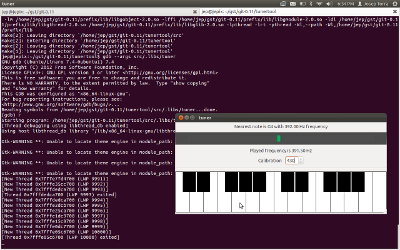
Josep Torra from Fluendo ended up working with Edward Hervey on hammering out the design for the clutter-gst sink at the conference, but he also found some time to do a port of his nice little tuner tool as you can see from the screenshot below.

Tuner tool for GStreamer 0.11

George Kiagiadakis kept hammering away at the qtGStreamer bindings, working both on a new release of the bindings for the GStreamer 0.10 series, but also some preparatory work for 0.11.

In addition to the application work, Wim Taymans, Tim-Phillip Müller and Sebastian Dröge from Collabora did a lot of core GStreamer clean ups and improvements in addition to providing a lot of assistance, bugfixing and advice for the people doing application porting. All critical items are now sorted in 0.11 although there are some nice to have’s still on the radar, and Wim plans on putting out some new releases next week, to kickstart the countdown to the first 1.0 release.

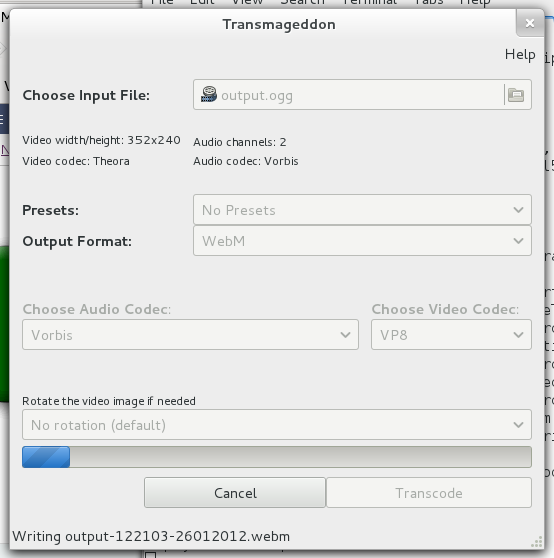
As for my own little pet project Transmageddon, it is quite far along now, with both manually configured re-encodes and profile re-encodes working. Still debugging remuxing though and I am also waiting for the deinterlacer to get ported to re-enable deinterlacing in the new version. For a screenshot take a look at the one I posted in my previous blogpost.

GStreamer Hackfest in Malaga update

Things have been going really well here at the GStreamer Hackfest in Malaga. Thanks to the help of Ara and Yaiza from Nido Malaga, we have a great venue in downtown Malaga and they have also helped us greatly with sorting out food.
We have a great group of people here and are making great progress, and by tomorrow I hope we will have screenshots of quite a few applications running with GStreamer 0.11, for instance both Rhythmbox and Jokosher for instance is already screen shootable, if not fully functional :)

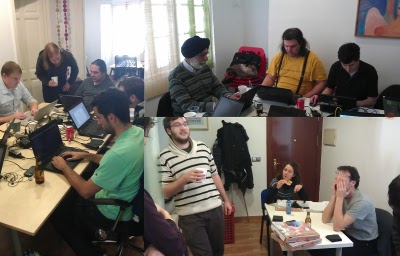
GStreamer Hackfest Malaga 2012

GStreamer Hackfest Malaga 2012

Also making good progress on Transmageddon, even if the move to GObject Introspection bindings are making things a bit more complicated. Screenshot below of the progress so far.

Transmageddon at Hackfest in Malaga 2012

Transmageddon at Hackfest in Malaga 2012

Also a big thanks to Fluendo who is sponsoring the lunches at the hackfest and Collabora who is sponsoring tonight’s dinner. Ensuring that no hacker is left hungry during this hackfest.

Update: Yaiza took these photos from the hackfest